Establishing secure connection…Loading editor…Preparing document…

Minnesota Garnishment Interrogatories

This template is fully customizable. Edit the text, fill out the fields, and send it for signature. Give it a try!
Minnesota Garnishment Interrogatories

What Minnesota Garnishment Interrogatories Are and when they apply

Minnesota Garnishment Interrogatories are written discovery questions used in garnishment proceedings to identify assets, income sources, or third-party holders of funds linked to a judgment debtor. Creditors or their attorneys use the form to obtain sworn information from a debtor or a garnishee (for example, an employer or bank) about wages, account balances, and exemption status. Responses typically must be signed under penalty of perjury and filed with the court or served on interested parties. The form fits within Minnesota civil discovery and garnishment processes and complements motions to enforce or compel payment.

Why these interrogatories matter in collection cases

They create a sworn record of assets and income, streamline debt-collection steps, and give a clear evidentiary basis for enforcement actions such as wage garnishment or levies.

Why these interrogatories matter in collection cases

Who prepares, serves, and answers these interrogatories

Accurate use by each participant helps the court assess enforceability and protects parties from sanctions or delays.

  • Judgment creditors and counsel — Prepare targeted questions to identify collectible assets and calculate amounts owed; may file results with the court.
  • Debtors / judgment debtors — Provide accurate, sworn responses about income, accounts, and exemptions to avoid perjury risk.
  • Garnishees (banks, employers) — Respond about amounts held or wages owed and comply with service procedures for garnishment.

Primary parts of a professional Minnesota Garnishment Interrogatories form

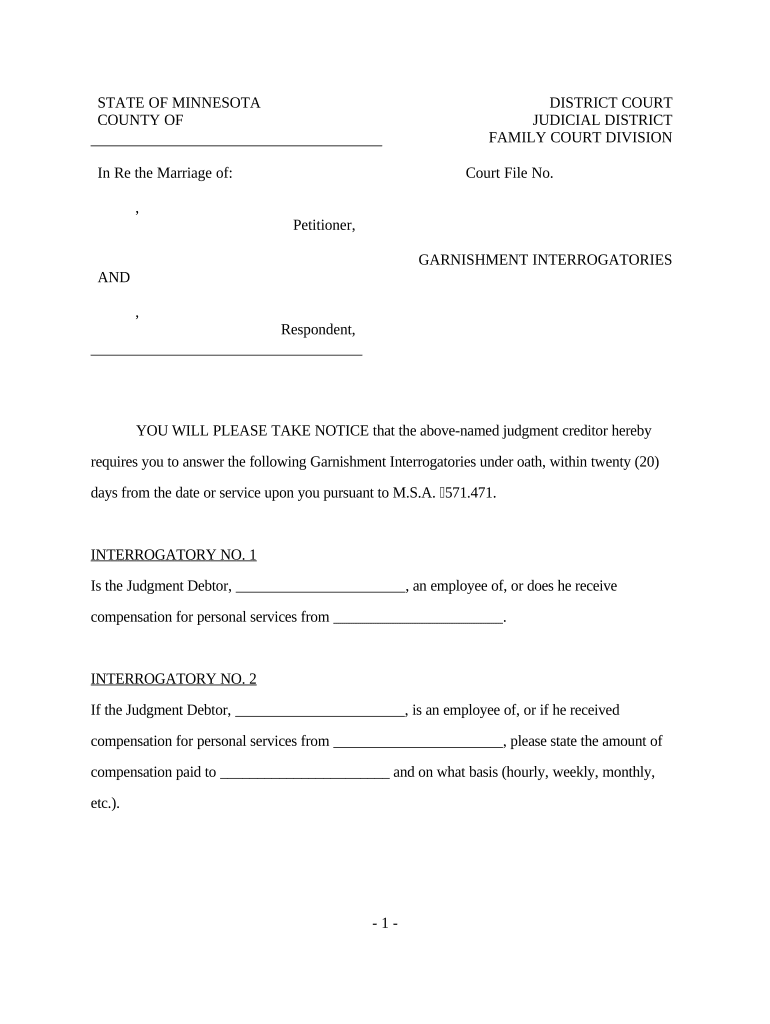
A well-constructed set of garnishment interrogatories combines clear case metadata, precise questions, procedural instructions, verification language, signature blocks, and notices about exemptions and penalties for false statements.

Case caption

Court name, party names, and case number placed at the top so the interrogatories are correctly filed and associated with the enforcement matter.
Service instructions

Clear directions for how to serve the form on the garnishee and debtor, including permitted methods and any filing steps required by local rules.

Numbered interrogatories

Concise, numbered questions addressing employment, bank accounts, amounts owed, payment dates, and exemption claims to simplify responses and verification.

Verification statement

A sworn declaration requiring the respondent to attest under penalty of perjury that answers are true, including signature and date lines.

Signature block

Designated area for respondent signature, printed name, title, and contact information; includes space for notary when required by practice or local rule.

Notice and exemptions

Plain-language notice about common exemptions (wages, benefits) and the legal effect of false responses to reduce disputes and clarify rights.

Essential fields you must include on the form

Case number: Court case ID
Party names: Plaintiff and defendant
Garnishee identity: Name and contact
Interrogatory list: Numbered questions
Response deadline: Date or days
Verification: Signature under oath

Step-by-step: completing and serving garnishment interrogatories

Follow these steps to prepare, serve, and preserve the interrogatories for enforcement or follow-up.

  • 01
    Prepare form: Populate caption, case number, and targeted questions.
  • 02
    Sign and verify: Include verification language; attorney signs if required.
  • 03
    Serve parties: Serve debtor and garnishee using permitted methods.
  • 04
    File proof: File affidavit or proof of service with the court.

Setting up a digital workflow for these interrogatories

Configure an electronic workflow that covers document fields, signer authentication, routing, and reminders for efficient execution and recordkeeping.

Field Configuration
Upload document PDF or DOCX accepted; ensure final formatting
Place fields Add signature/date/verification fields where required
Authentication Choose email, SMS code, or stronger ID proofing
Routing and reminders Define signer order and automatic follow-ups

Where to send and how to file completed responses

After the garnishee or debtor completes responses, follow procedural steps for service and court filing to preserve enforcement options.

  • Serve respondent: Deliver by permitted methods such as mail or hand delivery.
  • File proof: File an affidavit of service or certificate with the clerk.
  • Attach to motion: Use answers when filing a motion to garnish or compel.
  • Preserve records: Keep signed copies and the audit trail for enforcement hearings.

Technical considerations for eSigning and eSubmission

Retain tamper-evident signed copies and authentication records; courts accept electronic submissions when local rules allow.

  • File formats: PDF and DOCX accepted
  • Integrations: CRM and storage connectors (Salesforce, NetSuite, Google Workspace)
  • Authentication: Email, SMS, or advanced ID verification

Typical deadlines and timing to expect

Timing depends on local rules; use explicit deadlines in the form and confirm local court requirements to avoid waiving rights.

Response deadline:

Typically 30 days from service; confirm local rule

Motion to compel:

File after reasonable notice and statutory cure period

Service proof filing:

File affidavit or certificate promptly after service

Enforcement window:

Use responses promptly when moving to garnish or levy

Retention of records:

Keep signed responses until resolution and appeal period

Key milestones from issuing interrogatories to enforcement

A sequential view helps track preparation, service, response, and enforcement actions in garnishment proceedings.

01

Draft and review

Finalize questions, verification language, and service instructions

02

Serve interrogatories

Deliver to garnishee and debtor per local procedure

03

Receive responses

Collect sworn answers and document any objections

04

Enforcement step

File motions or garnishment orders using the responses

Common preparation and service mistakes to avoid

  • Incomplete captioning or incorrect case numbers lead clerks to reject filings and delay enforcement efforts; always verify court identifiers before service.
  • Vague or compound interrogatories produce evasive answers and complicate motions to compel; ask narrow, fact-specific questions to reduce ambiguity.
  • Serving the wrong party (sending to debtor instead of garnishee) can waive rights; confirm the proper garnishee identity before service.
  • Omitting a clear verification line or notary block when required may render answers noncompliant with local practice and susceptible to challenge.

Legal risks and possible sanctions

Perjury risk: False statements
Contempt exposure: Court sanctions
Claim dismissal: Procedural defects risk dismissal
Monetary sanctions: Attorney fees or fines
Enforcement delay: Incomplete answers delay action
Privacy concerns: Sensitive data handling

eSignature vendor pricing and capabilities relevant to garnishment interrogatories

Compare common capability dimensions and starting prices when choosing an eSignature provider for secure signing and recordkeeping for legal discovery documents.

signNow DocuSign Adobe Sign PandaDoc HelloSign
Starting Price $8/user/mo $15/user/mo $14/user/mo $19/user/mo $15/user/mo
Free Trial 7-day trial Varies Varies Varies Varies
Bulk Send Yes Yes Yes Yes No
Audit Trail Yes Yes Yes Yes Yes
Envelope Cap No envelope cap 100 envelopes/user/year Varies Varies Varies

Frequently asked questions about Minnesota Garnishment Interrogatories

Answers to common procedural and practical questions to help parties prepare, serve, and use interrogatory responses effectively.


Need help? Contact support

be ready to get more
Join over 28 million airSlate SignNow users