Establishing secure connection…Loading editor…Preparing document…

Hawaii Small Estate Affidavit

This template is fully customizable. Edit the text, fill out the fields, and send it for signature. Give it a try!
Hawaii Small Estate Affidavit

What the Hawaii Small Estate Affidavit Is

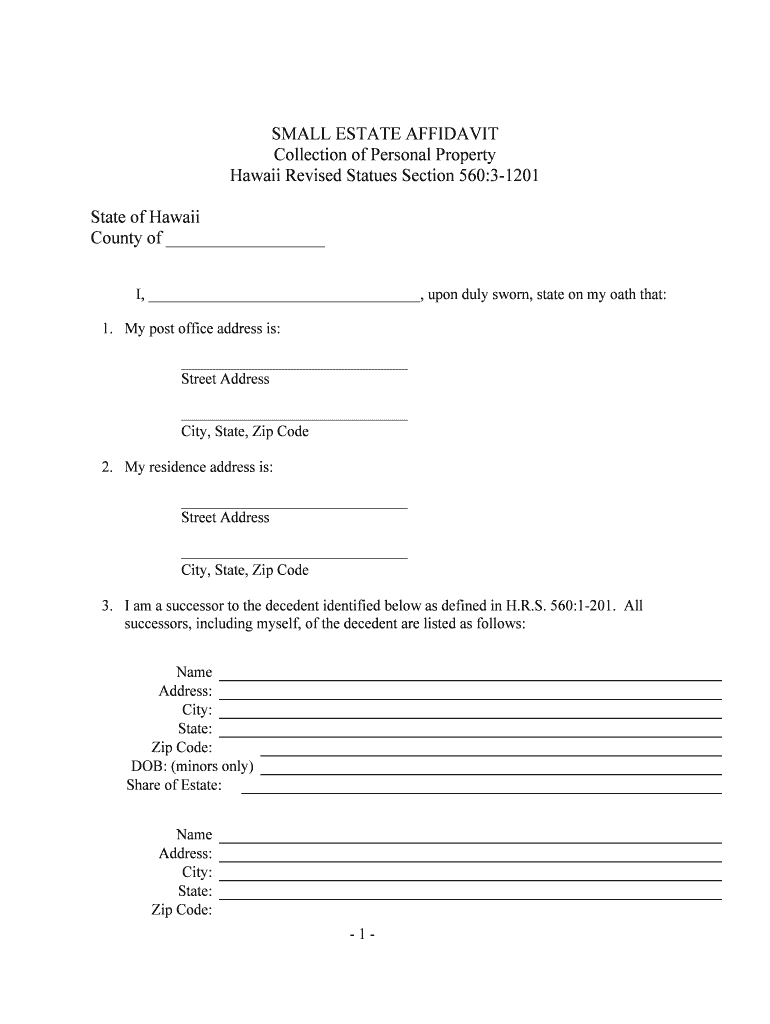
The Hawaii Small Estate Affidavit is a sworn written statement used to claim certain assets of a deceased person without opening full probate when the estate falls below applicable statutory thresholds. It provides a simplified procedure for transferring personal property, bank accounts, or other non-probate assets directly to heirs or designated beneficiaries, reducing time and administrative complexity compared with formal probate. The affidavit is submitted to the holding institution or filed with the court or county clerk where required, and must be completed accurately to avoid delays or rejection.

Why the Affidavit Is Useful for Small Estates

A small estate affidavit streamlines asset transfer, avoids full probate for qualifying estates, and can shorten final administration time while lowering professional costs when compared with formal probate proceedings.

Why the Affidavit Is Useful for Small Estates

Who Typically Prepares and Uses This Affidavit

Executors, surviving family members, and authorized claimants commonly prepare a small estate affidavit when the decedent’s estate meets the state’s small estate criteria.

  • Family members and heirs — Surviving spouse or adult children often prepare and sign the affidavit to claim bank accounts or personal property.
  • Financial institutions — Banks and brokers review the affidavit to release account funds or transfer ownership to the claimant.
  • Estate attorneys and paralegals — Lawyers may assist to confirm eligibility, prepare the affidavit, and advise on filing or submission requirements.

Confirm the claimant’s standing and any state-specific thresholds before relying on the affidavit for asset transfer.

Step-by-Step: Completing the Hawaii Small Estate Affidavit

Complete, verify, and sign the affidavit in the correct order to reduce processing time and avoid rejections.

  • 01
    Gather documents: Collect death certificate, IDs, and asset statements.
  • 02
    Confirm eligibility: Verify estate value meets small estate threshold.
  • 03
    Complete affidavit: Fill fields accurately and attach exhibits when required.
  • 04
    Notarize or witness: Execute before a notary or as state law requires.

Key Sections Included in a Professional Affidavit

A well-constructed small estate affidavit contains specific sections that establish identity, entitlement, asset detail, and legal affirmation to facilitate acceptance by institutions and courts.

Affiant Identification

Full name, address, and government ID of the person making the affidavit, including their relationship to the decedent and contact information for follow-up.
Decedent Information

Full legal name of the decedent, last residence, date of death, and any probate case number if one exists.

Assets Claimed

Detailed list of each asset claimed with identifiers (account numbers, vehicle VIN, description) and estimated values to demonstrate total estate size.

Legal Statement

A sworn declaration that the estate qualifies under Hawaii law for small estate procedures and that no formal probate is pending or required.

Attachments

Copies of the death certificate, beneficiary designations, account statements, ID copies, and any letters testamentary if applicable.

Oath and Execution

Signature block for the affiant, notary acknowledgment or witness statements, and execution date to complete the affidavit's legal formalities.

Essential Information and Supporting Documents

Death Certificate: Certified copy required
Photo ID: Government-issued ID of claimant
Asset Statements: Recent account or title statements
Beneficiary Forms: Payable-on-death designations
Affidavit Signed: Signed and dated by affiant
Notary/Witness: Notary or witness acknowledgment

Where to File or Submit the Affidavit

Submission depends on the asset type and holder—follow the holder’s process and local court rules for any filing or notice requirements.

  • Banks and Financial Institutions: Submit affidavit with certified death certificate and ID to account holder.
  • Motor Vehicles: Provide affidavit and title to the county motor vehicle office or state DMV.
  • County Clerk or Probate Court: File only if statute or holder requires court acceptance.
  • Third-Party Holders: Follow holder-specific procedures for releasing property.

Comparing eSignature Vendors for Affidavit Execution

Trusted eSignature platforms differ on price, bulk sending, and compliance features; signNow is listed first for clear comparison across common capability dimensions.

signNow DocuSign Adobe Sign PandaDoc HelloSign
Starting Price $8/user/mo $15/user/mo $14/user/mo $19/user/mo $15/user/mo
Free Trial 7-day free trial, no credit card required Varies by vendor Varies by vendor Varies by vendor Varies by vendor
Bulk Send Yes Yes Yes Yes No
Audit Trail Yes Yes Yes Yes Yes
HIPAA Compliant Yes Yes Yes No No
Envelope Cap No cap 100 envelopes/user/year No cap No cap No cap

Digital Signing and File Formats

When submitting electronically, choose a platform that supports common formats and meets legal authentication standards.

  • Supported Formats: PDF, DOCX, HTML
  • Integrations: Works with Google Workspace, Microsoft 365, Box, NetSuite
  • Authentication: Email, SMS code, or stronger KBA where required

Ensure the chosen platform satisfies ESIGN and UETA requirements for intent, consent, attribution, and record retention when using electronic signatures.

Common Mistakes That Cause Delays

  • Incorrect decedent name or DOB on affidavit and death certificate mismatch causes verification delays.
  • Missing certified death certificate or insufficient ID for claimant leads institutions to refuse release.
  • Failure to list all assets or provide account identifiers prompts additional requests and slows processing.
  • Not notarizing or obtaining required witness statements per local rules results in affidavit rejection.

Potential Risks of an Incorrect or Misused Affidavit

Civil Liability: Wrongful claim exposure
Delay: Asset release postponed
Rejection: Institution rejects affidavit
Criminal Risk: Perjury or fraud charges
Financial Loss: Incorrect distributions required to be reversed
Estate Dispute: Potential litigation among heirs

Practical Tips for Accurate Completion

Follow these best practices to improve the likelihood that institutions accept the affidavit on first submission.

Verify all names and dates
Cross-check decedent and claimant information against certified records to prevent mismatches.
Attach certified death certificate
Provide a certified copy rather than a photocopy to meet most institution requirements.
Include clear asset identifiers
List account numbers, VINs, or title numbers and include recent statements to speed verification.
Confirm execution formalities
Check whether a notary, witnesses, or court filing is required and complete those steps before submission.

Practical Scenarios Where the Affidavit Is Applied

These examples illustrate common situations and outcomes when the affidavit is used correctly.

Bank Account Release

A surviving adult submits a sworn affidavit with the death certificate and account statement

  • Bank verifies account ownership and disburses funds to the claimant
  • Proper attachments and accurate account identifiers allowed the release without probate, reducing time and expense.

Vehicle Title Transfer

An heir files the affidavit with the DMV alongside the vehicle title

  • DMV confirms the affidavit meets statutory requirements and issues a new title
  • Clear VIN, title copy, and correct execution streamlined transfer without opening probate.

Frequently Asked Questions

Answers to common questions about qualifying, completing, and submitting a Hawaii Small Estate Affidavit.


Need help? Contact support

be ready to get more
Join over 28 million airSlate SignNow users