Establishing secure connection…Loading editor…Preparing document…

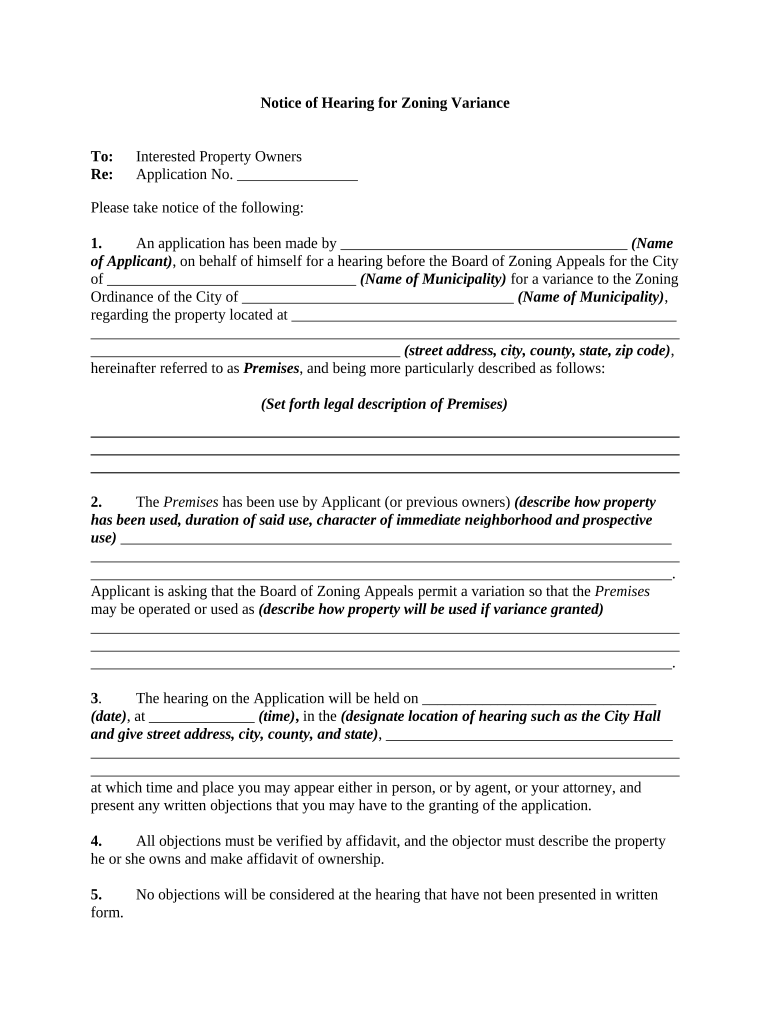
Notice of Hearing for Zoning Variance

This template is fully customizable. Edit the text, fill out the fields, and send it for signature. Give it a try!
Notice of Hearing for Zoning Variance

What a Notice of Hearing for Zoning Variance Is and When It’s Used

A Notice of Hearing for Zoning Variance is a formal public notification that a landowner or applicant requests a change from the applicable zoning rules and that a hearing will be held before the planning or zoning board. The notice identifies the applicant, the property (address and legal description), the variance requested, and the hearing’s date, time, and location. It informs neighbors and interested parties about how to participate, where to view application materials, and how to submit comments. Proper notice protects due process, preserves the administrative record, and reduces the risk of later legal challenge.

Why Proper Notice Matters for Zoning Variance Hearings

Accurate notice satisfies statutory and procedural requirements, preserves the hearing’s validity, enables public participation, and reduces the risk of appeals or remands that delay projects.

Why Proper Notice Matters for Zoning Variance Hearings

Who Prepares and Relies on a Notice of Hearing

The notice is prepared by applicants or municipal staff and used by officials, nearby property owners, and interested stakeholders.

  • Property owners or applicants who request the variance and must give required notice to the community.
  • Municipal planning or zoning staff who draft, verify, publish, and file the notice in official records.
  • Adjacent property owners and community members who review the application and may attend or comment.

Typical Signers and Responsible Parties

Applicant — Property Owner

The individual or entity requesting the variance. Responsible for accurate application data and for serving or paying for required notices; may need to attest to service or mailing.

Municipal Official — Zoning Clerk

The clerk or planning staff member who schedules the hearing, confirms statutory notice requirements are met, files proof of publication or mailing, and maintains the administrative record.

Essential Data Elements to Include

Hearing Date: MM/DD/YYYY format
Hearing Time: Time with time zone
Hearing Location: Room, building, or virtual link
Property Address: Street address and parcel ID
Variance Requested: Specific code section and relief
Applicant Contact: Name, phone, email

Consequences of Defective or Missing Notice

Invalid Hearing: May require rehearing
Appeal Risk: Elevated chance of legal challenge
Delay: Project timelines extended
Costs: Additional administrative or legal fees
Remand: Decision returned to board
Loss of Finality: Court may void approvals

Common Preparation Mistakes to Avoid

  • Using an incomplete legal description—omitting parcel identifiers or recorded lot numbers can confuse notice recipients and the record.
  • Failing to follow local timing rules—issuing notice too late or too early may invalidate the hearing date under municipal code.
  • Relying on incorrect recipient lists—omitting required adjacent owners or taxing districts can produce procedural defects.
  • Publishing ambiguous variance language—vague descriptions of relief make it hard for the public and board to evaluate the request.

Step-by-step: Prepare and Issue a Notice of Hearing

Follow these sequential steps to draft, distribute, and file a compliant Notice of Hearing for a zoning variance.

  • 01
    Gather Documents: Collect application, plat, legal description
  • 02
    Draft Notice: Include date, time, property, variance specifics
  • 03
    Serve Recipients: Mail, post, and publish per local rules
  • 04
    File Proof: Submit affidavits of service and publication

Digital Workflow Settings for e-Notices and eFiling

Suggested configuration options for preparing, authenticating, and archiving notices in an electronic workflow or municipal portal.

Field Configuration
Authorized Signers Applicant and municipal clerk
Authentication Email link; optional SMS code
Submission Method Portal upload + email copy
Record Format PDF/A with timestamped audit trail

Typical Document Flow from Draft to Record

A standard process shows how the notice moves from the applicant through municipal processing to public dissemination and filing.

  • Draft Notice: Prepare text and attach plat or map
  • Authorize: Applicant signs; clerk reviews
  • Distribute: Mail, post on site, publish in paper
  • File Proof: Upload affidavits to the record

Technical Requirements for Electronic Notices and Submissions

Ensure chosen platforms support secure PDFs, signer authentication, and auditable records before issuing electronic notices.

  • Supported Formats: PDF, PDF/A, DOCX for archival
  • Integrations: Portal, cloud storage, or CMS
  • Authentication Options: Email link, SMS code, ID verification

Typical Timing and Publication Expectations

Notice timing and publication requirements vary by jurisdiction; below are common timing elements to verify against local ordinance or municipal code.

Advance Notice Period:

Commonly 10–30 days before hearing

Newspaper Publication:

Often once or twice before hearing

Posted On-site Sign:

Typically posted 10–30 days in advance

Mailed Notice:

Mail to adjacent owners per local rule

Filing Proof Deadline:

Affidavit of publication or mailing filed before hearing

Real-world Examples of Notice Use and Outcomes

Two brief scenarios show how accurate notices support fair hearings and defensible administrative records.

Municipal Posting and Publication

A city clerk prepared a notice with parcel ID and map for a corner-lot variance

  • Notice was published twice in the legal newspaper
  • Because mailing and publication were documented, the board’s approval with conditions was sustained on appeal, shortening project delay and legal cost.

Electronic Notice with Affidavit

An applicant used an online portal to issue notices and upload mailed receipt affidavits

  • Staff attached a signed affidavit and timestamped PDFs to the record
  • The clear electronic record allowed the planning board to proceed without adjournment and provided immediate public access to supporting documents.

Core Elements of a Professional Notice of Hearing

A professional notice is concise, legally precise, and provides stakeholders the information needed to participate or object.

Clear Identification

Property address, parcel ID, and applicant name must be explicit and match application records.
Specific Relief

State the exact variance sought and cite the local code section or dimensional standard at issue.

Hearing Logistics

Provide date, time, physical location or virtual link, accessibility info, and contact for accommodations.

Public Access Info

Explain where application materials or plans may be inspected or downloaded before the hearing.

Service Statement

Include how notice was delivered: mailed, posted, published, including dates and publication name.

Signature and Date

Signed by applicant or municipal official with the date of issuance and filer’s contact details.

eSignature Vendor Pricing Snapshot for Notice Workflows

Overview of starting price and selected features relevant to issuing and tracking Notices of Hearing; verify vendor sites for full plan details.

signNow DocuSign Adobe Sign PandaDoc HelloSign
Starting Price $8/user/mo $15/user/mo $14/user/mo $19/user/mo $15/user/mo
Free Trial 7-day free trial Varies by vendor Varies by vendor Varies by vendor Varies by vendor
Bulk Send Yes Varies by vendor Varies by vendor Varies by vendor Varies by vendor
Audit Trail Yes Yes Yes Yes Yes
Envelope Cap No cap 100 envelopes/user/year Varies by vendor Varies by vendor Varies by vendor

FAQs: Common Questions About Notices of Hearing for Zoning Variance

Answers to frequent questions about preparing, serving, and documenting notices for zoning variance hearings.


Need help? Contact support

be ready to get more
Join over 28 million airSlate SignNow users