Establishing secure connection…Loading editor…Preparing document…

Interview Questions Checklist

This template is fully customizable. Edit the text, fill out the fields, and send it for signature. Give it a try!
Interview Questions Checklist

What the Interview Questions Checklist Is and When to Use It

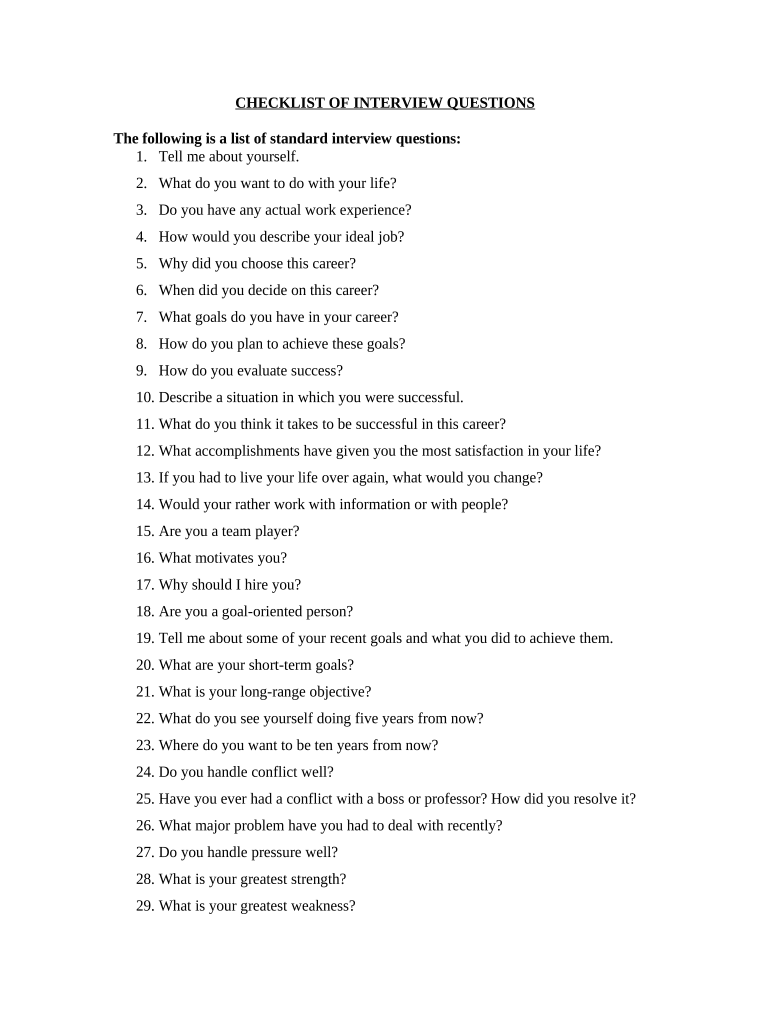
The Interview Questions Checklist is a structured guide hiring teams use to plan, standardize, and document job interview questions and expected answers. It helps ensure legally compliant, consistent evaluation across candidates by capturing role-specific questions, core competencies to assess, interview stages, and notes for each interviewer. The checklist supports objective scoring, reduces bias, and creates an auditable record that can be retained with other hiring documentation for regulatory or internal review purposes.

Why a Checklist Improves Hiring Consistency

A standard Interview Questions Checklist reduces variability between interviewers, clarifies assessment criteria, and improves defensibility of hiring decisions under employment law.

Why a Checklist Improves Hiring Consistency

Who Should Use This Checklist

Typical users include hiring managers, HR generalists, interview panel members, and recruiters who coordinate candidate evaluations.

  • Hiring managers who need consistent candidate comparisons across multiple interviews and open roles.
  • HR or talent teams tasked with compliance, recordkeeping, and structured interview design.
  • Recruiters or panel members who must follow job-specific competency frameworks and scoring rubrics.

Use this checklist to document interview structure and store final completed copies with applicant records for retention and review.

Core Elements to Include in a Professional Checklist

A practical Interview Questions Checklist combines role context, standardized questions, scoring guidance, logistics, and documentation fields so interviewers can collect comparable notes and decisions.

Role Summary

Short job description and key responsibilities that frame which competencies and questions are relevant for the role and level.
Interview Stages

Clear labels for phone screen, technical interview, and final interview with instructions for what each stage must evaluate.

Standard Questions

A set of core behavioral and technical questions used across candidates to compare evidence against the job's success criteria.

Scoring Rubric

A consistent rating scale (e.g., 1–5) with short descriptors so scores are comparable across interviewers.

Notes & Evidence

Space to record candidate answers, examples given, and objective evidence that supports the score assigned for each question.

Decision Fields

Final recommendation, required approvals, and any follow-up items such as reference checks or conditional offers.

Step-by-Step: Preparing and Using the Checklist

Follow these steps to create, distribute, and collect a completed Interview Questions Checklist for each candidate.

  • 01
    Define Roles: List the hiring team and their interview responsibilities.
  • 02
    Select Questions: Choose standardized questions mapped to competencies.
  • 03
    Share Checklist: Provide the form to interviewers before the session.
  • 04
    Collect and Store: Save completed checklists with candidate records.

Typical Flow from Preparation to Retention

A common workflow moves from checklist design to interviewer use, scoring, decision, and secure retention.

  • Design: HR defines questions, rubric, and required fields.
  • Distribute: Recruiter shares the checklist with panel members.
  • Interview: Interviewers complete questions and scoring during or immediately after the interview.
  • Archive: Completed documents are stored in the applicant file per retention policy.

How to Configure an Online Checklist Workflow

Set up a simple online flow so interviewers receive, complete, and return checklists with minimal friction.

Field Configuration
Access Control Restrict editing to assigned interviewers and HR reviewers.
Authentication Use corporate SSO or email verification for signer attribution.
Auto-Routing Route completed checklists to HR or the ATS automatically.
Audit Trail Capture timestamps and user IDs for each completed checklist.

Digital Submission and eSignature Considerations

Choose a platform that supports secure collection, signer attribution, and audit trails for interview documentation.

  • Authentication: Email links with optional SMS or SSO provide clear attribution for interviewer entries.
  • Format Support: Accept PDF and DOCX so forms can be saved and searched reliably.
  • Integrations: Integrate with ATS, HRIS, or cloud storage for automatic filing and retention.

Ensure any eSignature provider meets ESIGN and UETA requirements and can retain a reproducible record of the completed checklist.

Timing and Internal Deadlines for Checklist Completion

Establish firm internal deadlines to ensure timely evaluation and compliance with hiring timelines.

Completion Deadline:

Require completed checklist within 48 hours of the interview.

Decision Window:

Document hiring recommendation within five business days of final interview.

Reference Check:

Initiate reference checks within two business days of positive recommendation.

Offer Approval:

Obtain compensation and legal approvals before issuing an offer.

Record Filing:

File checklist in the applicant record within seven days of decision.

Common Mistakes to Avoid

  • Using different questions for each candidate without mapping them to consistent competencies, which undermines comparability and creates defensibility risks.
  • Failing to record interviewer identity and date on the checklist, which makes attribution and audits difficult during future disputes or investigations.
  • Allowing informal, handwritten notes that are not captured in the official applicant file and therefore bypass retention and search requirements.
  • Not removing interview questions that may elicit protected-class information or unrelated personal details, creating potential discrimination exposure.

Risks If Checklists Are Incomplete or Noncompliant

Discrimination Claims: Incomplete documentation
Data Privacy: Unauthorized PI retention
Regulatory Audit: Missing records
Recordkeeping Violations: Retention noncompliance
Operational Delays: Unclear recommendations
Reputational Harm: Inconsistent process

How Teams Use the Interview Questions Checklist in Practice

Real-world examples show how a checklist standardizes hiring across roles and interviewers.

Midmarket Engineering Hire

A hiring manager defined role-specific technical and behavioral questions

  • Panel used a 1–5 rubric
  • The checklist reduced time-to-offer and created a searchable audit trail for the candidate file.

University Admissions Interview

An admissions office standardized prompts for evaluators

  • Interviewers recorded evidence-based scores
  • Completed checklists were retained to support decisions and appeals processes.

Comparing eSignature Options for Collecting Interview Checklists

Basic vendor differences affect cost, compliance, and whether the service supports bulk sending or HIPAA workflows; signNow is shown first for comparison.

signNow DocuSign Adobe Sign PandaDoc HelloSign
Starting Price $8/user/mo $15/user/mo $14/user/mo $19/user/mo $15/user/mo
Free Trial 7-day free trial Yes, trial available Yes, trial available Yes, trial available Yes, trial available
Bulk Send Yes Yes Yes Yes No
Audit Trail Yes Yes Yes Yes Yes
HIPAA Compliant Yes Yes Yes No No
Envelope Cap No cap 100 envelopes/user/year Varies by plan Varies by plan Varies by plan

Frequently Asked Questions About the Interview Questions Checklist

Answers to common questions about using, signing, and storing interview checklists, including compliance concerns and practical troubleshooting.


Need help? Contact support

be ready to get more
Join over 28 million airSlate SignNow users