Establishing secure connection…Loading editor…Preparing document…

Complaint for Unlawful Detainer

This template is fully customizable. Edit the text, fill out the fields, and send it for signature. Give it a try!
Complaint for Unlawful Detainer

What a Complaint for Unlawful Detainer Is

A Complaint for Unlawful Detainer is the formal court pleading a landlord files to seek possession of real property after a tenant fails to comply with lease terms or pay rent. It begins a civil eviction process and sets out the parties, the property, the grounds for removal, the monetary amounts sought (rent, fees, costs), and the requested court orders. The complaint initiates service of process, establishes case timing for an answer and hearing, and creates a record that can result in a writ of possession if the landlord prevails.

Why the Complaint Matters to Landlords and Managers

The complaint is the legal mechanism to regain possession and recover rent or damages; it preserves procedural rights, triggers judicial timelines, and creates enforceable remedies when correctly prepared.

Why the Complaint Matters to Landlords and Managers

Who Typically Prepares and Files This Complaint

Choose the preparer based on case complexity: simple nonpayment matters may be handled in-house, while contested actions benefit from counsel familiar with local eviction law.

  • Self-represented landlords who manage one or a few rental units and handle filings directly.
  • Property management companies that file at scale and follow internal eviction policies.
  • Attorneys handling complex cases, contested tenancies, or large portfolios.

Core Sections You Should Include in the Complaint

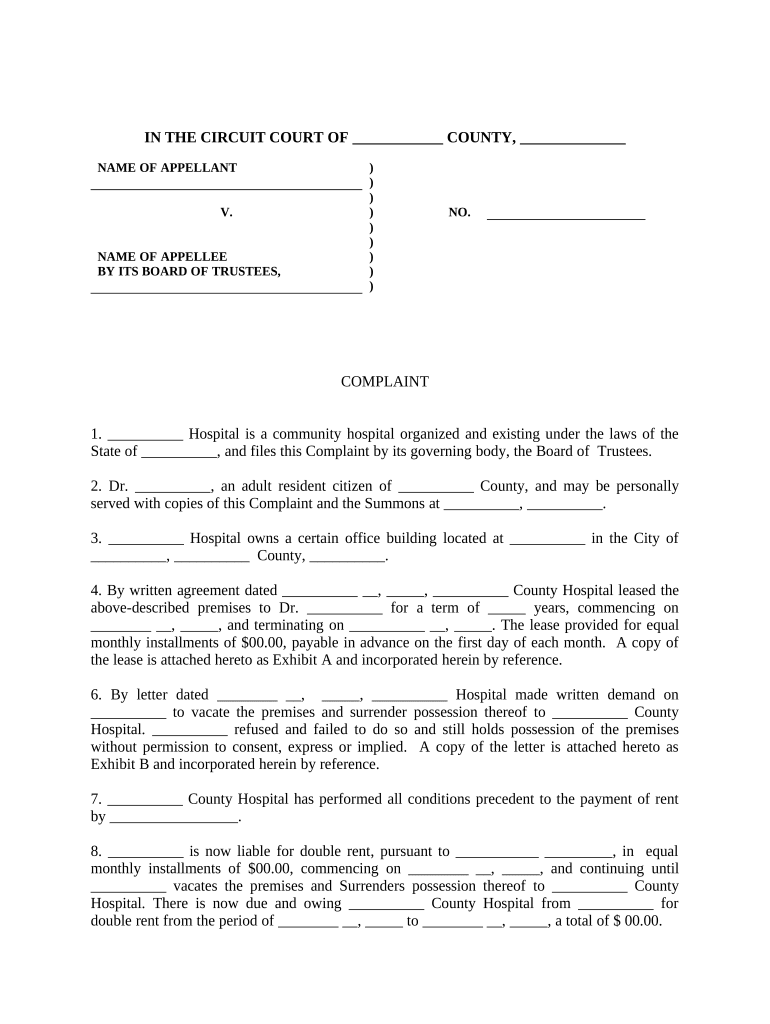
A professional complaint organizes facts and relief so the court and opposing party can understand the claim quickly. Use numbered paragraphs, clear headings, and attached exhibits for lease, notice, and rent ledger.

Caption

Court name, case number (if known), plaintiff and defendant names and addresses; essential for proper filing.
Jurisdictional Basis

Basis for the court's authority and venue, e.g., county where the property is located; include statutory citation where appropriate.

Statement of Facts

Chronological facts: lease start, breaches, notices served, amounts owed, and dates of demand or termination notices.

Cause of Action

Legal grounds (nonpayment, holdover, breach) stated plainly so the court understands the remedy sought.

Damages and Costs

Specify unpaid rent, late fees, attorney fees (if contract allows), and statutory costs sought by plaintiff.

Prayer for Relief

Clear request: possession, money judgment, writ of possession, and any requested hearing or temporary orders.

Essential Information to Provide on the Form

Plaintiff name: Full legal name
Defendant name: Full legal name
Property address: Street, city, state, ZIP
Lease dates: Start and end dates
Amount owed: Total unpaid rent/fees
Service method: How process will be served

Step-by-Step: Preparing and Filing the Complaint

Follow these steps in order to prepare a defensible complaint and avoid procedural pitfalls that can delay possession.

  • 01
    Assemble documents: Gather lease, ledger, notices, and tenant communications.
  • 02
    Draft complaint: State facts, amounts, and relief succinctly.
  • 03
    File with court: Submit complaint and pay filing fee at the appropriate county court.
  • 04
    Serve tenant: Complete proper service of process per local rules.

Where the Complaint Goes and What Happens Next

After filing, the court issues a case number and sets deadlines; proper filing and service are critical to preserve the timeline to answer and hearing.

  • Clerk review: Court clerk accepts filing, assigns case number.
  • Service of process: Tenant must be served under local rules.
  • Answer period: Tenant has a state-specific window to respond.
  • Hearing and order: Court schedules hearing; judgment may follow.

Configuring an Online Filing and Signing Workflow

Set up a consistent digital workflow to prepare the complaint, collect signatures, and route exhibits for filing and service.

Document upload PDF | Upload final complaint and exhibits
Template fields Signature | Place signature and date fields
Signer order Assign roles | Landlord then attorney
Authentication Email or SMS | Choose signer verification
Delivery Download | Save court-ready PDF

Digital Signing and eSubmission Considerations

Choose a platform that offers secure storage, tamper-evident signed PDFs, and integrations that simplify exporting court-ready documents.

  • Authentication: Email, SMS, or advanced methods
  • Audit trail: Timestamps, IP, and action log
  • File formats: PDF/A preferred for court filing

Consequences of an Incorrect or Incomplete Complaint

Case dismissal: Court may dismiss for improper service
Default judgment: Failure to pursue can yield tenant default
Sanctions: Court sanctions for bad-faith filings
Counterclaims: Tenant may assert wrongful eviction
Delayed possession: Errors extend time to regain possession
Financial exposure: Liability for costs or statutory damages

Common Mistakes to Avoid When Preparing the Complaint

  • Using an incorrect defendant name or omitting aliases, which can invalidate service or require amended pleadings and additional fees.
  • Failing to attach the lease and notice copies; courts expect supporting exhibits to substantiate nonpayment or breach claims.
  • Relying on informal notice instead of legally required pre-suit notices; many jurisdictions require specific notice formats and delivery methods.
  • Submitting a document that is not court-ready (missing signatures, exhibits, or incorrect formatting), which can lead to rejection or processing delay.

Typical Timelines and Deadlines in an Unlawful Detainer Case

Timelines vary significantly by state; confirm local rules for precise deadlines on notices, answers, hearings, and enforcement.

Pre-suit notice period:

Often 3–30 days depending on reason and state

Answer deadline:

Tenant response time commonly 5–30 days

Hearing scheduling:

Court sets a hearing typically within 7–30 days

Writ of possession:

Issued after judgment and any appeal window

Appeal period:

Short statutory window; varies by state

Real-World Examples of Using a Complaint for Unlawful Detainer

Two practical examples show how organizations streamline eviction filings while retaining compliance and record integrity.

Martin Properties

A small portfolio landlord standardized its complaint template and digital exhibits to reduce preparation time.

  • The change cut manual preparation steps.
  • Tim Martin, Founder of Martin Properties, noted that processing and executing documents online improved compliance and efficiency across mobile and offline workflows.

Optica Ventures LLC

A property owner centralized documents and used templated complaints for recurring nonpayment cases.

  • Centralization reduced errors in names and amounts.
  • Brian Fitzgibbons, COO at Optica Ventures LLC, reported the interface was simple for staff and customers, improving turnaround on filings.

Practical Tips for Accurate and Efficient Complaints

Adopt consistent templates, verify local rules, and ensure exhibits are complete to shorten processing and reduce dismissal risk.

Use consistent templates
Standardize fields and exhibits so each complaint contains the same required components and reduces clerk rejections.
Verify tenant identity
Confirm tenant legal name and any co-occupant aliases before filing to prevent service errors.
Attach supporting exhibits
Include lease, ledger, and notice copies to substantiate claims without follow-up requests.
Confirm local rules
Check county court filing procedures, accepted file formats, and required pre-suit notices before filing.

Comparison: signNow and Common eSignature Vendors for Filing Documents

Platform pricing and capability differ; signNow is listed first for comparison. Verify plan features and limits directly with each vendor before purchase.

signNow DocuSign Adobe Sign PandaDoc HelloSign
Starting Price $8/user/mo $15/user/mo $14/user/mo $19/user/mo $15/user/mo
Free Trial 7-day free trial Varies Varies Varies Varies
Bulk Send Yes Yes Yes Yes No
Audit Trail Yes Yes Yes Yes Yes
HIPAA Compliant Yes Yes Yes No No

FAQs: Common Questions About Complaints for Unlawful Detainer

Answers to frequent practical questions about preparing, filing, serving, and amending eviction complaints.


Need help? Contact support

be ready to get more
Join over 28 million airSlate SignNow users