Establishing secure connection… Loading editor… Preparing document…
Navigation

Fill and Sign the Home Equity Conversion Mortgage Reverse Mortgage Form
Fill and Sign the Home Equity Conversion Mortgage Reverse Mortgage Form

How it works

Open the document and fill out all its fields.
Apply your legally-binding eSignature.
Save and invite other recipients to sign it.

Rate template

4.8
66 votes
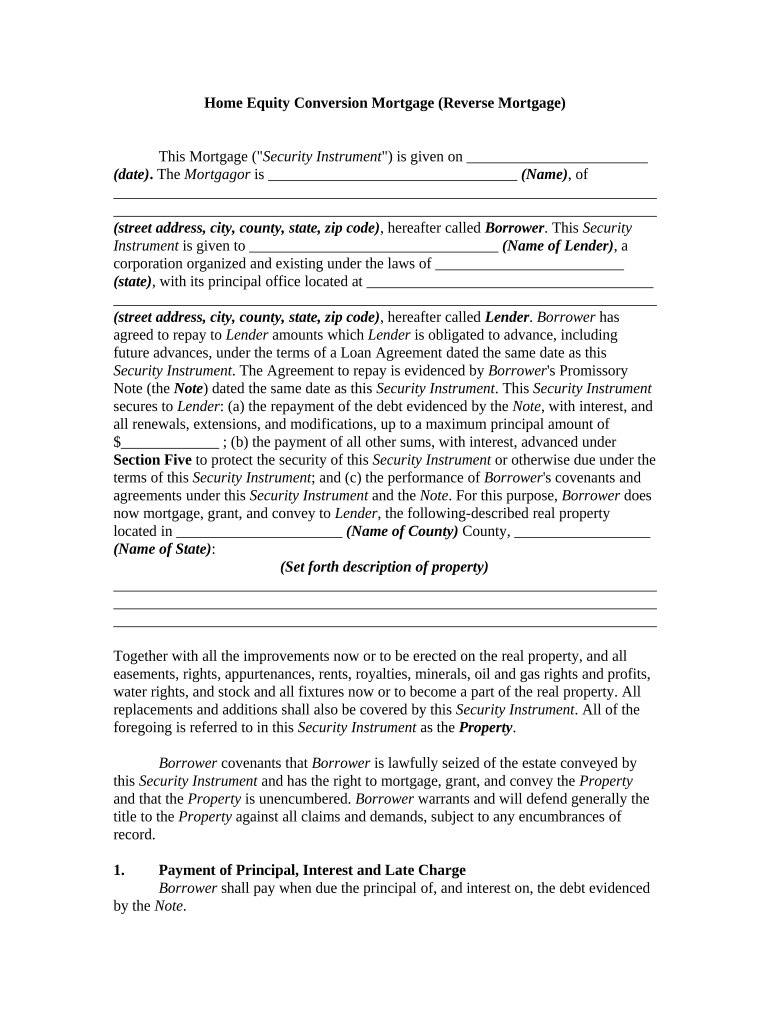
Home Equity Conversion Mortgage (Reverse Mortgage) This Mortgage (" Security Instrument ") is given on ________________________ (date) . The Mortgagor is _________________________________ (Name) , of ________________________________________________________________________ ________________________________________________________________________ (street address, city, county, state, zip code) , hereafter called Borrower . This Security Instrument is given to _________________________________ (Name of Lender) , a corporation organized and existing under the laws of _________________________ (state) , with its principal office located at ______________________________________ ________________________________________________________________________ (street address, city, county, state, zip code) , hereafter called Lender . Borrower has agreed to repay to Lender amounts which Lender is obligated to advance, including future advances, under the terms of a Loan Agreement dated the same date as this Security Instrument . The Agreement to repay is evidenced by Borrower 's Promissory Note (the Note ) dated the same date as this Security Instrument . This Security Instrument secures to Lender : (a) the repayment of the debt evidenced by the Note , with interest, and all renewals, extensions, and modifications, up to a maximum principal amount of $_____________ ; (b) the payment of all other sums, with interest, advanced under Section Five to protect the security of this Security Instrument or otherwise due under the terms of this Security Instrument ; and (c) the performance of Borrower 's covenants and agreements under this Security Instrument and the Note . For this purpose, Borrower does now mortgage, grant, and convey to Lender , the following-described real property located in ______________________ (Name of County) County, __________________ (Name of State) : (S et forth description of property) ________________________________________________________________________ ________________________________________________________________________ ________________________________________________________________________ Together with all the improvements now or to be erected on the real property, and all easements, rights, appurtenances, rents, royalties, minerals, oil and gas rights and profits, water rights, and stock and all fixtures now or to become a part of the real property. All replacements and additions shall also be covered by this Security Instrument . All of the foregoing is referred to in this Security Instrument as the Property . Borrower covenants that Borrower is lawfully seized of the estate conveyed by this Security Instrument and has the right to mortgage, grant, and convey the Property and that the Property is unencumbered. Borrower warrants and will defend generally the title to the Property against all claims and demands, subject to any encumbrances of record. 1. Payment of Principal, Interest and Late Charge Borrower shall pay when due the principal of, and interest on, the debt evidenced by the Note . 2. Payment of Property Charges Borrower shall pay all Property charges consisting of taxes, ground rents, flood and hazard insurance premiums, and assessments in a timely manner, and shall provide evidence of payment to Lender , unless Lender pays Property charges by withholding funds from monthly payments due to Borrower or by charging such payments to a line of credit as provided for in the Loan Agreement. 3. Fire, Flood, and Other Hazard A. Borrower shall insure all improvements on the Property , whether now in existence or subsequently erected, against any hazards, casualties, and contingencies, including fire. This insurance shall be maintained in the amounts, to the extent, and for the periods required by Lender and the Secretary of Housing and Urban Development (the Secretary ). Borrower shall also insure all improvements on the Property , whether now in existence or subsequently erected, against loss by floods to the extent required by the Secretary . All insurance shall be carried with companies approved by Lender . The insurance policies and any renewals shall be held by Lender and shall include loss payable clauses in favor of, and in a form acceptable to, Lender . B. In the event of loss, Borrower shall give Lender immediate notice by mail. Lender may make proof of loss if not made promptly by Borrower . Each insurance company concerned is authorized and directed to make payment for such loss to Borrower and to Lender jointly. Insurance proceeds shall be applied to restoration or repair of the damaged Property , if the restoration or repair is economically feasible and Lender 's security is not lessened. If the restoration or repair is not economically feasible or Lender 's security would be lessened, the insurance proceeds shall be applied first to the reduction of any indebtedness under a second Note and second Security Instrument held by the Secretary on the Property and then to the reduction of the indebtedness under the Note and this Security Instrument . Any excess insurance proceeds over an amount required to pay all outstanding indebtedness under the Note and this Security Instrument shall be paid to the entity legally entitled to same. C. In the event of foreclosure of this Security Instrument or other transfer of title to the Property that extinguishes the indebtedness, all right, title, and interest of Borrower in and to insurance policies in force shall pass to the purchaser. 4. Preservation and Maintenance of Property; Leaseholds A. Borrower shall not commit waste or destroy, damage, or substantially change the Property or allow the Property to deteriorate, reasonable wear and tear excepted. Lender may inspect the Property if the Property is vacant or abandoned or the loan is in default. Lender may take reasonable action to protect and preserve vacant or abandoned Property . B. If this Security Instrument is on a leasehold, Borrower shall comply with the provisions of the lease. If Borrower acquires fee title to the Property , the leasehold and fee title shall not be merged unless Lender agrees to the merger in writing. 5. Charges to Borrower and Protection of Lender’s Rights in Property A. Borrower shall pay all governmental or municipal charges, fines, and impositions that are not included in Section Two. Borrower shall pay these obligations on time directly to the entity which is owed the payment. If failure to pay would adversely affect Lender 's interest in the Property , on Lender 's request Borrower shall promptly furnish to Lender receipts evidencing these payments. Borrower shall promptly discharge any lien which has priority over this Security Instrument in the manner provided in Section Twelve , Paragraph C . B. If Borrower fails to make these payments or the Property charges required by Section Two , or fails to perform any other covenants and agreements contained in this Security Instrument , or there is a legal proceeding that may significantly affect Lender 's rights in the Property (such as a proceeding in bankruptcy, for condemnation, or to enforce laws or regulations), then Lender may do and pay whatever is necessary to protect the value of the Property and Lender 's rights in the Property , including payment of taxes, hazard insurance, and other items mentioned in Section Two . C. Any amounts disbursed by Lender under this Section shall become an additional debt of Borrower as provided for in the Loan Agreement and shall be secured by this Security Instrument . 6. Inspection Lender or its agent may enter on, inspect, or make appraisals of the Property in a reasonable manner and at reasonable times provided that Lender shall give Borrower notice prior to any inspection or appraisal specifying a purpose for the inspection or appraisal which must be related to Lender 's interest in the Property . 7 Condemnation The proceeds of any award or claim for damages, direct or consequential, in connection with any condemnation or other taking of any part of the Property , or for a conveyance in place of condemnation shall be paid to Lender and Borrower jointly. The proceeds shall be applied first to the reduction of any indebtedness under a second Note and second Security Instrument held by the Secretary to the Property , and then to the reduction of the indebtedness under the Note and this Security Instrument . Any excess proceeds over an amount required to pay all outstanding indebtedness under the Note and this Security Instrument shall be paid to the entity legally entitled to them. 8. Fees Lender may collect fees and charges authorized by the Secretary . 9. Grounds for Acceleration of Debt A. Due and Payable. Lender may require immediate payment in full of all sums secured by this Security Instrument if: (i) a Borrower dies and the Property is not the principal residence of at least one surviving Borrower ; or (ii) a Borrower conveys all of his or her title in the Property and no other Borrower retains title to the Property in fee simple or retains a leasehold under a lease for less than 99 years which is renewable or a lease having a remaining period of not less than 50 years beyond the date of the 100th birthday of the youngest Borrower . B. Due and Payable with Secretary Approval. Lender may require immediate payment in full of all sums secured by this Security Instrument , on approval of the Secretary , if: 1. The Property ceases to be the principal residence of a Borrower for reasons other than death and the Property is not the principal residence of at least one other Borrower ; 2. For a period of longer than 12 consecutive months, a Borrower fails to occupy the Property because of physical or mental illness and the Property is not the principal residence of at least one other Borrower ; or 3. An obligation of the Borrower under this Security Instrument is not performed. Principal residence shall have the same meaning as in the Loan Agreement. C. Notice to Lender. Borrower shall notify Lender whenever any of the events listed in Paragraphs A and B of this Section 9 occur. D. Notice to Secretary and Borrower. Lender shall notify the Secretary and Borrower whenever the loan becomes due and payable under this Section 9 . Lender shall not have the right to foreclose until Borrower has had 30 days after notice to either: 1. Correct the matter which resulted in the Security Instrument coming due and payable; 2. Pay the balance in full; 3. Sell the Property for at least 95% of the appraised value and apply the net proceeds of the sale toward the balance; or 4. Provide the Lender with a deed in lieu of foreclosure. E. Mortgage Not Insured. Borrower agrees that should this Security Instrument and the Note secured by it not be eligible for insurance under the National Housing Act within ( e.g., 30) _____ days from the date of this Security Instrument , Lender may, at its option, require immediate payment in full of all sums secured by this Security Instrument . A written statement of any authorized agent of the Secretary dated subsequent to ( e.g., 30) ______ days from the date of this Security Instrument , declining to insure this Security Instrument and the Note secured by it, shall be deemed conclusive proof of ineligibility. Notwithstanding the foregoing, this option may not be exercised by Lender when the unavailability of insurance is solely due to Lender 's failure to remit a mortgage insurance premium to the Secretary . 10. No Deficiency Judgments Borrower shall have no personal liability for payment of the debt. Lender may enforce the debt only through the sale of the Property . Lender shall not be permitted to obtain a deficiency judgment against Borrower if the Property is foreclosed. If this Security Instrument is assigned to the Secretary , Borrower shall not be liable for any difference between the mortgage insurance benefits paid to Lender and the outstanding indebtedness, including accrued interest, owed by Borrower at the time of the assignment. 11. Reinstatement Borrower has a right to be reinstated if Lender has required immediate payment in full. This right applies even after foreclosure proceedings are instituted. To reinstate this Security Instrument , Borrower shall correct the condition which resulted in the requirement for immediate payment in full. Foreclosure costs and reasonable and customary attorney's fees and expenses properly associated with the foreclosure proceeding shall be added to the principal balance. On reinstatement by Borrower , this Security Instrument and the obligations that it secures shall remain in effect as if Lender had not required immediate payment in full. However, Lender is not required to permit reinstatement if: (i) Lender has accepted reinstatement after the commencement of foreclosure proceedings within two years immediately preceding the commencement of a current foreclosure proceeding; (ii) reinstatement will preclude foreclosure on different grounds in the future; or (iii) reinstatement will adversely affect the priority of the mortgage lien. 12. First Lien Status A. Modification. If state law limits the first lien status of this Security Instrument as originally executed and recorded, to a maximum amount of debt or a maximum number of years, or if state law otherwise prevents the Lender from making loan advances secured by the first lien, Borrower agrees to execute any additional documents required by Lender and approved by the Secretary to extend the first lien status to an additional amount of debt and an additional number of years, and to cause any other liens to be removed or subordinated as provided in the Loan Agreement. If state law does not permit the extension of the first lien status, then for purposes of Section 9 Borrower will be deemed to have failed to perform an obligation under this security agreement. B. Tax Deferral Programs. Borrower shall not participate in a real estate tax deferral program, if any liens created by the tax deferral are not subordinate to this Security Instrument . C. Prior Liens. Borrower shall promptly discharge any lien which has priority over this Security Instrument unless Borrower : (a) agrees in writing to the payment of the obligation secured by the lien in a manner acceptable to Lender ; (b) contests in good faith the lien by, or defends against enforcement of the lien in, legal proceedings which in the Lender 's opinion operate to prevent the enforcement of the lien or forfeiture of any part of the Property ; or (c) secures from the holder of the lien an agreement satisfactory to Lender subordinating the lien to this Security Instrument . If Lender determines that any part of the Property is subject to a lien which may attain priority over this Security Instrument , Lender may give Borrower a notice identifying the lien. Borrower shall satisfy the lien or take one or more of the actions set forth above within (e.g., 10) _____ days of the giving of notice. 13. Relationship to Second Security Instrument A. Second Security Instrument. In order to secure payments which the Secretary may make to or on behalf of Borrower pursuant to Section of the National Housing Act and the loan agreement, the Secretary has required Borrower to grant a Second Security Instrument on the Property to the Secretary . B. Relationship of First and Second Security Instrument s. Payments made by the Secretary shall not be included in the debt under the Note secured by this Security Instrument unless: 1. This Security Instrument is assigned to the Secretary ; or 2. The Secretary accepts reimbursement by Lender for all payments made by the Secretary . If the circumstances described in Subparagraph 1 or 2 occur, then all payments by the Secretary , including interest on the payments but excluding late charges paid by the Secretary , shall be included in the debt. C. Effect on Borrower. Where there is no assignment or reimbursement as described in subparagraph B(1) or (2) and the Secretary makes payments to Borrower , then Borrower shall not: 1. Be required to pay amounts owed under the Note , or pay any rents and revenues of the Property under Section 19 to Lender or a receiver of the Property , until the Secretary has required payment in full of all outstanding principal and accrued interest under the second Note held by Secretary and secured by the second Security Instrument ; or 2. Be obligated to pay interest or shared appreciation under the Note at any time, whether accrued before or after the payments by the Secretary , and whether or not accrued interest has been included in the principal balance under the Note . D. No Duty of the Secretary . The Secretary has no duty to Lender to enforce covenants of the second Security Instrument or to take actions to preserve the value of the Property , even though Lender may be unable to collect amounts owed under the Note because of restrictions in this Section 13 . 14. Forbearance by Lender not a Waiver Any forbearance by Lender in exercising any right or remedy shall not be a waiver of or preclude the exercise of any right or remedy. 15. Successors and Assigns Bound; Joint and Several Liability The covenants and agreements of this Security Instrument shall bind and benefit the successors and assigns of Lender . An assignment made in accordance with the regulations of the Secretary shall fully relieve Lender of its obligations under this Security Instrument . Borrower may not assign any rights or obligations under this Security Instrument or under the Note . Borrower 's covenants and agreements shall be joint and several. 16. Notices Any notice to Borrower provided for in this Security Instrument shall be given by delivering it or by mailing it by first class mail unless applicable law requires use of another method. The notice shall be directed to the Property address or any other address all Borrower s jointly designate. Any notice to Lender shall be given by first class mail to Lender 's address stated in this Security Instrument or any address Lender designates by notice to Borrower . Any notice provided for in this Security Instrument shall be deemed to have been given to Borrower or Lender when given as provided in this Section. 17. Governing Law; Severability This Security Instrument shall be governed by federal law and the law of the jurisdiction in which the Property is located. If any provision or clause of this Security Instrument or the Note conflicts with applicable law, the conflict shall not affect other provisions of this Security Instrument or the Note which can be given effect without the conflicting provision. To this end the provisions of this Security Instrument and the Note are declared to be severable. 18. Borrower’s Copy Borrower shall be given one conformed copy of this Security Instrument . 19. Assignment of Rents A. Borrower unconditionally assigns and transfers to Lender all the rents and revenues of the Property . Borrower authorizes Lender or Lender 's agents to collect the rents and revenues and directs each tenant of the Property to pay the rents to Lender or Lender 's agents. However, prior to Lender 's notice to Borrower of Borrower 's breach of any covenant or agreement in the Security Instrument , Borrower shall collect and receive all rents and revenues of the Property as trustee for the benefit of Lender and Borrower . This assignment of rents constitutes an absolute assignment and not an assignment for additional security, and all rents received by Borrower shall be held by Borrower as trustee for the benefit of Lender , to be applied to the sums secured by this Security Instrument . However, notwithstanding the foregoing, unless Lender gives notice of breach to Borrower : (a) Borrower shall be entitled to collect and receive all of the rents of the Property ; and (b) each tenant of the Property shall pay all rents due and unpaid to Borrower or Borrower’s agent on Borrower’s written demand to the tenant. B. Borrower has not executed any prior assignment of the rents and has not and will not perform any act that would prevent Lender from exercising its rights under this Section 19 . C. Lender shall not be required to enter on, take control of, or maintain the Property before or after giving notice of breach to Borrower . However, Lender or a judicially appointed receiver may do so at any time there is a breach. Any application of rents shall not cure or waive any default or invalidate any other right or remedy of Lender . This assignment of rents of the Property shall terminate when the debt secured by this Security Instrument is paid in full. 20. Foreclosure Procedure A. If Lender requires immediate payment in full under Section 9 , Lender may invoke the power of sale and any other remedies permitted by applicable law. Lender shall be entitled to collect all expenses incurred in pursuing the remedies provided in this Section 20 , including, but not limited to, reasonable attorney's fees and the costs of title evidence. B. If Lender invokes the power of sale, Lender shall give notice of sale to Borrower in the manner provided in Section 16. Lender shall publish and post the notice of sale, and the Property shall be sold in the manner prescribed by applicable law. Lender or its designee may purchase the Property at any sale. The proceeds of the sale shall be applied in the following order: (a) to all expenses of the sale, including, but not limited to, reasonable attorney's fees; (b) to all sums secured by this Security Instrument ; and (c) any excess to the person or persons legally entitled to it. 21. Riders to Security Instrument If one or more riders are executed by Borrower and recorded together with this Security Instrument , the covenants of each such rider shall be incorporated into and shall amend and supplement the covenants and agreements of this Security Instrument as if the riders were in a part of this Security Instrument . Borrower accepts and agrees to the terms contained in this Security Instrument and in any riders executed by Borrower and recorded with it. WITNESS our signatures as of the day and date first above stated. _____________________________ (Name of Lender) By: __________________________ ____________________________ _____________________________ ____________________________ (P rinted or typed name) Name and Signature of Borrower ______________________________ ______________________________ (Name and Office in Corporation) Acknowledgements before Notary Public

Useful advice on finalizing your ‘Home Equity Conversion Mortgage Reverse Mortgage’ online

Are you fed up with the inconvenience of handling physical documents? Look no further than airSlate SignNow, the premier eSignature solution for individuals and businesses. Bid farewell to the lengthy process of printing and scanning papers. With airSlate SignNow, you can seamlessly finalize and sign documents online. Make use of the extensive features packed into this user-friendly and cost-effective platform and transform your document management approach. Whether you need to approve forms or gather electronic signatures, airSlate SignNow manages it all effortlessly, needing just a few clicks.

Follow this detailed guide:

  1. Access your account or register for a free trial with our service.
  2. Click +Create to upload a file from your device, cloud storage, or our template library.
  3. Open your ‘Home Equity Conversion Mortgage Reverse Mortgage’ in the editor.
  4. Click Me (Fill Out Now) to finalize the document on your end.
  5. Add and designate fillable fields for others (if necessary).
  6. Advance with the Send Invite settings to solicit eSignatures from others.
  7. Save, print your copy, or convert it into a reusable template.

No need to worry if you need to collaborate with your colleagues on your Home Equity Conversion Mortgage Reverse Mortgage or send it for notarization—our platform offers everything required to complete such tasks. Sign up with airSlate SignNow today and elevate your document management to new levels!

Here is a list of the most common customer questions. If you can’t find an answer to your question, please don’t hesitate to reach out to us.

Need help? Contact Support

The best way to complete and sign your home equity conversion mortgage reverse mortgage form

Save time on document management with airSlate SignNow and get your home equity conversion mortgage reverse mortgage form eSigned quickly from anywhere with our fully compliant eSignature tool.

How to Sign a PDF Online How to Sign a PDF Online

How to fill out and sign documents online

Previously, working with paperwork took lots of time and effort. But with airSlate SignNow, document management is fast and easy. Our robust and user-friendly eSignature solution enables you to easily complete and eSign your home equity conversion mortgage reverse mortgage form online from any internet-connected device.

Follow the step-by-step guide to eSign your home equity conversion mortgage reverse mortgage form template online:

  • 1.Sign up for a free trial with airSlate SignNow or log in to your account with password credentials or SSO authentication.
  • 2.Click Upload or Create and add a form for eSigning from your device, the cloud, or our form collection.
  • 3.Click on the document name to open it in the editor and use the left-side menu to complete all the blank fields appropriately.
  • 4.Place the My Signature field where you need to eSign your sample. Type your name, draw, or upload an image of your regular signature.
  • 5.Click Save and Close to finish modifying your completed document.

After your home equity conversion mortgage reverse mortgage form template is ready, download it to your device, save it to the cloud, or invite other individuals to electronically sign it. With airSlate SignNow, the eSigning process only requires several clicks. Use our robust eSignature tool wherever you are to manage your paperwork productively!


How to Sign a PDF Using Google Chrome How to Sign a PDF Using Google Chrome

How to complete and sign documents in Google Chrome

Completing and signing documents is simple with the airSlate SignNow extension for Google Chrome. Adding it to your browser is a quick and effective way to deal with your paperwork online. Sign your home equity conversion mortgage reverse mortgage form sample with a legally-binding eSignature in just a few clicks without switching between tools and tabs.

Follow the step-by-step guide to eSign your home equity conversion mortgage reverse mortgage form in Google Chrome:

  • 1.Navigate to the Chrome Web Store, find the airSlate SignNow extension for Chrome, and add it to your browser.
  • 2.Right-click on the link to a form you need to approve and select Open in airSlate SignNow.
  • 3.Log in to your account with your password or Google/Facebook sign-in option. If you don’t have one, you can start a free trial.
  • 4.Utilize the Edit & Sign toolbar on the left to complete your sample, then drag and drop the My Signature field.
  • 5.Add an image of your handwritten signature, draw it, or simply enter your full name to eSign.
  • 6.Verify all data is correct and click Save and Close to finish editing your paperwork.

Now, you can save your home equity conversion mortgage reverse mortgage form template to your device or cloud storage, email the copy to other individuals, or invite them to eSign your form with an email request or a protected Signing Link. The airSlate SignNow extension for Google Chrome improves your document workflows with minimum time and effort. Try airSlate SignNow today!


How to Sign a PDF in Gmail How to Sign a PDF in Gmail How to Sign a PDF in Gmail

How to fill out and sign documents in Gmail

Every time you receive an email containing the home equity conversion mortgage reverse mortgage form for approval, there’s no need to print and scan a document or save and re-upload it to another tool. There’s a better solution if you use Gmail. Try the airSlate SignNow add-on to promptly eSign any paperwork right from your inbox.

Follow the step-by-step guide to eSign your home equity conversion mortgage reverse mortgage form in Gmail:

  • 1.Navigate to the Google Workplace Marketplace and locate a airSlate SignNow add-on for Gmail.
  • 2.Install the program with a related button and grant the tool access to your Google account.
  • 3.Open an email with an attachment that needs signing and use the S key on the right panel to launch the add-on.
  • 4.Log in to your airSlate SignNow account. Choose Send to Sign to forward the file to other parties for approval or click Upload to open it in the editor.
  • 5.Place the My Signature option where you need to eSign: type, draw, or upload your signature.

This eSigning process saves time and only takes a few clicks. Use the airSlate SignNow add-on for Gmail to adjust your home equity conversion mortgage reverse mortgage form with fillable fields, sign documents legally, and invite other people to eSign them al without leaving your inbox. Improve your signature workflows now!


How to Sign a PDF on a Mobile Device How to Sign a PDF on a Mobile Device How to Sign a PDF on a Mobile Device

How to fill out and sign paperwork in a mobile browser

Need to quickly fill out and sign your home equity conversion mortgage reverse mortgage form on a smartphone while doing your work on the go? airSlate SignNow can help without needing to install additional software programs. Open our airSlate SignNow solution from any browser on your mobile device and add legally-binding eSignatures on the go, 24/7.

Follow the step-by-step guidelines to eSign your home equity conversion mortgage reverse mortgage form in a browser:

  • 1.Open any browser on your device and go to the www.signnow.com
  • 2.Register for an account with a free trial or log in with your password credentials or SSO authentication.
  • 3.Click Upload or Create and pick a file that needs to be completed from a cloud, your device, or our form catalogue with ready-to go templates.
  • 4.Open the form and complete the blank fields with tools from Edit & Sign menu on the left.
  • 5.Place the My Signature area to the sample, then enter your name, draw, or add your signature.

In a few simple clicks, your home equity conversion mortgage reverse mortgage form is completed from wherever you are. As soon as you're finished editing, you can save the file on your device, create a reusable template for it, email it to other people, or ask them to eSign it. Make your documents on the go quick and effective with airSlate SignNow!


How to Sign a PDF on iPhone How to Sign a PDF on iPhone

How to fill out and sign documents on iOS

In today’s corporate environment, tasks must be completed rapidly even when you’re away from your computer. Using the airSlate SignNow app, you can organize your paperwork and approve your home equity conversion mortgage reverse mortgage form with a legally-binding eSignature right on your iPhone or iPad. Set it up on your device to conclude contracts and manage forms from anyplace 24/7.

Follow the step-by-step guidelines to eSign your home equity conversion mortgage reverse mortgage form on iOS devices:

  • 1.Go to the App Store, find the airSlate SignNow app by airSlate, and install it on your device.
  • 2.Launch the application, tap Create to import a template, and choose Myself.
  • 3.Choose Signature at the bottom toolbar and simply draw your signature with a finger or stylus to eSign the sample.
  • 4.Tap Done -> Save after signing the sample.
  • 5.Tap Save or use the Make Template option to re-use this document in the future.

This method is so straightforward your home equity conversion mortgage reverse mortgage form is completed and signed in just a few taps. The airSlate SignNow app works in the cloud so all the forms on your mobile device are kept in your account and are available whenever you need them. Use airSlate SignNow for iOS to boost your document management and eSignature workflows!


How to Sign a PDF on Android How to Sign a PDF on Android

How to fill out and sign paperwork on Android

With airSlate SignNow, it’s simple to sign your home equity conversion mortgage reverse mortgage form on the go. Set up its mobile app for Android OS on your device and start improving eSignature workflows right on your smartphone or tablet.

Follow the step-by-step guide to eSign your home equity conversion mortgage reverse mortgage form on Android:

  • 1.Go to Google Play, find the airSlate SignNow app from airSlate, and install it on your device.
  • 2.Sign in to your account or create it with a free trial, then upload a file with a ➕ key on the bottom of you screen.
  • 3.Tap on the imported file and select Open in Editor from the dropdown menu.
  • 4.Tap on Tools tab -> Signature, then draw or type your name to eSign the form. Complete empty fields with other tools on the bottom if necessary.
  • 5.Use the ✔ button, then tap on the Save option to finish editing.

With an easy-to-use interface and total compliance with main eSignature standards, the airSlate SignNow application is the perfect tool for signing your home equity conversion mortgage reverse mortgage form. It even operates without internet and updates all document modifications once your internet connection is restored and the tool is synced. Complete and eSign forms, send them for approval, and create multi-usable templates anytime and from anywhere with airSlate SignNow.

Sign up and try Home equity conversion mortgage reverse mortgage form
  • Close deals faster
  • Improve productivity
  • Delight customers
  • Increase revenue
  • Save time & money
  • Reduce payment cycles

