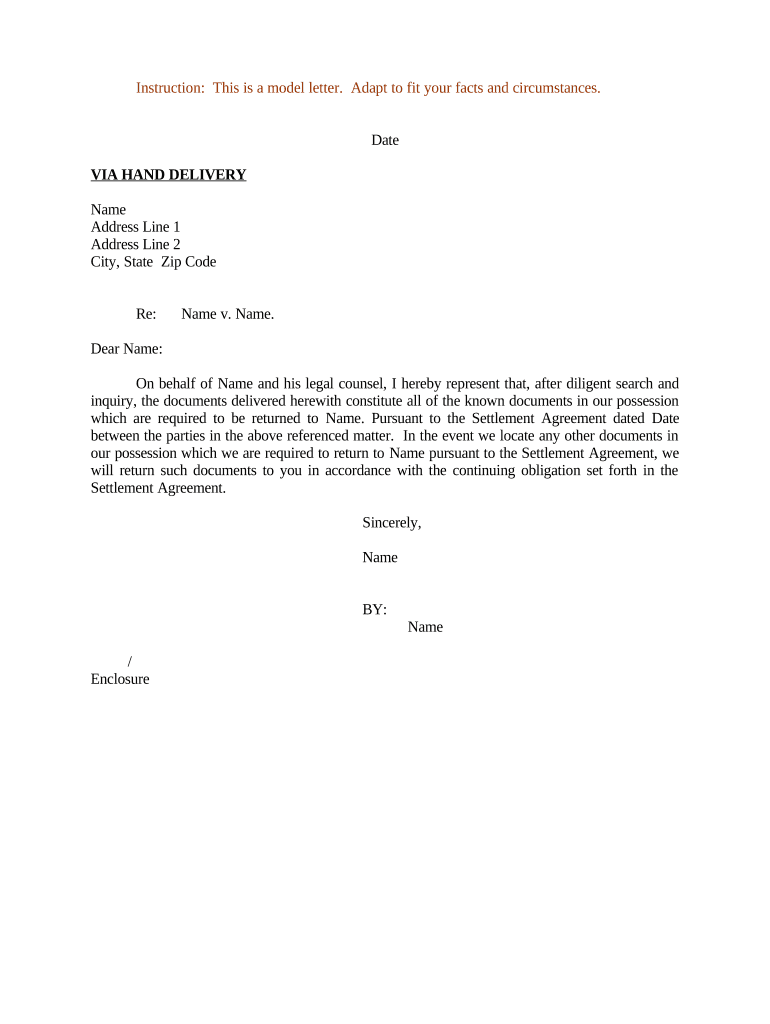
Letter Regarding Document Return Pursuant to Settlement Agreement
What this letter is and when it’s used
Why a clear return letter matters in settlement compliance
A precise return letter creates a written record of the request and the responding party’s obligations, reduces ambiguity about what must be returned, and documents timelines that can be enforced under the settlement. It also helps preserve chain-of-custody, supports audit trails for sensitive materials, and reduces the risk of later disagreements about compliance or spoliation.
Who typically prepares and receives this letter
The recipient may be an individual, a business, an insurer, or a third-party custodian; the letter should identify the recipient precisely and state the authority under the settlement to request return.
- Defense counsel or plaintiff counsel initiating document return requests after settlement, ensuring contractual obligations are met.
- Claims administrators or settlement administrators coordinating physical or electronic transfers and tracking receipt confirmations.
- Corporate records or compliance teams responsible for securing, redacting, and archiving returned materials as required.
Primary signers and stakeholders
Claims Administrator
A claims administrator prepares and sends the letter on behalf of the settlement bank or claimant class. They track returned items, log receipt dates, and maintain audit trails to demonstrate compliance during post-settlement reporting and potential audits.
Defense Counsel
Defense counsel or corporate counsel typically signs demand letters when the settlement requires the opposing party to return confidential materials. Their signature establishes legal authority and often includes representations about what will be retained or destroyed.
Key risks and legal consequences of incorrect letters
Common preparation mistakes to avoid
- Vague document descriptions that fail to uniquely identify file names, Bates ranges, or physical box labels, causing disputes about scope.
- Omitting the required return method (physical mail, RON notarized delivery, secure portal) or failing to specify acceptable file formats for electronic returns.
- Not including signature or authority details for the person certifying return, which undermines enforceability and creates evidentiary gaps.
- Failing to reference the exact settlement paragraph or exhibit that mandates return, which weakens the letter’s contractual foundation.
Step-by-step: preparing the return letter
-
01Identify documents: List file names, Bates numbers, or exhibit identifiers
-
02Set return method: Specify secure portal, registered mail, courier, or RON notarized delivery
-
03State deadline: Provide a clear deadline and acceptable delivery window
-
04Request certification: Require a signed return receipt or signed attestation of destruction
Digital workflow settings for eSubmission and tracking
| Field | Configuration |
|---|---|
| Authentication | Email + SMS code or KBA depending on sensitivity |
| File format | Accept PDF/A preferred; preserve native files when specified |
| Audit capture | Record IP, timestamp, and signer actions |
| Retention policy | Set automated archival and export for litigation hold |
Delivery channels and technical compatibility
Ensure the chosen platform can export a tamper-evident audit trail and store signed records in compliance with settlement and regulatory retention rules.
- Integrations: Works with Salesforce, NetSuite, Google Workspace
- File types: PDF, DOCX, and secure archive formats
- Authentication: Supports SMS codes, KBA, and SSO
Typical electronic return workflow
-
Upload: Sender uploads return instructions and expected items
-
Assign fields: Place signature, date, and certification fields
-
Authenticate signer: Verify via email, SMS, or KBA
-
Capture audit: System records timestamp, IP, and actions
Typical timing and processing expectations
Initial return window:
Commonly 7–30 calendar days from letter date
Extension or cure period:
Often an additional 7–14 days if mutually agreed
Acknowledgment:
Recipient should confirm receipt within 3 business days
Processing time:
Administrator logs and verifies returns within 5 business days
Retention hold:
Preserve originals during any pending disputes
Comparison: eSignature vendor basics for settlement returns
| signNow | DocuSign | Adobe Sign | PandaDoc | HelloSign | |
|---|---|---|---|---|---|
| Starting Price | $8/user/mo | $15/user/mo | $14/user/mo | $19/user/mo | $15/user/mo |
| Free Trial | 7-day free trial | Varies by vendor | Varies by vendor | Varies by vendor | Varies by vendor |
| Bulk Send | Yes | Yes | Yes | Yes | No |
| Audit Trail | Yes | Yes | Yes | Yes | Yes |
| Envelope Cap | No envelope cap | 100 envelopes/user/year | Varies by plan | Varies by plan | Varies by plan |
Real examples of similar document workflows
Optica Ventures (COO)
The interface is simple and easy-to-use for our team; more importantly, it is just as easy for our customers.
- They used a secure portal for returns.
- The clear list of Bates ranges and required certification reduced follow-up and accelerated final distribution reporting to plaintiffs by several weeks.
Fertility Centers of Illinois (Founder)
The team needed HIPAA-compliant document flows and strong audit trails for patient records.
- They required BAAs and encrypted transfers.
- Implementing a consistent letter template with required attestation language and a secure upload cut processing errors and preserved regulatory compliance.
Practical tips for producing an effective return letter
Frequently asked questions about return letters and electronic returns
-
Can this letter be e-signed?
Yes. Electronic signatures are valid under the ESIGN Act (15 U.S.C. §7001) and UETA in most states; ensure intent, consent, attribution, and retention are documented.
-
Is remote notarization allowed?
Many states permit remote online notarization (RON) with identity proofing and audio-video recording; verify state notary rules before relying on RON.
-
What proof should be required?
Request a signed certification of return or destruction, tracking numbers for shipments, and an electronic audit trail showing signer identity and timestamps.
-
How to handle redacted materials?
Specify acceptable redaction methods and require retained unredacted master copies under secure custody if settlement requires it; document the redaction authority.
-
What if recipient disputes scope?
Reference the settlement clause, provide itemized lists, allow short meet-and-confer periods, and preserve all communications for potential enforcement.
-
How long to keep return records?
Follow applicable retention standards: at minimum federal requirements (e.g., IRS 3 years) and industry regs such as HIPAA six-year rules; consult counsel for specifics.