Establishing secure connection… Loading editor… Preparing document…
Navigation

Fill and Sign the Ifyouarenottheintendedrecipientyouareherebynotifiedthatanyusedisclosuredistribution Form
Fill and Sign the Ifyouarenottheintendedrecipientyouareherebynotifiedthatanyusedisclosuredistribution Form

How it works

Open the document and fill out all its fields.
Apply your legally-binding eSignature.
Save and invite other recipients to sign it.

Rate template

4.5
38 votes
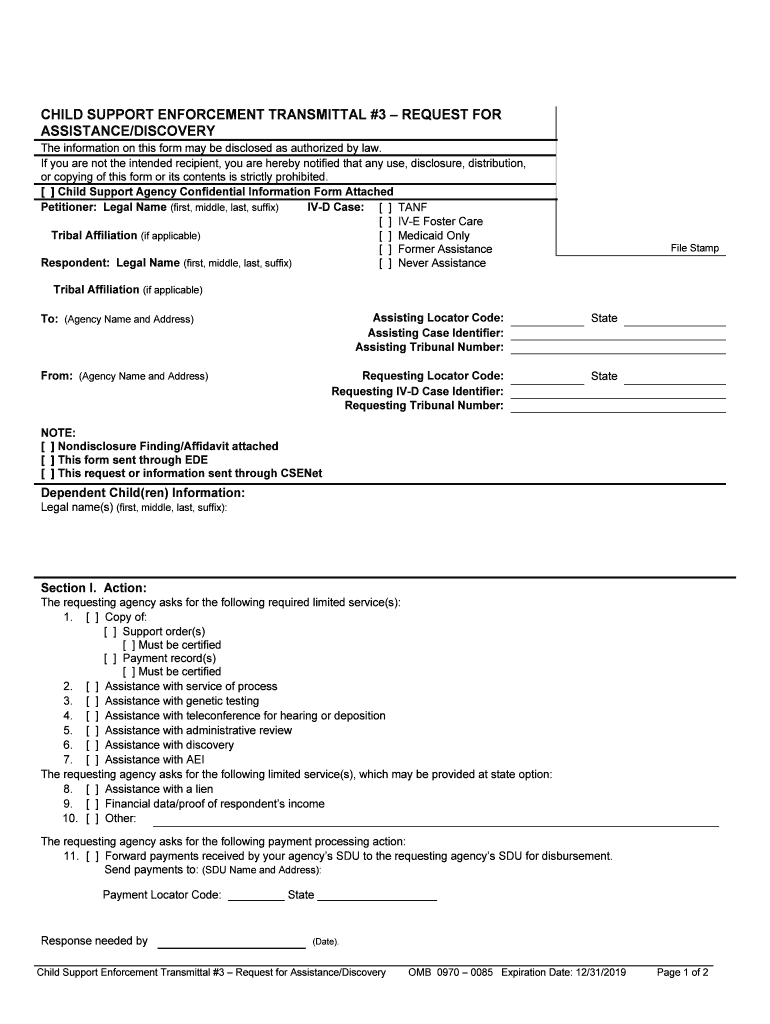
                                                                                                                                                                                                                                                                                                                                                                                                                                                                                                                                                                                                                                                                                                                                                             CHILD SUPPORT ENFORCEMENT TRANSMITTAL #3  – REQUEST FOR  ASSISTANCE/DISCOVERY  File Stamp  The information  on this form may be disclosed as authorized by law .  If you are not the  intended recipient, you are hereby notified that any use, disclosure, distribution,  or copying of this form or its contents is strictly prohibited.  [  ]  Child Support Agency Confidential Information  Form Attached  Petitioner: Legal Name  (first, middle, last, suffix)  IV­D Case:  [  ]  TANF  [  ]  IV ­E Foster Care  Tribal Affiliation  (if applicable)  [  ]  Medicaid Only  [  ]  Former Assistance  Respondent:  Legal  Name (first, middle, last, suffix)  [  ]  Never Assistance  Tribal Affiliation  (if applicable)  To: (Agency Name and Address)  Assisting Locator Code :  State  Assisting Case Identifier :  Assisting Tribunal Number :  From: (Agency  Name and Address)  Requesting Locator Code :  State  Requesting IV­D Case Identifier :  Requesting Tribunal Number :  NOTE:  [  ] Nondisclosure Finding/Affidavit  attached  [  ] This form sent through EDE  [  ] This request or information  sent through CSENet  Dependent Child(ren) Information:  Legal  name (s) (first, middle, last, suffix):  Section  I.  Action :  The requesting agency asks for the following required limited service(s):  1.   [  ]  Copy of:    [  ] Support  order (s)   [  ] Must be certified    [  ]  Payment  record (s)   [  ] Must be certified    2. [  ]  Assistance  with service of p rocess  3. [  ]  Assistance  with genetic t esting  4. [  ]  Assistance with t eleconference for hearing or d eposition   5. [  ]    Assistance with administrative r eview  6. [  ]  Assistance with d iscovery  7. [  ]  Assistance with AEI  The requesting  agency asks for the following limited ser vice(s), which may be provided at state option:  8.  [  ]  Assistance with a  lien  9.  [  ]  Financial data/proof of respondent’s i ncome  10. [  ]  Other:  The requesting agency asks for the following payment processing  action:  11.  [  ]  Forward payments received by your agency’s SDU to the requesting  agency’s SDU for disbursement.  Send payments t o: (SDU Name and Address):  Payment Locator Code:  _________ State ___________________  Response  needed by    (Date).  Child Support Enforcement Transmittal #3  – Request for Assistance/Discovery  OMB  0970  – 0085  Expiration Date:  12/31/2019 Page  1 of  2                                                                                                                                                                                                                                                                                                                                                                                     CHILD SUPPORT ENFORCEMENT TRANSMITTAL #3  – REQUEST FOR ASSISTANCE/DISCOVERY, PAGE 2    Section II.  Other Pertinent Information :  Please Return the Acknowledgment  Section III. Contact Information:  Date  Requesting  contact  person (first, middle, last , suffix)  ( )  Direct t elephone  number and  extension  Fax:  (  )  E­mail :  Encryption Requirements:  When communicating this form through electronic transmission, precautions must b e taken to ensure the security of the data. Child  support agencies are encouraged to use the electronic applications provided by the federal Office  of Child Support Enforcement.  Other  electronic means, such as encrypted attachments to e ­mails may be used if the encryption method is compliant with Federal Information  Processing Standard (FIPS) Publication 140 ­2 (FIPS PUB 140 ­2).  Child Support Enforcement Transmittal #3  – Request for Assistance/Discovery  OMB  0970  – 0085  Page  2 of  2                                                                                                                                                                                                                                                                                                                                                                                                                                                                                                                                                                                ______________________________ ____________________________________________________________________________________________                                                                                                                                                                                                                                                                                                                  CHILD SUPPORT ENFORCEMENT TRANSMITTAL #3  – RE QUEST FOR  ASSISTANCE/DISCOVERY ACKNOWLEDGMENT  File Stamp  The information  on this form  may be disclosed as authorized by law.  If you are  not the intended  recipient, you are hereby notified that any  use, disclosure, distribution, or  copying of this  form or its  contents is strictly prohibited.  Petitioner:  Legal Name  (first, middle, last,  suffix)  IV­D Case:  [  ] TANF  [  ]  IV ­E Foster Care  Tribal Affiliation  (if applicable)  [  ]  Medicaid Only  [  ]  Former Assistance  Respondent: Legal Name (first, middle, last,  suffix)  [  ]  Never Assistance  Tribal Affiliation  (if applicable)  To: (Agency Name and Address)  Assisting Locator Code :  Assisting Case Identifier :  Assisting Tribunal Number :  State  From: (Agency Name and Address )  Requesting Locator Code :  Requesting IV­D Case Identifier :  Requesting Tribunal Number :  State  NOTE:  [  ] Nondisclosure Finding/ Affidavit  attached  [  ] This form sent through EDE  [  ] This request or information sent through CSENet  ACKNOWLEDG MENT:  To be Completed by  Assisting Agency and Returned to  Requesting Agency  [  ] Request received and no additional information is n ecessary  [  ]    Additional information  needed  (See remarks .)  [  ] Remarks/Response  [  ]  Your request  has been forwarded for action to:  Name of person  (first, middle, last , suffix):  Agency  name :  Address :  Locator code:  Direct telep hone  number  and extension :  Fax:  ( )  E­mail:  Date  Person completing f orm (first, middle, last , suffix)  Direct  telephone number and  extension  Fax :  (  )  E­mail :  Encryption Requirements:  When communicating this form through electronic transmission, precautions must  be taken to ensure the security of the data. Child  support agencies are encouraged to use the electronic applications provided by the federal Office  of Child Support Enforcement.  Other  electronic means, such as encrypted attachments to emails may be used if the encryption met hod is compliant with Federal Information  Processing Standard (FIPS) Publication 140 ­2 (FIPS PUB 140 ­2).  Child Support Enforcement Transmittal #3  – Request for Assistance/Discovery  OMB  0970  – 0085   Expiration Date:  12/31/2019 Page  1 of  1  Acknowledgment  ­Return This Page to the Requesting Agency                                                                                        If this is a tribal IV ­D   case, note that   tribal locator   codes uniquely identify tribal cases with “9” in the first   position,   0  (zero) in the second position,   and then a 3 ­character   tribal   code defined by the Bureau of Indian Affairs (BIA).                                            INSTRUCTIONS FOR THE CHILD SUPPORT ENFORCEMENT TRANSMITTAL #3    REQUEST FOR   ASSI STANCE/DISCOVERY   AND ACKNOWLEDG MENT   PURPOSE OF THE FORM:     The CSE Transm ittal #3  ­  Request   for Assistance/Discovery is designed for use when a   IV ­D agency   needs limited    assistance from another   IV ­D agency , but  does not want the other   agency   to open a IV ­D   case.    Federal   law and   regulations    require all IV ­D agencies to cooperate  with  requests from another   state agency for limited services   and payment forwarding .   Sections   316 and 318 of UIFSA contain specific   provisions that allow a tribunal to receive evidence from another state  and  to obtain discovery through a tribunal of another   state.    Whenever possible, a  CSE Transmittal #3   request should be s  ent   electronically   using the appropriate CSENet transaction.      When a   IV ­D agency   receives   a CSE Transmittal #3   ­  Request for Assistance/Discovery from another   IV ­D agency , it should not    open an  intergovernmental   IV ­D case.    It  should only provide the limited assistance requested.    By contrast, a n initiating jurisdiction    should use CSE Transmittal #1   ­  Initial Request   when asking t  he  responding jurisdiction   to open an interstate IV ­D case.    HEADING/CAPTION :  The agency   requesting assistance/discovery determines the   heading.     Note that the heading appears on both the  Child  Support Enforcement   Transmittal #3   and on the  Acknowledgment   page.    •    Check   if a  Child Support Agency Confidential Information Form is attached.     Th e Ch ild Support Agency    Confidential Information Form   will be needed for   most actions being requested since most   of the identifying  information has   been removed from   the  CSE  Transmittal #3 .   •    Identify the  petitioner  and  respondent   by full legal   name   (first, middle, last , suffix) and,  if applicable,   include the    name of the tribe with which the petitioner or respondent   is   affiliated.    •    Check the appropriate box to identify the type of   IV ­D  case: TANF,   IV ­E foster care, M edicaid only,  former    assistance, o r never  assistance.    •    In the space marked “To:”, list the name and address (street,   PO   Box,   city, state, and zip code) of the agency to    which you are sending the CSE Transmittal   #3.     •    In the appropriate spaces,   if   applicable and if   known,   enter   the assisting  agency’s  locat or  code ,   state,   case identifier,   and  tribunal number .      The assisting  agency  is the  IV­D agency   that is   providing services   at the request of   the requesting  agency.  Under    “case identifier”, enter the number/identifier   identical   to the one submitted on the Federal Case    Registry, which is a left ­justified up to 15 ­character alphanumeric field, allowing all   characters except asterisk and    backslash, and with all characters in uppercase.  Under “tribunal number”, you may enter t he docket number, cause   number, or   any other appropriate reference number that the assisting tribunal may use to identify the case,  if known.      Italicized  text that appears within a “box” refers to policy or   provides additional information.    TANF means  the obligee’s family is currently receiving IV ­A cash payments.  A Medicaid only   case is a case in  which the obligee’s family receives Medicaid but does not receive TANF.  A   former assistance case might   be a case  for state   arrears only   or for   a family that previously received TANF, but   is   not   doing so at   this time.    For an address outside the United States, be sure to include the  foreign country and postal   code .   45 CFR 303.7(a)(8)   lists   limited services the  state IV­D  agency must provide and authorizes   a  state to     honor requests for   other services at its option.    Tribal IV­D programs may choose to use the federal Intergovernmental forms.    However, they are not required to  use or accept such forms .   If you have any questions,    contact the tribal IV­D agency   directly using the contact    information on the OCSE website.    Child Support Enforcement Transmittal #3  – Request for Assistance/Discovery and Acknowledgment Instructions  Page 1 of  4                                                                                                                                                                     •    In   the s  pace marked “From:”, list   the requesting agency’s name and address (street,   PO   Box,   city, state, zip code).     •    In the appropriate spaces, enter the requesting  agency’s locator  code, state, IV ­D case identifier, and, if applicable,    tribunal number.      In the “ NOTE:” section,   check   any of the following  that  apply:    •    Non disclosure Finding/Affidavit   attached   ­  If there is   a finding prohibiting disclosure of a party’s   or child(ren)’s    address/identifying information or an affidavit alleging that disclosure of such i nformation would result in risk of   harm, check   th e box for “Nondisclosure Finding/Affidavit   attached ” and attach a copy of the finding/affidavit in  accordance with section 312 of UIFSA.  If   there is a finding/affidavit   prohibiting   disclosure,   the information must   be  sealed and may not be disclosed to the   other   party or the public.  You may provide the address   of the IV ­D agency    as a substitute address for   the protected party .    •    This   form s ent through EDE   ­  Check if   this transmittal was   sent   through the Electronic Document Exchange  (EDE).    •    This   request   or information s ent through CSENet   ­  Check   if this request   f or   information was sent through  CSENet.    The requesting   agency   is the  agency   that   is   requesting services from   the assisting  agency.  Under   “case identifier ,”  enter the number/identifier identical to the one submitted on t  he Federal Case Registry, which is a left ­justified  up to  15 ­character alphanumeric field, allowing all characters except asterisk   and backslash, and with all   characters in  uppercase.    Under “tribunal   number”, you may enter   the docket number, cause number, or   any   other   appropriate  r   eference number that the  requesting  tribunal may use to identify the case,   if   known.     UIFSA   requires that   the  petition   or   accompanying documents   include certain identifying information regarding the  parties   and c hild(ren) (e.g. residential address, social   security number) unless   a party   alleges in an affidavit or   a  pleading under oath that the health, safety, or   liberty   of a party or   child would be jeopardized by   disclosure of   such  information.  In that event, the   information must be sealed.      If  a  jurisdiction has reason to believe that   information should not be released because of   safety   concerns,   it should  ensure that there is a nondisclosure finding or an allegation in an affidavit or the pleading that d isclosure of   identifying   informa tion would r  esult in a risk   of   harm, as   provided under   section 312 of UIFSA.  In addition to  identifying information included on this form, it may be appropriate to submit   certain financial information under   seal.     The following options   are available for   making IV ­D requ ests and sending information on   IV­D cases:    1.    CSENet transactions are the recommended method for making requests or sending information to anoth er   state.   If CSENet is not   listed as an option on the form, then it cannot be used to convey   any of the    requests   for information or IV ­D requests   provided on the form.    Supporting documentation should be sent    through EDE, whenever possible.    If certified copies are needed, hard copies should also be sent by mail.     Mail or fax may also be used for all documents when EDE is   not available.    2.    If CSENet transactions   are not available in your   state, EDE is the next   preferred method for   transmitting  your request   or information.  Both your   state and the receiving state must be using the EDE application to  use this communication   method.    3.    If the EDE   application is not available in your   state or   the receiving state, then mail or fax must be used to  communicate your   request.     Dependent  Child(ren ) Information    •  List all child (ren ) for whom support is owed or being sought.  For each child, provide the child’s full legal name  (first, middle, last , suffix).   S ection   I.     A ction :   Check the appropriate box(es) to indicate which limited services are requested.  Multiple services may be requested,  as appropriate.  To make a quick locate/locate only request, use CSENet, or, for states and t ribes without CSENet, the  Child Support Locate Request form.  You may also make locate inquiries through the OCSE State S ervices Portal.  •  Check  item 1  “Copy of” to request copies of “Support  order(s)” and/or “Payment  record (s)”.  Check the applicable  “Must be certified” box(es) if the copies must be certified.  Child Support Enforcement Transmittal #3  – Request for Assistance/Discovery and Acknowledgment Instructions  Page 2 of  4                                                                                                                                                                                                                                                                                                                                                                                                                                                                                         •    Check  item 2  “Assistance with service of process” if you want assistance with service  of process.  You may directly  contact (via telephone, fax, or other means) the sheriff or other appropriate official in another  agency to request  personal service of process in the other jurisdiction . Send the request for assistance/discovery  on the CSE  Transmittal #3 only if such attempts have been unsuccessful.  Attach such documentation as nece ssary for service of  process.  •  Check  item 3  “Assistance with genetic testing” if you want assistance with genetic testing.  Include i n section II, or attach ,  any necessary information or materials, including the names of genetic testing laboratories, proto cols to be followed, and  testing kits.  •  Check  item 4  “Assistance with teleconference for hearing or deposition” if you want assistance in schedul ing a  telecon ference for a hearing or deposition.  Attach a copy of the hearing notice or deposition.  •  Check  item 5  “Assistance with administrative review” if you want assistance with an administr ative review. Use the  CSE Transmittal #2 rather than this form if you nee d assistance from the order ­issuing agency with an administrative  review for a contested debt certification in the federal collection and enforcement program ,  you  are the submitting  state, and you have an intergovernmental case with the order ­issuing agency .  •  Check  item 6  “Assistance with discovery” if you want assistance with discovery.  If you are requesting that the tribunal in the other state compel a person over whom it has jurisd iction to respond to a  discovery order issued by a tribunal of another state (in accordance with section 318 of UIFSA), attach a copy of the  discovery order. Some states may require a certified copy.  • Check  item 7  “Assistance with  AEI” if you want assistance through high ­volume, automated administrative  enforcement in interstate case s  (AEI).  Check the Intergovernmental Reference Guide (IRG) for  state­specific  requirements .  • Check  item 8  “Assistance with a lien” if you want assistance with a lien . Attach an arrears balance and/or provide  other information in section II that the assisting agency may need.  Prior to using  the CSE  Transmittal #3 for this  purpose, contact the assisting state and determine if  the CSE  Transmittal  #3 or  CSE  Transmittal  #1 Is needed.  If the  assisting state requires a “full” referral (case information and documentation), use  the CSE  Transmittal #1 instea d.  •  Check  item 9 “Financial data/proof of respondent’s income” if you want financial data or proof of the respondent’s  income.  Explain your request in section II or an attachment.  •  Check  item 10 “Other” if the reason you want assistance or discovery is not listed above.  On the blank line, in dicate  the assistance needed; be as specific as possible.  •  Check  item 11  “Forward payments received by your agency’s SDU to the requesting agency’s SDU for disburs ement”  if the requesting agency  needs this payment processing action. In the space marked “Send payments to:” list the name  and address (street, PO Box, city, state, and zip code) of your agency’s  state disbursemen t unit (SDU).  In the  appropriate spaces, enter the locator code and state where payments should be sent.  In the space provided, note the date that the response is needed.  S ection  II.  Other Pertinent Information:  In  this section provide additional information that may useful in processing your request.  Provide any necessary  identifying information and background information about why the request is being made, including:  (1) information on the  nature of the pending action (e.g., parentage, support, modification, enforcement);  and (2) the reason  assistance from  the  other  agency  is needed.  If the information is related to section 1, identify the item number.  S ection  III.  Contact  Information :  At the bottom of page  2, provide a specific contact person’s name, a direct telephone number ( including extension if  necessary) , a fax  number , and  an e­mail address to expedite communication between jurisdictions.  ACKNOWLEDGMENT:  The requesting  agency should always include the “Acknowledgment” page with  the CSE  Transmittal #3.  The requesting  agency  completes the Heading/Caption on the acknowledgment page.  The assisting  state agency completes the rest of the  acknowledgment  and returns it to the requesting agency.  If the assisting agency does not provide the requested lim ited  service for a reason other than the need for more information, the assisting agency may use t he “Remarks/Response” check  box and explain  in the provided space. An automated acknowledgment may be sent through CSENet .  Child Support Enforcement Transmittal #3  – Request for Assistance/Discovery and Acknowledgment Instructions  Page 3 of  4                                                                                                     Encryption Requirements:  When communicating this form through electronic transmission, precautions must  be taken to ensure the security of the data.  Child support agencies are  encouraged to use the electronic applications provided by the federal Office of Child Support  Enforcement.  Other electronic means, such as encrypted attachments to e ­mails may be used if the encryption method is  compliant with Federal Information Processing Standard (FIPS) Publication 140 ­2 (FIPS PUB 140 ­2).  The Paperwork Reduction Act of 1995  Public reporting burden for this collection of information is estimated to average  0.08 hours per response, including the time for  reviewing instructions, gatheri ng and maintaining the data needed, and reviewing the collection of information.  An agency may not conduct or sponsor, and a person is not required to respond to, a collection of informat ion unless it displays a  currently valid OMB control number.  Child Support Enforcement Transmittal #3  – Request for Assistance/Discovery and Acknowledgment Instructions  Page 4 of  4 

Practical advice on finalizing your ‘Ifyouarenottheintendedrecipientyouareherebynotifiedthatanyusedisclosuredistribution’ online

Are you fed up with the inconvenience of handling paperwork? Look no further than airSlate SignNow, the premier eSignature solution for individuals and businesses. Bid farewell to the lengthy procedure of printing and scanning documents. With airSlate SignNow, you can seamlessly finalize and authorize documents online. Take advantage of the robust features embedded in this user-friendly and cost-effective platform and transform your methodology for document management. Whether you need to validate forms or gather electronic signatures, airSlate SignNow manages everything efficiently, requiring just a few clicks.

Adhere to this comprehensive guide:

  1. Sign in to your account or register for a complimentary trial with our service.
  2. Click +Create to upload a document from your device, cloud storage, or our template library.
  3. Access your ‘Ifyouarenottheintendedrecipientyouareherebynotifiedthatanyusedisclosuredistribution’ in the editor.
  4. Click Me (Fill Out Now) to prepare the document on your end.
  5. Insert and designate fillable fields for others (if needed).
  6. Continue with the Send Invite settings to solicit eSignatures from others.
  7. Save, print your version, or transform it into a multi-usable template.

Don’t be concerned if you need to collaborate with your colleagues on your Ifyouarenottheintendedrecipientyouareherebynotifiedthatanyusedisclosuredistribution or send it for notarization—our service provides everything necessary to accomplish such tasks. Register with airSlate SignNow today and enhance your document management to a new level!

Here is a list of the most common customer questions. If you can’t find an answer to your question, please don’t hesitate to reach out to us.

Need help? Contact Support

The best way to complete and sign your ifyouarenottheintendedrecipientyouareherebynotifiedthatanyusedisclosuredistribution form


Save time on document management with airSlate SignNow and get your ifyouarenottheintendedrecipientyouareherebynotifiedthatanyusedisclosuredistribution form eSigned quickly from anywhere with our fully compliant eSignature tool.

How to Sign a PDF Online How to Sign a PDF Online

How to complete and sign documents online

Previously, coping with paperwork required pretty much time and effort. But with airSlate SignNow, document management is quick and simple. Our robust and easy-to-use eSignature solution enables you to effortlessly complete and electronically sign your ifyouarenottheintendedrecipientyouareherebynotifiedthatanyusedisclosuredistribution form online from any internet-connected device.

Follow the step-by-step guide to eSign your ifyouarenottheintendedrecipientyouareherebynotifiedthatanyusedisclosuredistribution form template online:

  • 1.Register for a free trial with airSlate SignNow or log in to your account with password credentials or SSO authorization option.
  • 2.Click Upload or Create and add a form for eSigning from your device, the cloud, or our form catalogue.
  • 3.Click on the file name to open it in the editor and use the left-side toolbar to fill out all the empty fields properly.
  • 4.Drop the My Signature field where you need to eSign your form. Type your name, draw, or import an image of your handwritten signature.
  • 5.Click Save and Close to finish modifying your completed form.

As soon as your ifyouarenottheintendedrecipientyouareherebynotifiedthatanyusedisclosuredistribution form template is ready, download it to your device, export it to the cloud, or invite other individuals to electronically sign it. With airSlate SignNow, the eSigning process only requires a few clicks. Use our robust eSignature tool wherever you are to manage your paperwork productively!


How to Sign a PDF Using Google Chrome How to Sign a PDF Using Google Chrome

How to complete and sign paperwork in Google Chrome

Completing and signing documents is simple with the airSlate SignNow extension for Google Chrome. Adding it to your browser is a fast and efficient way to deal with your forms online. Sign your ifyouarenottheintendedrecipientyouareherebynotifiedthatanyusedisclosuredistribution form template with a legally-binding eSignature in just a few clicks without switching between tools and tabs.

Follow the step-by-step guidelines to eSign your ifyouarenottheintendedrecipientyouareherebynotifiedthatanyusedisclosuredistribution form in Google Chrome:

  • 1.Go to the Chrome Web Store, find the airSlate SignNow extension for Chrome, and add it to your browser.
  • 2.Right-click on the link to a document you need to sign and select Open in airSlate SignNow.
  • 3.Log in to your account with your credentials or Google/Facebook sign-in buttons. If you don’t have one, you can start a free trial.
  • 4.Utilize the Edit & Sign menu on the left to complete your template, then drag and drop the My Signature option.
  • 5.Upload an image of your handwritten signature, draw it, or simply enter your full name to eSign.
  • 6.Verify all data is correct and click Save and Close to finish editing your paperwork.

Now, you can save your ifyouarenottheintendedrecipientyouareherebynotifiedthatanyusedisclosuredistribution form template to your device or cloud storage, email the copy to other individuals, or invite them to eSign your document via an email request or a protected Signing Link. The airSlate SignNow extension for Google Chrome improves your document processes with minimum effort and time. Try airSlate SignNow today!


How to Sign a PDF in Gmail How to Sign a PDF in Gmail How to Sign a PDF in Gmail

How to fill out and sign documents in Gmail

Every time you get an email containing the ifyouarenottheintendedrecipientyouareherebynotifiedthatanyusedisclosuredistribution form for signing, there’s no need to print and scan a file or download and re-upload it to another tool. There’s a much better solution if you use Gmail. Try the airSlate SignNow add-on to rapidly eSign any documents right from your inbox.

Follow the step-by-step guidelines to eSign your ifyouarenottheintendedrecipientyouareherebynotifiedthatanyusedisclosuredistribution form in Gmail:

  • 1.Visit the Google Workplace Marketplace and find a airSlate SignNow add-on for Gmail.
  • 2.Set up the program with a corresponding button and grant the tool access to your Google account.
  • 3.Open an email with an attached file that needs approval and use the S sign on the right panel to launch the add-on.
  • 4.Log in to your airSlate SignNow account. Choose Send to Sign to forward the file to other people for approval or click Upload to open it in the editor.
  • 5.Put the My Signature field where you need to eSign: type, draw, or upload your signature.

This eSigning process saves efforts and only takes a couple of clicks. Take advantage of the airSlate SignNow add-on for Gmail to adjust your ifyouarenottheintendedrecipientyouareherebynotifiedthatanyusedisclosuredistribution form with fillable fields, sign paperwork legally, and invite other individuals to eSign them al without leaving your mailbox. Enhance your signature workflows now!


How to Sign a PDF on a Mobile Device How to Sign a PDF on a Mobile Device How to Sign a PDF on a Mobile Device

How to fill out and sign documents in a mobile browser

Need to rapidly submit and sign your ifyouarenottheintendedrecipientyouareherebynotifiedthatanyusedisclosuredistribution form on a smartphone while doing your work on the go? airSlate SignNow can help without the need to set up additional software applications. Open our airSlate SignNow tool from any browser on your mobile device and add legally-binding eSignatures on the go, 24/7.

Follow the step-by-step guidelines to eSign your ifyouarenottheintendedrecipientyouareherebynotifiedthatanyusedisclosuredistribution form in a browser:

  • 1.Open any browser on your device and follow the link www.signnow.com
  • 2.Register for an account with a free trial or log in with your password credentials or SSO option.
  • 3.Click Upload or Create and import a file that needs to be completed from a cloud, your device, or our form catalogue with ready-made templates.
  • 4.Open the form and complete the blank fields with tools from Edit & Sign menu on the left.
  • 5.Put the My Signature area to the form, then enter your name, draw, or upload your signature.

In a few simple clicks, your ifyouarenottheintendedrecipientyouareherebynotifiedthatanyusedisclosuredistribution form is completed from wherever you are. When you're done with editing, you can save the file on your device, generate a reusable template for it, email it to other people, or ask them to eSign it. Make your documents on the go quick and productive with airSlate SignNow!


How to Sign a PDF on iPhone How to Sign a PDF on iPhone

How to complete and sign forms on iOS

In today’s corporate environment, tasks must be done rapidly even when you’re away from your computer. Using the airSlate SignNow mobile app, you can organize your paperwork and approve your ifyouarenottheintendedrecipientyouareherebynotifiedthatanyusedisclosuredistribution form with a legally-binding eSignature right on your iPhone or iPad. Install it on your device to conclude contracts and manage forms from just about anywhere 24/7.

Follow the step-by-step guidelines to eSign your ifyouarenottheintendedrecipientyouareherebynotifiedthatanyusedisclosuredistribution form on iOS devices:

  • 1.Go to the App Store, find the airSlate SignNow app by airSlate, and install it on your device.
  • 2.Open the application, tap Create to upload a form, and choose Myself.
  • 3.Select Signature at the bottom toolbar and simply draw your autograph with a finger or stylus to eSign the sample.
  • 4.Tap Done -> Save after signing the sample.
  • 5.Tap Save or use the Make Template option to re-use this document in the future.

This method is so straightforward your ifyouarenottheintendedrecipientyouareherebynotifiedthatanyusedisclosuredistribution form is completed and signed within a couple of taps. The airSlate SignNow app works in the cloud so all the forms on your mobile device remain in your account and are available any time you need them. Use airSlate SignNow for iOS to boost your document management and eSignature workflows!


How to Sign a PDF on Android How to Sign a PDF on Android

How to fill out and sign paperwork on Android

With airSlate SignNow, it’s simple to sign your ifyouarenottheintendedrecipientyouareherebynotifiedthatanyusedisclosuredistribution form on the go. Install its mobile application for Android OS on your device and start improving eSignature workflows right on your smartphone or tablet.

Follow the step-by-step guidelines to eSign your ifyouarenottheintendedrecipientyouareherebynotifiedthatanyusedisclosuredistribution form on Android:

  • 1.Navigate to Google Play, find the airSlate SignNow application from airSlate, and install it on your device.
  • 2.Log in to your account or create it with a free trial, then add a file with a ➕ button on the bottom of you screen.
  • 3.Tap on the imported document and choose Open in Editor from the dropdown menu.
  • 4.Tap on Tools tab -> Signature, then draw or type your name to eSign the template. Complete blank fields with other tools on the bottom if needed.
  • 5.Utilize the ✔ key, then tap on the Save option to end up with editing.

With an easy-to-use interface and total compliance with primary eSignature requirements, the airSlate SignNow app is the perfect tool for signing your ifyouarenottheintendedrecipientyouareherebynotifiedthatanyusedisclosuredistribution form. It even operates without internet and updates all record modifications once your internet connection is restored and the tool is synced. Complete and eSign documents, send them for eSigning, and make multi-usable templates anytime and from anyplace with airSlate SignNow.

Sign up and try Ifyouarenottheintendedrecipientyouareherebynotifiedthatanyusedisclosuredistribution form
  • Close deals faster
  • Improve productivity
  • Delight customers
  • Increase revenue
  • Save time & money
  • Reduce payment cycles

