Establishing secure connection…Loading editor…Preparing document…

Illinois Workers' Compensation Form

This template is fully customizable. Edit the text, fill out the fields, and send it for signature. Give it a try!
Illinois Workers' Compensation Form

What the Illinois Workers' Compensation Form Is

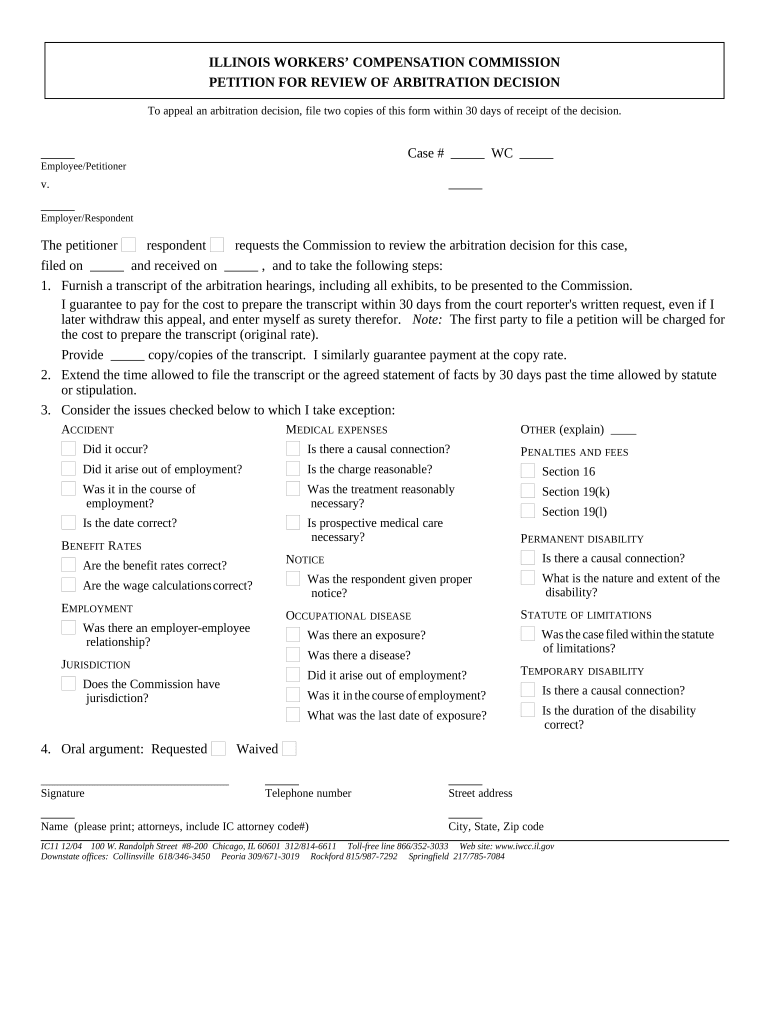
The Illinois Workers' Compensation Form is the standard incident and claim documentation used to report work-related injuries or illnesses and to initiate benefits and medical care coordination through the employer's insurer or the Illinois Workers' Compensation Commission. It records the injured worker's identifying details, the date and location of the incident, a description of injury, treating provider information, and work status. Accurate completion creates the factual record that insurers, claims adjusters, medical providers, and regulators rely on to determine coverage, benefits, and return-to-work actions.

Why a Complete Illinois Workers' Compensation Form Matters

A properly completed form speeds claims handling, preserves the employee's right to benefits, and reduces disputes about causation and medical care. Electronic completion and secure storage also supports legal admissibility under ESIGN (15 U.S.C. ch. 96) and Illinois law where electronic records are accepted.

Why a Complete Illinois Workers' Compensation Form Matters

Who Typically Completes or Receives This Form

Employers, HR and safety officers, treating clinicians, and claims administrators are the primary parties who prepare, review, or receive Illinois Workers' Compensation Forms.

  • Employees report injuries and provide initial incident details to supervisors or HR.
  • Employers or safety officers complete employer sections and submit to insurers.
  • Medical providers supply treatment details and return-to-work status for claims.

Accurate routing to the insurer and retention in the employer's personnel file reduces processing delays and supports compliance in audits or litigation.

Real-World Illustrations of Form Use

These short examples show how organizations use the Illinois Workers' Compensation Form to manage incidents and claims efficiently.

Optica Ventures

Optica's field technician reported a back strain using a mobile form immediately after the incident

  • Mobile capture preserved scene details and witness names
  • As a result the employer coordinated same-day care, the insurer opened the claim without delay, and return-to-work planning began within 48 hours.

Fertility Centers of Illinois

A clinic employee completed the form after a workplace slip using an electronic workflow

  • Clinic attached medical notes securely
  • The secure record supported timely benefits approval and maintained HIPAA protections during insurer review and provider coordination.

Core Elements to Include on a Professional Form

A compliant Illinois Workers' Compensation Form combines identity data, incident facts, medical details, employer input, claim routing, and acknowledgement fields for clear legal and administrative use.

Employee Details

Full legal name, date of birth, address, contact number, Social Security number or TIN when required for benefits and payroll processing.
Incident Information

Date, time, precise location, the task being performed, and a concise description of how the injury or illness occurred.

Injury Description

Body part(s) affected, nature of injury or exposure, observed symptoms, and whether first aid or emergency care was provided.

Medical Treatment

Treating provider name, facility, treatment dates, work restrictions, and referral details for specialists or physical therapy.

Employer Section

Employer contact, supervisor statement, witness names, payroll classification, and insurer or claim number when available.

Signatures & Dates

Employee, employer representative, and clinician acknowledgements with dated signature lines and fields for digital signature metadata.

Step-by-Step: Completing the Form

Use this sequence to gather accurate information and route the form correctly for insurer processing.

  • 01
    Report Incident: Tell your supervisor and seek emergency care if needed before filling the form.
  • 02
    Complete Employee Section: Provide personal, incident, and symptom details in clear, factual language.
  • 03
    Employer Input: Supervisor documents witnesses, tasks, and any corrective actions taken.
  • 04
    Submit to Insurer: Send the completed form and attachments to your employer's carrier or claims portal.

How Electronic Submissions Flow

An electronic workflow standardizes routing and audit trails while retaining signatures and attachments for review.

  • Upload Document: Sender uploads the completed form and supporting files to the claims system.
  • Assign Fields: Designate signature, date, and provider fields for each signer role.
  • Authenticate Signers: Signers verify identity via email link, SMS code, or stronger methods where required.
  • Record Audit Trail: System captures timestamps, IP, and action history for admissibility and compliance.

Recommended Digital Workflow Settings

Configure these settings to balance signer convenience with verification and compliance needs.

Field Configuration
Signer Authentication Email link plus optional SMS code for increased assurance
Field Types Signature, date, text, checkbox, and attachment fields enabled
Routing Sequential routing for employer then clinician then insurer
Notifications Automatic reminders at 24 and 72 hours for pending signatures

Technical Considerations for eSubmission

Choose a platform that supports secure uploads, audit trails, and common file formats to ensure integrity and accessibility.

  • File Formats: PDF, DOCX accepted for form capture
  • Integrations: Works with HRIS, claims, and cloud storage platforms
  • Security: TLS transport and AES-256 at-rest encryption

Confirm the selected platform complies with ESIGN/UETA and any industry rules such as HIPAA when the form includes protected health information.

Data and Security Elements to Verify

Encryption: TLS 1.2/1.3 in transit; AES-256 at rest
Audit Trail: Timestamped signer events and IP logs
Access Controls: Role-based permissions and SSO
HIPAA Support: BAA available when needed
Certification: SOC 2 Type II and ISO 27001
Retention: Exportable, machine-readable records

Consequences of Incorrect or Late Forms

Denial Risk: Incomplete facts may lead to claim denial
Delay in Benefits: Processing holds can postpone medical payments
Legal Disputes: Errors increase litigation exposure
Penalties: Employer fines for reporting failures
HIPAA Violations: Unauthorized PHI disclosure incurs sanctions
Recordkeeping Failures: Poor retention affects audits and appeals

Common Pitfalls to Avoid

  • Missing or inconsistent dates between incident report and medical notes lead to avoidable disputes and delays in adjudication.
  • Using abbreviations or informal job titles can confuse payroll classification and hamper benefits calculation.
  • Failing to attach medical records or witness statements usually triggers follow-up requests that prolong claim resolution.
  • Relying on handwritten, low-quality scans makes text illegible and increases the chance of data entry errors.

Typical Filing and Processing Expectations

Timelines for reporting and insurer response vary by employer policy and state rules; prompt reporting reduces investigation complexity.

Employee Report Timing:

Report the injury to your employer as soon as possible to preserve rights

Employer Filing:

Employers generally notify their insurer immediately and file required forms per carrier rules

Insurer Acknowledgement:

Insurers often acknowledge claims within days, but response times vary

Medical Authorization:

Insurer review may take additional days to approve specific treatments

Appeals Window:

Appeal periods differ by jurisdiction—consult your state commission or counsel

Key Milestones in Claim Processing

A typical claim advances through discovery, submission, review, and resolution; track each milestone to manage expectations.

01

Incident Reported

Employee notifies supervisor and documents initial facts.

02

Form Submitted

Employer or employee completes and sends form to insurer.

03

Medical Review

Provider records and restrictions are reviewed for coverage decisions.

04

Claim Resolution

Benefits are authorized, denied, or referred to dispute resolution.

Pricing and Feature Snapshot for eSignature Providers

Compare starting prices and core feature availability across common eSignature vendors; signNow is listed first per comparison convention.

signNow DocuSign Adobe Sign PandaDoc HelloSign
Starting Price $8/user/mo $15/user/mo $14/user/mo $19/user/mo $15/user/mo
Free Trial 7-day free trial Varies Varies Varies Varies
Bulk Send Yes Yes Yes Yes No
Audit Trail Yes Yes Yes Yes Yes
HIPAA Compliant Yes Yes Yes No No

Frequently Asked Questions About the Illinois Workers' Compensation Form

Answers to common operational and legal questions about completing, signing, and storing the form.


Need help? Contact support

be ready to get more
Join over 28 million airSlate SignNow users