Establishing secure connection… Loading editor… Preparing document…
Navigation

Fill and Sign the Insurance Trust Form
Fill and Sign the Insurance Trust Form

How it works

Open the document and fill out all its fields.
Apply your legally-binding eSignature.
Save and invite other recipients to sign it.

Rate template

4.7
34 votes
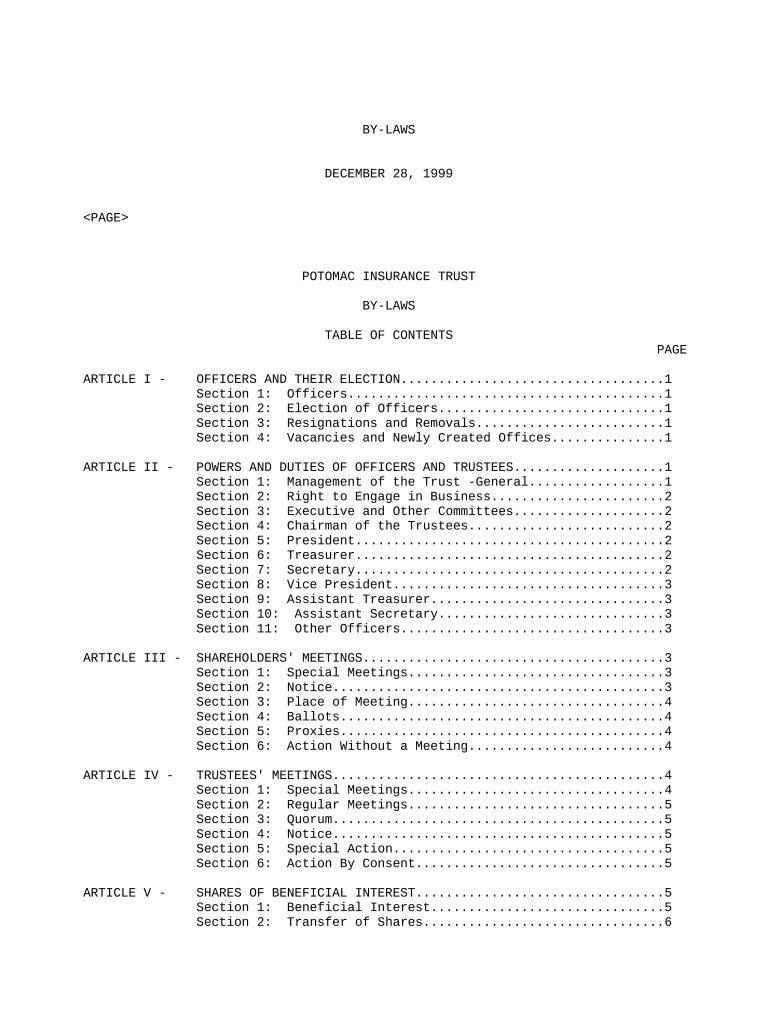
BY-LAWS DECEMBER 28, 1999 POTOMAC INSURANCE TRUST BY-LAWS TABLE OF CONTENTS PAGE ARTICLE I - OFFICERS AND THEIR ELECTION...................................1 Section 1: Officers..........................................1 Section 2: Election of Officers..............................1 Section 3: Resignations and Removals.........................1 Section 4: Vacancies and Newly Created Offices...............1 ARTICLE II - POWERS AND DUTIES OF OFFICERS AND TRUSTEES....................1 Section 1: Management of the Trust -General..................1 Section 2: Right to Engage in Business.......................2 Section 3: Executive and Other Committees....................2 Section 4: Chairman of the Trustees..........................2 Section 5: President.........................................2 Section 6: Treasurer.........................................2 Section 7: Secretary.........................................2 Section 8: Vice President....................................3 Section 9: Assistant Treasurer...............................3 Section 10: Assistant Secretary..............................3 Section 11: Other Officers...................................3 ARTICLE III - SHAREHOLDERS' MEETINGS........................................3 Section 1: Special Meetings..................................3 Section 2: Notice............................................3 Section 3: Place of Meeting..................................4 Section 4: Ballots...........................................4 Section 5: Proxies...........................................4 Section 6: Action Without a Meeting..........................4 ARTICLE IV - TRUSTEES' MEETINGS............................................4 Section 1: Special Meetings..................................4 Section 2: Regular Meetings..................................5 Section 3: Quorum............................................5 Section 4: Notice............................................5 Section 5: Special Action....................................5 Section 6: Action By Consent.................................5 ARTICLE V - SHARES OF BENEFICIAL INTEREST.................................5 Section 1: Beneficial Interest...............................5 Section 2: Transfer of Shares................................6 Section 3: Equitable Interest Not Recognized.................6 ARTICLE VI - INSPECTION OF BOOKS...........................................6 ARTICLE VII - FISCAL YEAR...................................................6 ARTICLE VIII - AMENDMENTS....................................................6 ARTICLE IX - PRINCIPAL OFFICE OF THE TRUST.................................6 BY-LAWS OF THE POTOMAC INSURANCE TRUST These By-Laws of the Potomac Insurance Trust (the "Trust"), a Massachusetts business trust, are subject to the Trust's Declaration of Trust as from time to time amended. ARTICLE I OFFICERS AND THEIR ELECTION OFFICERS SECTION 1. The officers of the Trust shall be a President, a Treasurer, a Secretary, and such other officers as the Trustees may from time to time elect. It shall not be necessary for any Trustee or officer to be a holder of shares in the Trust. ELECTION OF OFFICERS SECTION 2. The President, Treasurer and Secretary shall be chosen annually by the Trustees. Two or more offices may be held by a single person except the offices of President and Secretary. The officers shall hold office until their successors are chosen and qualified. RESIGNATIONS AND REMOVALS SECTION 3. Any officer of the Trust may resign by filing a written resignation with the President, the Trustees or the Secretary, which resignation shall take effect on being so filed or at such time as may be therein specified. The Trustees may at any meeting remove any officer by a majority vote of the voting Trustees. VACANCIES AND NEWLY CREATED OFFICES SECTION 4. If any vacancy shall occur in any office or if any new office shall be created, such vacancies or newly created offices may be filled by the Trustees at any regular or special meeting of the Trustees. ARTICLE II POWERS AND DUTIES OF OFFICERS AND TRUSTEES MANAGEMENT OF THE TRUST - GENERAL SECTION 1. The business and affairs of the Trust shall be managed by the Trustees, and they shall have all powers necessary and desirable to carry out their responsibilities, so far as such powers are not inconsistent with the laws of the Commonwealth of Massachusetts, the Declaration of Trust, or these By-Laws. RIGHT TO ENGAGE IN BUSINESS SECTION 2. Any officer or Trustee of the Trust, the investment adviser, the manager, the administrator and any officers or directors of the investment adviser, manager or administrator may have personal business interests and may engage in personal business activities. EXECUTIVE AND OTHER COMMITTEES SECTION 3. The Trustees may elect from their own number an executive committee which shall have the power and duty to conduct the current and ordinary business of the Trust, including the purchase and sale of securities, while the Trustees are not in session, and such other powers and duties as the Trustees may from time to time delegate to such committee. The Trustees also may elect from their own number other committees from time to time. The number composing such committees and the powers conferred upon the same are to be determined by vote of the Trustees. CHAIRMAN OF THE TRUSTEES SECTION 4. The Trustees may, but need not, appoint from among their number a Chairman. He or she shall perform such duties as the Trustees may from time to time designate. PRESIDENT SECTION 5. The President shall be the chief executive officer of the Trust and, subject to the supervision of the Trustees, shall have general supervision over the business and policies of the Trust. When present, he or she shall preside at all meetings of the Shareholders and the Trustees, and he or she may, subject to the approval of the Trustees, appoint a Trustee to preside at such meetings in his or her absence. The President shall perform such duties additional to all of the foregoing as the Trustees may from time to time designate. TREASURER SECTION 6. The Treasurer shall be the principal financial and accounting officer of the Trust. He or she shall deliver all funds and securities of the Trust that may come into his or her hands to such bank or trust company as the Trustees shall employ as Custodian. He or she shall have the custody of the seal of the Trust. He or she shall make annual reports regarding the business and condition of the Trust, which reports shall be preserved in Trust records, and he or she shall furnish such other reports regarding the business and condition of the Trust as the Trustees may from time to time require. The Treasurer shall perform such additional duties as the Trustees may from time to time designate. SECRETARY SECTION 7. The Secretary shall record in books kept for the purpose all votes and proceedings of the Trustees and the Shareholders at their respective meetings. The Secretary shall perform such additional duties as the Trustees may from time to time designate. 2 VICE PRESIDENT SECTION 8. Any Vice President of the Trust shall perform such duties as the Trustees may from time to time designate. ASSISTANT TREASURER SECTION 9. Any Assistant Treasurer of the Trust shall perform such duties as the Trustees may from time to time designate. ASSISTANT SECRETARY SECTION 10. Any Assistant Secretary of the Trust shall perform such duties as the Trustees may from time to time designate. OTHER OFFICERS SECTION 11. The Trustees from time to time may appoint such other officers or agents as they may deem advisable, each of whom shall have such title, hold office for such period, have such authority and perform such duties as the Trustees may determine. The Trustees from time to time may delegate to one or more officers or agents the power to appoint any such subordinate officers or agents and to prescribe their respective rights, terms of office, authorities and duties. ARTICLE III SHAREHOLDERS' MEETINGS SPECIAL MEETINGS SECTION 1. A special meeting of the Shareholders shall be called by the Secretary whenever (a) ordered by the Trustees or (b) requested, for the purpose of removing a Trustee from office, in writing by the holder or holders of at least 10% of the outstanding Shares entitled to vote. If the Secretary, when so ordered or requested, refuses or neglects for more than 30 days to call such special meeting, the Trustees or the Shareholders so requesting may, in the name of the Secretary, call the meeting by giving notice thereof in the manner required when notice is given by the Secretary. If the meeting is a meeting of the Shareholders of one or more series or classes of Shares, but not a meeting of all Shareholders of the Trust, then only the Shareholders of such one or more series shall be entitled to notice of and to vote at such meeting. NOTICE SECTION 2. Except as provided above, notices of the place, date and hour, and purpose(s) for which any special meeting of the Shareholders is called shall be given by the Secretary by delivering or mailing, postage prepaid, to each Shareholder entitled to vote at such meeting, a written or printed notification of such meeting, at least 15 days before the meeting, to such address as may be registered with the Trust by the Shareholder. 3 PLACE OF MEETING SECTION 3. All special meetings of the Shareholders shall be held at the principal place of business of the Trust or at such other place in the United States as the Trustees may designate. BALLOTS SECTION 4. The vote upon any question shall be by ballot whenever requested by any person entitled to vote, but, unless such a request is made, voting may be conducted in any way approved by the meeting. PROXIES SECTION 5. Shareholders entitled to vote may vote either in person or by proxy, provided that an instrument authorizing such proxy to act is executed by the Shareholder in writing and dated not more than eleven months before the meeting, unless the instrument specifically provides for a longer period. Shareholders may have their votes recorded by telephone, at which time Shareholders may authorize proxies to vote their Shares in accordance with their instructions. Shareholders will not execute telephone proxies in writing, but will receive a confirmation of their instructions by mail and be provided an opportunity to correct any incorrect instructions. Proxies shall be delivered to the Secretary of the Trust or other person responsible for recording the proceedings before being voted. A proxy with respect to Shares held in the name of two or more persons shall be valid if executed by one of them unless at or prior to exercise of such proxy the Trust receives a specific written notice to the contrary from any one of them. Unless otherwise specifically limited by their terms, proxies shall entitle the holder thereof to vote at any adjournment of a meeting. A proxy purporting to be exercised by or on behalf of a Shareholder shall be deemed valid unless challenged at or prior to its exercise and the burden of providing invalidity shall rest on the challenger. At all meetings of the Shareholders, unless the voting is conducted by inspectors, all questions relating to the qualifications of voters, the validity of proxies, and the acceptance or rejection of votes shall be decided by the chairman of the meeting. ACTION WITHOUT A MEETING SECTION 6. Any action to be taken by Shareholders may be taken without a meeting if all Shareholders entitled to vote on the matter consent to the action in writing and the written consents are filed with the records of meetings of Shareholders of the Trust. Such consent shall be treated for all purposes as a vote at a meeting. ARTICLE IV TRUSTEES' MEETINGS SPECIAL MEETINGS SECTION 1. Special meetings of the Trustees shall be called by the Secretary at the written request of the President, the Treasurer, or any two Trustees, and if the Secretary, when so requested, refuses or fails for more than 24 hours to call such meeting, the President, the Treasurer, or such two Trustees may, in the name of the Secretary, call such meeting by giving due notice in the manner required when notice is to be given by the Secretary. All special meetings of the Trustees shall be held at the principal place of 4 business of the Trust or such other place in the United States as the person or persons requesting such meeting to be called may designate, but any meeting may adjourn to any other place. REGULAR MEETINGS SECTION 2. Regular meetings of the Trustees may be held without call or notice at such places and at such times as the Trustees may from time to time determine, provided that any Trustee who is absent when such determination is made shall be given notice of the determination. QUORUM SECTION 3. A majority of the Trustees shall constitute a quorum for the transaction of business. NOTICE SECTION 4. Except as otherwise provided, notice of any special meeting of the Trustees shall be given by the Secretary to each Trustee orally or by mail, hand delivery or telegram. A notice may be mailed, postage prepaid, addressed to him or her at his or her address as registered on the books of the Trust or, if not so registered, at his or her last known address at least three days before the meeting or delivered to him or her at least two days before the meeting, provided orally by telephone at least 24 hours before the meeting or sent to him or her at least 24 hours before the meeting by prepaid telegram addressed to him or her at said registered address, if any, or if he has no such registered address, at his last known address. SPECIAL ACTION SECTION 5. When all the Trustees shall be present at any meeting, however called or wherever held, or shall assent to the holding of the meeting without notice, or after the meeting shall sign a written assent thereto on the record of such meeting, the acts of such meeting shall be valid as if such meeting had been regularly held. ACTION BY CONSENT SECTION 6. Any action by the Trustees may be taken without a meeting if a written consent thereto is signed by all the Trustees and filed with the records of the Trustees' meeting or by telephone consent provided a quorum of Trustees participate in any such telephone meeting. Such consent shall be treated as a vote of the Trustees for all purposes. ARTICLE V SHARES OF BENEFICIAL INTEREST BENEFICIAL INTEREST SECTION 1. The beneficial interest in the Trust shall at all times be divided into an unlimited number of transferable Shares without par value, each of which shall represent an equal proportionate interest in the series or class 5 thereof with each other Share of any outstanding series or class thereof. No Share shall have priority or preference over another Share. TRANSFER OF SHARES SECTION 2. The Shares of the Trust shall be transferable, so as to affect the rights of the Trust, only by transfer recorded on the books of the Trust, in person or by attorney. EQUITABLE INTEREST NOT RECOGNIZED SECTION 3. The Trust shall be entitled to treat the holder of record of any Share or Shares of beneficial interest as the holder in fact thereof and shall not be bound to recognize any equitable or other claim or interest in such Share or Shares on the part of any other person except as may be otherwise expressly provided by law. ARTICLE VI INSPECTION OF BOOKS The Trustees shall from time to time determine whether and to what extent, and at what times and places, and under what conditions and regulations the accounts and books of the Trust or any of them shall be open to the inspection of the Shareholders; and no Shareholder shall have any right to inspect any account or book or document of the Trust except as conferred by law or otherwise by the Trustees or by resolution of the Shareholders. ARTICLE VII FISCAL YEAR The fiscal year of the Trust shall end on such date as the Trustees shall from time to time determine. ARTICLE VIII AMENDMENTS These By-Laws may be amended at any meeting of the Trustees of the Trust by a majority vote. ARTICLE IX PRINCIPAL OFFICE OF THE TRUST The principal place of business of the Trust shall be located within or without the Commonwealth of Massachusetts as the Trustees may determine or as they may authorize.

Practical advice on finalizing your ‘Insurance Trust’ online

Are you fed up with the inconvenience of handling documents? Look no further than airSlate SignNow, the leading electronic signature solution for individuals and enterprises. Bid farewell to the lengthy procedure of printing and scanning files. With airSlate SignNow, you can seamlessly complete and sign documents online. Utilize the robust features integrated into this user-friendly and affordable platform and transform your method of document management. Whether you need to authorize forms or gather signatures, airSlate SignNow manages it all effortlessly, with just a few clicks.

Follow this comprehensive guide:

  1. Sign in to your account or initiate a free trial with our service.
  2. Click +Create to upload a file from your device, cloud storage, or our form library.
  3. Access your ‘Insurance Trust’ in the editor.
  4. Click Me (Fill Out Now) to prepare the document on your end.
  5. Add and designate fillable fields for others (if necessary).
  6. Proceed with the Send Invite settings to solicit eSignatures from others.
  7. Download, print your copy, or convert it into a multi-usable template.

Don’t be concerned if you need to collaborate with your colleagues on your Insurance Trust or send it for notarization—our solution offers everything you require to achieve such tasks. Create an account with airSlate SignNow today and take your document management to the next level!

Here is a list of the most common customer questions. If you can’t find an answer to your question, please don’t hesitate to reach out to us.

Need help? Contact Support

The best way to complete and sign your insurance trust form

Save time on document management with airSlate SignNow and get your insurance trust form eSigned quickly from anywhere with our fully compliant eSignature tool.

How to Sign a PDF Online How to Sign a PDF Online

How to fill out and sign paperwork online

In the past, coping with paperwork required lots of time and effort. But with airSlate SignNow, document management is quick and simple. Our robust and easy-to-use eSignature solution lets you effortlessly complete and electronically sign your insurance trust form online from any internet-connected device.

Follow the step-by-step guidelines to eSign your insurance trust form template online:

  • 1.Sign up for a free trial with airSlate SignNow or log in to your account with password credentials or SSO authorization option.
  • 2.Click Upload or Create and import a file for eSigning from your device, the cloud, or our form library.
  • 3.Click on the file name to open it in the editor and use the left-side toolbar to fill out all the empty areas accordingly.
  • 4.Put the My Signature field where you need to eSign your form. Type your name, draw, or upload a picture of your handwritten signature.
  • 5.Click Save and Close to finish editing your completed document.

After your insurance trust form template is ready, download it to your device, save it to the cloud, or invite other parties to eSign it. With airSlate SignNow, the eSigning process only takes a few clicks. Use our robust eSignature tool wherever you are to deal with your paperwork efficiently!


How to Sign a PDF Using Google Chrome How to Sign a PDF Using Google Chrome

How to complete and sign paperwork in Google Chrome

Completing and signing documents is easy with the airSlate SignNow extension for Google Chrome. Adding it to your browser is a fast and efficient way to manage your forms online. Sign your insurance trust form sample with a legally-binding electronic signature in just a few clicks without switching between tools and tabs.

Follow the step-by-step guide to eSign your insurance trust form in Google Chrome:

  • 1.Navigate to the Chrome Web Store, search for the airSlate SignNow extension for Chrome, and add it to your browser.
  • 2.Right-click on the link to a form you need to approve and choose Open in airSlate SignNow.
  • 3.Log in to your account using your credentials or Google/Facebook sign-in option. If you don’t have one, sign up for a free trial.
  • 4.Use the Edit & Sign menu on the left to complete your template, then drag and drop the My Signature option.
  • 5.Insert a photo of your handwritten signature, draw it, or simply type in your full name to eSign.
  • 6.Verify all the details are correct and click Save and Close to finish modifying your form.

Now, you can save your insurance trust form template to your device or cloud storage, send the copy to other people, or invite them to eSign your form via an email request or a protected Signing Link. The airSlate SignNow extension for Google Chrome improves your document workflows with minimum effort and time. Start using airSlate SignNow today!


How to Sign a PDF in Gmail How to Sign a PDF in Gmail How to Sign a PDF in Gmail

How to complete and sign forms in Gmail

Every time you receive an email containing the insurance trust form for approval, there’s no need to print and scan a file or download and re-upload it to a different tool. There’s a much better solution if you use Gmail. Try the airSlate SignNow add-on to promptly eSign any paperwork right from your inbox.

Follow the step-by-step guide to eSign your insurance trust form in Gmail:

  • 1.Visit the Google Workplace Marketplace and find a airSlate SignNow add-on for Gmail.
  • 2.Install the program with a corresponding button and grant the tool access to your Google account.
  • 3.Open an email with an attachment that needs signing and utilize the S key on the right sidebar to launch the add-on.
  • 4.Log in to your airSlate SignNow account. Select Send to Sign to forward the file to other people for approval or click Upload to open it in the editor.
  • 5.Put the My Signature field where you need to eSign: type, draw, or import your signature.

This eSigning process saves efforts and only takes a few clicks. Take advantage of the airSlate SignNow add-on for Gmail to adjust your insurance trust form with fillable fields, sign paperwork legally, and invite other individuals to eSign them al without leaving your mailbox. Improve your signature workflows now!


How to Sign a PDF on a Mobile Device How to Sign a PDF on a Mobile Device How to Sign a PDF on a Mobile Device

How to complete and sign forms in a mobile browser

Need to rapidly fill out and sign your insurance trust form on a smartphone while working on the go? airSlate SignNow can help without the need to set up extra software programs. Open our airSlate SignNow tool from any browser on your mobile device and create legally-binding eSignatures on the go, 24/7.

Follow the step-by-step guidelines to eSign your insurance trust form in a browser:

  • 1.Open any browser on your device and go to the www.signnow.com
  • 2.Sign up for an account with a free trial or log in with your password credentials or SSO option.
  • 3.Click Upload or Create and import a file that needs to be completed from a cloud, your device, or our form library with ready-made templates.
  • 4.Open the form and complete the empty fields with tools from Edit & Sign menu on the left.
  • 5.Put the My Signature area to the form, then enter your name, draw, or upload your signature.

In a few simple clicks, your insurance trust form is completed from wherever you are. Once you're finished editing, you can save the document on your device, create a reusable template for it, email it to other individuals, or invite them electronically sign it. Make your documents on the go quick and efficient with airSlate SignNow!


How to Sign a PDF on iPhone How to Sign a PDF on iPhone

How to complete and sign forms on iOS

In today’s corporate environment, tasks must be done rapidly even when you’re away from your computer. With the airSlate SignNow application, you can organize your paperwork and sign your insurance trust form with a legally-binding eSignature right on your iPhone or iPad. Set it up on your device to conclude contracts and manage documents from anyplace 24/7.

Follow the step-by-step guidelines to eSign your insurance trust form on iOS devices:

  • 1.Open the App Store, search for the airSlate SignNow app by airSlate, and install it on your device.
  • 2.Launch the application, tap Create to upload a form, and select Myself.
  • 3.Choose Signature at the bottom toolbar and simply draw your signature with a finger or stylus to eSign the form.
  • 4.Tap Done -> Save right after signing the sample.
  • 5.Tap Save or use the Make Template option to re-use this paperwork later on.

This method is so easy your insurance trust form is completed and signed in just a couple of taps. The airSlate SignNow application works in the cloud so all the forms on your mobile device are kept in your account and are available any time you need them. Use airSlate SignNow for iOS to enhance your document management and eSignature workflows!


How to Sign a PDF on Android How to Sign a PDF on Android

How to fill out and sign documents on Android

With airSlate SignNow, it’s easy to sign your insurance trust form on the go. Set up its mobile app for Android OS on your device and start boosting eSignature workflows right on your smartphone or tablet.

Follow the step-by-step guidelines to eSign your insurance trust form on Android:

  • 1.Go to Google Play, search for the airSlate SignNow app from airSlate, and install it on your device.
  • 2.Sign in to your account or register it with a free trial, then import a file with a ➕ key on the bottom of you screen.
  • 3.Tap on the imported file and choose Open in Editor from the dropdown menu.
  • 4.Tap on Tools tab -> Signature, then draw or type your name to eSign the template. Fill out blank fields with other tools on the bottom if required.
  • 5.Utilize the ✔ key, then tap on the Save option to finish editing.

With a user-friendly interface and total compliance with main eSignature requirements, the airSlate SignNow app is the perfect tool for signing your insurance trust form. It even operates offline and updates all document adjustments when your internet connection is restored and the tool is synced. Complete and eSign forms, send them for approval, and make multi-usable templates anytime and from anyplace with airSlate SignNow.

Sign up and try Insurance trust form
  • Close deals faster
  • Improve productivity
  • Delight customers
  • Increase revenue
  • Save time & money
  • Reduce payment cycles


