Establishing secure connection… Loading editor… Preparing document…
Navigation

Fill and Sign the Joint Agreement between Form
Fill and Sign the Joint Agreement between Form

How it works

Open the document and fill out all its fields.
Apply your legally-binding eSignature.
Save and invite other recipients to sign it.

Rate template

4.4
57 votes
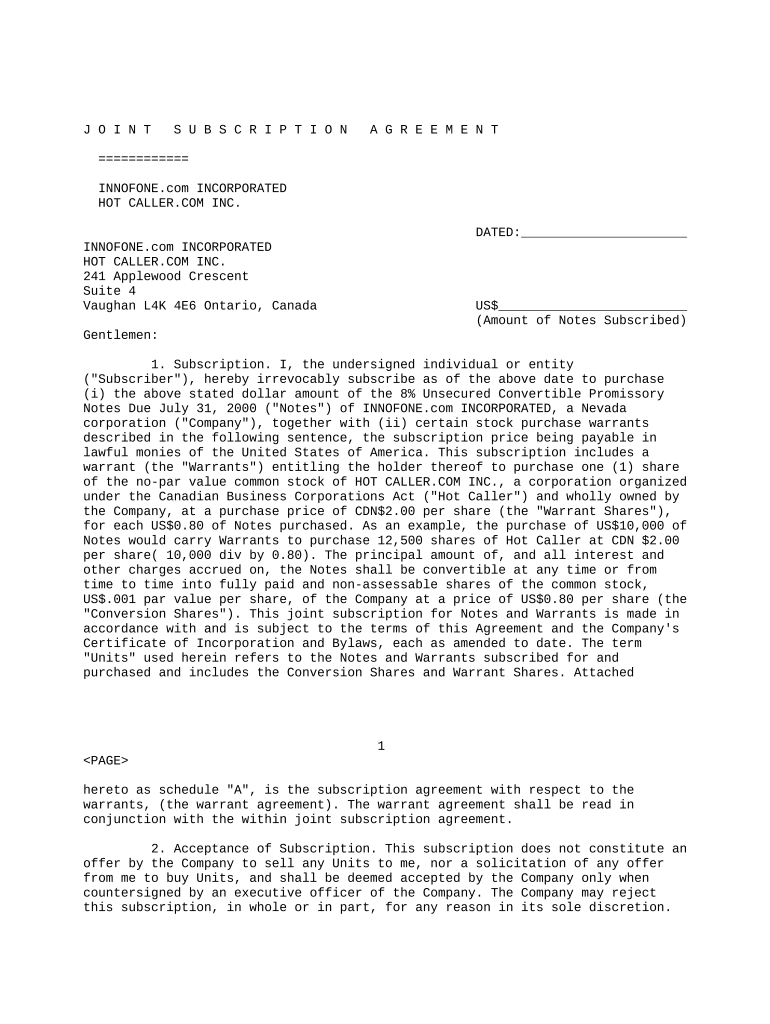
J O I N T S U B S C R I P T I O N A G R E E M E N T ============ INNOFONE.com INCORPORATED HOT CALLER.COM INC. DATED:______________________ INNOFONE.com INCORPORATED HOT CALLER.COM INC. 241 Applewood Crescent Suite 4 Vaughan L4K 4E6 Ontario, Canada US$_________________________ (Amount of Notes Subscribed) Gentlemen: 1. Subscription. I, the undersigned individual or entity ("Subscriber"), hereby irrevocably subscribe as of the above date to purchase (i) the above stated dollar amount of the 8% Unsecured Convertible Promissory Notes Due July 31, 2000 ("Notes") of INNOFONE.com INCORPORATED, a Nevada corporation ("Company"), together with (ii) certain stock purchase warrants described in the following sentence, the subscription price being payable in lawful monies of the United States of America. This subscription includes a warrant (the "Warrants") entitling the holder thereof to purchase one (1) share of the no-par value common stock of HOT CALLER.COM INC., a corporation organized under the Canadian Business Corporations Act ("Hot Caller") and wholly owned by the Company, at a purchase price of CDN$2.00 per share (the "Warrant Shares"), for each US$0.80 of Notes purchased. As an example, the purchase of US$10,000 of Notes would carry Warrants to purchase 12,500 shares of Hot Caller at CDN $2.00 per share( 10,000 div by 0.80). The principal amount of, and all interest and other charges accrued on, the Notes shall be convertible at any time or from time to time into fully paid and non-assessable shares of the common stock, US$.001 par value per share, of the Company at a price of US$0.80 per share (the "Conversion Shares"). This joint subscription for Notes and Warrants is made in accordance with and is subject to the terms of this Agreement and the Company's Certificate of Incorporation and Bylaws, each as amended to date. The term "Units" used herein refers to the Notes and Warrants subscribed for and purchased and includes the Conversion Shares and Warrant Shares. Attached 1 hereto as schedule "A", is the subscription agreement with respect to the warrants, (the warrant agreement). The warrant agreement shall be read in conjunction with the within joint subscription agreement. 2. Acceptance of Subscription. This subscription does not constitute an offer by the Company to sell any Units to me, nor a solicitation of any offer from me to buy Units, and shall be deemed accepted by the Company only when countersigned by an executive officer of the Company. The Company may reject this subscription, in whole or in part, for any reason in its sole discretion. 3. The Company's Representations, Warranties and Agreements. The Company hereby represents and warrants to Subscriber and agrees with Subscriber that: (a) The Company is duly organized under the laws of the State of Nevada, in good standing, duly authorized to carry on its current operations where and in the manner currently conducted. The Company's common shares are quoted on the OTC Bulletin Board under symbol "INNF," and are traded in the over-the-counter market. Hot Caller is a newly organized company with limited assets and no current operations that is privately held by the Company. (b) The Company will promptly issue the Notes and Warrants following acceptance of this subscription and receiving due payment, and shall promptly issue the Conversion Shares upon due conversion of the Notes and issue the Warrant Shares upon proper exercise of the Warrants. The Notes and Warrants, and Conversion Shares and Warrant Shares, when issued to Subscriber against due payment therefor or proper conversion, will be duly authorized, validly issued and fully paid and non-assessable. 4. Subscriber's Representations, Warranties and Agreements. With full knowledge that the Company and its officers, directors and controlling persons will be relying upon the following, among other things, in determining whether a sale of Units to me will be exempt from the registration requirements of the U.S. Securities Act of 1933, as amended ("Act"), I represent and warrant to the Company and agree with the Company that: (a) I have received and carefully reviewed such information provided to me in writing by the Company and Hot Caller, or information from books and records of the Company, as I have requested in making a decision to subscribe for the Units. I understand that additional information concerning the Company and Hot Caller has been made available for inspection by me and my attorney, accountant or other adviser, and that the books and records of the Company and Hot Caller will be available, upon reasonable notice, for inspection by subscribers during reasonable business hours at its above-stated place of business. I and my advisers have had a reasonable opportunity to ask questions of and receive answers from the Company, or a person or persons acting on its behalf, concerning the offering of the Units, and all such questions have been answered to my full satisfaction. No oral representations have been made or oral information furnished to me or my adviser(s) in connection with the offering of the Units which were in any way inconsistent with written information provided. I acknowledge and agree that I have been furnished with substantially the same information regarding the Company and Hot Caller and their respective current (or in the case of Hot Caller, proposed) operations, assets, financial condition and plan of operation as would be contained in a registration statement and included prospectus prepared in connection with a public offering of the Units, or that such information has been made freely available to me by the Company. (b) I understand that the Notes and Conversion Shares have not been registered under the Act but will be issued in reliance upon Regulation S of the U.S. Securities and Exchange Commission, an exemption from the registration requirements of the Act for sales of securities made solely 2 outside the United States of America, which term includes its territories and possessions ("USA") to persons who are not "U.S. Persons." I understand that the Notes and Conversion Shares may not be offered or sold by me in the USA or to any U.S. Person during the 1-year "distribution compliance period" following completion of the offering of the Notes. I agree not to engage in any hedging transactions during the distribution compliance period involving the Notes or Conversion Shares except in compliance with the Act. I understand and agree that a stop transfer order affecting the Notes shall be placed in the Company's records, and a stop transfer order affecting the Conversion Shares shall be placed with the Company's transfer agent, in each case preventing the transfer thereof except as permitted by law. (c) I have not been solicited to purchase the Units while present in the USA, and I was outside the USA at the time of executing this Agreement. The funds utilized for the purchase of the Units were not been obtained from any U.S. Person. (d) I am not a "U.S. Person", and I am purchasing the Units for my own account and not on behalf of or for the account of any U.S. Person. I, alone or together with my adviser(s), have such knowledge and experience in financial, tax and business matters as to enable me to utilize the information made available to me in order to evaluate the merits and risks of purchasing the Units and to make an informed investment decision with respect thereto. (e) I have not engaged in any act intended to precondition the U.S. market for the resale of the Notes, Conversion Shares, Warrants or Warrant Shares. I am not acting as a "distributor" of the Units or any components of the Units. However, if I should be deemed to be a distributor prior to reselling the Units to a non-U.S. Person during the restricted period, I will send a notice to each new purchaser of the Units or component parts of the Units that he is subject to the restrictions of Regulation S during the 1-year distribution compliance period. (f) I understand and agree that any and all instruments which are issued representing the Notes shall, unless and until removed upon registration under the Act or in accordance with applicable law, contain a legend substantially in the following form: "This promissory note and the common shares issuable upon conversion have not been registered under the U.S. Securities Act of 1933 ("Act") but have been offered and sold in reliance upon Regulation S under the Act. Transfer of this note or such shares is prohibited except in accordance with the provisions of Regulation S, pursuant to registration under the Act, or pursuant to an exemption from registration under the Act. Any hedging transactions involving this note or the underlying common shares may not be conducted unless in compliance with the Act." (g) I understand and agree that any and all certificates which may be issued representing Conversion Shares not already registered under the Act prior to issuance upon Note conversion shall, unless and until removed upon registration under the Act or in accordance with applicable law, contain a legend substantially in the following form: "These shares have not been registered under the U.S. Securities Act of 1933 ("Act") but have been offered and sold in reliance upon Regulation S under the Act. Transfer of these shares is prohibited except in accordance with the provisions of Regulation S, pursuant to 3 registration under the Act, or pursuant to an exemption from registration under the Act. Any hedging transactions involving these shares may not be conducted unless in compliance with the Act." (i) The Warrants and all certificates evidencing the Warrant Shares shall bear such legends or restrictions as may be required by applicable laws, rules or regulations of Canada or any province or other governmental unit thereof. Subscriber agrees to the placement of all such legends and restrictions on the Warrants and Warrant Share certificates and agrees to the placement of a stop transfer order in the transfer records of Hot Caller preventing the transfer of the Warrants and Warrant Shares except in accordance with law. (j) If Subscriber is a corporation or other entity, Subscriber has full power and authority to execute this Agreement, to make all representations, warranties and covenants set forth herein and to acquire and hold the Units, and has its principal office at the place set forth on the signature page hereof. If Subscriber is an individual, Subscriber is at least 21 years of age and resides at the place set forth on the signature page hereof. All information which Subscriber has provided to the Company is correct and complete as of the date set forth above and, if there should be any adverse change in such information prior to this subscription being accepted, Subscriber will immediately provide the Company with such information. (k) Subscriber has not been solicited by the Company or anyone on its behalf by any form of general solicitation or general advertising, including but not limited to (i) any advertisement, article, notice or other communication published in any newspaper, magazine or similar media or broadcast over television or radio, or made available over telephone lines by any information service, or (ii) any seminar or meeting whose attendees had been invited by any means of general solicitation or general advertising. 4. Miscellaneous. (a) I agree not to transfer or assign this Agreement, or any of my interest herein, and further agree that any transfer or assignment of the Units acquired pursuant hereto shall be made only in accordance with this Agreement and all applicable laws. I agree that I may not cancel, terminate or revoke this Agreement or any agreement made by me hereunder. This Agreement constitutes the entire agreement between the parties hereto and may be amended only by a writing executed by both parties. This Agreement shall be enforced, governed and construed in all respects in accordance with the laws of the State of Nevada. (b) Notwithstanding any of the representations, warranties, acknowledgements or agreements made herein by me, I do not thereby or in any other manner waive any rights granted to me under applicable securities laws. I stipulate and agree, however, that the operation of this Agreement will not result in a waiver of such rights. All representations, warranties, covenants and undertakings made by me in this Agreement shall survive the Company's acceptance of this Agreement and the issuance and delivery of the Units. (c) Wherever the pronouns he, his or him appear in this Agreement, they shall include the feminine and neuter genders as well as the masculine and apply equally to individual and entity subscribers, unless the context clearly requires otherwise. (d) Notices between the parties shall be effective only if in writing and delivered: if to the Company, to the address on the first page hereof; and if to me, to the address on the signature page hereof; or to any subsequent address provided in writing by either party. 4 (e) This Agreement shall be binding upon and inure to the benefit of the parties and their respective heirs, administrators, executors, legal representatives, successors and assigns. By executing this Agreement, I represent that I have carefully read it in its entirety. 6. Payment for Units. The purchase price of the Units shall be paid in United States dollars, by cash, personal or business check, bank or cashier's check, or money order. 7. Definitions. The terms "distributor," "distribution compliance period," "United States of America" and "U.S. Person" used in this Agreement shall have the meanings given them in Rule 902 of Regulation S under the Act. The term "affiliate" shall have the meaning given it in Rule 144(a) under the Act. 8. Registration Rights. As promptly as practicable following the purchase and payment for all of the Units, the Company shall cause a registration statement on Form SB-2 or other appropriate form to be filed with the U.S. Securities and Exchange Commission for the purpose of registering the Conversion Shares under the Act for resale to the public. The holder or holders of the Conversion Shares at the time of such registration ("Holder") shall have the right pursuant to such registration to sell the Conversion Shares at prevailing market prices in the over-the-counter market or on any exchange where the Company's Common Shares then are listed, as the case may be, or in negotiated transactions, all in accordance with the Act and other applicable law. Each Holder shall, in connection with such registration, make such representations and warranties to the Company and furnish such information as the Company shall reasonably request. No demand, request or other action by any Holder shall be necessary for inclusion of his or her Conversion Shares in the registration, and such inclusion shall be automatic. The Company shall use its best efforts to cause such registration to become effective as soon as practicable. All expenses of registering the Conversion Shares, other than selling expenses, shall be borne by the Company. The Company shall furnish to the Holders such numbers of copies of a prospectus, including a preliminary prospectus, in conformity with the requirements of the Act, and such other documents as they may reasonably request in order to facilitate the disposition of Conversion Shares owned by them. 5 Signature Page In Witness Whereof, I have executed this Subscription Agreement and initialled every preceding page hereof on the date first above written. INDIVIDUAL SUBSCRIBERS ONLY: (Not Corporations, Partnerships, Trusts or other entities) Signature X................................................................. Print Name (of all subscribers) _______________________________________________ Residence Address _____________________________________________________________ _________________________________________________ Fax No. ( ) - ---------------------------- Home Telephone No. ( ) - Work Telephone No. ( ) - ------- ------------- ------- -------- Social Security Number _______________________________________________________ (First listed person's number, if more than person is subscribing) COMPANY OR OTHER ENTITY SUBSCRIBERS ONLY: Print Name of Subscriber (Company/Entity Name) _________________________________ Auth. Person's Signature X.................................................... 6 Authorized Person's Name & Title (Print) _____________________________________ Address of Principal Office ___________________________________________________ _______________________________________________________________________________ Organized under laws of State of _______________________________________________ Telephone ( ) - Fax No. ( ) - ------- ------------------- -------- --------------------------- Federal Tax I.D. Number ________________________________________________________ Subscriber: Do Not Write Below This Line Accepted: _______ X....................................................... Signature Rejected: _______ Name:__________________________________________ DATED: ____________________________ , 19___ Title:_____________________________ 7

Useful Suggestions for Preparing Your ‘Joint Agreement Between’ Online

Are you fatigued by the inconvenience of handling documents? Look no further than airSlate SignNow, the premier eSignature solution for individuals and businesses. Bid farewell to the monotonous routine of printing and scanning papers. With airSlate SignNow, you can effortlessly complete and sign documents online. Take advantage of the robust features embedded in this user-friendly and cost-effective platform and transform your method of document management. Whether you require signing forms or collecting eSignatures, airSlate SignNow manages everything with ease, needing just a few clicks.

Follow this detailed guide:

  1. Access your account or initiate a free trial of our service.
  2. Click +Create to upload a document from your device, cloud, or our template library.
  3. Open your ‘Joint Agreement Between’ in the editor.
  4. Click Me (Fill Out Now) to set up the form on your end.
  5. Insert and designate fillable fields for others (if needed).
  6. Move forward with the Send Invite options to solicit eSignatures from others.
  7. Download, print your version, or convert it into a reusable template.

Don’t fret if you need to collaborate with others on your Joint Agreement Between or send it for notarization—our platform has everything you require to accomplish such tasks. Register with airSlate SignNow today and enhance your document management to a new height!

Here is a list of the most common customer questions. If you can’t find an answer to your question, please don’t hesitate to reach out to us.

Need help? Contact Support

The best way to complete and sign your joint agreement between form

Save time on document management with airSlate SignNow and get your joint agreement between form eSigned quickly from anywhere with our fully compliant eSignature tool.

How to Sign a PDF Online How to Sign a PDF Online

How to complete and sign forms online

Previously, working with paperwork took pretty much time and effort. But with airSlate SignNow, document management is easy and fast. Our powerful and user-friendly eSignature solution lets you effortlessly fill out and electronically sign your joint agreement between form online from any internet-connected device.

Follow the step-by-step guidelines to eSign your joint agreement between form template online:

  • 1.Register for a free trial with airSlate SignNow or log in to your account with password credentials or SSO authorization option.
  • 2.Click Upload or Create and add a file for eSigning from your device, the cloud, or our form catalogue.
  • 3.Click on the file name to open it in the editor and utilize the left-side toolbar to complete all the blank fields properly.
  • 4.Place the My Signature field where you need to approve your form. Provide your name, draw, or upload a picture of your regular signature.
  • 5.Click Save and Close to finish editing your completed form.

After your joint agreement between form template is ready, download it to your device, export it to the cloud, or invite other parties to electronically sign it. With airSlate SignNow, the eSigning process only takes several clicks. Use our powerful eSignature solution wherever you are to handle your paperwork successfully!


How to Sign a PDF Using Google Chrome How to Sign a PDF Using Google Chrome

How to complete and sign paperwork in Google Chrome

Completing and signing documents is simple with the airSlate SignNow extension for Google Chrome. Installing it to your browser is a fast and effective way to deal with your paperwork online. Sign your joint agreement between form template with a legally-binding eSignature in just a couple of clicks without switching between applications and tabs.

Follow the step-by-step guide to eSign your joint agreement between form template in Google Chrome:

  • 1.Go to the Chrome Web Store, find the airSlate SignNow extension for Chrome, and install it to your browser.
  • 2.Right-click on the link to a document you need to eSign and select Open in airSlate SignNow.
  • 3.Log in to your account using your credentials or Google/Facebook sign-in buttons. If you don’t have one, you can start a free trial.
  • 4.Utilize the Edit & Sign toolbar on the left to complete your sample, then drag and drop the My Signature field.
  • 5.Upload a picture of your handwritten signature, draw it, or simply type in your full name to eSign.
  • 6.Verify all information is correct and click Save and Close to finish editing your paperwork.

Now, you can save your joint agreement between form sample to your device or cloud storage, send the copy to other individuals, or invite them to eSign your document with an email request or a secure Signing Link. The airSlate SignNow extension for Google Chrome improves your document processes with minimum effort and time. Try airSlate SignNow today!


How to Sign a PDF in Gmail How to Sign a PDF in Gmail How to Sign a PDF in Gmail

How to complete and sign forms in Gmail

Every time you get an email containing the joint agreement between form for signing, there’s no need to print and scan a file or download and re-upload it to a different program. There’s a better solution if you use Gmail. Try the airSlate SignNow add-on to quickly eSign any documents right from your inbox.

Follow the step-by-step guide to eSign your joint agreement between form in Gmail:

  • 1.Navigate to the Google Workplace Marketplace and locate a airSlate SignNow add-on for Gmail.
  • 2.Set up the program with a corresponding button and grant the tool access to your Google account.
  • 3.Open an email with an attachment that needs signing and utilize the S sign on the right sidebar to launch the add-on.
  • 4.Log in to your airSlate SignNow account. Choose Send to Sign to forward the file to other people for approval or click Upload to open it in the editor.
  • 5.Put the My Signature option where you need to eSign: type, draw, or upload your signature.

This eSigning process saves time and only requires a couple of clicks. Use the airSlate SignNow add-on for Gmail to adjust your joint agreement between form with fillable fields, sign paperwork legally, and invite other people to eSign them al without leaving your mailbox. Improve your signature workflows now!


How to Sign a PDF on a Mobile Device How to Sign a PDF on a Mobile Device How to Sign a PDF on a Mobile Device

How to complete and sign paperwork in a mobile browser

Need to rapidly fill out and sign your joint agreement between form on a mobile phone while doing your work on the go? airSlate SignNow can help without needing to install extra software programs. Open our airSlate SignNow solution from any browser on your mobile device and create legally-binding eSignatures on the go, 24/7.

Follow the step-by-step guide to eSign your joint agreement between form in a browser:

  • 1.Open any browser on your device and go to the www.signnow.com
  • 2.Register for an account with a free trial or log in with your password credentials or SSO option.
  • 3.Click Upload or Create and import a file that needs to be completed from a cloud, your device, or our form catalogue with ready-made templates.
  • 4.Open the form and fill out the empty fields with tools from Edit & Sign menu on the left.
  • 5.Add the My Signature field to the sample, then enter your name, draw, or upload your signature.

In a few simple clicks, your joint agreement between form is completed from wherever you are. When you're finished editing, you can save the file on your device, create a reusable template for it, email it to other people, or invite them electronically sign it. Make your documents on the go quick and effective with airSlate SignNow!


How to Sign a PDF on iPhone How to Sign a PDF on iPhone

How to fill out and sign paperwork on iOS

In today’s business community, tasks must be accomplished quickly even when you’re away from your computer. With the airSlate SignNow application, you can organize your paperwork and sign your joint agreement between form with a legally-binding eSignature right on your iPhone or iPad. Set it up on your device to conclude contracts and manage forms from anywhere 24/7.

Follow the step-by-step guide to eSign your joint agreement between form on iOS devices:

  • 1.Open the App Store, find the airSlate SignNow app by airSlate, and install it on your device.
  • 2.Launch the application, tap Create to add a form, and select Myself.
  • 3.Select Signature at the bottom toolbar and simply draw your autograph with a finger or stylus to eSign the form.
  • 4.Tap Done -> Save right after signing the sample.
  • 5.Tap Save or use the Make Template option to re-use this paperwork in the future.

This process is so easy your joint agreement between form is completed and signed in a few taps. The airSlate SignNow app works in the cloud so all the forms on your mobile device remain in your account and are available whenever you need them. Use airSlate SignNow for iOS to improve your document management and eSignature workflows!


How to Sign a PDF on Android How to Sign a PDF on Android

How to complete and sign forms on Android

With airSlate SignNow, it’s simple to sign your joint agreement between form on the go. Install its mobile application for Android OS on your device and start enhancing eSignature workflows right on your smartphone or tablet.

Follow the step-by-step guidelines to eSign your joint agreement between form on Android:

  • 1.Navigate to Google Play, search for the airSlate SignNow application from airSlate, and install it on your device.
  • 2.Log in to your account or create it with a free trial, then upload a file with a ➕ button on the bottom of you screen.
  • 3.Tap on the imported document and select Open in Editor from the dropdown menu.
  • 4.Tap on Tools tab -> Signature, then draw or type your name to eSign the template. Fill out empty fields with other tools on the bottom if needed.
  • 5.Use the ✔ key, then tap on the Save option to end up with editing.

With an easy-to-use interface and total compliance with primary eSignature standards, the airSlate SignNow application is the perfect tool for signing your joint agreement between form. It even works offline and updates all record adjustments when your internet connection is restored and the tool is synced. Complete and eSign forms, send them for eSigning, and make re-usable templates anytime and from anywhere with airSlate SignNow.

Sign up and try Joint agreement between form
  • Close deals faster
  • Improve productivity
  • Delight customers
  • Increase revenue
  • Save time & money
  • Reduce payment cycles

