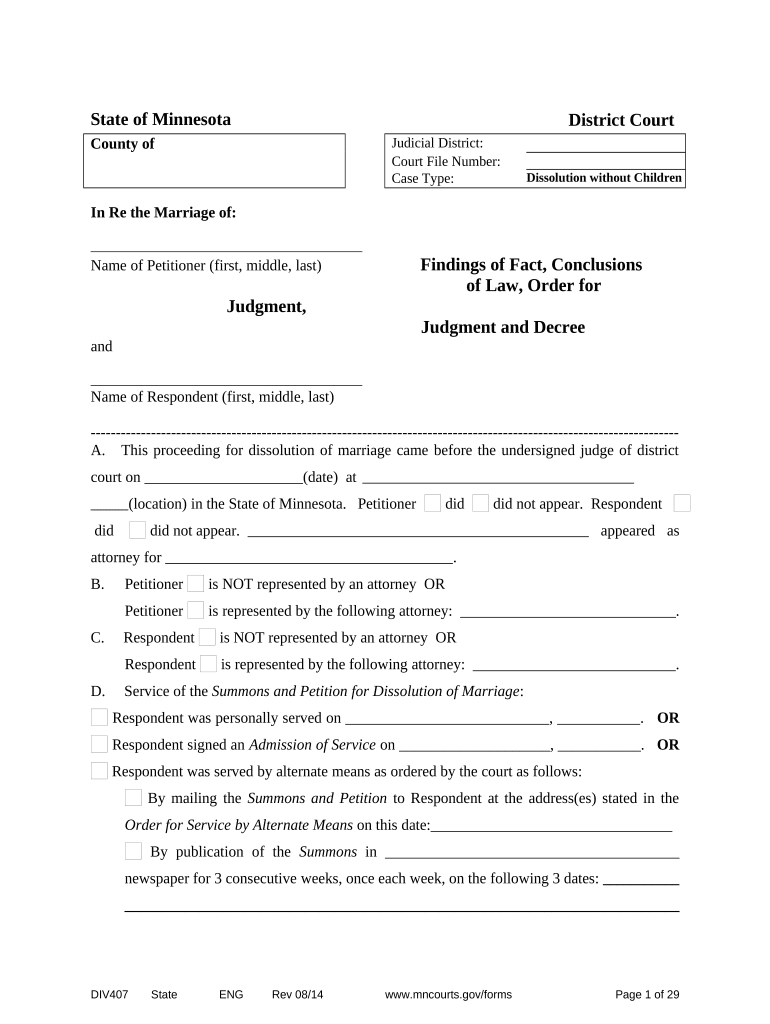
State of Minnesota
District Court
County of Judicial District:
Court File Number:
Case Type: Dissolution without Children
In Re the Marriage of:
Name of Petitioner (first, middle, last) Findings of Fact, Conclusions
of Law, Order for
Judgment,
Judgment and Decree
and
Name of Respondent (first, middle, last)
---------------------------------------------------------------------------------------------------------------------
A. This proceeding for dissolution of marriage came before the undersigned judge of district
court on _____________________(date) at
(location) in the State of Minnesota. Petitioner did did not appear. Respondent
did did not appear. appeared as
attorney for .
B. Petitioner is NOT represented by an attorney OR
Petitioner is represented by the following attorney: _____________________________ .
C. Respondent is NOT represented by an attorney OR
Respondent is represented by the following attorney: ___________________________ .
D. Service of the Summons and Petition for Dissolution of Marriage :
Respondent was personally served on ___________________________, ___________. OR
Respondent signed an Admission of Service on ____________________, ___________. OR
Respondent was served by alternate means as ordered by the court as follows:
By mailing the Summons and Petition to Respondent at the address(es) stated in the
Order for Service by Alternate Means on this date:________________________________
By publication of the Summons in _______________________________________
newspaper for 3 consecutive weeks, once each week, on the following 3 dates: ___________
__________________________________________________________________________
DIV407 State ENG Rev 08/14 www.mncourts.gov/forms Page 1 of 29
E. Petitioner was served with an Answer and Counter-Petition : YES NO
If YES, Petitioner was served with the Answer and Counter-Petition on __________________
Month Day Year
F. Respondent did not respond, so Petitioner proceeded by default.
(Note: If the parties reached an agreement, use the Stipulated Findings of Fact, Conclusions
of Law, Order for Judgment, Judgment and Decree. )
Findings of Fact
1. Information about Petitioner
Full Name:
First Middle Last
Address where you live:
Street Address Apt. No.
City County State Zip Code
Mailing address: Same as above address OR
Street Address Apt. No.
City County State Zip Code
Date of Birth: ________________________
Month Day Year
List all of Petitioner’s former or other names or write “None”:
First Middle Last
First Middle Last
Petitioner’s social security number is listed on Confidential Form 11.1 and submitted along
with the Petition.
DIV407 State ENG Rev 08/14 www.mncourts.gov/forms Page 2 of 29
2. Information about Respondent
Full Name:
First Middle Last
Address:
Street Address Apt. No.
________________________________________________________________________
City County State Zip Code
Respondent's address is unknown to Petitioner.
Respondent’s Mailing address: Same as above address OR
Street Address Apt. No.
City County State Zip Code
Respondent’s Date of Birth: ________________________
Month Day Year
List all of Respondent’s former or other names or write “None”:
First Middle Last
First Middle Last
DIV407 State ENG Rev 08/14 www.mncourts.gov/forms Page 3 of 29
3. Our Marriage
Petitioner and Respondent were married on: (month, day, year) , in the
City of _____________________, County of ______________________________, State
of __________________________, Country of .
4. 180 Day Requirement
Petitioner has been living in Minnesota for the past six (6) months. YES NO
Respondent has been living in Minnesota for the past six (6) months.
YES NO U NKNOWN
Petitioner and Respondent were married in Minnesota, but neither Petitioner nor
Respondent reside in Minnesota, nor reside in a jurisdiction that will allow an action for
dissolution because of the sex or sexual orientation of the Petitioner and Respondent.
YES NO
5. Armed Forces
5 Is Petitioner an active duty member of the armed forces? YES NO
If YES , has Petitioner been stationed in Minnesota for the past six (6) months?
YES NO
Is Respondent an active duty member of the armed forces?
YES NO UNKNOWN
If YES , has Respondent been stationed in Minnesota for the past (6) months?
YES NO
6. Marriage Cannot be Saved
There has been an irretrievable breakdown of the marriage relationship and the marriage
between Petitioner and Respondent cannot be saved.
DIV407 State ENG Rev 08/14 www.mncourts.gov/forms Page 4 of 29
7. Physical Living Situation
The Petitioner and Respondent live together at this time. YES NO
If NO , the date of separation was: .
Month Day Year
If YES , Petitioner and Respondent are living together because:
8. Other Proceedings
A separate court case for marriage dissolution, legal separation, or annulment has already
been started by Petitioner or Respondent in Minnesota or elsewhere. YES NO
If YES, the type of court case is: , and it was started in
________________________ County in the State of ____________________ and the
Court file number is , and the status or outcome of the case is:
Open Closed Unknown or
9. Protection or Harassment Order
An Order for Protection or a Harassment/Restraining Order is in effect regarding
Petitioner and Respondent? YES NO If YES: The Order protects: Petitioner
Respondent and the Order was filed in
County in State on date,
and the Court file number is .
10. Children “ Minor” children are under age 18, or under age 20 but still in high school.
a. Do Petitioner and Respondent have minor children together? YES NO
b. Do Petitioner and Respondent have any adult dependent children who are not able to
support themselves because of a physical or mental condition? YES NO
DIV407 State ENG Rev 08/14 www.mncourts.gov/forms Page 5 of 29
c. Has either Petitioner or Respondent given birth during the marriage to a child who is
not a child of the other spouse? YES NO
If you answered NO to c, skip to d. If YES, continue below:
i. Fill in the information for all children during the marriage who are not biological
children of both spouses.
Full Name of Child Date of Birth Age Which Party is Birth Parent?
ii. Is there a Court Order naming someone other than the spouse as the father of the
child(ren) listed at i? YES NO If YES, fill in:
Full Name of Child Date of Court Order County/State of Order Court Case No.
iii. Have the spouse and biological Father signed a Minnesota Recognition of Parentage
(ROP) for any of the children listed in (i) above? YES NO
If YES , state the full name of the child:
and submit a certified copy of the Recognition of Parentage, if not submitted
with the Petition.
iv. Has a “ Husband’s Non-Paternity Statement ” for any of the children listed at (i) above
been signed? YES NO
If YES , state the name of the child:
and submit a certified copy of the “Husband’s Non-Paternity Statement,” if
not submitted with the Petition.
( For each minor child listed at c.(i.) there should be a paternity court order OR the
Recognition of Parentage and Non-Paternity Statement to use this Dissolution Without
Children form.)
d. Neither spouse is pregnant. YES NO (If either spouse is pregnant use
Marriage Dissolution With Children form.)
11. Public Assistance/Medical Assistance
DIV407 State ENG Rev 08/14 www.mncourts.gov/forms Page 6 of 29
Note: If either party is receiving public assistance from the State of Minnesota or applies for it
after this proceeding is started, the Petitioner should give notice of this marriage dissolution
action to the Support and Collections office for the county paying the assistance.
a. Petitioner receives public assistance from the State of Minnesota: YES NO
If YES, the assistance is from _______________________County. (Check all that apply):
MFIP Tribal TANF General Assistance Child Care Assistance
Minnesota Care Medical Assistance
b. Respondent receives public assistance from the State of Minnesota:
YES NO UNKNOWN
If YES, the assistance is from _______________________County. (Check all that apply):
MFIP Tribal TANF General Assistance Child Care Assistance
Minnesota Care Medical Assistance
12. Supplemental Security Income (SSI)
Supplemental Security Income (SSI) is a Federal income supplement program. It is available to
low-income
people if they are over age 65, or blind, or disabled.
a. Petitioner receives Supplemental Security Income: NO YES in the amount of
$____________ per month.
b. Respondent receives Supplemental Security Income: NO YES in the amount of
$____________ per month, or UNKNOWN
13. Petitioner’s Employment
a. Petitioner is employed. YES NO
b. Petitioner is Self-Employed. YES NO
c. Name and address of Petitioner’s employer. (If Petitioner has more than one job, list
the Name and Address of each employer.)
________________________________________________________________________
Name of Petitioner’s Employer (If Self-Employed, list name and business address)
DIV407 State ENG Rev 08/14 www.mncourts.gov/forms Page 7 of 29
________________________________________________________________________
Employer’s Street Address
________________________________________________________________________
City State Zip Code
Name of Petitioner’s Employer (If Self-Employed, list name and business address)
_______________________________________________________________________
Employer’s Street Address
_____________________________________________________________________
City State Zip Code
14. Petitioner’s Gross Income
The Income questions ask for monthly income. If you are paid weekly, multiply your weekly
income by 4.33 to get monthly income. If you are paid every two weeks, multiply by 2.17 to get
monthly income. If you are paid twice a month, multiply by 2.
Source of Income Amount per month (or zero) before taxes and deductions
Self Employment Income $________________ per month
Calculate net monthly self employment revenues as follows: (Annual gross revenues minus annual
ordinary and necessary business expenses) divided by 12=Net Monthly
Revenue.
Income from all jobs $________________per month
Commissions from all jobs $________________per month
Unemployment benefits $________________per month
Social Security Retirement, Survivors or
Disability Income $_______________ per month
Investments or Rental Income $________________per month
Annuity payments $________________per month
Pension or Disability from work or military $________________per month
Worker’s Compensation $________________per month
Court-ordered spousal maintenance you receive $________________ per month
Other ____________________ $________________per month
Identify Source
Total gross income $ _______________ per month
DIV407 State ENG Rev 08/14 www.mncourts.gov/forms Page 8 of 29
Petitioner receive child support payments. YES NO If YES, Petitioner
receives child support payments from ____________________________(name(s) of
payor(s)) in the total amount of $_________________per month.
15. Respondent’s Employment
a. Respondent is employed. YES NO UNKNOWN
b. Respondent is Self-Employed. YES NO UNKNOWN
Name and address of Respondent’s employer. (If Respondent has more than one job, list
the Name and Address of each employer.)
________________________________________________________________________
Name of Respondent’s Employer (If Self-Employed list name and business address)
________________________________________________________________________
Employer’s Street Address
________________________________________________________________________
City State Zip Code
________________________________________________________________________
Name of Respondent’s Employer (If Self-Employed list name and business address)
________________________________________________________________________
Employer’s Street Address
City State Zip
Code
16. Respondent’s Gross Income
Petitioner has no information about Respondent’s income. OR
Petitioner does not have detailed information about Respondent’s
income, but has good reason to believe that Respondent’s pay is
$____________per week month year, with bonuses, overtime
or commissions in the additional amount of $__________________per
week month year. This is Respondent’s Net Income (after
DIV407 State ENG Rev 08/14 www.mncourts.gov/forms Page 9 of 29
taxes and deductions) or Gross Income (before taxes and
deductions.) OR
Petitioner has detailed information about Respondent’s income. (If
this is true, fll out the income information below.)
The Income questions ask for monthly income. If Respondent is paid weekly, multiply weekly
income by 4.33 to get monthly income. If Respondent is paid every two weeks, multiply by 2.17 to
get monthly income. If paid twice a month, multiply by 2.
Source of Income Amount per month (or zero) before taxes and deductions
Self Employment Income $________________per month
Calculate net monthly self employment revenues as follows: (Annual gross revenues
minus annual ordinary and necessary business expenses) divided by 12=Net Monthly
Revenue.
Income from all jobs $________________per month
Commissions from all jobs $________________per month
Unemployment benefits $________________per month
Social Security (SSDI or RSDI) $________________per month
Investments or Rental Income $________________per month
Annuity payments $________________per month
Pension or Disability from work or military $________________per month
Worker’s Compensation $________________per month
Court-ordered spousal maintenance you receive $________________ per month
Other ____________________ $________________per month
Identify Source
Total gross income $ _______________ per month
Does Respondent receive child support payments? YES NO If YES,
Respondent receives child support payments from
____________________________(name(s) of payor(s)) in the total amount of
$_________________per month.
17. Health Care Coverage
DIV407 State ENG Rev 08/14 www.mncourts.gov/forms Page 10 of 29
a. Petitioner has insurance coverage through his/her employment.
Medical: YES NO Dental: YES NO
If YES, this medical insurance covers: Petitioner Respondent and this dental
insurance covers: Petitioner Respondent
b. Respondent has insurance coverage through his/her employment.
Medical: YES NO UNKNOWN
Dental: YES NO UNKNOWN
If YES, this medical insurance covers: Petitioner Respondent
and this dental insurance covers: Petitioner Respondent
c. Petitioner receives Medical Assistance or Minnesota Care through the State of
Minnesota. YES NO
d. Respondent receives Medical Assistance or Minnesota Care through the State of
Minnesota. YES NO UNKNOWN
18. Spousal Maintenance
Spousal Maintenance is money paid by one spouse to the other for living expenses.
Check only one box:
Petitioner and Respondent can each pay their own living expenses and do not need
spousal maintenance at this time, or in the future.
Petitioner or Respondent may need spousal maintenance in the future. The court
should reserve maintenance to allow either party to ask for spousal maintenance in the
future because: (explain why you want to do this)
DIV407 State ENG Rev 08/14 www.mncourts.gov/forms Page 11 of 29
Petitioner needs spousal maintenance from Respondent now. Petitioner is _______
years of age. Petitioner and Respondent have been married for _________ years.
Petitioner has the following education: ________________________________________.
Petitioner’s gross monthly income totals $__________________. Petitioner’s monthly
expenses total $______________ and Petitioner is not able to maintain the standard of
living established during the marriage because:
. Respondent has the ability to pay Petitioner $_____________per month
for spousal maintenance.
Respondent needs spousal maintenance from Petitioner now. Respondent is
__________ years of age. Petitioner and Respondent have been married for _________
years. Respondent has the following education:_________________________________.
Respondent’s gross monthly income totals $______________. Respondent’s monthly
expenses total $________________, and Respondent is not able to maintain the standard
of living established during the marriage because: _______________________________
Petitioner has the ability to pay Respondent $_____________per
month for spousal maintenance.
19. Vehicles
Vehicles are cars, trucks, boats, motorcycles, snowmobiles, personal watercraft, all terrain
vehicles etc. owned by Petitioner and Respondent together or separately, including vehicles
purchased after separation:
Petitioner owns a vehicle. YES NO
Respondent own a vehicle. YES NO UNKNOWN
List all vehicles owned by Petitioner and Respondent together or separately:
Type of
Vehicle (car,
boat, truck etc.) Year/Make/
Model Name(s) on
Title Value Balance Owed Monthly
Payment
$ $ $
$ $ $
DIV407 State ENG Rev 08/14 www.mncourts.gov/forms Page 12 of 29
$ $ $
$ $ $
20. Marital Property
Marital property means almost anything that you or your spouse now own that was
received or bought during the marriage, even during the times you were separated.
Marital Property includes household goods, furniture, jewelry, boats, real estate and other
things. Marital property does not include a gift or inheritance received by one spouse
alone .
The marital property been divided between Petitioner and Respondent already, to
Petitioner’s satisfaction. YES NO
If NO , Petitioner requests the following marital property:
21. Non-Marital Property
Non-marital property means: (1) anything that you or your spouse owned before the
marriage; (2) anything that you or your spouse received as a gift, bequest, devise, or
inheritance, to you or your spouse alone ; (3) anything that you or your spouse got in trade
or in exchange for your non-marital property; (4) anything that is an increase in the value
of non-marital property; (5) anything you or your spouse received after the valuation date
set by the court; or (6) anything defined as non-marital property by a valid antenuptial
contract.
a. Petitioner has non-marital property. YES NO
If YES, list Petitioner’s non-marital property:
b. Respondent has non-marital property. YES NO UNKNOWN
If YES, list Respondent’s non-marital property:
DIV407 State ENG Rev 08/14 www.mncourts.gov/forms Page 13 of 29
22. Cash & Accounts – Not including Pension and Employer-Funded Retirement
Accounts
Petitioner has money in banks, savings, cash or investments. YES NO
Respondent has money in banks, savings, cash or investments. YES NO
UNKNOWN
If YES,
a. List all accounts owned by you alone, your spouse alone, or owned by both of you
jointly including those opened after separation. “Type of account” means checking,
savings, money market accounts, certificates of deposit, stocks, bonds, stock options,
mutual funds, savings bonds, and Treasury Bills, etc. Use Confidential Information Form
11.1 (CON111) to list Financial Institution name, account holder name(s), and account
numbers.
Do not include Pension or Employer-Funded Retirement Accounts, which are listed at
#26.
Financial
Institution Type of Account Amount Belongs to:
(name on account)
$
$
$
$
$
$
b . List cash not listed at a.:
Petitioner has cash in the amount of $ .
Respondent has cash in the amount of $ OR UNKNOWN
23. B usiness Interest
DIV407 State ENG Rev 08/14 www.mncourts.gov/forms Page 14 of 29
Petitioner has an interest in a business. YES NO
Respondent had an interest in a business. YES NO UNKNOWN
If YES, the name of the business is ____________________________, the address is
________________________________________________________________________
_______and the value is $________________. I arrived at this value as follows:
24. Manufactured Home
Petitioner owns a manufactured home. YES NO
Respondent owns a manufactured home. YES NO UNKNOWN
If either Petitioner or Respondent own a manufactured home, together or
separately, complete the following information:
a. Address of the manufactured home:
in the city of , state of
b. What type of home is it? (single, double-wide etc.)
c. Whose name(s) is on the title?
d. When was the home purchased?
e. What was the purchase price? $
f. What is the current values of the home? $
g. How did you arrive at that amount as the current value?
h. How much money is still owed on the home? $
DIV407 State ENG Rev 08/14 www.mncourts.gov/forms Page 15 of 29
i. If money is owed on the home, who is the money owed to?
j. Do you own the land the home sits on, or do you rent a lot? Rent Own
Note: If you own the lot, you must list the land at Paragraph 25.
25. Real Property - Land, Buildings, Contracts for Deed
All real property now owned by Petitioner or Respondent together or separately must be listed.
Include real property acquired before the marriage, during the marriage, and after separation.
a. Petitioner and Respondent jointly own real property. YES NO
b. Petitioner owns real property solely in his/her own name or with someone other than
Respondent. YES NO
c. Respondent owns real property solely in his/her own name or with someone other
than Petitioner. YES NO UNKNOWN
d. How many properties are owned by you and your spouse in total? None One
Two Three _______
If you or your spouse own real property, separately or together, complete the
following information about the property. If there is more than one piece of real
property, photocopy and complete a Real Property Information page for each piece of
property. Staple the additional sheets to the Stipulated Findings of Fact and label each
sheet "Attachment to Stipulated Findings of Fact of ____________________(your
names)"
Real Property Information
1. Real Estate belongs to: (List full names of all owners
DIV407 State ENG Rev 08/14 www.mncourts.gov/forms Page 16 of 29
2. Legal Description is: (The full legal description must be included. Copy the legal
description from the deed. Do not use the property tax statement legal description. If the
legal description is long, you may use an attachment. Type or print neatly.)
___________________________________________________________________________
___________________________________________________________________________
___________________________________________________________________________
___________________________________________________________________________
3. Street Address of the real property is:
City______________________________________State______________Zip
The property is in_____________________________________County.
4. Purchase date_________________(month , day, year) and purchase price:$
5. Mortgages or loans: (List all mortgages and loans on the property)
There are no mortgages or loans on this property.
1 st
Mortgage: Amount currently owed $ and name of lender
2 nd
Mortgage: Amount currently owed $ and name of lender
Other mortgages or loans :
6. Current Market Value of this property: $
How did you arrive at this value?
7. This property is the homestead: _______Yes _________No
26. Retirement Plans
a. Petitioner has a retirement account. (IRA, 401(k), 403(b) or other)
YES NO If YES: The name of the Financial Institution, account holder
name(s), and account number is listed on Confidential Information Form 11.1 (CON111).
DIV407 State ENG Rev 08/14 www.mncourts.gov/forms Page 17 of 29
The current balance is: $
b. Petitioner , or Petitioner’s past or present employer, union, or other group, paid
money into a pension, profit sharing, or other retirement plan for Petitioner.
YES NO If YES:
i. The name of the plan is:______________________________________________
ii. The employer, union or group providing the plan is:
iii. The date Petitioner began working at the job or joined the union or group plan
is:
iv. The type of plan is: (e.g. defined benefit, defined contribution)
v. The present value of the pension or plan is:
c. Respondent has a retirement account. (IRA, 401(k), 403(b) or other)
YES NO UNKNOWN If YES: The name of the Financial Institution,
account holder name(s), and account number is listed on Confidential Information Form
11.1 (CON111). The current balance is: $
d. Respondent , or Respondent’s past or present employer, union, or other group, paid
money into a pension, profit sharing, or other retirement plan for Respondent.
YES NO UNKNOWN If YES , and it is a Pension, Profit-Sharing, or other
Retirement Plan:
DIV407 State ENG Rev 08/14 www.mncourts.gov/forms Page 18 of 29
i. The name of the plan is:
ii. The employer, union or group providing the plan is:
iii. The date Respondent began working at the job or joined the union or group plan is:
iv. The type of plan is: ( e.g. defined benefit, defined contribution)
v. The present value of the pension or plan is:
27. Debts
Petitioner has debts. YES NO
Respondent has debts. YES NO UNKNOWN
If YES, list debts in your name, your spouse’s name and in both names jointly. Include
unpaid debts from before the marriage date, during the marriage, and after separation.
Fill in all information completely and attach another sheet of paper if necessary.
Money is owed
to: Money was used
for: Whose Name is on the
Account and When was
the Debt Incurred?
Name Date Balance
Owed Monthly
Payment
$ $
$ $
$ $
$ $
$ $
$ $
$ $
$ $
DIV407 State ENG Rev 08/14 www.mncourts.gov/forms Page 19 of 29
$ $
$ $
$ $
Total Debt $ $
28. Name Change
a. Neither person wants to change his/her name.
b. Petitioner Respondent want to change his/her name to: ( full name, not
initials)
first middle last
This name change request is made with no intent to defraud or mislead anyone:
True False.
The person requesting the name change has been convicted of a felony:
YES NO If YES:
i. Notice of this request for name change has been given to the proper authority as
required by Minn.Stat.§259.13. (IMPORTANT NOTICE: If you are a convicted
felon and you request a name change without following the requirements of Minn.
Stat § 259.13, using the new last name after your divorce is a gross misdemeanor.)
ii. An Affidavit of Service of the Notice marked Exhibit “A” has been submitted
along with this Findings of Fact, Conclusions of Law, Order for Judgment, Judgment
and Decree.
29. Other Findings
DIV407 State ENG Rev 08/14 www.mncourts.gov/forms Page 20 of 29
BASED UPON THE ABOVE INFORMATION, the Court makes the following:
CONCLUSIONS OF LAW
1. The bonds of matrimony between Petitioner and Respondent are dissolved, so they are
single and not married.
2. Health Care Coverage for the Parties
a. Each party to provide for his or her own medical dental insurance.
b. ____________________________(full name) shall provide medical
dental insurance for ______________________________________________
(full name)
c. Allowing____________________________(full name), at his/her own expense,
to continue the dependent coverage available under the other party’s insurance
plan, pursuant to federal and state statutes.
d. Reserving the issue of medical and dental insurance for the parties.
3. Spousal Maintenance
a. Neither party is awarded spousal maintenance.
b. Maintenance is reserved because:
Either party can ask the court to order the payment of spousal maintenance in the future
by filing a Motion stating a change in circumstances.
DIV407 State ENG Rev 08/14 www.mncourts.gov/forms Page 21 of 29
c. Petitioner Respondent shall pay permanent spousal maintenance to the
other party in the amount of $ per month starting on (date):
.
Any past due amounts are still owed.
d. Petitioner Respondent shall pay temporary spousal maintenance to the
other party in the amount of $ per month starting on (date):
and ending: . Any
past due amounts are still owed.
The monthly amount of permanent or temporary spousal maintenance shall be:
subject to income withholding from the payor’s income, regardless of source, by his
or her employer, trustee, or other payor of funds and mailed to: Minnesota Child Support
Payment Center, P.O. Box 64326, St. Paul, MN 55164-0326. If the person paying
spousal support is self-employed, send payments to Minnesota Child Support Payment
Center, P.O. Box 64306, St. Paul, MN 55164-0306. To start income withholding,
Petitioner or Respondent must apply for income withholding at the Child Support
Office in their county. Until income withholding starts, the person owing maintenance
shall pay the amount directly to the spouse receiving it.
OR
Maintenance shall be paid directly by the spouse owing the maintenance to the
spouse receiving it, payable on the ____________________day of each month.
4. Vehicles
Awarding the vehicles as follows and ordering the party receiving the vehicles to pay for any loans or
insurance for such vehicle:
Year / Make / Model Awarded to:
DIV407 State ENG Rev 08/14 www.mncourts.gov/forms Page 22 of 29
5. Marital Property
The parties’ marital property, household goods, furniture and furnishings are awarded:
a. As currently divided OR
b. As follows (add pages if necessary):
To Petitioner:
To Respondent:
6. Non-Marital Property
The parties’ non-marital property is awarded:
a. As currently divided OR
b. As follows (add pages if necessary):
To Petitioner:
To Respondent:
7. Cash and Accounts
a. Awarding the savings and investments as follows:
Institution Type of Account Amount Awarded to
$
$
$
$
$
$
DIV407 State ENG Rev 08/14 www.mncourts.gov/forms Page 23 of 29
b. Awarding any cash not included in a. above to the party who currently has the cash
OR
Awarding the cash as follows:
8. Business
None OR
Awarding the parties’ business as follows:
9 . Manufactured Home
None OR
Awarding the manufactured home located at :
street address
city state
to Petitioner Respondent. The debt on the manufactured home owed to:
____ shall be paid by Petitioner
Respondent.
10. Real Property
None OR
Awarding solely to Petitioner Respondent all right, title, and interest of the
parties in the real property located at:
Street address____________________________________________________________
in the City of , County of ___________________,
State of , which has the following legal description:
with the following mortgages and loans to be paid, after the divorce is final, by
Petitioner Respondent:
DIV407 State ENG Rev 08/14 www.mncourts.gov/forms Page 24 of 29
1 st
Mortgage: Amount currently owed: $ and name of lender:
2 nd
Mortgage: Amount currently owed: $ and name of lender:
and subject to the following liens or other agreements:
A lien in favor of Petitioner Respondent in the amount of $
Other request regarding the property: (describe the request fully)
11. Additional Real Property
None OR
Awarding solely to Petitioner Respondent all right, title, and interest of the
parties in the real property located at:
Street address____________________________________________________________
in the City of , County of
___________________, State of , which has the
following legal description:
with the following mortgages and loans to be paid, after the divorce is final, by
Petitioner Respondent:
1 st
Mortgage: Amount currently owed: $ and name of lender:
2 nd
Mortgage: Amount currently owed: $ and name of lender:
DIV407 State ENG Rev 08/14 www.mncourts.gov/forms Page 25 of 29
and subject to the following liens or other agreements:
A lien in favor of Petitioner Respondent in the amount of $
Other request regarding the property: (describe the request fully)
12. Retirement Funds
a. Awarding Petitioner’s pension, profit sharing, retirement plan, I.R.A., or 401(k) or
other retirement fund as follows:
Petitioner has no retirement funds OR
100% to Petitioner OR
Dividing Petitioner’s retirement benefits fairly and equitably between the parties as
follows:
b. Awarding Respondent’s pension, profit sharing, retirement plan, I.R.A., or 401(k) or
other retirement fund as follows:
Respondent has no retirement funds OR
100% to Respondent OR
Dividing Respondent’s retirement benefits fairly and equitably between the parties as
follows:
13. Debts
a. Dividing the debts as follows and ordering each party to hold the other harmless
from any responsibility for the debts so divided. Include all debts listed at #27
above.
DIV407 State ENG Rev 08/14 www.mncourts.gov/forms Page 26 of 29
Debt Owed To: To Be Paid By:
b. Ordering that each party is solely responsible for paying any other debts incurred
solely by him or her and ordering each party to hold the other harmless from any
responsibility for such separately incurred debts.
14. Name Change
Neither party is requesting a name change.
OR
Changing Petitioner’s name to:
First Middle Last
Changing Respondent’s name to:
First Middle Last
15. Other :
16. Other :
DIV407 State ENG Rev 08/14 www.mncourts.gov/forms Page 27 of 29
17. Each party shall execute any and all documents necessary to transfer real and personal
property as awarded herein without further order of the Court. Should either party fail to
execute the necessary documents, a certified copy of the Judgment and Decree shall
operate to transfer title as awarded.
18. Petitioner shall personally serve Respondent with a copy of the Judgment and Decree by
having a third party (the server), age 18 or older, hand a copy of the Judgment and
Decree to Respondent. The server’s Affidavit of Service , filed with the Court by
Petitioner, will be proof of service.
NOTICE: APPENDIX A SHALL BE INCORPORATED AND MADE A PART OF
THE JUDGMENT AND DECREE. Appendix A contains provisions regarding Payments
to Public Agency, Minnesota Statutes § 518A.50; Depriving Another of Custodial or Parental
Rights--A Felony, Minnesota Statutes § 609.26; Rules of Support, Maintenance, Parenting
Time; Parental Rights from Minnesota Statutes § 518.17, subdivision 3; Wage and Income
Deduction of Support and Maintenance, Minnesota Statutes § 518A.53; Change of Address
or Residence; Cost of Living Increase of Support and Maintenance pursuant to Minnesota
Statutes § 518A.75; Judgments for Unpaid Support pursuant to Minnesota Statutes §
548.091; Judgments for Unpaid Maintenance pursuant to Minnesota Statutes §548.091;
Medical Insurance and Expenses pursuant to Minnesota Statutes § 518A.41; and Minnesota
Statutes § 259.115 regarding criminal penalties for failure to comply with felon name change
law.
ORDER FOR JUDGMENT
LET JUDGMENT BE ENTERED IMMEDIATELY.
The foregoing facts were found BY THE COURT
by me after due hearing and the
Order thereon is recommended.
District Court Referee Judge of District Court
Dated:_____________________ Dated:______________________________
DIV407 State ENG Rev 08/14 www.mncourts.gov/forms Page 28 of 29
JUDGMENT
I certify the above Conclusions of Law are the Judgment of the Court and Judgment is hereby
entered.
___________________________________________
Court Administrator
Deputy
Dated:
DIV407 State ENG Rev 08/14 www.mncourts.go