Establishing secure connection…Loading editor…Preparing document…

Notice to Owner

This template is fully customizable. Edit the text, fill out the fields, and send it for signature. Give it a try!
Notice to Owner

What a Notice to Owner Is and when it's used

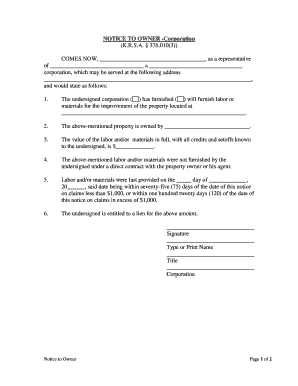
Notice to Owner is a written preliminary notice used in construction and contracting to alert property owners, general contractors, lenders, and other stakeholders that a contractor, subcontractor, or supplier provided labor or materials and may assert a mechanic's lien if unpaid. The notice documents claimant identity, the property, contract dates, and amounts claimed. States impose differing formalities and deadlines; serving a correct, timely notice is often required to preserve lien rights and to preserve remedies under contract or statute.

Why serving a Notice to Owner matters

A properly served Notice to Owner creates a record of the claim, preserves the right to file a mechanic's lien, and increases leverage for payment or negotiation while statutory deadlines remain open.

Why serving a Notice to Owner matters

Which parties commonly prepare or receive a Notice to Owner

Contractors, subcontractors, suppliers, and vendors use a Notice to Owner to protect payment rights and notify project stakeholders before lien enforcement.

  • General contractors: file notices for unpaid subcontracts or supplier claims to protect project payment chains and project cash flow.
  • Subcontractors and suppliers: establish lien rights when they lack direct contract privity with the property owner or lender.
  • Lenders and developers: receive notices to track potential encumbrances before disbursing funds or finalizing title matters.

Step-by-step: Prepare and serve a Notice to Owner

Follow this sequence to draft, serve, and document a Notice to Owner that preserves lien rights while complying with state requirements.

  • 01
    Verify Eligibility: Confirm claimant status, contract dates, and unpaid amounts before drafting the notice.
  • 02
    Complete Notice: Include claimant, property description, dates, scope of work, and amount due.
  • 03
    Serve Properly: Use the state-required delivery method and retain proof of service.
  • 04
    Document & File: Keep copies, record the service date, and prepare for possible lien filing.

Configure an online Notice to Owner workflow

Set up templates, required fields, and delivery options to reflect state rules and internal approval steps before sending notices electronically.

Workflow field name and purpose Configuration and default values for template fields
Document template and default fields Pre-fill state-specific notice fields and require signatures and dates
Signer roles and approval order Claimant signs; optional supervisor approval; notary step when required by state
Delivery methods and proof options Certified mail, personal service, RON, or email with delivery receipt
Document retention and export settings Auto-archive as PDF/A with attached audit trail and export capability

Where to send or file a Notice to Owner

Determine recipients and recording requirements: owners, general contractors, lenders, and sometimes county recorders are typical recipients for Notices to Owner.

  • Primary Recipients: Property owner, general contractor, and construction lender commonly receive the notice.
  • County Recording: Some jurisdictions permit or require recording the notice or subsequent lien with the county recorder.
  • Lender Notification: Send copies to the lender per contract to protect lien priority and payment oversight.
  • Service Proof: Retain certified mail receipts, delivery affidavits, or RON session logs as evidence.

Digital signing, notarization, and evidence requirements

Use digital tools that meet statute authentication and evidence requirements, provide reliable audit trails, and support remote online notarization where state law permits.

  • Authentication: Email plus SMS code or stronger authentication
  • Audit Trail: Timestamp, IP address, and action log
  • File Formats: PDF/A recommended for long-term retention

Critical timing notes and statutory windows

Notice windows and filing deadlines vary widely by state; confirm the applicable statute and serve as early as practical to preserve rights.

Initial Service Window:

Serve promptly upon starting work; check state statute for fixed windows.

Time to Record Lien:

If unpaid, record a mechanic's lien within the state's statutory filing period after last work.

Response Period:

Owners or contractors may have state-defined response windows; preserve related documentation.

Notary/RON Scheduling:

Allow time for notarization or RON sessions where required before filing.

Document Retention Timing:

Retain proof of service and copies according to retention rules applicable to the claim.

Key milestones from notice preparation to lien filing

Track service, statutory waiting periods, and filing deadlines in sequence so each milestone is completed on time to preserve remedies.

01

Draft and Verify

Assemble claimant details, contract dates, amount, and property description.

02

Serve Notice

Deliver by the required method and retain proof of delivery.

03

Wait Statutory Period

Allow any state-prescribed response window to expire or resolve disputes.

04

File Mechanic's Lien

If unresolved, prepare and record a lien within the statutory filing deadline.

Common mistakes when preparing a Notice to Owner

  • Incomplete property description often causes recording office rejection or an ineffective notice; include street address, parcel number, and unit identifiers when applicable.
  • Using an incorrect recipient name (contractor versus recorded owner) can invalidate service; verify the owner in public records before mailing.
  • Missing or late service is a frequent reason for lost lien rights; track dates, deadlines, and delivery confirmations carefully.
  • Vague or unstated amounts owed complicate enforcement and settlement; include itemized amounts or clearly mark estimates to be updated later.

Consequences of incorrect or untimely notices

Forfeited Lien Rights: Late or defective notice may bar mechanic's lien
Payment Delay: Enforcement and collection delayed
Record Rejection: County recorder can reject insufficient descriptions
Contract Penalties: May breach contractual notice clauses
Legal Costs: Increased attorney and litigation expenses
Bond Claim Complications: Bond recovery and priority may be harder

Core elements every professional Notice to Owner should include

A robust notice contains clear claimant identification, an unambiguous property description, scope and dates of work, a stated amount, and verifiable proof of service.

Claimant ID

Provide the claimant's full legal name, business name, license number if applicable, taxpayer ID, and contact details so the party is unmistakably identified for later enforcement.
Property Details

Include street address, parcel or assessor number, and legal description or unit number when available so recorders and title searches can match the notice to the property.

Scope of Work

Summarize services performed or materials supplied and reference contracts or change orders to clarify the factual basis of the claim and link to invoicing.

Dates

List the contract start date and last date of work using MM/DD/YYYY format; these dates determine statutory timelines and eligibility for lien filing.

Amount

State the unpaid balance or an itemized list of charges. If amount is estimated, clearly label it and update when exact figures are available.

Service Evidence

Attach or retain certified mail receipts, signed delivery affidavits, or digital audit logs and notarization records as proof of timely and proper service.

Security and compliance considerations for electronic notices

Encryption: TLS 1.2/1.3 in transit; AES-256 at rest
Authentication: Email, SMS code, or stronger multi-factor authentication
Audit Trail: Complete timestamped event log stored
HIPAA BAA: BAA available for healthcare workflows when PHI is involved
Retention Export: Exportable PDF/A with attached audit certificate
Certifications: SOC 2 Type II; ISO 27001; PCI DSS listed

Practical tips to reduce risk and accelerate payment

Adopt consistent procedures, verify public records, and document every step to reduce errors and protect rights.

Verify owner identity against public records
Search county assessor and recorder records before serving the notice; using the recorded owner name prevents misdirected service and strengthens enforceability in lien or title disputes.
Preserve delivery receipts and digital logs
Keep certified mail return receipts, signed delivery affidavits, RON session recordings, and platform audit trails together to document compliance with statutory notice and service requirements.
Use standard templates with state modules
Maintain approved templates per jurisdiction to ensure required statutory language, mandatory disclosures, and deadlines are included; update templates promptly when laws change.
Coordinate with lender and general contractor early
Notify lenders and general contractors according to contract terms to clarify payment responsibility, reduce surprises, and potentially avoid formal lien filings through negotiated resolution.

Real-world scenarios showing Notice to Owner use

Two short examples illustrate how notices preserve rights and support recovery before formal lien filings.

Subcontractor — Commercial Project

A subcontractor completed electrical work on a commercial redevelopment and was unpaid for months.

  • Filed a timely Notice to Owner and served the lender.
  • The notice preserved the subcontractor's ability to record a mechanic's lien, led to expedited payment negotiations, and avoided a full bond claim; certified mail receipts and invoices proved the claim.

Supplier — Residential Remodel

A materials supplier delivered fixtures to a residential remodel but had no contract with the owner.

  • Served a Notice to Owner to preserve rights.
  • When payment was delayed, the notice supported a lien and strengthened recovery through settlement; accurate delivery dates, invoices, and claimant identity were decisive.

eSignature vendor comparison for Notice to Owner workflows

Compare starting price and basic feature availability for common eSignature vendors when selecting a tool to prepare, serve, and store Notices to Owner.

signNow DocuSign Adobe Sign PandaDoc HelloSign
Starting Price $8/user/mo $15/user/mo $14/user/mo $19/user/mo $15/user/mo
Free Trial 7-day free trial Varies by plan Varies by plan Varies by plan Varies by plan
Bulk Send Yes Yes Yes Yes No
Audit Trail Yes Yes Yes Yes Yes
HIPAA Compliant Yes Yes Yes No No

Frequently asked questions about Notices to Owner

Common questions cover timing, service methods, electronic notarization, error correction, and retention of notices and proofs.


Need help? Contact support

be ready to get more
Join over 28 million airSlate SignNow users