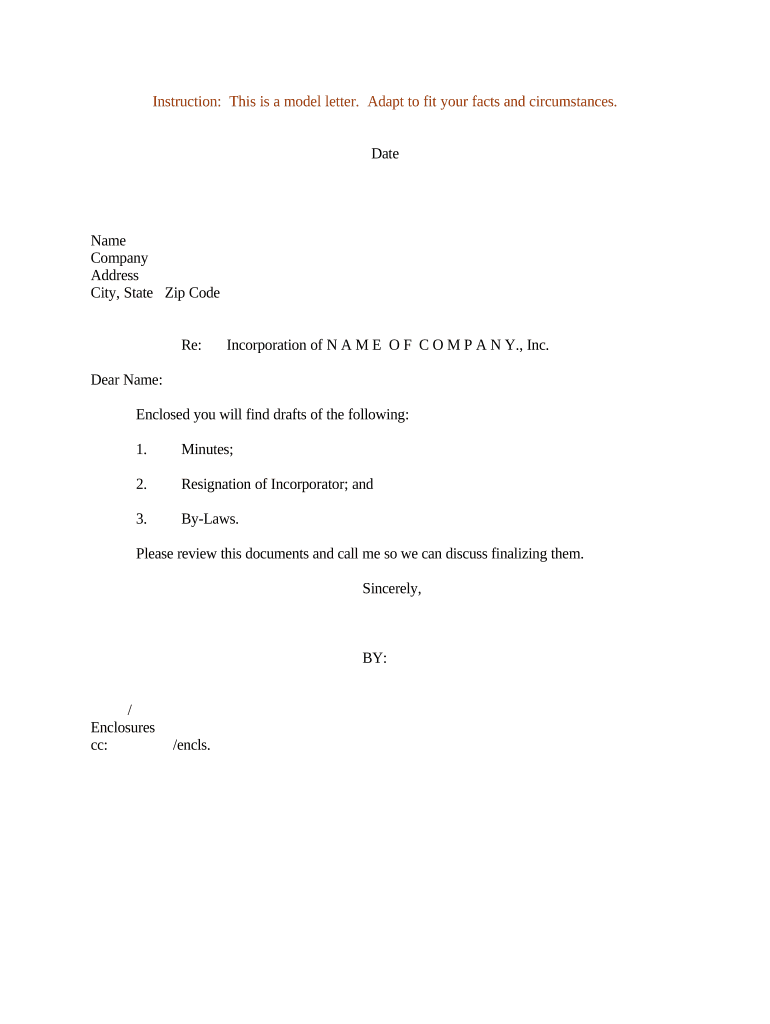
Letter Regarding Incorporation of Company
What a Letter Regarding Incorporation of Company Is
Why This Letter Matters for New Corporations
A clear incorporation letter establishes the company's legal identity for counterparties, confirms who may bind the corporation, and speeds account setup, vendor enrollment, and contract execution. It reduces ambiguity about authority and provides a concise record to attach to formation filings or electronic onboarding workflows.
Who Typically Prepares or Receives This Letter
The letter streamlines downstream onboarding tasks and reduces follow-up requests by providing essential formation details in a single document.
- Corporate secretary or incorporator notifying banks and vendors of the new company and authorized signers.
- Outside counsel or corporate attorney delivering formation confirmation to tax advisors and escrow agents.
- Finance or treasury teams requesting account setups, tax ID processing, and payment vendor enrollment.
Stepwise Process to Complete the Incorporation Letter
-
01Gather documents: Collect articles, EIN notice, and bylaws if available.
-
02Draft letter: Use the approved template and fill required fields.
-
03Confirm signers: Ensure listed signatories are authorized by board or bylaws.
-
04Send and retain: Deliver to recipient and save an executed copy for records.
Where to Send or File the Letter Regarding Incorporation of Company
-
Banks and financial institutions: Provide to open accounts, enroll in ACH, or request merchant services.
-
Vendors and service providers: Send to set up supplier accounts and billing arrangements.
-
Clients or counterparties: Attach when executing contracts that require entity verification.
-
State or local agencies: Include as a supporting document for licensing or permit applications.
How to Configure an Online Workflow for This Letter
| Field | Configuration |
|---|---|
| Template name | Use a clear, versioned title such as 'Incorporation Letter v1' |
| Signer order | Define sequence: corporate signer → lawyer → recipient |
| Authentication | Use email plus SMS code for recipient verification |
| Retention | Enable audit trail and automatic archival on completion |
Digital Signing Considerations for Incorporation Letters
Verify the platform supports your legal and retention obligations (for example, ESIGN/UETA compliance and the ability to export signed PDFs and audit logs for long-term storage).
- Encryption standards: TLS 1.2/1.3 in transit; AES-256 at rest
- Audit trail: Time-stamped events with IP and signer attribution
- Authentication options: Email, SMS, KBA, or advanced signer authentication
Timing Considerations and Typical Deadlines
Formation filing:
File articles per state timeframe; processing varies by state.
EIN application:
Apply at IRS before banking and tax registration.
Bank account setup:
Allow several business days for verification and approvals.
Tax registrations:
Register for state tax IDs as required by state agencies.
Document retention start:
Retention periods begin on formation or effective date.
Common Risks and Consequences of Errors in the Letter
Comparing eSignature Options for Delivering Incorporation Letters
| signNow | DocuSign | Adobe Sign | PandaDoc | HelloSign | |
|---|---|---|---|---|---|
| Starting Price | $8/user/mo | $15/user/mo | $14/user/mo | $19/user/mo | $15/user/mo |
| Free Trial | 7-day free trial | Varies by plan | Varies by plan | Free plan available | Free plan available |
| Bulk Send | Yes (Premium tier) | Yes (paid tiers) | Yes (paid tiers) | Yes | No |
| Audit Trail | Yes | Yes | Yes | Yes | Yes |
| HIPAA Compliant | Yes (BAA) | Yes (BAA) | Yes (BAA) | No | No |
Industry Examples: How Organizations Use an Incorporation Letter
Optica Ventures LLC
A venture fund attaches an incorporation letter to vendor onboarding to confirm entity status and signatories.
- The letter lists authorized officers and EIN.
- The team reported that including a concise letter reduced vendor follow-ups and sped account activation while preserving an auditable record of authority and attachments.
Martin Properties
A property management firm uses the letter when opening a corporate bank account for rent collections.
- It names the account signers and effective date.
- Having the letter plus articles of incorporation simplified bank verification and allowed quicker setup of ACH and merchant services for property operations.
Typical Signatories and Who May Execute the Letter
Corporate Secretary
The corporate secretary often prepares and signs incorporation correspondence on the corporation’s behalf, certifying formation facts and attaching formation documents. They should confirm board resolutions or bylaws authorizing the named signatories before sending the letter.
Authorized Officer
An officer such as the CEO or CFO may sign to bind the company for banking and vendor purposes. Ensure their authority is documented in corporate minutes or the bylaws to avoid disputes in downstream transactions.
Practical Tips to Avoid Delays or Rejection
FAQs and Common Questions About Incorporation Letters
-
Who should sign the incorporation letter?
An officer or authorized representative should sign. Confirm authority through corporate bylaws or a board resolution to avoid challenges to the signer's authority during bank or vendor onboarding.
-
Is notarization required for this letter?
Notarization is rarely required for the letter itself, but some banks or foreign entities may request a notarized signature or apostille. Verify recipient requirements before sending to prevent delays.
-
Can the letter be e-signed and remain valid?
Yes. Electronic signatures are valid under the ESIGN Act (15 U.S.C. §7001) and UETA where adopted, provided the signature demonstrates intent, consent, attribution, and the record can be retained and reproduced.
-
How do I correct an error after sending?
Retract or supersede the original with a corrected letter that references the prior version. Keep both documents and an audit trail showing the correction and the reason for amendment.
-
How should I submit to a state agency?
Most state filings for formation are submitted through the Secretary of State portal; the incorporation letter is a supporting communication to counterparties rather than the state filing itself.
-
How long should I keep the executed letter?
Retain the executed letter for at least three years for tax records and longer as needed for contractual disputes; consult IRS guidance (IRC §6501(a)) and state requirements for specific retention periods.