Establishing secure connection…Loading editor…Preparing document…

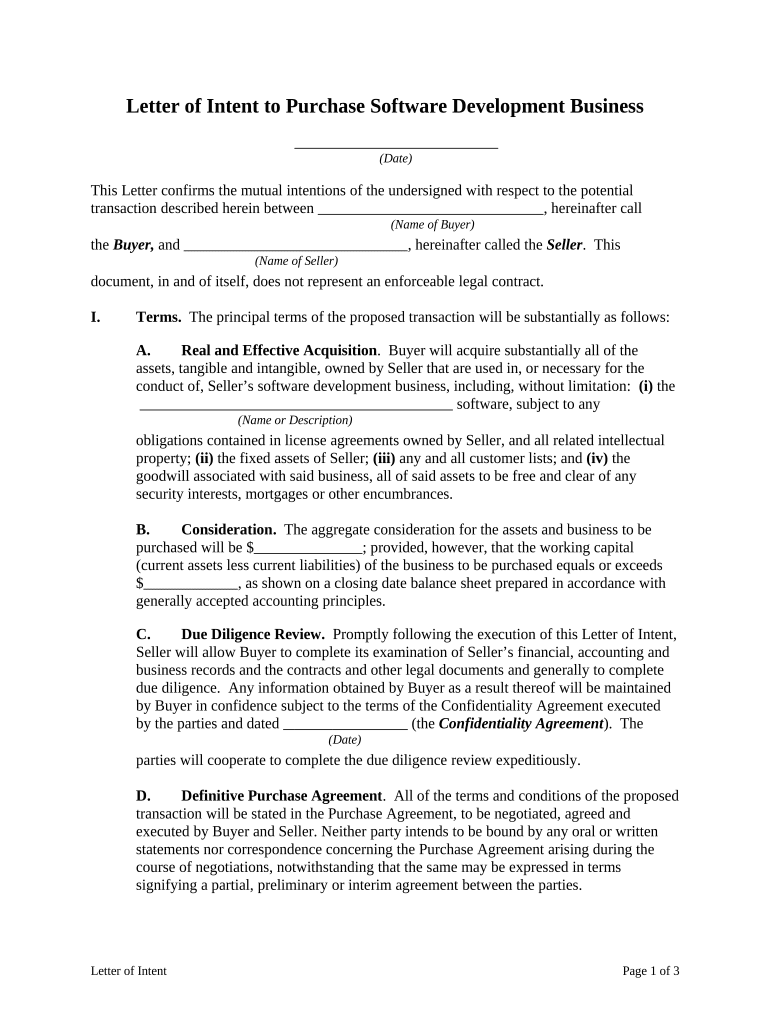
Letter of Intent to Purchase Software Development Business

This template is fully customizable. Edit the text, fill out the fields, and send it for signature. Give it a try!
Letter of Intent to Purchase Software Development Business

What a Letter of Intent to Purchase Software Development Business Is

A Letter of Intent to Purchase Software Development Business is a preliminary, non-binding written statement that records the buyer’s proposed terms for acquiring a software development company. It frames the proposed purchase price, payment structure, key assets and liabilities to transfer, due diligence scope, exclusivity periods, and closing conditions. Parties use the letter to confirm mutual interest, outline the timeline for negotiation, and set allocation of responsibilities before drafting a definitive purchase agreement. While some provisions may be binding, the LOI typically reserves most commercial and legal obligations for the final purchase contract.

Why Use a Letter of Intent in a Software Development Acquisition

An LOI accelerates negotiations by documenting core deal terms early, reducing misunderstandings and guiding due diligence. It establishes negotiation scope, timing, and limited binding obligations such as confidentiality or exclusivity, which helps both parties allocate resources and manage risk before a definitive agreement.

Why Use a Letter of Intent in a Software Development Acquisition

Who Typically Prepares and Reviews This LOI

Buyers, sellers, corporate counsel, and financial advisors typically prepare or review the Letter of Intent to Purchase Software Development Business.

  • Strategic acquirers: corporate buyers conducting acquisitions of development firms, evaluating IP and client contracts.
  • Private equity or investor groups: assessing revenue streams, recurring services, and growth potential before firm offers.
  • Sellers and founders: using LOI to test buyer seriousness and preserve negotiating leverage during due diligence.

Step-by-step: Drafting and Executing the LOI

Follow these steps to draft, review, and execute a clear Letter of Intent to Purchase Software Development Business.

  • 01
    Prepare draft: Summarize price, structure, assets, liabilities, and proposed timeline.
  • 02
    Define scope: Specify included IP, customer contracts, employee transfers, and excluded assets.
  • 03
    Insert terms: Add confidentiality, exclusivity, breakup fees, and due diligence conditions.
  • 04
    Sign & share: Obtain signatures, distribute to stakeholders, and begin due diligence.

Core Components to Include in the LOI

A professional Letter of Intent to Purchase Software Development Business includes clear commercial terms, scope of assets, due diligence parameters, and conditions precedent to closing.

Purchase Price

State total consideration, payment schedule, escrow or holdback terms, any earnout formulas, and currency; allocate amounts to tangible assets, intangible IP, and assumed liabilities for tax clarity.
Assets Included

Specify source code, repository references, documentation, licenses, client contracts, and any hardware or third-party dependencies. Identify excluded assets and required consents for transfer.

Liabilities & Exclusions

List assumed liabilities, pending claims, employment obligations, and carve-outs. Make clear which obligations remain with the seller and any indemnity mechanics.

Due Diligence

Define the documents and systems the buyer may review, timing, data protection measures, and conditions that permit termination or renegotiation following material findings.

Confidentiality

Include binding non-disclosure obligations to protect source code, client information, financials, and proprietary processes during diligence; specify permitted disclosures and remedies.

Closing Conditions

Set regulatory approvals, IP assignment completion, third-party consents, escrow mechanics, and payment triggers as prerequisites to closing the transaction.

Digital Workflow Settings for an LOI

Configure your digital workflow to place fields, authenticate signers, and retain an audit trail for the Letter of Intent.

Field Configuration
Signature Field Standard signature, typed or drawn, with timestamp
Initials Field Place initials at key section pages
Date Field MM/DD/YYYY format auto-filled on sign
Authentication Email link, SMS code, or KBA option

How the LOI Moves Through the Transaction Flow

Typical routing for an LOI includes drafting, internal approvals, execution, and delivery to the counterparty for their signature and response.

  • Draft: Prepare LOI terms and supporting schedules.
  • Internal Approval: Legal and finance review, board sign-off as needed.
  • Execution: Signers sign and date; notarize if required.
  • Delivery: Send executed LOI with receipt confirmation.

Platform and Integration Considerations for Electronic LOIs

Choose a platform that supports PDF/DOCX, audit trails, required signer authentication, and retention.

  • File Formats: PDF, Word DOCX supported
  • Integrations: Salesforce, NetSuite, Google Workspace supported
  • Auth Options: Email, SMS code, and KBA available

Key Deadlines to Put in the LOI

Set clear dates and deadlines in the LOI to prevent misunderstandings during diligence, negotiation, and closing.

Due Diligence Completion Period (in days):

Specify days allowed (commonly 30–90) for completion.

Exclusivity Period and Termination Triggers:

Define exclusivity start, length, and conditions that allow termination.

LOI Execution Deadline and Date:

State when parties must sign to preserve the proposed terms.

Target Closing Date and Deliverables:

Align closing target with regulatory approvals and payment milestones.

Termination for Convenience Notice Period:

Describe notice period for terminating negotiations without penalty.

Milestones: From LOI to Closing

Track essential milestones from LOI signing through closing to keep the transaction on schedule and manage dependencies.

01

LOI Execution

Parties sign LOI and effect any binding confidentiality or exclusivity clauses.

02

Due Diligence

Buyer completes document review, technical audits, and financial verification per schedule.

03

Negotiation

Finalize purchase agreement, IP assignment, and employment conditions.

04

Closing

Execute definitive agreements, transfer funds, and record required documents.

Common Drafting Errors to Avoid

  • Using ambiguous language about which terms are binding leads to disputes and unintended obligations during negotiation.
  • Failing to list specific assets and IP identifiers like repository names or registration numbers causes disagreements over what transfers at closing.
  • Omitting explicit timelines for diligence and closing leaves parties unable to enforce milestones and increases risk of stalled transactions.
  • Neglecting confidentiality or data access protections before sharing source code and customer data can create irreparable competitive harm.

Practical Risks and Contractual Consequences

Accidental Binding: Poor drafting can create enforceable obligations
Exclusivity Breach: Breakup fee or damages exposure
Confidentiality Leak: Loss of IP value and legal claims
Misrepresentation: Fraud claims, rescission risk
Ineffective Signatures: Invalid signatures may void terms
Due Diligence Delay: Missed deadlines can terminate offer

Security and Compliance Considerations

Transmission Encryption: TLS 1.2 and 1.3 encrypted in transit
Storage Encryption: AES-256 encryption at rest applied
Certifications: SOC 2 Type II and ISO 27001
Regulatory Compliance: ESIGN, UETA, CCPA, GDPR covered
Healthcare Protections: HIPAA compliant with BAA available
Audit Trail: Detailed timestamps, IP, and action logs

eSignature Pricing and Feature Comparison Relevant to LOIs

Compare common eSignature pricing and feature criteria relevant to executing a Letter of Intent to Purchase Software Development Business.

signNow DocuSign Adobe Sign PandaDoc HelloSign
Starting Price $8/user/mo $15/user/mo $14/user/mo $19/user/mo $15/user/mo
Free Trial Yes, 7-day free trial Varies by vendor Varies by vendor Varies by vendor Varies by vendor
Bulk Send Yes Yes Yes Yes No
Audit Trail Yes Yes Yes Yes Yes
HIPAA Compliant Yes Yes Yes No No
Envelope Cap No cap 100 envelopes/user/year Varies by plan Varies by plan Varies by plan

Frequently Asked Questions About LOIs for Software Development Acquisitions

Answers to common questions about use, enforceability, and signature options for the Letter of Intent to Purchase Software Development Business.


Need help? Contact support

be ready to get more
Join over 28 million airSlate SignNow users