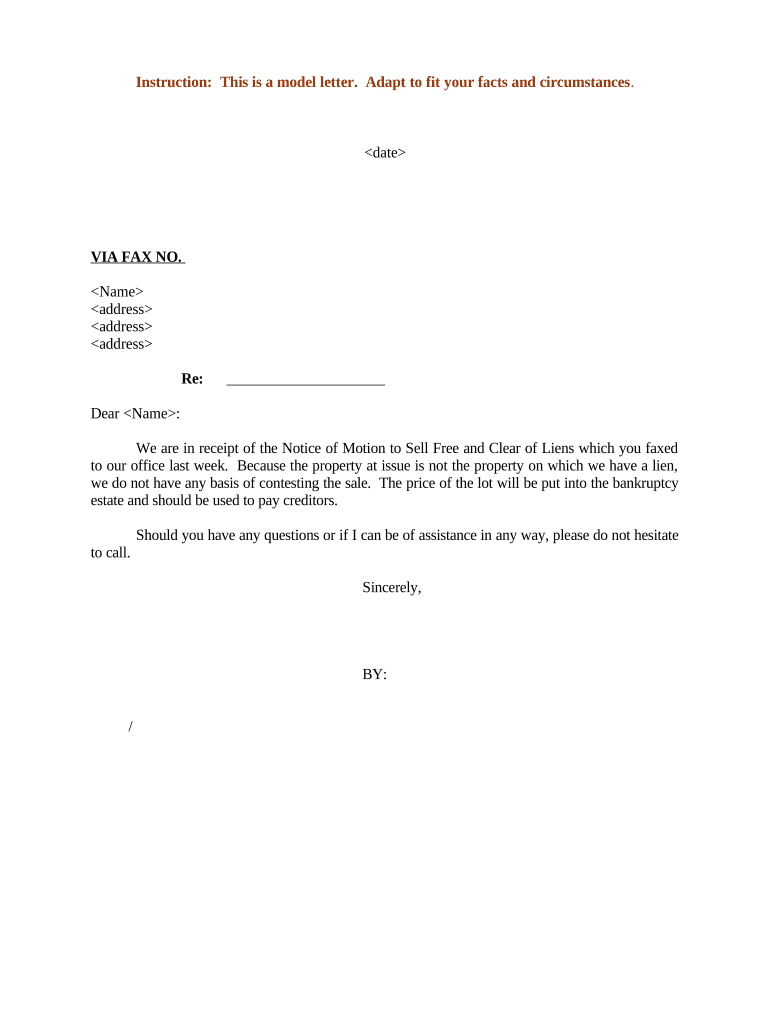
Letter Regarding Notice of Motion to Sell Free and Clear of Liens
What the Letter Regarding Notice of Motion to Sell Free and Clear of Liens Is
Why This Letter Matters for a Motion to Sell Free and Clear of Liens
A clear, complete notice letter preserves parties' procedural rights, documents service and notice steps for the record, and reduces the likelihood of objections or delays by demonstrating compliance with court rules and lien-holder notification requirements.
Who Typically Prepares and Receives This Letter
Timely, documented notice reduces risk of motion denial and helps ensure that any sale proceeds distribution or lien resolution proceeds according to court order and applicable statutes.
- Movant or seller counsel notifying lienholders and interested parties.
- Bankruptcy trustee or chapter 7/11 counsel when property is estate asset.
- Secured creditors and title companies listed to preserve objection rights.
Who May Sign and Deliver the Letter
Movant Representative
An authorized officer, attorney of record, or designated agent for the seller may sign the letter and file proof of service with the court. The signer should have authority to bind the movant and confirm served parties.
Bankruptcy Trustee
When the sale is part of a bankruptcy estate, the trustee or trustee's counsel may sign or join the notice letter to confirm estate administration steps and notice to creditors and parties in interest.
Step-by-Step: Preparing and Sending the Notice Letter
-
01Gather Case Data: Collect docket, lien records, and creditor contacts
-
02Draft Notice: Summarize motion, sale terms, and hearing request
-
03Attach Proofs: Include proposed order, purchase contract, and service list
-
04Serve and File: Serve parties, file proof of service and docket
How Notice, Motion, and Sale Interact in Court Process
-
File Motion: Movant files motion to sell with supporting exhibits
-
Send Notice: Send the Letter and proof-of-service to parties in interest
-
Response Period: Creditors may object within local rule timeframes
-
Hearing & Order: Court holds hearing and issues sale order if warranted
Digital Workflow Settings for Preparing and Routing the Letter
| Field | Configuration |
|---|---|
| Template | Create reusable notice template with dynamic fields |
| Signer Order | Set movant/counsel first, then trustee if required |
| Authentication | Use email or SMS code for signer verification |
| Audit Trail | Enable IP, timestamp, and certificate of completion |
Platform Considerations for eSigning and eFiling the Notice Letter
Ensure the chosen provider retains a tamper-evident audit trail and can produce reproducible records for the court and parties in interest.
- Formats Supported: PDF, DOCX, and export-ready filing formats
- Integrations: Connectors for Microsoft 365, Google Workspace, NetSuite, and court e-filing portals
- Authentication: Email, SMS, or advanced signer verification options
eSignature Pricing Comparison for Preparing and Serving the Notice Letter
| signNow | DocuSign | Adobe Sign | PandaDoc | HelloSign | |
|---|---|---|---|---|---|
| Starting Price | $8/user/mo | $15/user/mo | $14/user/mo | $19/user/mo | $15/user/mo |
| Free Trial | 7-day free trial | Varies | Varies | Varies | Varies |
| Bulk Send | Yes | Yes | Yes | Yes | No |
| Audit Trail | Yes | Yes | Yes | Yes | Yes |
| HIPAA Compliant | Yes | Yes | Yes | No | No |
| Envelope Cap | No cap | 100 envelopes/user/yr | Varies | Varies | Varies |
Common Mistakes to Avoid When Preparing the Notice Letter
- Failing to list all known lienholders because of incomplete title or UCC searches can lead to objections and a contested sale.
- Using vague sale terms or missing material terms in the notice invites creditor motions to continue or to require additional disclosures.
- Not filing or serving proof of service according to local rules may result in the court denying the motion for lack of notice.
- Relying on incorrect or abbreviated legal descriptions increases title issues and can delay clearing liens at closing.
Consequences of an Incorrect or Incomplete Notice Letter
Typical Deadlines and Timing Expectations
Advance Notice:
Serve notice consistent with local rule; commonly 14–28 days before hearing
Objection Window:
Creditors typically have until the hearing or a set pre-hearing cutoff to object
Hearing Date:
Court schedules hearing and may continue for additional notice or briefing
Sale Closing:
Closing typically follows entry of a sale order and satisfaction of conditions
Proof of Service Filing:
File proof of service promptly after service, per local court requirements
Representative Scenarios Where the Notice Letter Is Used
Distressed Property Sale
A trustee seeks to sell bank-owned property to maximize estate value
- Known mortgage and tax liens identified
- The trustee filed the motion, served creditors, and attached payoff estimates and title reports to support the requested free-and-clear order.
Corporate Asset Disposition
A company proposes a judicial sale of equipment used as collateral
- Secured lenders are notified with proposed sale terms
- Counsel served the notice letter with the purchase agreement and proposed order to permit creditor review before the hearing.
Frequently Asked Questions About Notice Letters for Motions to Sell Free and Clear of Liens
-
Who must be notified?
Notify all known lienholders, the trustee if applicable, parties in interest, and any party required by local rule. Confirm the court's service list requirements and include creditors found in UCC and recorded lien searches.
-
Is notarization required?
Notarization is usually required for deeds and certain transfer instruments attached to the sale; the notice letter itself typically does not require notarization, but supporting documents may.
-
Can the letter be e-signed?
Yes. Electronic signatures are generally valid under the ESIGN Act (15 U.S.C. ch. 96) and UETA where adopted, provided intent, consent, attribution, and record retention are satisfied.
-
What if a creditor objects?
An objection triggers additional briefing or a hearing. The court will evaluate whether the sale should proceed, whether liens should attach to proceeds, or whether sale terms must be modified.
-
How to prove service?
File a proof of service affidavit or declaration that lists recipients, delivery method, and service date. Attach any required certificates or return receipts.
-
When to involve counsel?
Engage counsel for drafting or review when lien priority, conflicting claims, or unusual sale terms exist; counsel helps ensure compliance with local rules and reduces risk of a contested sale.