Establishing secure connection…Loading editor…Preparing document…

Letter Suspending Employee for Alcohol Use

This template is fully customizable. Edit the text, fill out the fields, and send it for signature. Give it a try!
Letter Suspending Employee for Alcohol Use

What the Letter Suspending Employee for Alcohol Use Is

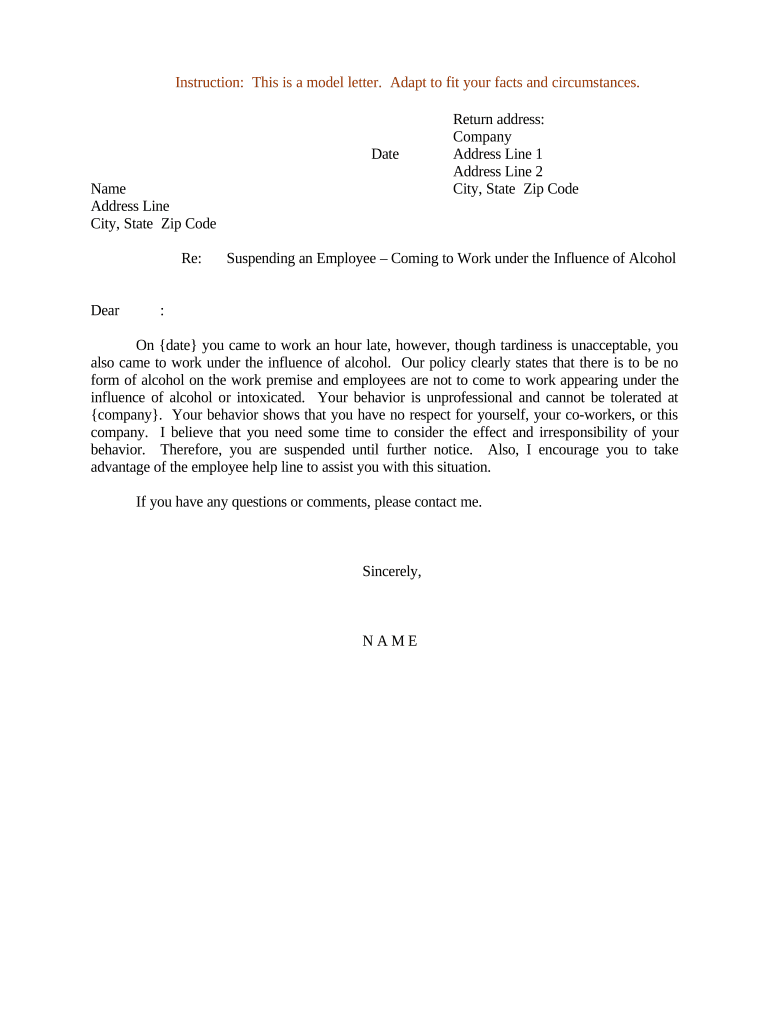
A Letter Suspending Employee for Alcohol Use is a formal written notice from an employer that temporarily removes an employee from duty because of suspected or confirmed alcohol impairment or policy violations related to alcohol. The letter typically states the factual basis for suspension, the effective date and duration, any pay or benefits implications, required actions (testing, meeting, treatment), and next steps for investigation or return-to-work conditions. It serves both operational and documentation purposes and supports consistent application of workplace safety and disciplinary procedures.

Why a Clear Suspension Letter Matters

A precise suspension letter documents employer action, protects workplace safety, preserves evidence for investigations, and reduces legal ambiguity when followed with fair procedures.

Why a Clear Suspension Letter Matters

Who Prepares and Receives This Letter

Copies are typically placed in the employee file and shared with legal counsel, occupational health, or security as needed while limiting disclosure to a need-to-know basis.

  • Human resources teams who manage disciplinary processes and ensure policy compliance.
  • Supervisors or managers who witnessed performance or safety incidents related to alcohol.
  • Legal or compliance officers reviewing workplace safety and potential liability.

Essential Parts of a Professional Suspension Letter

Include factual, objective details and clear instructions so the employee understands the reason, duration, required actions, and how to contest or appeal the suspension.

Statement of Facts

Concise description of observed behavior, date/time, location, and any witnesses. Avoid speculation and stick to verifiable facts; include incident report references if applicable.
Policy Reference

Cite the specific company policy or handbook provision violated, including section number or title, so the basis for discipline is transparent and consistent with established rules.

Effective Period

State the suspension start date and whether it is paid or unpaid. Clarify whether the suspension is pending investigation or a final disciplinary action.

Required Actions

List actions the employee must complete (e.g., drug/alcohol test, meeting with HR, medical evaluation, treatment referral) and acceptable timelines for completion.

Return Conditions

Explain any conditions for returning to work, such as negative test results, treatment completion, follow-up evaluations, or reasonable accommodation procedures.

Appeal and Contact

Provide instructions for appealing the suspension, the contact person or department, and the deadline for submitting a written response or request for a meeting.

Step-by-Step: Drafting and Issuing the Letter

Follow a consistent process to document facts, notify the employee, and preserve records while protecting privacy and legal compliance.

  • 01
    Gather Facts: Collect incident reports, witness statements, and any video or testing information.
  • 02
    Review Policy: Confirm applicable policy language and prior disciplinary history before drafting the letter.
  • 03
    Draft Letter: Prepare a concise, factual notice including dates, actions required, and appeal rights.
  • 04
    Deliver Securely: Provide the letter in person or via a secure, documented method and retain proof of delivery.

Typical Workflow After Issuing a Suspension

A standardized post-issuance workflow helps ensure timely testing, investigation, and lawful return-to-work decisions.

  • Notification Sent: Employee receives suspension letter and access to policy documents.
  • Testing Ordered: If required, schedule alcohol/drug testing promptly with a certified provider.
  • Investigation Conducted: HR or compliance completes fact-finding and documents outcomes.
  • Decision Issued: Employer communicates results and next steps, including return conditions or further discipline.

Digital Delivery and File Requirements

Keep access limited to HR, legal, and necessary supervisors; follow applicable data protection rules such as HIPAA when health information is involved.

  • File Format: Use PDF/A or PDF to preserve formatting and metadata for legal records.
  • Authentication: Require signer authentication (email + optional SMS code) for e-signed acknowledgements.
  • Integrations: Ensure compatibility with HRIS, document repositories, and case management systems.

Configuring a Digital Suspension Workflow

Design workflow settings to capture signatures, attestations, and required attachments while keeping audit logs intact.

Field Configuration
Signature Block Require typed name, signature, and date fields for acknowledgement.
Attachments Allow uploading of test results, doctor notes, or incident reports.
Notifications Auto-notify HR and the manager when employee signs or uploads items.
Audit Trail Enable IP, timestamp, and action logging for compliance records.

Key Deadlines to Include or Observe

Specify and track critical timelines to preserve rights and meet procedural fairness requirements.

Effective Suspension Date:

Date when work duties cease and pay treatment begins.

Testing Window:

State the deadline to complete required alcohol testing (typically within 24–72 hours).

Investigation Completion:

Indicate target date for concluding the fact-finding process.

Employee Response Deadline:

Date by which the employee may submit a written response or schedule a meeting.

Appeal Period:

Length of time the employee has to appeal the suspension decision.

Sequential Milestones from Incident to Resolution

Track each milestone to maintain a defensible timeline and ensure decisions are timely and documented.

01

Incident Documented

Report created and witnesses identified for follow-up.

02

Immediate Safety Action

Employee removed from safety-sensitive duties pending review.

03

Testing and Assessment

Testing completed and results logged in the case file.

04

Final Determination

Outcome communicated and records updated with rationale.

Common Mistakes to Avoid When Preparing the Letter

  • Including speculative language or conclusions that go beyond observable facts; stick to what was seen, who saw it, and when.
  • Failing to reference the exact policy provision violated or omitting prior disciplinary history, which can suggest inconsistent application.
  • Delivering the letter without documenting method of delivery or proof of receipt, weakening ability to show notice was given.
  • Over-disclosing medical or health details to nonessential parties; limit access to personnel with a documented need-to-know.

Risks and Legal Consequences of an Improper Letter

Discrimination Claim: Improper or inconsistent suspensions can lead to discrimination or retaliation allegations.
Privacy Breach: Sharing health-related information improperly may violate HIPAA or state privacy laws.
Unlawful Termination Risk: Poorly documented processes can convert a suspension into a wrongful termination claim.
Collective Bargaining Violation: Failing to follow union grievance procedures may breach a collective bargaining agreement.
Regulatory Exposure: Safety-sensitive industries face heightened scrutiny and potential fines if protocols are ignored.
Evidence Admissibility: Inadequate records may be excluded in arbitration or court, undermining employer defenses.

Sensitive Data to Protect in Personnel Records

Health Information: Medical details and test results must be restricted and stored securely.
Investigation Notes: Interviews and witness statements require controlled access.
Signed Letters: Keep original signed notices in the official personnel file.
Authentication Logs: Preserve e-signature audit trails and access records.
Legal Correspondence: Attorney-client privileged communications must be marked and limited.
Disciplinary History: Include prior warnings and corrective action summaries.

Comparing eSignature Vendors for Managing Suspension Letters

Platforms differ on price, bulk sending, HIPAA support, and envelope limits; signNow is listed first for straightforward cost and compliance comparison.

signNow DocuSign Adobe Sign PandaDoc HelloSign
Starting Price $8/user/mo $15/user/mo $14/user/mo $19/user/mo $15/user/mo
Free Trial 7-day free trial Varies Varies Varies Varies
Bulk Send Yes Yes Yes Yes No
Audit Trail Yes Yes Yes Yes Yes
HIPAA Compliant Yes Yes Yes No No

Real-World Examples of How Employers Use This Letter

These anonymized scenarios illustrate common approaches and outcomes when suspensions are handled with clear documentation.

Manufacturing Safety Incident

A supervisor observed erratic behavior near heavy machinery

  • employer ordered immediate alcohol testing
  • the documented suspension and test result supported a reinstatement contingent on treatment and negative follow-up tests.

Customer-Facing Staff

A bartender reported to work smelling of alcohol and received a suspension letter

  • the company required testing within 24 hours
  • the documented policy reference and consistent enforcement prevented wage claim disputes.

Frequently Asked Questions About Suspension Letters

Answers to common legal, procedural, and privacy questions employers and HR professionals encounter when issuing suspension letters.


Need help? Contact support

be ready to get more
Join over 28 million airSlate SignNow users