Establishing secure connection… Loading editor… Preparing document…
Navigation

Fill and Sign the License Software Distribution Form
Fill and Sign the License Software Distribution Form

How it works

Open the document and fill out all its fields.
Apply your legally-binding eSignature.
Save and invite other recipients to sign it.

Rate template

4.6
46 votes
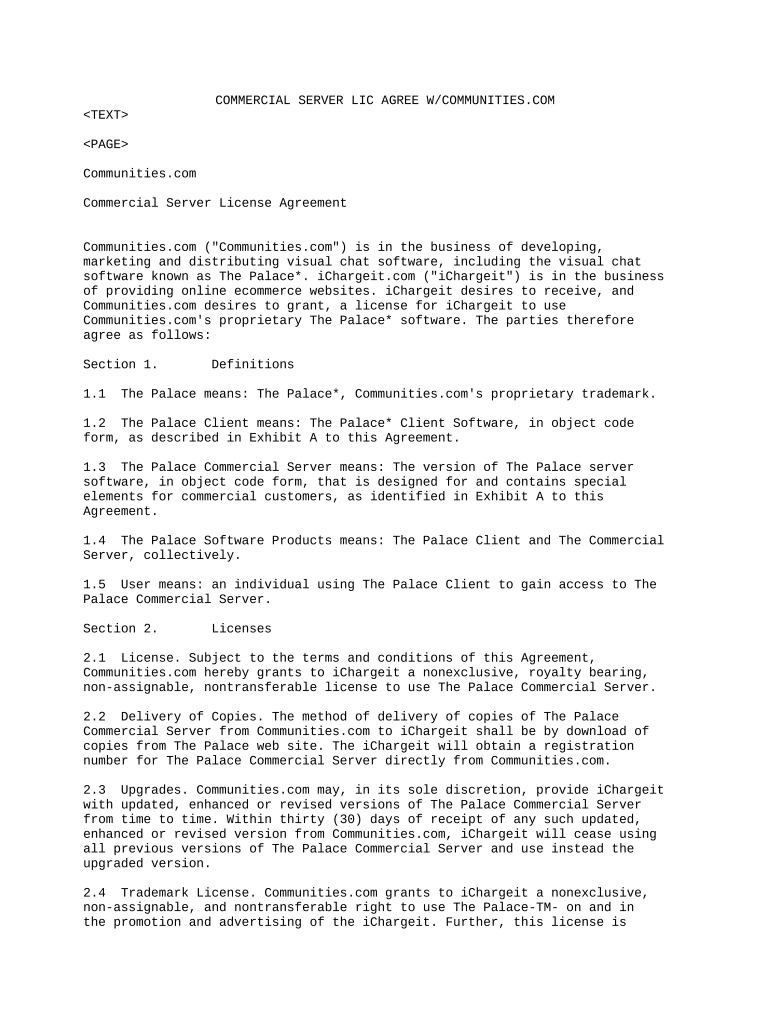
COMMERCIAL SERVER LIC AGREE W/COMMUNITIES.COM Communities.com Commercial Server License Agreement Communities.com ("Communities.com") is in the business of developing, marketing and distributing visual chat software, including the visual chat software known as The Palace*. iChargeit.com ("iChargeit") is in the business of providing online ecommerce websites. iChargeit desires to receive, and Communities.com desires to grant, a license for iChargeit to use Communities.com's proprietary The Palace* software. The parties therefore agree as follows: Section 1. Definitions 1.1 The Palace means: The Palace*, Communities.com's proprietary trademark. 1.2 The Palace Client means: The Palace* Client Software, in object code form, as described in Exhibit A to this Agreement. 1.3 The Palace Commercial Server means: The version of The Palace server software, in object code form, that is designed for and contains special elements for commercial customers, as identified in Exhibit A to this Agreement. 1.4 The Palace Software Products means: The Palace Client and The Commercial Server, collectively. 1.5 User means: an individual using The Palace Client to gain access to The Palace Commercial Server. Section 2. Licenses 2.1 License. Subject to the terms and conditions of this Agreement, Communities.com hereby grants to iChargeit a nonexclusive, royalty bearing, non-assignable, nontransferable license to use The Palace Commercial Server. 2.2 Delivery of Copies. The method of delivery of copies of The Palace Commercial Server from Communities.com to iChargeit shall be by download of copies from The Palace web site. The iChargeit will obtain a registration number for The Palace Commercial Server directly from Communities.com. 2.3 Upgrades. Communities.com may, in its sole discretion, provide iChargeit with updated, enhanced or revised versions of The Palace Commercial Server from time to time. Within thirty (30) days of receipt of any such updated, enhanced or revised version from Communities.com, iChargeit will cease using all previous versions of The Palace Commercial Server and use instead the upgraded version. 2.4 Trademark License. Communities.com grants to iChargeit a nonexclusive, non-assignable, and nontransferable right to use The Palace-TM- on and in the promotion and advertising of the iChargeit. Further, this license is conditional upon iChargeit's compliance with the requirements of section 3.3 below. iChargeit agrees to ensure that its use of The Palace will meet the highest levels of quality and integrity, will not be unlawful, and will not interfere with Communities.com's rights in The Palace. 2.5 No Reverse Engineering. iChargeit agrees not to reverse engineer, reverse compile, or otherwise disassemble The Palace Software Products. iChargeit may not use, reproduce, sublicense, distribute or dispose of any of The Palace Software Products, in whole or in part, other than as permitted under this Agreement. 2.6 Exclusive Use of The Palace Client. iChargeit agrees to use only The Palace Client software to access The Palace Commercial Server. No other client software may be created or used to access The Palace Commercial Server. Section 3. Intellectual Property Ownership/Labeling 3.1 Communities.com Ownership. iChargeit agrees that this license does not grant any title or other right of ownership to The Palace Software Products, or title, license or other right of ownership to The Palace or any Communities.com trademark or work. iChargeit acknowledges that The Palace Software Products and The Palace-TM-, and the intellectual property contained therein, are proprietary to Communities.com. 3.2 Copyright Notice. iChargeit shall not remove any copyright notices or proprietary or other legends or notices contained on or within The Palace Software Products, and iChargeit shall conspicuously display the copyright notice, "-C- [insert date] Communities.com" on iChargeit's The Palace web sites, and on any copy of The Palace Commercial Server used by iChargeit. 3.3 Trademark Notice. Where iChargeit makes reference to The Palace, iChargeit shall state: "The Palace is a registered trademark of Communities.com and is being used with express permission of its owner." iChargeit agrees to comply with trademark guidelines that Communities.com may, from time to time, issue concerning the reproduction, use and placement of The Palace or other Communities.com marks by Communities.com's licensees. Section 4. Proper Use of Software Licensee will not use The Palace Commercial Server or The Palace Client to transmit or receive illegal or pornographic material, to commit tortious acts, or to violate the legal rights of any person. Licensee will comply with the provisions and requirements of The Digital Millennium Copyright Act, 17 U.S.C.Section.512et seq., and all other laws which govern and limit the legal liability of Internet service providers and publishers. Licensee will not unlawfully use any copyrighted work, trade secret, trademark, logo, or likeness of any person in connection with The Palace Commercial Server or The Palace Client, or in the Licensee Site. Section 5. Joint Promotion; Revenue Sharing The parties have discussed and agreed to execute the joint promotional, marketing and/or revenue sharing activities set forth in Exhibit B to this Agreement. Section 6. Payments 2 6.1 License Fee and Royalties. In consideration of the licenses granted under this Agreement, and the other obligations herein, iChargeit will pay to Communities.com the payments set forth on Exhibit C. 6.2 Records. iChargeit shall keep accurate records of all operations affecting payments hereunder, and shall permit Communities.com or its duly authorized agent to inspect all such records and to make copies of or extracts from such recoreds during regular business hours throughout the term of this Agreement and for a reasonable period of not less than 3 months thereafter. 6.3 Payments. Not later than the last day of each January and July, iChargeit shall furnish to Communities.com a written statement of all amounts due pursuant to Sec. 5 and Exhibit B. Section 7. Support 7.1 Subject to Section 7.3, Communities.com will, at no additional charge, provide first level support (i.e., direct support) for The Palace Commercial Server to the iChargeit. This support will be provided to iChargeit for a period of one (1) year from the effective date (the "initial term"). The parties agree that, in order for Communities.com to continue providing support after the initial term, the parties must enter into a separate support or revenue sharing agreement. 7.2 Communities.com will, at no additional charge, provide first level support (i.e., direct support) via email for end Users, except that support for User issues relating uniquely to the iChargeit will be provided by iChargeit. 7.3 The parties agree that, for support requiring Communities.com to actually develop site content or code for integration, a separate consulting agreement for one or more of our customer consultants to work with iChargeit to plan, design, and integrate iChargeit's site must be negotiated and entered into by the parties. Communities.com charges $ 150.00/hr for consulting time plus regular expenses. Section 8. Right to Independent Development, Advertising Nothing in this Agreement is intended to limit in any way the right of either party to develop products independently, and to do business with other parties. iChargeit understands that advertising is a method of generating revenue for Communities.com, and that Communities.com will be conducting advertising on The Palace Client which will be viewed by the Users. Section 9. Disclaimers of Warranty and Indemnity 9.1 Communities.com licenses The Palace Commercial Server to iChargeit hereunder solely on an "As Is" basis. Communities.com MAKES NO WARRANTIES WHATSOEVER, EITHER EXPRESS OR IMPLIED, REGARDING THE PALACE SOFTWARE PRODUCTS, INCLUDING WARRANTIES WITH RESPECT TO THEIR MERCHANTABILITY OR FITNESS FOR ANY PARTICULAR PURPOSE. 9.2 Subject to the limitations set forth in Section 10, Communities.com hereby indemnifies iChargeit, its officers, directors, agents and representatives for third party claims that The Palace Software Products are not owned by Communities.com, provided that: (i) iChargeit must promptly give Communities.com notice in writing of any such claim or action and permit Communities.com, 3 through counsel of its choice, to answer and defend such claim or action; (ii) iChargeit must provide Communities.com information, assistance and authority, at Communities.com's expense, to enable Communities.com to defend such claim or action; and (iii) Communities.com will not be responsible for any settlement made by iChargeit without Communities.com's written permission. If Communities.com receives notice of an alleged copyright or trade secret infringement, or if iChargeit's use of one or more of The Palace Software Products shall be prevented by permanent injunction for reasons of copyright or trade secret infringement, Communities.com may, at its sole option and expense, procure for Licensee the right to continued use of The Palace Software Products as provided hereunder, or modify The Palace Software Products such that it is no longer infringing, or replace The Palace Software Products with software of comparable functional capability. 9.3 Communities.com shall have no liability under this Section 9 for any claim or suit to the extent that any alleged infringement is based upon: (i) the combination, operation, or use of The Palace Software Products with devices, parts, or software not supplied by Communities.com, (ii) modifications made to The Palace Software Products other than those made by Communities.com or in accordance with Communities.com's written instructions, or (iii) use of The Palace Software Products other than as permitted under this Agreement or in a manner for which they were not intended. 9.4 Communities.com is not responsible for statements and/or content that are published by iChargeit or Users utilizing The Palace Software Products. Accordingly, Communities.com shall have no liability under this Section 9 or otherwise for any claim or suit, including costs, damages, and attorney fees, to the extent that iChargeit is held liable to a third party for copyright infringement, tort, defamation, unfair business practice, or criminal or other wrongful act by virtue of publication by Users of any material utilizing The Palace Software Products. 9.5 Indemnity for Improper Use. iChargeit shall indemnify Communities.com against any claim or liability arising out of any improper use The Palace Server or The Palace Client as described in Section 4 above. iChargeit shall reimburse Communities.com for the costs and reasonable expenses (including attorney's fees) incurred by Communities.com in connection with any claim of improper use of The Palace Commercial Server by iChargeit and/or its employees, agents, representatives and users. Section 10. Limitation of Liability Except for indemnification for infringement as and only to the extent provided in Section 9 of this Agreement, in no event will Communities.com be liable to iChargeit for incidental, indirect, special, or consequential damages resulting from the use, sale or distribution of The Palace Software Products and/or any other products, whether under a theory of contract, warranty, tort, products liability or otherwise. In no event will the parties be liable to each other, on any theory of tort, indemnity, infringement, breach of contract, warranty, or equity, for damages in excess of the amounts paid to Communities.com hereunder during the initial term of this Agreement. Section 11. Effective Date; Term The effective date of this Agreement is the date on which the latter signature was made to this document in the space indicated for signature below. This Agreement will continue in force for one (1) year from the effective date (the "initial term"). Following the initial term, this Agreement will be automatically renewed each year, unless notice of non-renewal is provided by one party to the 4 other within ninety (90) days prior to the date of the expiration of the one-year term (the "anniversary date"). If one party or both parties provide notice of non-renewal, this Agreement will terminate on the anniversary date. Either party may terminate this Agreement without cause at any time with a written notice of termination provided with sixty (60) days notice. Section 12. Breach and Termination If any breach of this Agreement by either party continues after thirty (30) days from the date of first written notice of such breach, the other party may terminate this Agreement immediately by second written notice. The rights of the parties under this clause are in addition to any other rights and remedies provided by law or under this Agreement. Section 13. Effect of Termination; Return of Communities.com Programs Upon expiration or termination of this Agreement, iChargeit shall promptly return to Communities.com all originals and copies of The Palace Commercial Server which are in its possession in hard copy or CD or in any other media or form, and iChargeit will stop any further use of The Palace Commercial Server. iChargeit is not obligated however, to recall copies of The Palace Client used by its employees, customers, or other Users. The terms and conditions of sections 2.5, 3.1, 9, 10, and 14 will survive any expiration or termination of this Agreement. Section 14. General 14.1 Complete Understanding. This Agreement constitutes the entire agreement between the parties concerning the subject matter hereof. Any amendment of any provision of this Agreement will be effective only if in writing and signed by both the parties. 14.2 Assignment. iChargeit may not assign this Agreement, nor may iChargeit transfer the rights granted hereunder without the prior written consent of a duly authorized representative of Communities.com except to successor entity as the result of sale, merger, or consolidation. Communities.com may assign this Agreement, in whole or in part. 14.3 Disclaimer of Agency. This Agreement will not be construed as creating an agency, partnership, joint venture or any other form of legal association between the parties, and iChargeit will not represent to the contrary, whether expressly, by implication, by appearance or otherwise. The parties are solely responsible for all of their own expenses incurred in exercising their respective rights and complying with the terms and conditions of this Agreement. 14.4 Waiver. Any delay by Communities.com hereunder and/or any failure by Communities.com to exercise any right hereunder will not be effective as a waiver unless expressly made in writing, signed by Communities.com. Any express waiver by Communities.com of any right hereunder shall not be deemed to be a waiver of any other or subsequent right. 14.5 Notices. All notices, demands or other communications with legal effect under this Agreement shall be in writing. Any notices required under or permitted under this Agreement shall be provided by First Class, Express Mail, or Certified Mail, with the effective date the date of postmark or express mail marked mailing, and shall be delivered to the following persons at the addresses indicated: 5 For Communities.com: Communities.com c/o Matthew Burgess Manager, Business Development 10101 N. De Anza Blvd, Suite 100 Cupertino, CA 95014 For iChargeit: 14.6 Governing Law. This Agreement will be governed by the laws of the State of California. Disputes arising out of this Agreement will be resolved by binding confidential arbitration under the Commercial Arbitration Rules of the American Arbitration Association, with the venue of the arbitration in the County of Santa Clara, California, excepting disputes involving copyright infringement, including any third party infringement liability, in order to preserve Communities.com's ability to obtain immediate injunctive relief. COMMUNITIES.COM ICHARGEIT.COM /s/ Matthew T. Burgess /s/ Jesse Cohen 5/15/99 - ---------------------------------- ---------------------------------- (SIGNATURE) (DATE) (SIGNATURE) (DATE) Matthew T. Burgess Jesse Cohen - ---------------------------------- ---------------------------------- (PRINTED NAME) (PRINTED NAME) Director of Business Development CEO - ---------------------------------- ---------------------------------- (TITLE) (TITLE)

Valuable advice on getting your ‘License Software Distribution’ ready online

Are you exhausted from the inconvenience of managing paperwork? Look no further than airSlate SignNow, the premier eSignature platform for individuals and small to medium-sized businesses. Bid farewell to the monotonous routine of printing and scanning documents. With airSlate SignNow, you can easily finalize and sign paperwork online. Utilize the powerful features integrated into this user-friendly and cost-effective platform and transform your method of document administration. Whether you need to authorize forms or obtain eSignatures, airSlate SignNow takes care of everything seamlessly, with just a few clicks.

Follow this comprehensive guide:

  1. Log into your account or initiate a free trial with our service.
  2. Click +Create to upload a file from your device, cloud storage, or our template collection.
  3. Access your ‘License Software Distribution’ in the editor.
  4. Click Me (Fill Out Now) to prepare the form from your end.
  5. Add and assign fillable fields for others (if required).
  6. Continue with the Send Invite settings to solicit eSignatures from others.
  7. Download, print your copy, or convert it into a reusable template.

Don’t be concerned if you need to work together with your colleagues on your License Software Distribution or send it for notarization—our platform provides everything necessary to accomplish such tasks. Register with airSlate SignNow today and elevate your document management to greater heights!

Here is a list of the most common customer questions. If you can’t find an answer to your question, please don’t hesitate to reach out to us.

Need help? Contact Support

The best way to complete and sign your license software distribution form

Save time on document management with airSlate SignNow and get your license software distribution form eSigned quickly from anywhere with our fully compliant eSignature tool.

How to Sign a PDF Online How to Sign a PDF Online

How to complete and sign paperwork online

Previously, coping with paperwork took lots of time and effort. But with airSlate SignNow, document management is quick and easy. Our robust and easy-to-use eSignature solution lets you easily complete and electronically sign your license software distribution form online from any internet-connected device.

Follow the step-by-step guide to eSign your license software distribution form template online:

  • 1.Sign up for a free trial with airSlate SignNow or log in to your account with password credentials or SSO authentication.
  • 2.Click Upload or Create and import a form for eSigning from your device, the cloud, or our form library.
  • 3.Click on the file name to open it in the editor and utilize the left-side menu to fill out all the empty fields properly.
  • 4.Place the My Signature field where you need to eSign your form. Type your name, draw, or upload a photo of your regular signature.
  • 5.Click Save and Close to finish editing your completed document.

As soon as your license software distribution form template is ready, download it to your device, save it to the cloud, or invite other people to electronically sign it. With airSlate SignNow, the eSigning process only requires a few clicks. Use our powerful eSignature tool wherever you are to handle your paperwork efficiently!


How to Sign a PDF Using Google Chrome How to Sign a PDF Using Google Chrome

How to fill out and sign forms in Google Chrome

Completing and signing paperwork is simple with the airSlate SignNow extension for Google Chrome. Installing it to your browser is a quick and effective way to manage your paperwork online. Sign your license software distribution form template with a legally-binding electronic signature in just a few clicks without switching between programs and tabs.

Follow the step-by-step guide to eSign your license software distribution form in Google Chrome:

  • 1.Navigate to the Chrome Web Store, search for the airSlate SignNow extension for Chrome, and add it to your browser.
  • 2.Right-click on the link to a document you need to approve and select Open in airSlate SignNow.
  • 3.Log in to your account using your password or Google/Facebook sign-in option. If you don’t have one, you can start a free trial.
  • 4.Use the Edit & Sign toolbar on the left to complete your sample, then drag and drop the My Signature option.
  • 5.Upload an image of your handwritten signature, draw it, or simply type in your full name to eSign.
  • 6.Verify all data is correct and click Save and Close to finish editing your form.

Now, you can save your license software distribution form sample to your device or cloud storage, send the copy to other people, or invite them to electronically sign your document with an email request or a protected Signing Link. The airSlate SignNow extension for Google Chrome improves your document workflows with minimum effort and time. Start using airSlate SignNow today!


How to Sign a PDF in Gmail How to Sign a PDF in Gmail How to Sign a PDF in Gmail

How to fill out and sign forms in Gmail

When you receive an email with the license software distribution form for approval, there’s no need to print and scan a document or download and re-upload it to a different program. There’s a better solution if you use Gmail. Try the airSlate SignNow add-on to rapidly eSign any documents right from your inbox.

Follow the step-by-step guidelines to eSign your license software distribution form in Gmail:

  • 1.Navigate to the Google Workplace Marketplace and find a airSlate SignNow add-on for Gmail.
  • 2.Set up the program with a related button and grant the tool access to your Google account.
  • 3.Open an email with an attachment that needs approval and use the S sign on the right panel to launch the add-on.
  • 4.Log in to your airSlate SignNow account. Select Send to Sign to forward the document to other parties for approval or click Upload to open it in the editor.
  • 5.Put the My Signature option where you need to eSign: type, draw, or upload your signature.

This eSigning process saves efforts and only requires a few clicks. Use the airSlate SignNow add-on for Gmail to update your license software distribution form with fillable fields, sign paperwork legally, and invite other individuals to eSign them al without leaving your inbox. Enhance your signature workflows now!


How to Sign a PDF on a Mobile Device How to Sign a PDF on a Mobile Device How to Sign a PDF on a Mobile Device

How to fill out and sign forms in a mobile browser

Need to quickly complete and sign your license software distribution form on a mobile phone while working on the go? airSlate SignNow can help without the need to install extra software applications. Open our airSlate SignNow solution from any browser on your mobile device and create legally-binding eSignatures on the go, 24/7.

Follow the step-by-step guidelines to eSign your license software distribution form in a browser:

  • 1.Open any browser on your device and follow the link www.signnow.com
  • 2.Create an account with a free trial or log in with your password credentials or SSO option.
  • 3.Click Upload or Create and pick a file that needs to be completed from a cloud, your device, or our form library with ready-made templates.
  • 4.Open the form and fill out the blank fields with tools from Edit & Sign menu on the left.
  • 5.Place the My Signature area to the form, then enter your name, draw, or add your signature.

In a few simple clicks, your license software distribution form is completed from wherever you are. When you're done with editing, you can save the file on your device, create a reusable template for it, email it to other people, or invite them eSign it. Make your paperwork on the go quick and productive with airSlate SignNow!


How to Sign a PDF on iPhone How to Sign a PDF on iPhone

How to fill out and sign forms on iOS

In today’s corporate environment, tasks must be accomplished quickly even when you’re away from your computer. With the airSlate SignNow application, you can organize your paperwork and sign your license software distribution form with a legally-binding eSignature right on your iPhone or iPad. Install it on your device to conclude agreements and manage forms from just about anywhere 24/7.

Follow the step-by-step guide to eSign your license software distribution form on iOS devices:

  • 1.Go to the App Store, search for the airSlate SignNow app by airSlate, and install it on your device.
  • 2.Open the application, tap Create to upload a form, and select Myself.
  • 3.Select Signature at the bottom toolbar and simply draw your signature with a finger or stylus to eSign the form.
  • 4.Tap Done -> Save after signing the sample.
  • 5.Tap Save or take advantage of the Make Template option to re-use this paperwork in the future.

This process is so easy your license software distribution form is completed and signed in a couple of taps. The airSlate SignNow app works in the cloud so all the forms on your mobile device remain in your account and are available any time you need them. Use airSlate SignNow for iOS to enhance your document management and eSignature workflows!


How to Sign a PDF on Android How to Sign a PDF on Android

How to complete and sign paperwork on Android

With airSlate SignNow, it’s easy to sign your license software distribution form on the go. Install its mobile app for Android OS on your device and start enhancing eSignature workflows right on your smartphone or tablet.

Follow the step-by-step guide to eSign your license software distribution form on Android:

  • 1.Navigate to Google Play, find the airSlate SignNow app from airSlate, and install it on your device.
  • 2.Log in to your account or create it with a free trial, then upload a file with a ➕ button on the bottom of you screen.
  • 3.Tap on the imported file and select Open in Editor from the dropdown menu.
  • 4.Tap on Tools tab -> Signature, then draw or type your name to eSign the sample. Fill out empty fields with other tools on the bottom if needed.
  • 5.Utilize the ✔ key, then tap on the Save option to finish editing.

With an intuitive interface and full compliance with primary eSignature laws and regulations, the airSlate SignNow application is the best tool for signing your license software distribution form. It even operates offline and updates all document modifications when your internet connection is restored and the tool is synced. Complete and eSign documents, send them for eSigning, and generate multi-usable templates anytime and from anyplace with airSlate SignNow.

Sign up and try License software distribution form
  • Close deals faster
  • Improve productivity
  • Delight customers
  • Increase revenue
  • Save time & money
  • Reduce payment cycles

