Establishing secure connection…Loading editor…Preparing document…

Acceptance of Election

This template is fully customizable. Edit the text, fill out the fields, and send it for signature. Give it a try!
Acceptance of Election

What an Acceptance of Election Is and When it’s Used

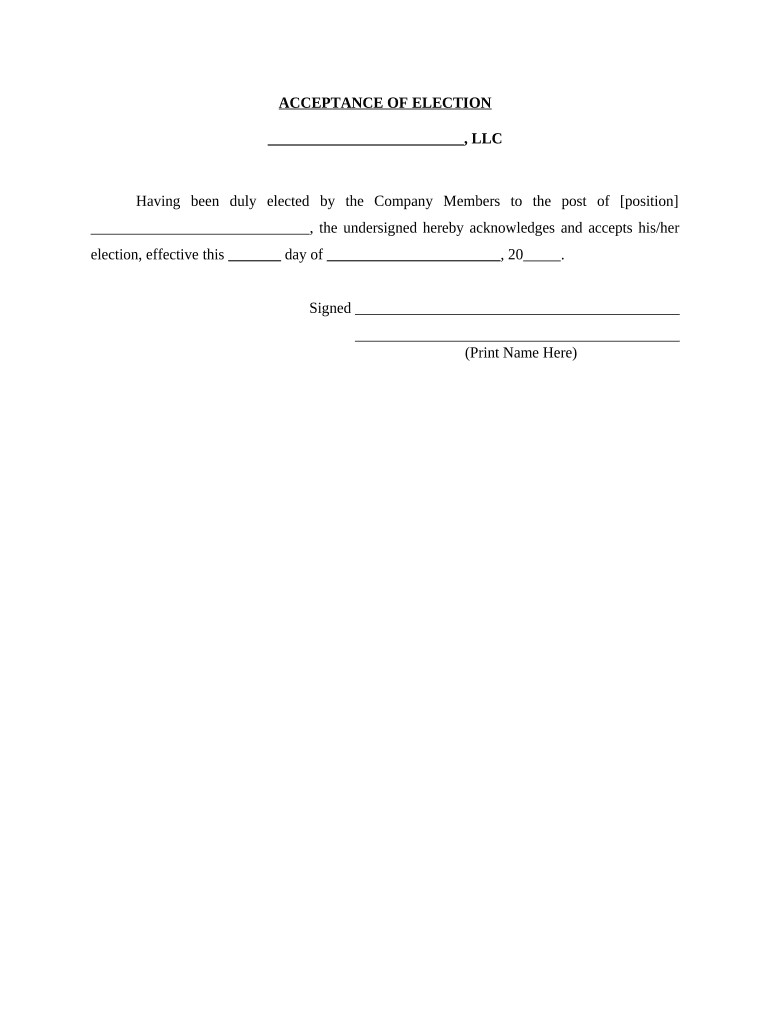
An Acceptance of Election is a signed declaration by a person or entity acknowledging and accepting a previously made election or choice that affects legal, tax, benefits, or contractual rights. Examples include acceptance of a tax election, corporate internal election (tax or governance), benefits enrollment confirmation, or a party accepting an election under statutory procedure. The document records the effective date, the scope of the election, the accepting party, and any conditions; it becomes part of the record used for compliance, filing, or administrative processing.

Why a Clear Acceptance Matters for Enforceability

A formal Acceptance of Election provides clear evidence of intent, attribution, and agreement terms needed for enforceability under federal e-signature law (15 U.S.C. ch. 96) and state UETA rules. It reduces disputes about timing, identity, and scope and creates an auditable record for tax, benefits, and regulatory review.

Why a Clear Acceptance Matters for Enforceability

Who Typically Completes an Acceptance of Election

Organizations and individuals who must confirm a prior choice commonly use this form to document acceptance and trigger downstream actions.

  • Employers and HR teams confirming employee benefit elections or plan changes.
  • Taxpayers or corporate officers acknowledging tax elections or adjustments.
  • Corporate secretaries recording internal governance or shareholder elections.

Use this document when you need a concise, signed record that an election was accepted and the effective terms are agreed.

Typical Signers and Their Roles

Employee

An employee signs to accept a benefits or payroll election; this signature establishes consent and starts benefit enrollment, withholding changes, or plan elections, and may be subject to consumer-disclosure rules under 15 U.S.C. §7001 for financial or consumer-facing records.

Corporate Officer

A corporate officer or authorized agent signs to accept a corporate or tax election on behalf of the entity; their signature must align with internal authorization and may trigger filings with tax authorities or corporate record updates.

Core Components of a Professional Acceptance of Election

A complete Acceptance of Election should be concise but include all elements needed to identify the election, the accepting party, and the effect of acceptance.

Title and Parties

A clear title, names of the accepting party and any counterparty, plus contact details to tie the acceptance to the correct record and file.
Reference to Election

A specific reference to the original election (date, document, or resolution) so the acceptance unambiguously links to that prior choice.

Effective Date

The date the acceptance takes effect, stated in MM/DD/YYYY format where possible to avoid ambiguity.

Scope and Conditions

A concise description of what the acceptance covers, including any limitations, attachments, or contingent provisions.

Signature Block

Lines for printed name, title (if signing for an entity), signature, and date; include witness or notary lines if required by law.

Audit Information

When signed electronically, include a record of signer email, IP address, timestamp, and an audit trail for traceability and evidentiary support.

Essential Data Fields to Include

Accepting Party: Full legal name
Original Reference: Election date/reference
Effective Date: MM/DD/YYYY
Scope: One-sentence description
Signature Line: Signature and date
Authorization: Title/authority

Step-by-Step: Completing an Acceptance of Election

Follow these sequential steps to prepare, sign, and file the Acceptance of Election without delays.

  • 01
    Prepare Document: Gather the original election reference and supporting documents.
  • 02
    Complete Fields: Enter legal names, dates, and scope using MM/DD/YYYY format.
  • 03
    Sign: Sign electronically or physically with required authentication.
  • 04
    Distribute: Send copies to stakeholders and file with the appropriate office.

Customizing an Online Acceptance Workflow

Configure an e-signature workflow to capture consent, verify identity, and route signed copies automatically.

Field Configuration
Signature Type Email link or SMS code authentication
Required Attachments Upload original election document as reference
Routing Sequential routing to legal, HR, or tax teams
Retention Auto-archive signed PDF with audit trail

Where to Send and How the Acceptance Moves Through Systems

Know the typical destinations and routing logic for completed acceptances so filings and notifications occur correctly.

  • Internal Records: File with corporate records or HR file for retention.
  • Tax Filing: Submit to tax department if election affects tax reporting.
  • Regulatory Office: File with agency when statutory filing is required.
  • Stakeholder Distribution: Email signed PDF to all parties for confirmation.

Digital Signing and Technical Requirements

Use an e-signature platform that captures attribution, timestamps, and an audit trail consistent with ESIGN and UETA.

  • Authentication: Email link, SMS code, or stronger methods
  • File Formats: PDF and DOCX supported
  • Integrations: Connects to CRM, storage, or HR systems

Platforms that retain tamper-evident signed PDFs and a verifiable audit trail meet the ESIGN/UETA 4-prong test for intent, consent, attribution, and retention when used correctly.

Common Timelines and Deadlines to Monitor

Timelines depend on the election type; confirm any statutory or internal deadlines before finalizing acceptance.

Internal Effective Date:

Effective date should be specified; impacts rights immediately upon acceptance.

Tax Reporting Window:

If election affects tax returns, verify IRS filing cycles and due dates.

Regulatory Filing:

Agency submissions may have strict windows; check the agency guidance.

Employer Deadlines:

Benefits elections often have specific enrollment periods.

Record Retention Start:

Retention begins on creation or effective date, per applicable law.

Key Processing Milestones After Acceptance Is Signed

Track these milestones to ensure the acceptance triggers the correct administrative and legal actions.

01

Sign Date Recorded

Timestamp recorded and PDF generated for the file.

02

Internal Routing

Document routes to legal, tax, or HR for review within 1–3 business days.

03

Regulatory Submission

File with any required agency or registry as applicable.

04

Archival

Signed record is archived and retained per retention policy.

Common Pitfalls to Avoid When Preparing an Acceptance

  • Referencing the wrong election or failing to include the original election date can create ambiguity and lead to disputes over which choice was accepted.
  • Using ambiguous language for scope or conditions (for example, 'all previous decisions') may create unintended obligations or leave critical items unresolved.
  • Mismatched signer names or titles compared to corporate records can invalidate an acceptance or delay processing for identity verification.
  • Neglecting required disclosures for consumer-facing financial or healthcare elections can breach ESIGN consumer-consent rules and create compliance risk.

Consequences of an Incorrect or Late Acceptance

Tax Penalties: Late or incorrect tax reporting may trigger IRC §6721 penalties.
Regulatory Rejection: Agencies may reject filings for missing or inconsistent data.
Contractual Dispute: Ambiguity can lead to litigation or arbitration.
Benefit Reversal: Incorrect acceptance may invalidate enrollment or coverage.
Identity Risk: Weak signer authentication can lead to repudiation claims.
Recordkeeping Violation: Failure to retain may breach retention rules.

eSignature Vendor Comparison for Signing and Storing an Acceptance of Election

Compare common plan and compliance factors that matter when selecting an e-signature provider to execute and retain accepted elections.

signNow DocuSign Adobe Sign PandaDoc HelloSign
Starting Price $8/user/mo $15/user/mo $14/user/mo $19/user/mo $15/user/mo
Free Trial 7-day free trial Varies by plan Varies by plan Varies by plan Varies by plan
Bulk Send Yes Yes Yes Yes Varies
Audit Trail Yes Yes Yes Yes Yes
HIPAA Compliant Yes Yes Yes No No
Envelope Cap No cap 100 envelopes/user/year Varies Varies Varies

FAQs — Common Questions About Acceptance of Election

Answers to typical questions about validity, signatures, and recordkeeping when executing an Acceptance of Election.


Need help? Contact support

be ready to get more
Join over 28 million airSlate SignNow users