Establishing secure connection… Loading editor… Preparing document…
Navigation

Fill and Sign the Limited Power of Attorney Where You Specify Powers with Sample Powers Included New York Form
Fill and Sign the Limited Power of Attorney Where You Specify Powers with Sample Powers Included New York Form

How it works

Open the document and fill out all its fields.
Apply your legally-binding eSignature.
Save and invite other recipients to sign it.

Rate template

4.7
45 votes
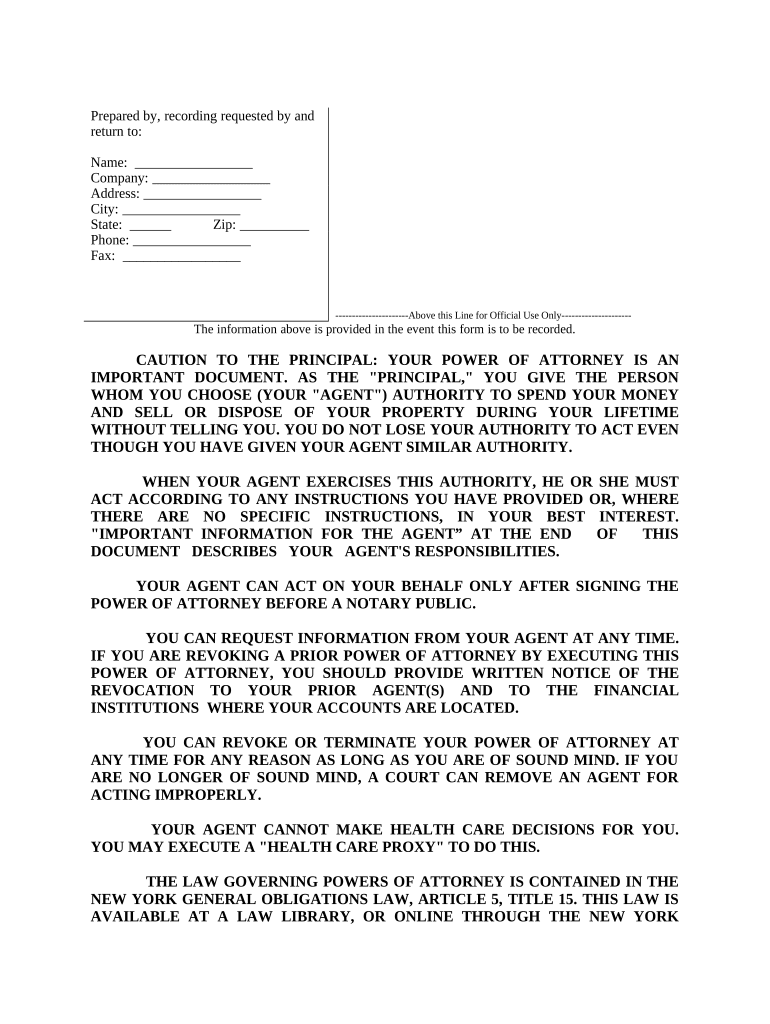
Prepared by, recording requested by and return to: ----------------------Above this Line for Official Use Only---------------------Name: _________________ Company: _________________ Address: _________________ City: _________________ State: ______ Zip: __________ Phone: _________________ Fax: _________________ The information above is provided in the event this form is to be recorded. CAUTION TO THE PRINCIPAL: YOUR POWER OF ATTORNEY IS AN IMPORTANT DOCUMENT. AS THE "PRINCIPAL," YOU GIVE THE PERSON WHOM YOU CHOOSE (YOUR "AGENT") AUTHORITY TO SPEND YOUR MONEY AND SELL OR DISPOSE OF YOUR PROPERTY DURING YOUR LIFETIME WITHOUT TELLING YOU. YOU DO NOT LOSE YOUR AUTHORITY TO ACT EVEN THOUGH YOU HAVE GIVEN YOUR AGENT SIMILAR AUTHORITY. WHEN YOUR AGENT EXERCISES THIS AUTHORITY, HE OR SHE MUST ACT ACCORDING TO ANY INSTRUCTIONS YOU HAVE PROVIDED OR, WHERE THERE ARE NO SPECIFIC INSTRUCTIONS, IN YOUR BEST INTEREST. "IMPORTANT INFORMATION FOR THE AGENT” AT THE END OF THIS DOCUMENT DESCRIBES YOUR AGENT'S RESPONSIBILITIES. YOUR AGENT CAN ACT ON YOUR BEHALF ONLY AFTER SIGNING THE POWER OF ATTORNEY BEFORE A NOTARY PUBLIC. YOU CAN REQUEST INFORMATION FROM YOUR AGENT AT ANY TIME. IF YOU ARE REVOKING A PRIOR POWER OF ATTORNEY BY EXECUTING THIS POWER OF ATTORNEY, YOU SHOULD PROVIDE WRITTEN NOTICE OF THE REVOCATION TO YOUR PRIOR AGENT(S) AND TO THE FINANCIAL INSTITUTIONS WHERE YOUR ACCOUNTS ARE LOCATED. YOU CAN REVOKE OR TERMINATE YOUR POWER OF ATTORNEY AT ANY TIME FOR ANY REASON AS LONG AS YOU ARE OF SOUND MIND. IF YOU ARE NO LONGER OF SOUND MIND, A COURT CAN REMOVE AN AGENT FOR ACTING IMPROPERLY. YOUR AGENT CANNOT MAKE HEALTH CARE DECISIONS FOR YOU. YOU MAY EXECUTE A "HEALTH CARE PROXY" TO DO THIS. THE LAW GOVERNING POWERS OF ATTORNEY IS CONTAINED IN THE NEW YORK GENERAL OBLIGATIONS LAW, ARTICLE 5, TITLE 15. THIS LAW IS AVAILABLE AT A LAW LIBRARY, OR ONLINE THROUGH THE NEW YORK STATE SENATE OR ASSEMBLY WEBSITES, WWW.SENATE.STATE.NY.US OR WWW.ASSEMBLY.STATE.NY.US. IF THERE IS ANYTHING ABOUT THIS DOCUMENT THAT YOU DO NOT UNDERSTAND, YOU SHOULD ASK A LAWYER OF YOUR OWN CHOOSING TO EXPLAIN IT TO YOU. LIMITED POWER OF ATTORNEY STATE OF NEW YORK COUNTY OF _________________________ KNOW ALL MEN BY THESE PRESENT, THAT I, _________________________ , whose address is _________________________ , _________________________ (City), _________________________ (State), _________________________ (Zip), “Principal”, have made, constituted and appointed, and by these presents do make, constitute and appoint, _________________________ my true and lawful attorney in fact to act with the following limited powers, to wit: Insert powers here. See examples at the end of this form ______________________________________________________________________________ ______________________________________________________________________________ ______________________________________________________________________________ FURTHER, I do authorize my aforesaid attorney-in-fact to execute, acknowledge and deliver any instrument under seal or otherwise, and to do all things necessary to carry out the intent hereof, hereby granting unto my said attorney-in-fact full power and authority to act in and concerning the premises as fully and effectually as I may do if personally present, limited, however, to the purpose for which this limited power of attorney is executed. PROVIDED, however, that all business transacted hereunder for me or for my account shall be transacted in my name, and that all endorsements and instruments executed by my said attorney-in-fact for the purpose of carrying out the foregoing powers shall contain my name, followed by that of my said attorney and the designation "attorney-in-fact". I further declare that any act or thing lawfully done hereunder and within the powers herein stated by my said attorney shall be binding on myself and my heirs, legal and personal representatives and assigns, whether the same shall have been done either before or after my death, or other revocation of this instrument, unless and until reliable intelligence or notice thereof shall have been received by my said attorney. This Power of Attorney shall be: ( ) Non-Durable. ( ) Durable and shall not be affected by any subsequent disability or incompetence. Third parties may rely upon the representations of the agents as to all matters relating to any power granted to them hereunder, and no person who may act in reliance upon the representations of the agent or the authority granted to it shall incur any liability to the principal or his estate as result of permitting the agent to exercise any power. SIGNATURE AND ACKNOWLEDGMENT: In Witness Whereof I have hereunto signed my name on ____________________________________ , 20      . PRINCIPAL signs here: ► __________________________________________ Individual Capacity within the State of New York State of New York, County of __________________ , ss On the ______ day of __________________ in the year ____________ before me, the undersigned, personally appeared ________________________ , personally known to me or proved to me on the basis of satisfactory evidence to be the individual whose name is subscribed to the within instrument and acknowledged to me that he executed the same in his capacity , and that by his signature on the instrument, the individual , or the person upon behalf of which the individual acted, executed the instrument. Signature and Office of Person Taking Acknowledgement Type/Print Name: __________________________ Individual Capacity Outside the State of New York State of __________________ , County of __________________ , ss On the ______ day of __________________ in the year ____________ before me, the undersigned, personally appeared ______________________________ , personally known to me or proved to me on the basis of satisfactory evidence to be the individual whose name is subscribed to the within instrument and acknowledged to me that he executed the same in his capacity , and that by his signature on the instrument, the individual , or the person upon behalf of which the individual acted, executed the instrument and that such individual made such appearance before the undersigned in the ________________________ (insert the city or other political subdivision and the State or country or other place the acknowledgment was taken). Signature and Office of Person Taking Acknowledgement Type/Print Name: __________________________ IMPORTANT INFORMATION FOR THE AGENT: When you accept the authority granted under this Power of Attorney, a special legal relationship is created between you and the principal. This relationship imposes on you legal responsibilities that continue until you resign or the Power of Attorney is terminated or revoked. You must: (1) act according to any instructions from the principal, or, where there are no instructions, in the principal's best interest; (2) avoid conflicts that would impair your ability to act in the principal's best interest; (3) keep the principal's property separate and distinct from any assets you own or control, unless otherwise permitted by law; (4) keep a record or all receipts, payments, and transactions conducted for the principal; and (5) disclose your identity as an agent whenever you act for the principal by writing or printing the principal's name and signing your own name as "agent" in either of the following manners: (Principal's Name) by (Your Signature) as Agent, or (your signature) as Agent for (Principal's Name). You may not use the principal's assets to benefit yourself or anyone else or give gifts to yourself or anyone else unless the principal has specifically granted you that authority in this document, which is either a statutory gifts rider attached to a statutory short form power of attorney or a non-statutory power of attorney. If you have that authority, you must act according to any instructions of the principal or, where there are no such instructions, in the principal's best interest. You may resign by giving written notice to the principal and to any co-agent, successor agent, monitor if one has been named in this document, or the principal's guardian if one has been appointed. If there is anything about this document or your responsibilities that you do not understand, you should seek legal advice. Liability of agent: The meaning of the authority given to you is defined in New York's General Obligations Law, Article 5, Title 15. If it is found that you have violated the law or acted outside the authority granted to you in the Power of Attorney, you may be liable under the law for your violation. AGENT'S SIGNATURE AND ACKNOWLEDGMENT OF APPOINTMENT: It is not required that the principal and the agent(s) sign at the same time, nor that multiple agents sign at the same time. I , ________________________________________________________________________ , have read the foregoing Power of Attorney. I am the person identified therein as agent for the principal named therein. I acknowledge my legal responsibilities. Agent signs here: ► __________________________________________ Type or Print Name __________________________________________ Type or Print Name Individual Capacity within the State of New York State of New York, County of __________________ , ss On the ______ day of __________________ in the year ____________ before me, the undersigned, personally appeared ________________________ , personally known to me or proved to me on the basis of satisfactory evidence to be the individual whose name is subscribed to the within instrument and acknowledged to me that he executed the same in his capacity , and that by his signature on the instrument, the individual , or the person upon behalf of which the individual acted, executed the instrument. Signature and Office of Person Taking Acknowledgement Type/Print Name: __________________________ Individual Capacity Outside the State of New York State of __________________ , County of __________________ , ss On the ______ day of __________________ in the year ____________ before me, the undersigned, personally appeared ______________________________ , personally known to me or proved to me on the basis of satisfactory evidence to be the individual whose name is subscribed to the within instrument and acknowledged to me that he executed the same in his capacity , and that by his signature on the instrument, the individual , or the person upon behalf of which the individual acted, executed the instrument and that such individual made such appearance before the undersigned in the ________________________ (insert the city or other political subdivision and the State or country or other place the acknowledgment was taken). Signature and Office of Person Taking Acknowledgement Type/Print Name: __________________________ SUCCESSOR AGENT'S SIGNATURE AND ACKNOWLEDGMENT OF APPOINTMENT: It is not required that the principal and the successor agent(s), if any, sign at the same time, nor that multiple successor agents sign at the same time. Furthermore, successor agents can not use this power of attorney unless the agent(s) designated above is/are unable or unwilling to serve. I/ we, ________________________ have read the foregoing power of attorney. I am/we are the person(s) identified therein as Successor agent(s) for the principal named therein. Successor agent(s) sign(s) here:==> ___________________________ Successor agent(s) sign(s) here:==> ___________________________ Individual Capacity within the State of New York State of New York, County of __________________ , ss On the ______ day of __________________ in the year ____________ before me, the undersigned, personally appeared ________________________ , personally known to me or proved to me on the basis of satisfactory evidence to be the individual whose name is subscribed to the within instrument and acknowledged to me that he executed the same in his capacity , and that by his signature on the instrument, the individual , or the person upon behalf of which the individual acted, executed the instrument. Signature and Office of Person Taking Acknowledgement Type/Print Name: __________________________ Individual Capacity Outside the State of New York State of __________________ , County of __________________ , ss On the ______ day of __________________ in the year ____________ before me, the undersigned, personally appeared ______________________________ , personally known to me or proved to me on the basis of satisfactory evidence to be the individual whose name is subscribed to the within instrument and acknowledged to me that he executed the same in his capacity , and that by his signature on the instrument, the individual , or the person upon behalf of which the individual acted, executed the instrument and that such individual made such appearance before the undersigned in the ________________________ (insert the city or other political subdivision and the State or country or other place the acknowledgment was taken). Signature and Office of Person Taking Acknowledgement Type/Print Name: __________________________ SIGNATURES OF WITNESSES: By signing as a witness, I acknowledge that the principal signed this document in my presence and the presence of the other witness, or that the principal acknowledged to me that the principal’s signature was affixed by him or her or at his or her direction. I also acknowledge that the principal has stated that this document reflects his or her wishes and that he or she has signed it voluntarily. ___________________________ _________________________ Signature of witness 1 Signature of witness 2 __________________________ __________________________ Date Date __________________________ __________________________ Print name Print name __________________________ __________________________ Address Address __________________________ __________________________ City, State, Zip code City, State, Zip code NOTICE: THESE ARE SAMPLE POWERS. Collection of Debts . To demand, collect, recover, sue for, receive and give receipt or release for any monies, debts, dividends, interests, royalties, legacies, annuities, demands, discounts, income, rents, profits, securities or other property of any sort, now or hereafter due or becoming due to me or to which I may be or hereafter become entitled. Endorsements . a) To endorse and negotiate for any and all purposes all promissory notes, bills of exchange, checks, drafts or other negotiable or non-negotiable paper payable to me or to my order; b) To endorse for transfer all certificates of stock, bond or other securities; c) To endorse and cash United States Savings Bonds and notes. Executing Government Vouchers . To execute vouchers in my behalf for any and all allowances, compensation and reimbursements properly payable to me by the Government of the United States or any agency or department thereof. Depositing Money and Other Property . To deposit in my attorney's or my name, or jointly in both our names, in any banking institution, funds or property, and to withdraw any part or all of my deposits at any time made by me in my behalf. Borrowing Money. To borrow money in my name when deemed necessary to my said attorney upon such terms as to my said attorney appear proper and to execute such instruments as may be requisite for such purpose. Acquisition of Property. To buy, receive, lease, accept or otherwise acquire in my name and for my account property, real, personal or mixed, upon such terms, considerations and conditions as my said attorney shall think proper. Recovering Possession of Property. To eject, remove or relieve tenants or other persons from, and recover possession of, any property, real, personal or mixed in which I now or hereafter may have an interest. Litigation . To institute, maintain, defend, compromise, arbitrate or otherwise dispose of, any and all actions, suits, attachments or other legal proceedings for or against me. Tax Returns . To prepare and execute any tax returns, including, but not limited to, Federal income tax returns, State income tax returns, Social Security tax returns, and Federal and State information and estimated returns; to execute any claims for refund, protests, applications for abatement, petitions to the United States Board of Tax Appeals or any other Board or Court, Federal or State, consents and waivers to determination and assessment of taxes and consents and waivers agreeing to a later determination and assessment of taxes than is provided by statute of limitations; to receive and endorse and collect any checks in settlement of any refund of taxes; to examine and to request and receive copies of any tax returns, reports and other information from the United States Treasury Department or any other taxing authority, Federal or State, in connection with any of the foregoing matters. Automobiles . To execute and deliver to the proper persons and authority any and all documents, instruments and papers necessary to effect proper registration of any automobile in which I now or may hereafter have an interest, or the sale thereof and transfer of legal title thereto as required by law, and to collect and receipt for all monies paid in consideration of such sale and transfer. Disposition of Property . To sell, assign, transfer, convey, exchange, deed, mortgage, pledge, lease, let, license, demise, remise, quitclaim, bargain or otherwise dispose of any or all of my real estate, stocks, bonds, evidences of indebtedness and other securities and other personal tangible and intangible or mixed property, or any custody, possession, interest or right therein at public or private sale, upon such terms, consideration, and conditions as my said attorney shall deem advisable and to execute, acknowledge and deliver such instruments and writings of whatsoever kind and nature as may be necessary, convenient or proper in the premises.

Valuable tips on preparing your ‘Limited Power Of Attorney Where You Specify Powers With Sample Powers Included New York’ online

Are you fed up with the complications of handling paperwork? Look no further than airSlate SignNow, the premier electronic signature solution for individuals and organizations. Bid farewell to the tedious process of printing and scanning documents. With airSlate SignNow, you can effortlessly finalize and sign documents online. Leverage the extensive features embedded in this user-friendly and cost-effective platform and transform your method of document management. Whether you need to authorize forms or collect signatures, airSlate SignNow takes care of everything with ease, needing just a few clicks.

Adhere to this detailed guide:

  1. Sign in to your account or sign up for a complimentary trial with our service.
  2. Click +Create to upload a file from your device, cloud, or our template library.
  3. Access your ‘Limited Power Of Attorney Where You Specify Powers With Sample Powers Included New York’ in the editor.
  4. Click Me (Fill Out Now) to finish the form on your end.
  5. Insert and designate fillable fields for other participants (if needed).
  6. Proceed with the Send Invite settings to solicit eSignatures from others.
  7. Download, print your copy, or convert it into a reusable template.

No need to worry if you have to work with your coworkers on your Limited Power Of Attorney Where You Specify Powers With Sample Powers Included New York or send it for notarization—our platform provides you with all the tools necessary to accomplish such tasks. Join airSlate SignNow today and raise your document management to a new level!

Here is a list of the most common customer questions. If you can’t find an answer to your question, please don’t hesitate to reach out to us.

Need help? Contact Support

The best way to complete and sign your limited power of attorney where you specify powers with sample powers included new york form


Save time on document management with airSlate SignNow and get your limited power of attorney where you specify powers with sample powers included new york form eSigned quickly from anywhere with our fully compliant eSignature tool.

How to Sign a PDF Online How to Sign a PDF Online

How to fill out and sign forms online

Previously, dealing with paperwork required lots of time and effort. But with airSlate SignNow, document management is quick and easy. Our robust and easy-to-use eSignature solution enables you to easily complete and eSign your limited power of attorney where you specify powers with sample powers included new york form online from any internet-connected device.

Follow the step-by-step guide to eSign your limited power of attorney where you specify powers with sample powers included new york form template online:

  • 1.Register for a free trial with airSlate SignNow or log in to your account with password credentials or SSO authorization option.
  • 2.Click Upload or Create and import a file for eSigning from your device, the cloud, or our form collection.
  • 3.Click on the file name to open it in the editor and use the left-side menu to fill out all the blank fields accordingly.
  • 4.Drop the My Signature field where you need to eSign your form. Provide your name, draw, or upload an image of your regular signature.
  • 5.Click Save and Close to finish modifying your completed form.

As soon as your limited power of attorney where you specify powers with sample powers included new york form template is ready, download it to your device, save it to the cloud, or invite other people to eSign it. With airSlate SignNow, the eSigning process only takes several clicks. Use our robust eSignature tool wherever you are to handle your paperwork productively!


How to Sign a PDF Using Google Chrome How to Sign a PDF Using Google Chrome

How to complete and sign forms in Google Chrome

Completing and signing documents is easy with the airSlate SignNow extension for Google Chrome. Installing it to your browser is a fast and beneficial way to deal with your forms online. Sign your limited power of attorney where you specify powers with sample powers included new york form template with a legally-binding electronic signature in a few clicks without switching between tools and tabs.

Follow the step-by-step guide to eSign your limited power of attorney where you specify powers with sample powers included new york form template in Google Chrome:

  • 1.Go to the Chrome Web Store, find the airSlate SignNow extension for Chrome, and install it to your browser.
  • 2.Right-click on the link to a document you need to sign and select Open in airSlate SignNow.
  • 3.Log in to your account with your password or Google/Facebook sign-in option. If you don’t have one, sign up for a free trial.
  • 4.Utilize the Edit & Sign menu on the left to complete your sample, then drag and drop the My Signature option.
  • 5.Add a photo of your handwritten signature, draw it, or simply type in your full name to eSign.
  • 6.Verify all data is correct and click Save and Close to finish modifying your form.

Now, you can save your limited power of attorney where you specify powers with sample powers included new york form sample to your device or cloud storage, send the copy to other individuals, or invite them to electronically sign your form with an email request or a secure Signing Link. The airSlate SignNow extension for Google Chrome enhances your document workflows with minimum effort and time. Try airSlate SignNow today!


How to Sign a PDF in Gmail How to Sign a PDF in Gmail How to Sign a PDF in Gmail

How to complete and sign paperwork in Gmail

Every time you get an email containing the limited power of attorney where you specify powers with sample powers included new york form for approval, there’s no need to print and scan a file or download and re-upload it to a different tool. There’s a much better solution if you use Gmail. Try the airSlate SignNow add-on to promptly eSign any paperwork right from your inbox.

Follow the step-by-step guide to eSign your limited power of attorney where you specify powers with sample powers included new york form in Gmail:

  • 1.Go to the Google Workplace Marketplace and locate a airSlate SignNow add-on for Gmail.
  • 2.Install the program with a corresponding button and grant the tool access to your Google account.
  • 3.Open an email with an attachment that needs signing and utilize the S key on the right panel to launch the add-on.
  • 4.Log in to your airSlate SignNow account. Opt for Send to Sign to forward the file to other people for approval or click Upload to open it in the editor.
  • 5.Place the My Signature field where you need to eSign: type, draw, or import your signature.

This eSigning process saves time and only takes a couple of clicks. Use the airSlate SignNow add-on for Gmail to update your limited power of attorney where you specify powers with sample powers included new york form with fillable fields, sign paperwork legally, and invite other individuals to eSign them al without leaving your inbox. Boost your signature workflows now!


How to Sign a PDF on a Mobile Device How to Sign a PDF on a Mobile Device How to Sign a PDF on a Mobile Device

How to fill out and sign paperwork in a mobile browser

Need to rapidly complete and sign your limited power of attorney where you specify powers with sample powers included new york form on a mobile phone while doing your work on the go? airSlate SignNow can help without needing to set up extra software applications. Open our airSlate SignNow solution from any browser on your mobile device and create legally-binding eSignatures on the go, 24/7.

Follow the step-by-step guidelines to eSign your limited power of attorney where you specify powers with sample powers included new york form in a browser:

  • 1.Open any browser on your device and go to the www.signnow.com
  • 2.Register for an account with a free trial or log in with your password credentials or SSO authentication.
  • 3.Click Upload or Create and add a file that needs to be completed from a cloud, your device, or our form catalogue with ready-to go templates.
  • 4.Open the form and fill out the empty fields with tools from Edit & Sign menu on the left.
  • 5.Add the My Signature field to the sample, then enter your name, draw, or upload your signature.

In a few simple clicks, your limited power of attorney where you specify powers with sample powers included new york form is completed from wherever you are. Once you're finished editing, you can save the document on your device, build a reusable template for it, email it to other people, or ask them to electronically sign it. Make your paperwork on the go speedy and efficient with airSlate SignNow!


How to Sign a PDF on iPhone How to Sign a PDF on iPhone

How to fill out and sign paperwork on iOS

In today’s business community, tasks must be done quickly even when you’re away from your computer. With the airSlate SignNow application, you can organize your paperwork and approve your limited power of attorney where you specify powers with sample powers included new york form with a legally-binding eSignature right on your iPhone or iPad. Install it on your device to conclude agreements and manage forms from anywhere 24/7.

Follow the step-by-step guide to eSign your limited power of attorney where you specify powers with sample powers included new york form on iOS devices:

  • 1.Open the App Store, search for the airSlate SignNow app by airSlate, and set it up on your device.
  • 2.Launch the application, tap Create to add a form, and choose Myself.
  • 3.Choose Signature at the bottom toolbar and simply draw your signature with a finger or stylus to eSign the form.
  • 4.Tap Done -> Save right after signing the sample.
  • 5.Tap Save or use the Make Template option to re-use this document in the future.

This process is so straightforward your limited power of attorney where you specify powers with sample powers included new york form is completed and signed in a few taps. The airSlate SignNow app works in the cloud so all the forms on your mobile device are kept in your account and are available whenever you need them. Use airSlate SignNow for iOS to improve your document management and eSignature workflows!


How to Sign a PDF on Android How to Sign a PDF on Android

How to fill out and sign paperwork on Android

With airSlate SignNow, it’s easy to sign your limited power of attorney where you specify powers with sample powers included new york form on the go. Install its mobile app for Android OS on your device and start boosting eSignature workflows right on your smartphone or tablet.

Follow the step-by-step guidelines to eSign your limited power of attorney where you specify powers with sample powers included new york form on Android:

  • 1.Open Google Play, find the airSlate SignNow app from airSlate, and install it on your device.
  • 2.Log in to your account or register it with a free trial, then import a file with a ➕ key on the bottom of you screen.
  • 3.Tap on the uploaded file and select Open in Editor from the dropdown menu.
  • 4.Tap on Tools tab -> Signature, then draw or type your name to eSign the template. Fill out blank fields with other tools on the bottom if needed.
  • 5.Utilize the ✔ key, then tap on the Save option to end up with editing.

With a user-friendly interface and full compliance with main eSignature requirements, the airSlate SignNow application is the perfect tool for signing your limited power of attorney where you specify powers with sample powers included new york form. It even operates without internet and updates all form modifications once your internet connection is restored and the tool is synced. Complete and eSign forms, send them for approval, and create multi-usable templates whenever you need and from anywhere with airSlate SignNow.

Sign up and try Limited power of attorney where you specify powers with sample powers included new york form
  • Close deals faster
  • Improve productivity
  • Delight customers
  • Increase revenue
  • Save time & money
  • Reduce payment cycles

