Establishing secure connection…Loading editor…Preparing document…

Louisiana Court Form

This template is fully customizable. Edit the text, fill out the fields, and send it for signature. Give it a try!
Louisiana Court Form

What the Louisiana Court Form Is and When it’s Used

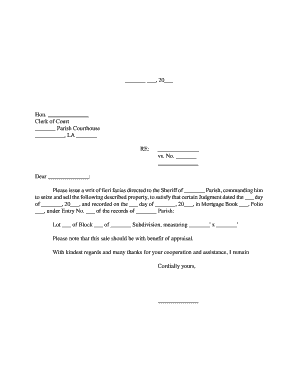
A Louisiana Court Form is any standardized document filed with a state or parish court in Louisiana to initiate proceedings, respond to claims, record affidavits, or provide evidence. Typical examples include complaints, answers, motions, affidavits, and certificates of service. These forms must follow local court formatting rules, identify the case caption and parties, and often require signature blocks, notarization, or proof of service. Electronic filing (e-filing) systems are common in many Louisiana courts, but procedural and notarization requirements vary by document type and by parish.

Why accurate completion matters for litigants and clerks

Completing the Louisiana Court Form correctly ensures the court accepts the filing, preserves procedural rights, and prevents delays or sanctions.

Why accurate completion matters for litigants and clerks

Who commonly prepares and files Louisiana Court Forms

Both attorneys and self-represented litigants complete Louisiana Court Forms; court clerks and notaries interact with them during filing and authentication.

  • Private attorneys preparing pleadings for parish or district courts, ensuring compliance with local rules and deadlines.
  • Self-represented parties (pro se) filing basic motions, affidavits, or small-claims documents without counsel.
  • Court clerks and filing staff who check form completeness, apply filing stamps, and administer e-filing systems.

Accuracy at the preparation stage reduces clerk intervention and preserves the filer’s procedural options and timelines.

Anatomy of a professional Louisiana Court Form

A complete court form includes standardized headings, party identification, factual recitals, signature and contact details, verification or oath language, and proof-of-service. Each element must be precise to meet court rule expectations and to support admissibility and service requirements.

Case Caption

Shows court name, docket number, and party designations. Align with local rule formatting and font requirements.
Title of Document

Identifies the pleading type (e.g., Motion to Dismiss, Affidavit) so the clerk assigns the correct internal workflow.

Factual Statement

Concise, numbered paragraphs presenting facts relevant to the request or response; avoid conclusory language without support.

Verification / Oath

When required, includes sworn language and space for a notary or judicial officer to acknowledge the signature.

Signature Block

Printed name, bar number (if attorney), address, phone, and signature line with date; allows contact and service.

Certificate of Service

Specifies how and when opposing parties were served, including email, mail, or e-service with date and method.

Essential data fields at a glance

Full Legal Name: Exact party name
Docket Number: Court-assigned ID
Court Name: Parish or district
Filer Contact: Address and phone
Signature Date: MM/DD/YYYY
Service Method: E-file, mail, or email

Step-by-step: filling out a Louisiana Court Form

Follow these sequential steps to prepare a filing that meets common Louisiana court expectations.

  • 01
    Gather documents: Collect pleadings, exhibits, and any supporting affidavits or IDs.
  • 02
    Complete header: Enter court, case caption, and docket number exactly as shown on prior filings.
  • 03
    Draft core text: Number paragraphs, state facts clearly, and cite any controlling rule or statute.
  • 04
    Sign and verify: Sign, date, and notarize if required; include certificate of service.

Where filings typically go and what happens next

After preparation, the filing route depends on local court procedures: e-filing, in-person drop-off, or mail. Each route triggers clerk review and docketing steps.

  • E-filing portals: Upload PDFs, receive electronic confirmation and docket timestamp.
  • In-person filing: Clerk stamps original; you retain a stamped copy as proof.
  • Mail submissions: Use certified mail or trackable service for proof of delivery.
  • Service to parties: Serve opposing counsel per local rules and record the certificate of service.

Digital formats and integrations for online completion

Courts and clerks accept standardized PDF and sometimes DOCX; e-filing portals and e-service platforms have specific format and size rules.

  • File formats: PDF and DOCX accepted
  • Integrations: Works with court e-filing systems
  • Authentication: Email or stronger signer verification

Use platform features that preserve text-searchability and attach a certificate of completion or audit trail when available.

Configuring an online workflow for Louisiana Court Forms

Set up routine automation for repeated filings to reduce errors and maintain consistent metadata.

Field Configuration
Signature Type Image overlay or cryptographic signature
Authentication Email link, SMS code, or stronger ID check
Notifications Automated email on completion and docket receipt
Retention Automatic archive and export of signed PDF

Common timelines and deadlines to watch

Court filings create downstream deadlines for service, responses, and hearings; track them carefully to preserve rights.

Service of Process Deadline:

Serve defendants within FRCP 4(m) 90 days for federal cases; state rules may differ.

Response Period:

Typically 20–30 days to answer a complaint; local rules may set different periods.

Hearing Scheduling:

Hearing dates depend on court calendar; allow local clerk processing time when requesting expedited relief.

E-filing Acknowledgement:

Clerk confirmation often establishes filing date and should be retained as proof.

Amendment Windows:

Many rules permit amendment once as of right; check local rule for timing and conditions.

Consequences of incorrect or incomplete filings

Rejection for Form Errors: Clerk rejection
Sanctions Risk: Filing sanctions possible
Perjury Exposure: False affidavits risk criminal charges
Fee Forfeiture: Court fees may be lost
Delay of Relief: Hearing postponement
Service Defect: Case dismissal risk

Practical tips for accurate and efficient completion

Follow these recommendations to reduce rejections and speed court processing.

Use exact headings and prior docket references
Copy the court name, docket number, and party captions exactly from prior filings. Consistency prevents misdocketing and ensures the clerk associates the new filing with the correct matter.
Preserve PDF text-searchability
Submit searchable PDFs rather than scanned images when possible. Searchable text supports clerk review and reduces issues when the court or opposing counsel needs to locate specific language.
Attach a clear certificate of service
State the deliverable method, date, and recipient. A precise certificate of service is often decisive if a party disputes receipt.
Maintain an audit trail for electronic signatures
Record signer identity, timestamp, and authentication method in case authenticity is later challenged in court proceedings.

Real-world filing scenarios and what succeeded

Two example scenarios illustrate how careful completion and e-signature practices reduce delay and preserve rights.

Private Attorney Filing

An attorney prepared a motion with attached affidavit and proof of service

  • Signed digitally with a clear audit trail
  • The clerk accepted the electronic filing, the hearing proceeded on schedule, and no corrective filing was required, saving staff hours and avoiding potential sanctions.

Pro Se Affidavit Submission

A self-represented litigant used a fillable PDF to complete an affidavit

  • Notarized the signature in-person
  • The organized certificate of service and notarization prevented a service dispute and allowed the judge to consider the affidavit on the initial docket.

Sample eSignature vendor comparison for court filings

Overview of common pricing and feature tradeoffs when selecting an eSignature solution for frequent court-related documents.

signNow DocuSign Adobe Sign PandaDoc HelloSign
Starting Price $8/user/mo $15/user/mo $14/user/mo $19/user/mo $15/user/mo
Free Trial 7-day free trial No No No No
Bulk Send Yes Yes Yes Yes No
Audit Trail Yes Yes Yes Yes Yes
HIPAA / Envelope Cap Yes Yes Yes No No

Frequently asked questions about Louisiana Court Forms

Answers to common questions about e-signature admissibility, notarization, corrections, and filing best practices.


Need help? Contact support

be ready to get more
Join over 28 million airSlate SignNow users