Establishing secure connection…Loading editor…Preparing document…

Written Revocation of Will

This template is fully customizable. Edit the text, fill out the fields, and send it for signature. Give it a try!
Written Revocation of Will

What a Written Revocation of Will Is

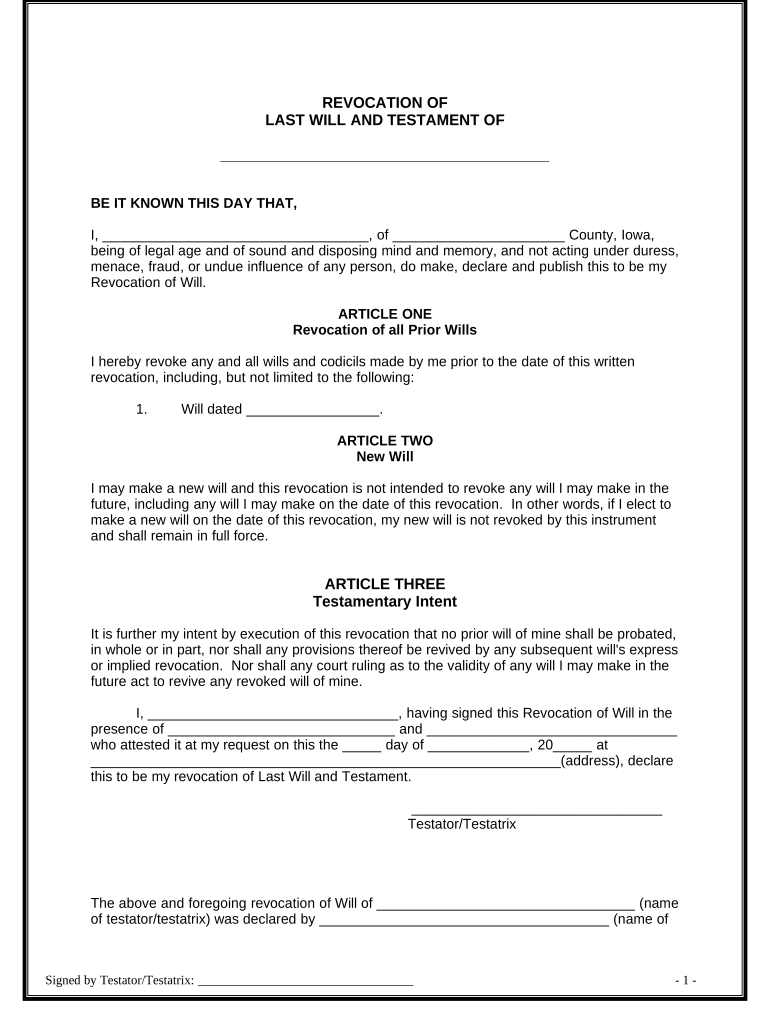
A Written Revocation of Will is a signed, dated document in which a testator formally cancels an earlier will or specific provisions of a will. It identifies the previously executed will, states the intent to revoke, and is executed according to state law requirements for wills—typically with witness attestation or a notarial acknowledgment. Because many jurisdictions treat wills as an exception to electronic-signature laws, a revocation frequently must be a physical, handwritten, or otherwise statutorily valid paper instrument to be effective for probate purposes.

Why a Clear Written Revocation Matters

A clear written revocation prevents ambiguity about the testator’s intent, reduces the risk of competing claims in probate, and preserves estate plan accuracy.

Why a Clear Written Revocation Matters

Who Typically Prepares or Uses a Revocation

The document is useful across ages and estates; legal review is recommended when assets or family circumstances are complex.

  • Individual testators updating beneficiaries or canceling prior wills.
  • Estate or probate attorneys preparing legally sufficient revocations.
  • Personal representatives or executors confirming which instruments control.

Step-by-Step: How to Complete a Written Revocation

Follow these four steps to prepare and execute a legally effective Written Revocation of Will under most U.S. jurisdictions.

  • 01
    Draft Revocation: Prepare a concise statement identifying and revoking the prior will.
  • 02
    Confirm State Rules: Check witness and notary requirements in the state of execution.
  • 03
    Execute with Witnesses: Sign in the physical presence of required witnesses or notary.
  • 04
    Distribute Copies: Give copies to your attorney, executor, and safe storage location.

Essential Elements to Include in a Professional Revocation

A professionally prepared revocation reduces risk in probate. Include each core element below and follow state formalities to ensure enforceability.

Clear Revocation Clause

A direct sentence that explicitly cancels the earlier will or specified provisions, naming the prior will by date and location to avoid ambiguity during probate review.
Testator Identity

Full legal name, address, and any identifying details that tie the revocation to the testator and reduce the risk of contested authenticity.

Execution Date

A visible MM/DD/YYYY signing date that establishes when the revocation takes effect for estate administration and potential statute-of-limitation questions.

Witness Attestation

Spaces for witness names, addresses, signatures, and dates consistent with the state’s required witness count and attestation language for wills.

Notary Acknowledgment

If the state or practice favors a self-proving affidavit, include a notary block with acknowledgment language so witnesses need not testify at probate.

Distribution Instructions

A record of to whom signed copies were delivered—attorney, executor, and safe-deposit box location—to aid discovery at probate.

Security and Compliance Essentials for Stored Revocations

In-transit encryption: TLS 1.2/1.3
At-rest encryption: AES-256 encryption
Audit trail: Timestamps and action log
Access controls: Role-based permissions
HIPAA readiness: BAA available if needed
Regulatory standards: ESIGN and UETA compliant

Risks and Legal Consequences of a Faulty Revocation

Invalidation Risk: Revocation may be void for improper execution
Probate Disputes: Contested revocation triggers litigation
Unintended Heirs: Assets may pass under old will
Tax Timing: Incorrect dates can complicate estate calculations
Lost Document: Missing originals hinder probate proof
Witness Errors: Insufficient attestation defeats revocation

Common Mistakes to Avoid

  • Using an electronic signature where wills are excluded under ESIGN and state law, resulting in non-recognition at probate.
  • Failing to reference the prior will precisely, which leaves uncertainty over which instrument was revoked.
  • Not observing state witness or notary formalities and thereby producing an invalid revocation.
  • Not distributing copies to the executor or attorney, causing delays and discovery issues during probate.

How a Revocation Moves from Draft to Probate File

This four-step flow shows typical handling from creation to storage; follow local rules at each stage to maintain validity.

  • Prepare Document: Draft the revocation with clear identification of the prior will.
  • Verify Formalities: Confirm state witness and notarization requirements before signing.
  • Execute Properly: Sign in required presence of witnesses or a notary as applicable.
  • Store and Notify: Deliver copies to your attorney and the named executor for probate readiness.

How to Configure an Online Workflow (Where Permitted)

If a jurisdiction allows any electronic steps for non-executory parts, these settings show typical platform configurations to manage execution and recordkeeping.

Field Configuration
Signer Authentication In-person verification or strong ID check
Witness Fields Conditional fields for required witness data
Notary Block Include acknowledgement and journal entry
Retention Setting Secure storage with long-term retention

Digital Signing Considerations and Integration Support

While wills are commonly excluded from electronic execution, platforms can help manage drafts, signatures for related documents, and storage.

  • File Formats: PDF, DOCX supported
  • Integrations: Salesforce, Microsoft 365, NetSuite
  • Advanced Auth: SMS, email, or KBA options

eSignature Vendor Pricing and Feature Snapshot

Comparison of common eSignature options used to manage supporting estate documents; signNow is listed first per platform ordering rules.

signNow DocuSign Adobe Sign PandaDoc HelloSign
Starting Price $8/user/mo $15/user/mo $14/user/mo $19/user/mo $15/user/mo
Free Trial 7-day free trial Varies Varies Varies Varies
Bulk Send Yes Yes Yes Yes No
Audit Trail Yes Yes Yes Yes Yes
HIPAA Compliant Yes Yes Yes No No
Envelope Cap No cap 100 envelopes/user/year Varies Varies Varies

Timing and When to Execute a Revocation

There is no general federal deadline for revoking a will; do it promptly after the decision and before circumstances change to ensure clarity at death.

When to Act:

Execute the revocation as soon as you decide to cancel the prior will

Effective Date:

Revocation usually effective on the signing date unless specified otherwise

Probate Notification:

Provide copies to your attorney and executor immediately

Self-Proving Affidavit:

Consider notarization to avoid witness testimony at probate

Record Keeping:

Store originals in a secure location accessible at death

Key Milestones from Draft to Probate Record

A typical milestone sequence helps ensure legal effect and discoverability during probate.

01

Draft Completed

Revocation text is prepared and reviewed for clarity

02

Formal Execution

Signing occurs with required witnesses or notary present

03

Copies Distributed

Attorney and executor receive certified copies

04

Secure Storage

Original placed with attorney, safe deposit, or estate file

Use Cases: How Written Revocations Are Used in Practice

Real-world examples illustrate common situations that prompt a formal written revocation of a prior will.

After Divorce

A testator divorces and needs to cancel a prior will dated before the divorce.

  • Immediate revocation prevents outdated beneficiary language.
  • The revocation names the prior will date, is signed with two witnesses, and copies are delivered to the executor and attorney to prevent probate disputes.

New Marriage

A testator marries and wants to revoke an earlier will favoring prior heirs.

  • Revocation clarifies intent for new spouse.
  • The document explicitly revokes the earlier instrument, is executed per state rules, and the attorney updates estate files and beneficiary designations accordingly.

Practical Tips to Ensure a Valid Revocation

Follow these practical recommendations to reduce the chance a revocation will be contested or invalidated.

Use Clear Language
State the word 'revoke' and reference the prior will by date to remove ambiguity.
Follow State Formalities
Observe the exact witness and notary requirements of the state of execution.
Keep Originals Safe
Store originals with your attorney and provide copies to the executor for probate access.
Document Distribution
Record to whom copies were sent, with dates and delivery method for chain-of-custody.

Frequently Asked Questions About Written Revocations

Answers to common questions about validity, execution, and recordkeeping for Written Revocation of Will documents.


Need help? Contact support

be ready to get more
Join over 28 million airSlate SignNow users