Establishing secure connection…Loading editor…Preparing document…

Louisiana Motion for Preliminary Default

This template is fully customizable. Edit the text, fill out the fields, and send it for signature. Give it a try!
Louisiana Motion for Preliminary Default

What the Louisiana Motion for Preliminary Default Is

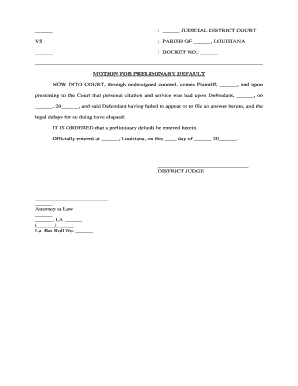
A Louisiana Motion for Preliminary Default is a court filing a plaintiff submits when a defendant has failed to timely plead or otherwise defend after proper service. The motion asks the court to recognize the defendant’s preliminary default, establishing liability for the uncontroverted facts and allowing the plaintiff to proceed toward a hearing on damages or confirmation of default. This procedural tool follows state civil procedure rules and local court practices; timing and evidence requirements vary by parish and court docketing rules.

Why a Preliminary Default Motion Matters

It formalizes a defendant’s failure to respond, helps shorten litigation timelines, preserves the plaintiff’s right to obtain relief without full trial, and can streamline proof of damages where liability is uncontested.

Why a Preliminary Default Motion Matters

Who Typically Prepares This Motion

Check local rules or consult counsel to confirm timing, required affidavits, and any additional filing steps before submission.

  • Plaintiff or in-house counsel preparing default paperwork and evidence for the court.
  • Private plaintiff attorneys seeking an expedited path to damages when liability is uncontested.
  • Collection agencies or creditor counsel documenting nonresponse to recover owed amounts.

Essential Parts of a Professional Preliminary Default Motion

A complete motion organizes the case facts, service chronology, cited authority, evidence of nonresponse, and a clear request for relief so the clerk and judge can act without ambiguity.

Caption

Court and party caption that exactly matches prior filings; includes docket number, judge, and correct party names to avoid clerical rejection.
Service Statement

Concise recital of how and when the defendant was served, including dates, method, and any affidavit of service required by local rules.

Failure to Answer

Explicit statement that the defendant failed to plead within the statutory or rule-based answer period, with dates tied to the summons.

Evidence Summary

Attach supporting exhibits such as affidavit of service, copy of complaint, proof of amount due, and any contractual documents underpinning the claim.

Relief Requested

Clear, itemized request (e.g., entry of preliminary default, brief hearing for damages, or clerk confirmation) so the court may issue a specific order.

Proposed Order

Include a ready-to-sign proposed order for judicial or clerk approval to reduce processing friction and clerical amendment.

Required Case and Party Information

Docket Number: Case identifier from initial filing
Party Names: Full legal names as on complaint
Service Date: Date service was completed
Method of Service: Personal, mail, or publication
Attached Exhibits: List of supporting documents
Signature Block: Counsel name, address, and bar number

Step-by-Step: Preparing and Filing the Motion

Follow these procedural steps to prepare a compliant, court-ready Motion for Preliminary Default and reduce the chance of delay or rejection.

  • 01
    Confirm service: Verify affidavit of service and exact service date
  • 02
    Draft motion: State facts, attach exhibits, and request specific relief
  • 03
    Prepare order: Include a proposed order the judge can sign
  • 04
    File and serve: File with the clerk and serve opposing parties per rules

How to Configure an Online Filing and Signing Workflow

Set up a digital workflow to create, sign, and submit the motion while preserving audit trails and required attachments.

Template Create a reusable motion template to prefill caption, case number, and signature blocks
Signer Authentication Require email and SMS code or higher verification for attorneys
Document Attachments Attach affidavits of service, complaint, and exhibits as PDFs
Notifications Enable automatic emails on completion and on filing
Retention Policy Set automatic archival and export for records preservation

Where to File and How to Serve After Filing

Filing and service routes depend on parish and court rules; confirm the clerk’s electronic filing portal and acceptable service methods before submission.

  • Clerk E-Filing: Submit via the court’s official electronic filing system when available
  • Postal Service: Send certified mail with return receipt if required by the rules
  • Personal Service: Use sheriff or process server for in-person service where necessary
  • Service to Counsel: Serve opposing counsel by email if local rules permit

Digital Delivery and eFiling Considerations

Ensure your digital platform supports PDF attachments, audit trails, signer authentication, and e-filing export formats required by the court.

  • File formats: PDF and DOCX accepted
  • Integrations: Salesforce, NetSuite, Microsoft 365
  • Authentication: Email, SMS code, or KBA

Common Timing and Deadlines to Monitor

Monitor statutory answer periods, local rule deadlines, and clerk processing times to know when a motion for preliminary default is timely and enforceable.

Answer Period:

File motion after defendant’s answer period expires under the summons

Clerk Processing:

Allow time for clerk review and docketing after filing

Hearing Scheduling:

Court may set a brief damages hearing after default entry

Service Timelines:

Complete service of the motion per local rules promptly

Motion Practice:

Opposing party may file a motion to set aside default within permitted time

Key Milestones from Filing to Judgment

A typical sequence leads from filing to clerk entry to possible hearing and ultimately to judgment or confirmation; track these steps to manage expectations.

01

File Motion

Submit motion and exhibits to the clerk for docketing

02

Serve Parties

Serve defendant and counsel in compliance with rules

03

Clerk Entry

Clerk may note the preliminary default on the docket

04

Damage Hearing

Court may hold hearing to determine damages and enter judgment

Common Preparation Mistakes to Avoid

  • Failing to attach a proper affidavit of service, which can lead to denial of the motion or delayed entry of default.
  • Using inconsistent party names between the complaint, summons, and motion, causing clerical rejection or confusion over identity.
  • Submitting an unsigned proposed order or omitting the judge’s required formatting, which increases processing time.
  • Neglecting to follow local parish rules on timing or electronic filing, resulting in administrative returns or resubmissions.

Consequences of an Incorrect or Incomplete Motion

Delayed Relief: Court may deny or delay default entry
Dismissal Risk: Motion could be dismissed for procedural defects
Sanctions Exposure: Improper filings can trigger court sanctions
Reversals: Default may be set aside on timely opposition
Evidence Gaps: Lack of proper exhibits weakens damages proof
Additional Costs: Repeat filings and hearings increase fees

Real-World Use Examples

These practical scenarios show how a preliminary default motion is used to advance an uncontested claim toward judgment.

Landlord Collection

A landlord files after a tenant fails to answer the complaint within the summons period, seeking preliminary default.

  • The motion attaches the lease, unpaid rent ledger, and affidavit of service.
  • The court notes default and schedules a hearing limited to actual damages and costs so the landlord can obtain an enforceable judgment.

Commercial Debt

A creditor sues a corporate debtor and receives no response; counsel files a motion for preliminary default.

  • Supporting exhibits include the contract, invoices, and proof of service.
  • The court enters preliminary default and allows the creditor to present documentation at a brief hearing to establish the amount due.

Practical Tips to Increase Approval Chances

Follow these best practices to minimize objections, clerk returns, and evidentiary issues when seeking preliminary default.

Verify Service Records
Double-check affidavits of service for accuracy, include tracking or server logs when applicable, and ensure the date used matches the summons timeframe to avoid timing disputes.
Use Clear Relief Language
Request specific judicial actions (entry of preliminary default, hearing for damages, clerk confirmation) and avoid ambiguous or open-ended phrasing that requires judicial interpretation.
Attach Complete Exhibits
Provide copies of the original complaint, invoices, contracts, and any affidavit of service in a single PDF, bookmarked and labeled to aid judicial review.
Prepare a Proposed Order
Include a concise proposed order the judge can sign immediately to reduce administrative friction and speed entry of default.

eSignature Vendor Pricing Snapshot for Motion Preparation

Comparing common eSignature vendors can help budget for document signing, collaboration, and storage when digitizing motion workflows.

signNow DocuSign Adobe Sign PandaDoc HelloSign
Starting Price $8/user/mo $15/user/mo $14/user/mo $19/user/mo $15/user/mo
Free Trial 7-day free trial Varies by vendor Varies by vendor Varies by vendor Varies by vendor
Bulk Send Yes Yes Yes Yes No
Audit Trail Yes Yes Yes Yes Yes
Envelope Cap No cap 100 envelopes/user/year Varies by plan Varies by plan Varies by plan

Frequently Asked Questions About Preliminary Default Motions

Answers to common questions about filing, service, setbacks, and digital execution for a Louisiana Motion for Preliminary Default.


Need help? Contact support

be ready to get more
Join over 28 million airSlate SignNow users