Establishing secure connection…Loading editor…Preparing document…

Louisiana Partition Property

This template is fully customizable. Edit the text, fill out the fields, and send it for signature. Give it a try!
Louisiana Partition Property

What the Louisiana Partition Property document is

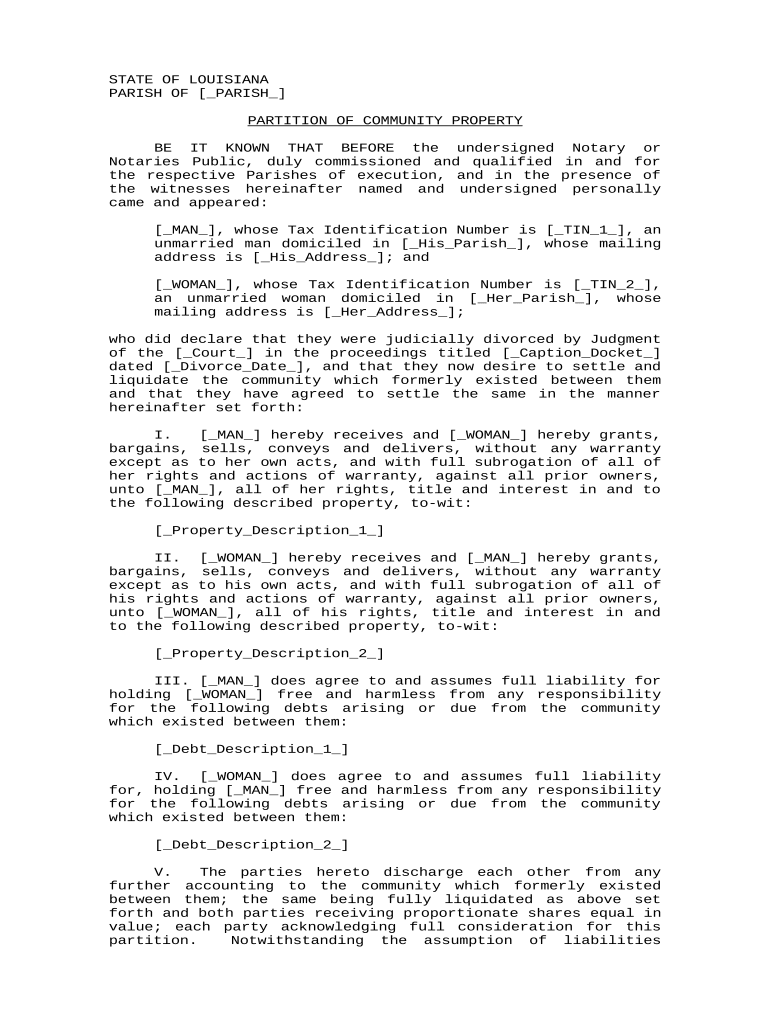
The Louisiana Partition Property document is a legal instrument used when co-owners of immovable property in Louisiana divide, sell, or apportion real estate interests among themselves or by court order. Under Louisiana civil law, partition may occur voluntarily by written agreement among owners or judicially when owners cannot agree; both routes resolve ownership interests, describe property portions or sale procedures, and set terms for distribution of proceeds. This document clarifies parties, legal descriptions, valuation method, costs allocation, and whether the partition will be recorded, notarially acknowledged, and submitted to the parish recorder.

Why a clear partition document matters in Louisiana

A professional Louisiana Partition Property document reduces title uncertainty, defines each owner’s rights, allocates costs, and speeds recording and resale. Clear terms limit litigation risk, make tax and transfer obligations predictable, and provide an auditable chain for title examiners and closing agents.

Why a clear partition document matters in Louisiana

Who commonly prepares or signs a Louisiana partition document

Each participant has distinct responsibilities: owners approve substance, counsel drafts and negotiates, notaries authenticate, and the recorder preserves the public record.

  • Co-owners and parties directly dividing property, often represented by counsel.
  • Attorneys and notaries preparing agreements or handling judicial partition filings.
  • Title companies and recorders who verify descriptions and accept recordings.

Core components of a professional Louisiana Partition Property document

A complete partition instrument organizes the transaction into standard sections so parties, notaries, title examiners, and courts can act without ambiguity.

Parties

Full legal names and capacities of all co-owners, including representatives, trustees, or guardians, to ensure correct attribution and authority.
Property

Precise legal description and parcel identifiers (lot, tract, parish, assessor ID) so the recorder can link the instrument to existing title records.

Partition Method

State whether the division is by private agreement, physical division, sale and split of proceeds, or court-ordered partition, plus steps for each method.

Consideration

Monetary amounts, valuation method, or allocation formula for distributing proceeds, plus responsibility for taxes and liens.

Notarial Clause

Acknowledgement language and notary block that conforms to Louisiana notarial practice and recording requirements.

Recording Instructions

Direction on where to file the instrument, who pays recording fees, and any requested clerk endorsements or attachments.

Step-by-step: preparing and finalizing a partition instrument

Follow these practical steps to reduce errors and expedite recording when dividing property in Louisiana.

  • 01
    Confirm ownership: Obtain current title search and identify all record owners.
  • 02
    Choose partition method: Agree on voluntary terms or prepare a judicial petition.
  • 03
    Draft instrument: Include legal description, allocations, and notarial language.
  • 04
    Notarize and record: Execute before a notary and submit to the parish recorder.

How to set up an online partition workflow

Configure the digital process so signers follow the correct sequence, authentication, and recording steps.

Field Configuration
Signature Order Sequential signing by owners, then notary
Authentication Email link plus ID verification for notary
Attachments Attach title search and prior deed copies
Output Format Export as notarized PDF for recording

Digital signing and submission considerations

Ensure the chosen platform can produce a sealed, timestamped PDF and store the audit record for title examiners and the recording clerk.

  • File Formats: PDF and DOCX supported
  • Integrations: Works with NetSuite, Google Workspace, Box
  • Authentication: Supports email, SMS, and advanced ID checks

Essential data elements to include for recording and title clarity

Owner Names: Full legal names
Legal Description: Metes, bounds, or lot details
Parcel ID: Assessor or tax ID
Docket Number: Court number if judicial
Consideration: Monetary or allocation terms
Notary Block: Acknowledgement language

Consequences of errors in a partition instrument

Clouded Title: Delayed transfers
Recording Rejection: Clerk returns the instrument
Tax Exposure: Unclear basis reporting
Litigation: Disputes and costs
Notarial Defect: Invalid acknowledgment
Incorrect Parties: Voidable conveyance

Common mistakes to avoid when preparing a partition

  • Using an imprecise legal description that differs from prior deeds, which can cause recording clerks to reject the instrument or create title disputes.
  • Failing to identify and resolve liens or mortgages before allocation, leaving successor owners liable for encumbrances they did not expect.
  • Omitting the correct signer capacity (for example, signing as trustee without listing the trust), which can invalidate the party’s authority to convey.
  • Relying on informal handwritten agreements without a proper notarial acknowledgment and recording instructions, which hampers title transfer and financing.

Partition options compared: judicial vs voluntary agreements

Compare the most common partition approaches to choose the method that fits the parties’ circumstances and timing constraints.

Partition document and deed comparison table Judicial Partition Voluntary Partition Agreement
Purpose court-ordered division private division
Court Involvement required optional
Typical Outcome sale or physical split deed transfers
Recording recorder files final order recorder files deed

Typical eSignature vendor comparison for partition documents

Select an eSignature provider that supports notarization, audit trails, and output formats acceptable to Louisiana recorders; signNow appears first for direct feature comparison.

signNow DocuSign Adobe Sign PandaDoc HelloSign
Starting Price $8/user/mo $15/user/mo $14/user/mo $19/user/mo $15/user/mo
Free Trial Yes — 7-day trial Varies by plan Varies by plan Varies by plan Varies by plan
Bulk Send Yes (Business Premium) Varies by plan Yes Yes Varies by plan
Audit Trail Yes Yes Yes Yes Yes
HIPAA Compliant Yes (BAA) Yes (BAA) Yes (BAA) Varies Varies

How partition documents are used in practice

Two illustrative scenarios show common outcomes and operational notes when partitioning property in Louisiana.

Example 1

A group of siblings agree to divide a family lot by assigning specific parcels to each heir using recorded deeds and a notarial partition agreement.

  • The parties hire counsel and obtain a title report to identify encumbrances.
  • The recorded instruments and notarial acknowledgment allow each heir to market their parcel with clear title abstracts and minimize post-closing disputes.

Example 2

Two co-owners cannot agree on division and file a judicial partition action seeking sale and pro rata distribution of proceeds.

  • The court orders an appraisal and sale under supervision.
  • After the sale, the court issues an order directing distribution of net proceeds and the clerk records the judgment to clear title for both former owners.

Frequently asked questions about Louisiana Partition Property

Answers to common legal, recording, and execution questions about partition documents in Louisiana.


Need help? Contact support

be ready to get more
Join over 28 million airSlate SignNow users