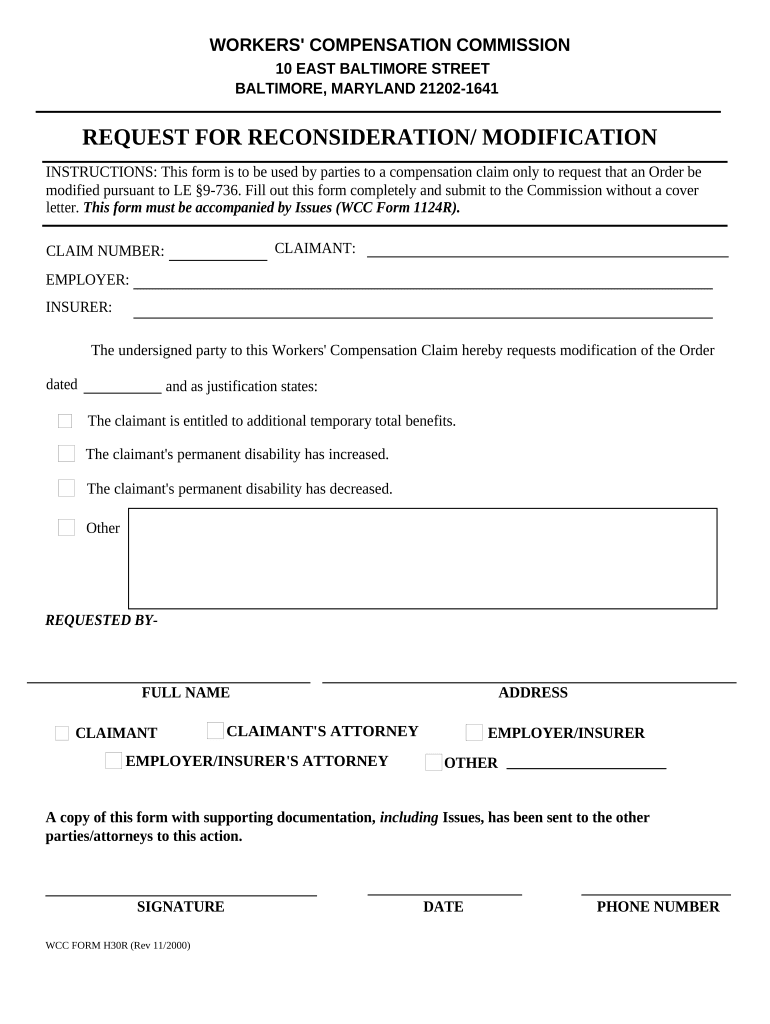
Maryland Request for Reconsideration/Modification
What the Maryland Request for Reconsideration/Modification Is
Why a Reconsideration or Modification Request Matters
Filing a Maryland Request for Reconsideration/Modification lets affected parties correct factual errors, present new evidence, or seek a reduced sanction without initiating new litigation; it preserves administrative remedies and can shorten resolution time compared with appeals to a court.
Who typically files a Maryland Request for Reconsideration/Modification
People and organizations affected by an agency decision commonly file these requests to seek correction or reduction of the agency action.
- Individual licensees and regulated professionals appealing disciplinary orders, fines, or license suspensions.
- Businesses disputing agency penalties, permit conditions, or enforcement actions against them.
- Individuals seeking modification of tax, unemployment, licensing determinations, or repayment terms.
Who can sign or file on behalf of a party
Regulated Individual
Individuals subject to agency discipline or assessment who initiate a reconsideration to correct factual records, present new evidence, or propose alternative remedies; they often need to provide sworn statements and supporting documents and may consult counsel for procedural compliance.
Business or Representative
Businesses, registered agents, or attorneys file on behalf of organizations to contest assessments, permit conditions, or enforcement; they must supply corporate authorization, contact details, and often an organizational affidavit.
Step-by-step: preparing your Maryland Request for Reconsideration/Modification
-
01Prepare the case: Identify decision, include case number, attach agency order.
-
02State grounds: Clearly explain legal errors, new facts, or procedural defects.
-
03Request relief: Specify exact modification requested and any proposed remedy.
-
04Attach evidence: Provide sworn declarations, documents, transcripts, or exhibits as needed.
How electronic submission typically works
-
Upload Document: Attach PDF or DOCX with exhibits combined.
-
Prepare Fields: Place signature, date, and exhibit reference fields.
-
Authenticate Signer: Use email, SMS code, or stronger methods as needed.
-
Submit & Track: Deliver to agency address and retain certificate of completion.
Technical considerations for e-filing and evidence
Platforms used to prepare and submit petitions should support PDF/DOCX uploads, secure transmission, and audit trails for administrative review.
- File Formats: PDF and Word DOCX formats accepted.
- Authentication Options: Email link, SMS code, KBA, or SSO.
- Integrations: Salesforce, Microsoft 365, NetSuite, Google Workspace.
Common eSignature pricing and feature comparison for petition filing platforms
| signNow | DocuSign | Adobe Sign | PandaDoc | HelloSign | |
|---|---|---|---|---|---|
| Starting Price | $8/user/mo | $15/user/mo | $14/user/mo | $19/user/mo | $15/user/mo |
| Free Trial | Yes, 7-day free trial | Varies by plan | Varies by plan | Varies by plan | Varies by plan |
| Bulk Send | Yes | Yes | Yes | Yes | No |
| Audit Trail | Yes | Yes | Yes | Yes | Yes |
| HIPAA Compliant | Yes | Yes | Yes | No | No |
Penalties and risks from incorrect or late submissions
Common preparation mistakes to avoid
- Failing to identify the exact decision and case number often leads to misrouting and delays; always copy the agency's reference number verbatim.
- Submitting unsigned, undated, or partially completed petitions is a frequent cause of rejection; check signature blocks carefully before filing.
- Providing broad, vague relief requests without specific orders or amounts reduces the petition's clarity and may result in denial for insufficiency.
- Relying on unsworn statements or hearsay without supporting exhibits weakens credibility; use sworn declarations when possible.
Practical best practices for stronger petitions
Illustrative examples of reconsideration/modification petitions
Licensing Appeal
A licensed contractor received a cease-and-desist order for alleged code violations and filed a reconsideration to correct factual errors in the inspection report and present remediation evidence.
- New inspection and sworn affidavits were attached.
- The agency reopened the record, reviewed the supplemental materials, and modified the order to require a compliance plan rather than immediate penalty. Clear exhibits and specific relief requests shortened the resolution and avoided court appeal.
Tax Assessment
A small business disputed a Maryland tax assessment, submitting corrected invoices and bank records with the reconsideration to show overstated taxable receipts.
- A sworn accounting declaration quantified the error.
- After review, the agency reduced the assessment amount and adjusted repayment terms, citing the new ledger evidence. Early, well-organized financial exhibits and a clear calculation of overpayment expedited settlement.
Key milestones and processing stages after filing
Filing and Acknowledgment
Agency acknowledges receipt and assigns case number.
Initial Review
Staff checks jurisdiction, completeness, and initial timetables.
Hearing or Supplemental Record
Agency may schedule hearing or accept supplemental evidence by deadline.
Final Decision
Agency issues modified order, denial, or other final disposition.
Frequently asked questions about Maryland Request for Reconsideration/Modification
-
Can I file after the deadline?
Late requests may be barred unless the agency's rules allow an extension for good cause or excusable neglect. Check the specific agency regulation and cite supporting facts for delay; attach any proof such as medical records or service issues to justify late filing.
-
What evidence strengthens a petition?
Sworn declarations, contemporaneous records, dated correspondence, corrected invoices, and official transcripts carry weight. Show how new evidence was unavailable earlier and why it would change the decision. Include exhibit list and Bates numbers to aid reviewers.
-
Are electronic signatures accepted in Maryland?
Electronic signatures are generally enforceable under ESIGN (15 U.S.C. ch. 96) and UETA if the agency permits electronic filings. Verify agency-specific rules; some administrative bodies require original ink signatures or notarized submissions for certain documents.
-
Do I need a lawyer to file?
Legal representation is optional but recommended for complex cases involving statutory interpretation, evidentiary disputes, or substantial sanctions. Counsel can ensure procedural compliance, craft persuasive legal arguments, and help preserve appellate rights if administrative review fails.
-
Can I amend a filed petition?
Many agencies allow amendments before final action if done promptly and with notice to other parties; substantive amendments may be restricted. Confirm the agency's procedural rules and file a motion to amend or a supplemental submission describing added facts or corrected allegations.
-
How long until a decision?
Processing times vary by agency, complexity, and caseload; some matters resolve in weeks while others take months. Ask the agency for typical adjudication timelines and track key dates; consider requesting expedited review when statutory standards allow.