Establishing secure connection…Loading editor…Preparing document…

Michigan Discharge Lien

This template is fully customizable. Edit the text, fill out the fields, and send it for signature. Give it a try!
Michigan Discharge Lien

What the Michigan Discharge Lien Is and Why It Matters

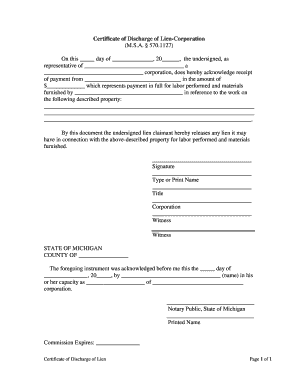
A Michigan Discharge Lien is a formal instrument used to remove or release a previously recorded lien against real property or personal property in Michigan after the underlying obligation has been satisfied or settled. The discharge is recorded in the county land records or delivered to the lienholder and affected parties so the public record no longer shows the encumbrance. Use of an accurate discharge document clears title, reduces risk for subsequent purchasers or lenders, and documents the release of the creditor’s security interest for the parties involved.

When a Discharge Lien Benefits Your Title and Transactions

A clear, properly recorded Michigan Discharge Lien restores marketable title and prevents surprises during sale, refinancing, or closing. It documents satisfaction of debt, stops continuing encumbrance search hits, and protects both payor and payee by creating a public record of release.

When a Discharge Lien Benefits Your Title and Transactions

Who Typically Prepares and Relies on a Discharge Lien

Several professional roles commonly prepare, file, or rely on a discharge lien when a recorded encumbrance must be removed from public records.

  • Title companies and closing agents who verify clear title prior to sale or refinance.
  • Lenders and lienholders who execute releases after satisfaction of loans, judgments, or secured obligations.
  • Property owners and attorneys who request, draft, and record discharges to restore unencumbered title.

Simple Steps to Complete and Record a Michigan Discharge Lien

Follow a concise sequence to prepare, authenticate, and record the discharge to ensure the lien is removed from public records without delay.

  • 01
    Prepare Document: Draft discharge referencing the recorded lien and include legal property description.
  • 02
    Obtain Signatures: Have the recorded lienholder sign, and include corporate signatory language if needed.
  • 03
    Notarize: Complete notary acknowledgement per Michigan recording office requirements.
  • 04
    Record: Submit to county register of deeds for recording and obtain recorded instrument number.

Where to File and How the Recording Flow Usually Works

A discharge lien is typically delivered to the county register of deeds in the county where the original lien was recorded; recording makes the release part of the permanent public record.

  • Locate Original: Identify the county and the recorded instrument to reference the exact lien.
  • Complete Discharge: Prepare a discharge form that cites the original instrument details and property description.
  • Submit to Recorder: File the discharge with the county register of deeds using their accepted method.
  • Receive Confirmation: Obtain a recorded copy or instrument number for your records and for title clearance.

How Discharge Liens Are Shared and Accepted Electronically

Electronic delivery and eRecording options speed processing, but acceptance rules vary by county and document type.

  • Email / PDF: Send unsigned drafts securely as PDF for review and signature.
  • eRecording Services: Many counties accept eRecorded discharges via approved e-filing vendors.
  • E-signature Platforms: Use compliant platforms for authentication and audit trails when allowed.

Essential Elements of a Professional Michigan Discharge Lien

A precise discharge document reduces recorder rejections and protects future title transactions. Include each element below to produce a defensible release.

Exact Reference

Cite the recorded instrument title, book/page or instrument number, recording date, and county to uniquely identify the lien being released.
Clear Parties

Name the lienholder and debtor exactly as in the recorded lien, and identify any corporate capacity or trustee role to avoid ambiguity.

Property Identification

Include the full legal description or parcel ID; street addresses alone are often insufficient for recorder indexing.

Authority to Release

State consideration or reason for discharge (payment, settlement, satisfaction) and include corporate resolution or power of attorney if required.

Notary Acknowledgement

Provide the notarization block formatted to county specification to validate the signer’s identity and signature.

Recording Directions

Include return-to instructions and contact information so the recorder returns the recorded copy to the correct party.

Common Formats and Supporting Files for Discharge Filings

Recorders accept a limited set of formats for eRecording; maintain both signed originals and electronic copies in compatible formats.

Signed PDF

Portable Document Format with an embedded signature or scanned signed original is widely accepted for electronic and physical recordkeeping.

PDF/A Archive

Long-term archival format for retention; use PDF/A when preserving an immutable copy for compliance.

DOCX Drafts

Editable word-processing drafts for internal review; convert to final signed PDF before recording.

CSV / Metadata

Spreadsheet or metadata files for batch eRecording submissions or bulk index mapping when supported by the recorder.

Timing Considerations and Expected Processing Steps

Recording promptly ensures the release clears title searches; statutory deadlines for related litigation or enforcement may affect timing.

Record Promptly:

Record the discharge as soon as practical to remove the lien from public search results.

Notary Availability:

Schedule notarization early; some notaries require appointment and may have travel fees.

County Processing:

Recording turnaround varies by county and ranges from same-day to several business days.

Title Clearance:

Allow title companies time to confirm release before closing; delayed recording can delay closings.

Retention Requirement:

Keep the recorded copy and related proofs per applicable record retention rules.

Key Milestones from Satisfaction to Recorded Release

Track these sequential stages to move from payment or settlement to a recorded discharge that clears public records.

01

Confirm Satisfaction

Obtain written proof the debt or obligation has been paid or settled.

02

Execute Release

Lienholder signs the discharge document or delivers an executed release instrument.

03

Notarize Signature

Complete any required notarization or acknowledgment before submission to recorder.

04

Record with County

Submit to the county register of deeds for recording and obtain recorded instrument confirmation.

Frequent Pitfalls to Avoid When Preparing a Discharge Lien

  • Using an incorrect instrument number or recording reference which can cause the recorder to reject or misindex the discharge.
  • Submitting an unsigned or improperly notarized discharge when the recorder requires an acknowledgment for acceptance.
  • Referencing only a street address rather than the recorded legal description, leading to indexing errors or incomplete release.
  • Failing to include return-to instructions so the recorder cannot return the recorded copy to the correct party.

Typical Signers and Their Roles

Title Officer

A title officer reviews the recorded discharge for accuracy, confirms the original lien reference, and coordinates recording to ensure the release satisfies title search requirements prior to closing.

Lienholder Agent

An authorized representative of the lienholder signs the discharge, provides proof of authority or payment, and ensures the release is delivered to the recorder and relevant parties.

Security and Compliance Considerations for Electronic Discharges

Encryption: TLS 1.2/1.3 in transit; AES-256 at rest
Authentication: Multi-factor and signer authentication options
Audit Trail: Time-stamped signing logs and IP addresses
HIPAA: HIPAA-compliant workflows (BAA required)
Compliance: SOC 2 Type II and ISO 27001 certifications
Retention: Secure storage with access controls

Consequences of an Incorrect or Unrecorded Discharge

Uncleared Title: Recorded lien remains searchable
Closing Delays: Real estate transactions can be postponed
Liability: Signer or preparer may face liability for misstatements
Recorder Rejection: Document may be refused for indexing errors
Cost: Additional fees for re-recording or corrections
Disputes: Potential title objections or litigation

How a Discharge Lien Differs from Similar Instruments

Understanding distinctions helps choose the correct instrument: a discharge removes an existing lien, while related documents serve different functions.

Document Type Discharge Release Deed
Purpose remove lien convey interest
Notarization often required required
Recording Location county register county register
Typical Use clear title transfer ownership

eSignature Pricing Snapshot for Discharge Lien Workflows

Comparing eSignature vendors helps choose a platform that supports notarization, audit trails, and bulk or enterprise workflows for frequent discharge processing.

signNow DocuSign Adobe Sign PandaDoc HelloSign
Starting Price $8/user/mo $15/user/mo $14/user/mo $19/user/mo $15/user/mo
Free Trial 7-day trial Yes Yes Yes Yes
Bulk Send Yes Yes Yes Yes No
Audit Trail Yes Yes Yes Yes Yes
HIPAA Compliant Yes Yes Yes No No

How to Amend or Revise an Existing Discharge

If a recorded discharge requires correction or amendment, follow an orderly checklist to produce and record the amendment correctly.

01

Identify Error:

Confirm the specific inaccuracy and gather supporting documentation
02

Draft Amendment:

Prepare a correcting instrument referencing the recorded discharge
03

Obtain Signatures:

Secure signatures and notarization from authorized parties
04

Record Amendment:

File the corrective instrument with the same county recorder
05

Notify Parties:

Send recorded copies to title companies and affected stakeholders
06

Retain Records:

Keep both original and recorded corrected copies for retention period

Frequently Asked Questions About Michigan Discharge Liens

Answers to common questions about preparation, notarization, recording, and correcting discharge liens in Michigan and similar jurisdictions.


Need help? Contact support

be ready to get more
Join over 28 million airSlate SignNow users