Establishing secure connection…Loading editor…Preparing document…

Minnesota Levy

This template is fully customizable. Edit the text, fill out the fields, and send it for signature. Give it a try!
Minnesota Levy

What the Minnesota Levy Is and when it applies

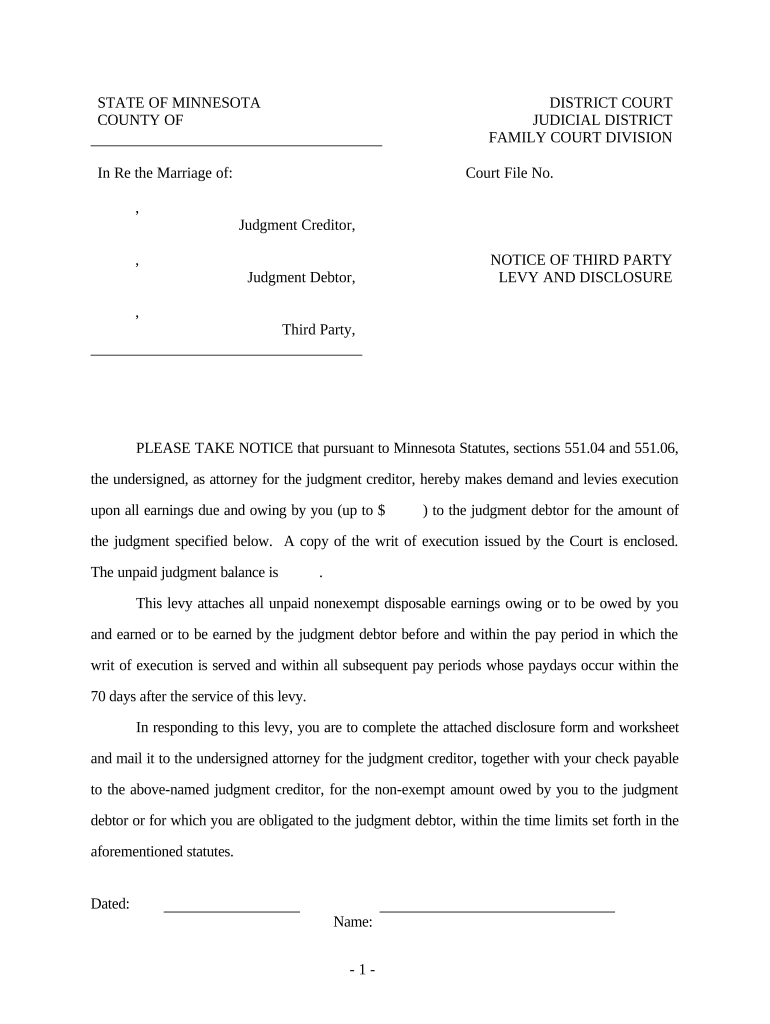
A Minnesota Levy is an administrative enforcement action used to collect unpaid state tax liabilities or other state-ordered debts by seizing specified assets or directing third parties to turn over funds. Common levy targets include bank accounts, wages, and personal property. The levy typically follows assessment, demand for payment, and final notice; it may be issued by the Minnesota Department of Revenue or by a court under state law. This guide explains required content, filing routes, timelines, and how electronic completion and e-signatures interact with enforcement workflows.

Why understanding a Minnesota Levy matters

A clear, compliant levy minimizes the risk of improper collection, reduces disputes, and preserves taxpayer appeal rights while ensuring state agencies access owed funds.

Why understanding a Minnesota Levy matters

Who prepares, serves, or responds to a Minnesota Levy

Several parties interact with a levy: state enforcement staff, tax attorneys, payroll administrators, bank compliance officers, and the taxpayer or their representative.

  • State Revenue Officials who prepare and file the levy and track enforcement actions.
  • Banks and Employers who receive levy service and must follow withholding or turnover rules.
  • Taxpayers and Representatives who may request release, negotiate payment, or file appeals.

Core components of a professional Minnesota Levy document

A complete levy includes identifying details, legal authority, clear specification of property or funds to be seized, service instructions, and proof of service. Missing items delay enforcement or create legal vulnerability.

Taxpayer ID

Include full legal name and taxpayer identification number so the levy attaches to the correct account; errors can misdirect enforcement and cause liability for the servicer.
Amount Owed

Show principal, interest, and statutory penalties as of the levy date with a clear total; ambiguous amounts lead to disputes and possible over- or under-collection.

Legal Authority

Cite the issuing authority (for example, state revenue statute or court order) and case or assessment number to prove enforceability and traceability.

Property Description

Specify levy type — bank account, wages, or tangible property — with account numbers, employer payroll ID, or physical location details for precise execution.

Service Instructions

Provide how, when, and where the levy must be served, including the return of service address and acceptable methods for delivery to third parties.

Signature & Date

Authorized signature block with printed name, title, and date; when electronic, include audit trail metadata to document signer identity and timing.

Step-by-step: preparing and issuing a Minnesota Levy

Follow these four high-level steps to prepare a compliant levy and document service for enforcement and appeals.

  • 01
    Verify Debt: Confirm assessment, totals, and taxpayer identity before drafting the levy.
  • 02
    Draft Levy: Populate required fields and cite legal authority; include clear property description.
  • 03
    Serve Levy: Deliver to the garnishee or custodian using authorized service methods and retain proof.
  • 04
    File Proof: Submit the return of service and any supporting documentation to the issuing office promptly.

How levy enforcement typically progresses

Levy enforcement follows a predictable flow from assessment to collection; documentation at each step supports legal compliance and dispute resolution.

  • Assessment: Agency determines tax or debt amount due following audit or return review.
  • Notice & Demand: Taxpayer receives demand for payment with a stated deadline and appeal instructions.
  • Levy Issuance: Agency issues levy to the identified custodian (bank, employer, or holder of property).
  • Collection: Custodian remits funds or withholds wages per levy instructions; agency applies payments and updates records.

Common pitfalls that delay levy processing

  • Incorrect taxpayer name or TIN that prevents matching to state records and misroutes the levy.
  • Vague property description or missing account numbers that leave the custodian unable to act.
  • Failure to document or file proof of service, compromising the agency's enforcement record and appeal defensibility.
  • Using outdated levy forms or omitting the issuing authority citation, resulting in rejection or rescission.

Risks and penalties associated with improper levy handling

Additional Interest: Accrues on unpaid tax balances until paid.
Penalties: Statutory penalties may increase the total owed.
Custodian Liability: Banks or employers risk liability for incorrect turnover.
Contempt or Fines: Willful noncompliance can lead to court sanctions.
Account Freezes: Immediate access restrictions can disrupt business operations.
Appeals Delays: Incomplete records weaken taxpayer appeal positions.

Setting up an online levy workflow

Configure a digital workflow to create, sign, serve, and archive levy documents while maintaining a clear audit trail.

Field Configuration
Document Upload Accept PDF or DOCX; enable version control and OCR.
Signature Fields Place signers, dates, and checkboxes; require signer identification.
Service Method Select certified mail, in-person, or secure electronic service.
Record Retention Store signed copies and proof-of-service logs for compliance.

Digital delivery and signing requirements for levy documents

Ensure the electronic platform you use supports secure signing, robust audit trails, and lawful service methods for levy documents.

  • Integrations: Salesforce, NetSuite, Microsoft 365 support.
  • File Formats: PDF and DOCX accepted.
  • Authentication: Email, SMS, or advanced options.

Typical timelines and processing expectations for levy actions

Processing times vary by agency and service method; the following items represent typical milestones and what to expect at each point.

Assessment to Demand:

Agency issues assessment and demand following review; timeframe varies by case.

Notice Period:

Taxpayers generally receive a notice with rights to appeal before enforced levy.

Service of Levy:

Once served, bank levies often take effect immediately; wage levies act on subsequent payroll cycles.

Proof-of-Service Filing:

File returns of service promptly to document compliance with procedural rules.

Release or Satisfaction:

Agency issues release after payment or successful appeal; processing time depends on agency workload.

eSignature platform pricing and capability comparison for levy workflows

Comparing core pricing and capabilities helps determine which eSignature provider aligns with volume, compliance, and authentication needs for levy processing.

signNow DocuSign Adobe Sign PandaDoc HelloSign
Starting Price $8/user/mo $15/user/mo $14/user/mo $19/user/mo $15/user/mo
Free Trial 7-day trial Varies by plan Varies by plan Varies by plan Varies by plan
Bulk Send Yes Yes Yes Yes Yes
Audit Trail Yes Yes Yes Yes Yes
HIPAA Compliant Yes Yes Yes No No
Envelope Cap No cap 100 envelopes/user/year Varies by plan Varies by plan Varies by plan

Security and compliance essentials for electronic levy documents

Encryption: TLS 1.2/1.3 and AES-256 at rest
ESIGN/UETA: E-signature legal framework support
Audit Trail: Comprehensive timestamp and IP logs
HIPAA Support: BAA available when PHI is present
21 CFR Part 11: Compliant options for regulated records
Certifications: SOC 2 Type II and ISO 27001 available

Minnesota Levy — frequently asked questions and troubleshooting

Answers address common procedural, technical, and legal questions about preparing, serving, and electronically signing levy documents.


Need help? Contact support

be ready to get more
Join over 28 million airSlate SignNow users