Establishing secure connection… Loading editor… Preparing document…
Navigation

Fill and Sign the Minutes Board Directors Sample Form

Fill and Sign the Minutes Board Directors Sample Form

How it works

Open the document and fill out all its fields.
Apply your legally-binding eSignature.
Save and invite other recipients to sign it.

Rate template

4.5
34 votes
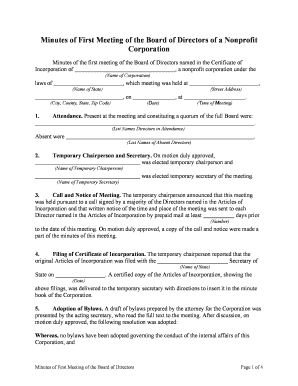
Minutes of First Meeting of the Board of Directors Page 1 of 4 Minutes of First Meeting of the Board of Directors of a Nonprofit Corporation Minutes of the first meeting of the Board of Directors named in the Certificate of Incorporation of , a nonprofit corporation under the (Name of Corporation) laws of , which meeting was held at , (Name of State)(Street Address) , on , at . (City, County, State, Zip Code) (Date)(Time of Meeting) 1.Attendance. Present at the meeting and constituting a quorum of the full Board were: . (List Names Directors in Attendance) Absent were . (List Names of Absent Directors) 2. Temporary Chairperson and Secretary. On motion duly approved, was elected temporary chairperson and (Name of Temporary Chairperson) was elected temporary secretary of the meeting. (Name of Temporary Secretary) 3. Call and Notice of Meeting. The temporary chairperson announced that this meeting was held pursuant to a call signed by a majority of the Directors named in the Articles of Incorporation and that written notice of the time and place of the meeting was sent to each Director named in the Articles of Incorporation by prepaid mail at least days prior (Number) to the date of this meeting. On motion duly approved, a copy of the call and notice were made a part of the minutes of this meeting.4. Filing of Certificate of Incorporation. The temporary chairperson reported that the original Articles of Incorporation was filed with the Secretary of (Name of State) State on . A certified copy of the Articles of Incorporation, showing the (Date) above filings, was delivered to the temporary secretary with directions to insert it in the minute book of the Corporation.5. Adoption of Bylaws. A draft of bylaws prepared by the attorney for the Corporation was presented by the acting secretary, who read the full text to the meeting. After discussion, on motion duly approved, the following resolution was adopted: Whereas, no bylaws have been adopted governing the conduct of the internal affairs of this Corporation; and Minutes of First Meeting of the Board of Directors Page 2 of 4Whereas, there has been presented to this meeting a set of bylaws suitable for the purpose, and their adoption is in the best interest of the Corporation;Resolved, that the bylaws presented to this meeting are adopted as the bylaws of this Corporation, effective immediately;Further resolved, that the Bylaws be authenticated as such by the certificate of the Secretary of this Corporation and placed in the Minute Book, and that a current, full and true copy of the Bylaws, certified by the secretary, be kept at the principal office of the Corporation for inspection by members at all reasonable times during business hours.6.Election of Officers. The Chairperson announced that the Bylaws provided for the election of a president, vice-president, secretary, and treasurer, and that nominations were in order for the election of such officers. The following slate of officers was then nominated: Name of OfficerName of President: Name of Vice-President: Name of Secretary: Name of Treasurer: There being no further nominations, by motion duly approved, the slate of nominees was elected to hold office for the terms provided in the Bylaws. Each elected officer was present at the meeting and assumed the duties of office. The President replaced the temporary chairperson as presiding officer of the meeting. The Secretary replaced the temporary secretary of the meeting. 7. Bond for Treasurer. On motion made, seconded, and unanimously carried, it was resolved that the Treasurer be required to post a corporate surety bond in the amount of $ before assuming the duties of that office, and that the President be authorized to approve the bond as to its sufficiency and form. 8. Adoption of Seal. On motion duly approved, it was resolved that the Corporation adopt as its seal the words, figures, and design impressed on these Minutes consisting of the words , and the words and figures "Incorporated on (Name of Corporation) . .” (Date)(Name of State) 9. Depository for and Withdrawal of Funds. To provide a depository for the funds of the Corporation and to authorize those who may withdraw such funds on behalf of the Corporation, on motion duly approved, the following resolution was adopted: Resolved, that , a national banking corporation (the (Name of Bank) Minutes of First Meeting of the Board of Directors Page 3 of 4Depository) is selected as a depository for the funds of this Corporation, that accounts shall be governed by the rules, regulations, Bylaws, and practices, present and future, of the Depository, including interest and service charges;Further resolved, that the officers of this Corporation set forth above, who have been regularly elected or appointed are authorized, on signature of any two of them, to withdraw those funds from the Depository on the check of the Corporation, signed as provided above, and that the officers authorized to withdraw funds are authorized to indorse and receive payment of bills and notes payable to the Corporation;Further resolved, that the Depository is authorized to pay any such instruments so indorsed and presented to it for payment, including those drawn to the individual order of any officer or any other person authorized to sign the instruments; andFurther resolved, that the authority conferred by these Minutes shall remain in full force and effect until written notice of its revocation by the Board of Directors of this Corporation is received by the Depository, and that the Secretary is authorized and directed to deliver to the Depository a certified copy of this Resolution and to certify to it the true and correct signatures of the above-named officers.10. Application for Tax Exemption. The matter of corporate exemption from taxation was then discussed. After discussion, on motion duly approved, the following resolution was adopted: Whereas this Corporation is organized for charitable purposes within the meaning of § 501(c)(3) of the Internal Revenue Code of 1986 [26 U.S.C.A. § 501(c)(3)]; andWhereas that and other statutes provide that Corporations organized for such charitable purposes are exempt from federal and state income taxes, franchise taxes, property taxes, and other forms of taxes and fees;Resolved that the Secretary of this Corporation is authorized to make application for such exemptions, and to do all things that may be necessary to apply for and establish such exemptions, including the certification and transmission to the Internal Revenue Service of copies of the Articles of the Incorporation, Bylaws, and financial statements of this Corporation and furnishing to the appropriate state, county, and municipal officials, the copy of the Internal Revenue Service's letter of exemption or other evidence establishing that the Corporation has applied in good faith for the federal tax exemption, together with such other documents as are necessary for the Corporation to establish such exemptions.11. Payment of Organizational Expenses. Payment for legal services in the formation and organization of this Corporation was next considered. The Secretary read to the meeting a letter from advising that the fee for his professional (Name of Attorney) services in the organization and formation of this Corporation is $ . After discussion, on motion duly approved, the following resolution was adopted: Minutes of First Meeting of the Board of Directors Page 4 of 4Resolved that the fair value to this Corporation of legal services performed in the formation and organization of the Corporation is $ , and that the Treasurer is authorized and directed to pay to by check of this Corporation, the (Name of Attorney) above amount.12. Adjournment. There being no further business to come before the meeting, on motion duly made, seconded, and unanimously carried, the meeting was declared adjourned.The foregoing Minutes of First Meeting of the Board of Directors of are hereby certified to be a true copy of the (Name of Corporation) Minutes of First Meeting of the Board of Directors of (Name of Corporation) adopted by the Directors of and effective as of the (Name of Corporation) . (Date) SEAL (Signature of Secretary) (Printed Name of Signature of Secretary)

Valuable advice on finishing your ‘Minutes Board Directors Sample’ online

Are you fatigued by the inconvenience of handling paperwork? Search no further than airSlate SignNow, the leading electronic signature solution for individuals and businesses. Wave farewell to the monotonous procedure of printing and scanning documents. With airSlate SignNow, you can conveniently complete and sign paperwork online. Utilize the powerful features bundled into this intuitive and cost-effective platform and transform your method of document management. Whether you need to authorize forms or gather electronic signatures, airSlate SignNow manages it all effortlessly, with just a few clicks.

Follow this detailed guide:

  1. Sign in to your account or sign up for a complimentary trial with our service.
  2. Click +Create to upload a file from your device, cloud storage, or our form library.
  3. Access your ‘Minutes Board Directors Sample’ in the editor.
  4. Click Me (Fill Out Now) to finish the form on your end.
  5. Add and designate fillable fields for other participants (if required).
  6. Proceed with the Send Invite settings to seek eSignatures from others.
  7. Download, print your version, or convert it into a reusable template.

No need to worry if you require collaboration with your colleagues on your Minutes Board Directors Sample or need to send it for notarization—our platform provides you with everything necessary to achieve such tasks. Sign up with airSlate SignNow today and enhance your document management to a new level!

Here is a list of the most common customer questions. If you can’t find an answer to your question, please don’t hesitate to reach out to us.

Need help? Contact Support

The best way to complete and sign your minutes board directors sample form

Save time on document management with airSlate SignNow and get your minutes board directors sample form eSigned quickly from anywhere with our fully compliant eSignature tool.

How to Sign a PDF Online How to Sign a PDF Online

How to fill out and sign forms online

In the past, coping with paperwork required pretty much time and effort. But with airSlate SignNow, document management is quick and simple. Our robust and user-friendly eSignature solution allows you to effortlessly fill out and electronically sign your minutes board directors sample form online from any internet-connected device.

Follow the step-by-step guidelines to eSign your minutes board directors sample form template online:

  • 1.Sign up for a free trial with airSlate SignNow or log in to your account with password credentials or SSO authorization option.
  • 2.Click Upload or Create and import a file for eSigning from your device, the cloud, or our form library.
  • 3.Click on the file name to open it in the editor and utilize the left-side menu to fill out all the blank fields properly.
  • 4.Place the My Signature field where you need to approve your form. Provide your name, draw, or import an image of your regular signature.
  • 5.Click Save and Close to accomplish editing your completed form.

Once your minutes board directors sample form template is ready, download it to your device, save it to the cloud, or invite other people to eSign it. With airSlate SignNow, the eSigning process only requires a few clicks. Use our robust eSignature solution wherever you are to handle your paperwork effectively!

How to Sign a PDF Using Google Chrome How to Sign a PDF Using Google Chrome

How to complete and sign paperwork in Google Chrome

Completing and signing paperwork is simple with the airSlate SignNow extension for Google Chrome. Installing it to your browser is a fast and efficient way to deal with your paperwork online. Sign your minutes board directors sample form template with a legally-binding eSignature in a few clicks without switching between programs and tabs.

Follow the step-by-step guide to eSign your minutes board directors sample form in Google Chrome:

  • 1.Go to the Chrome Web Store, find the airSlate SignNow extension for Chrome, and add it to your browser.
  • 2.Right-click on the link to a form you need to eSign and select Open in airSlate SignNow.
  • 3.Log in to your account with your password or Google/Facebook sign-in option. If you don’t have one, you can start a free trial.
  • 4.Use the Edit & Sign menu on the left to complete your sample, then drag and drop the My Signature field.
  • 5.Insert an image of your handwritten signature, draw it, or simply type in your full name to eSign.
  • 6.Make sure all the details are correct and click Save and Close to finish modifying your form.

Now, you can save your minutes board directors sample form sample to your device or cloud storage, send the copy to other people, or invite them to electronically sign your document via an email request or a protected Signing Link. The airSlate SignNow extension for Google Chrome improves your document workflows with minimum effort and time. Start using airSlate SignNow today!

How to Sign a PDF in Gmail How to Sign a PDF in Gmail How to Sign a PDF in Gmail

How to complete and sign documents in Gmail

When you receive an email with the minutes board directors sample form for signing, there’s no need to print and scan a file or save and re-upload it to a different tool. There’s a much better solution if you use Gmail. Try the airSlate SignNow add-on to quickly eSign any documents right from your inbox.

Follow the step-by-step guide to eSign your minutes board directors sample form in Gmail:

  • 1.Go to the Google Workplace Marketplace and look for a airSlate SignNow add-on for Gmail.
  • 2.Set up the tool with a corresponding button and grant the tool access to your Google account.
  • 3.Open an email with an attachment that needs approval and use the S sign on the right panel to launch the add-on.
  • 4.Log in to your airSlate SignNow account. Opt for Send to Sign to forward the file to other people for approval or click Upload to open it in the editor.
  • 5.Drop the My Signature field where you need to eSign: type, draw, or upload your signature.

This eSigning process saves efforts and only takes a few clicks. Take advantage of the airSlate SignNow add-on for Gmail to update your minutes board directors sample form with fillable fields, sign forms legally, and invite other people to eSign them al without leaving your inbox. Improve your signature workflows now!

How to Sign a PDF on a Mobile Device How to Sign a PDF on a Mobile Device How to Sign a PDF on a Mobile Device

How to fill out and sign forms in a mobile browser

Need to quickly submit and sign your minutes board directors sample form on a smartphone while working on the go? airSlate SignNow can help without the need to set up extra software apps. Open our airSlate SignNow solution from any browser on your mobile device and add legally-binding electronic signatures on the go, 24/7.

Follow the step-by-step guide to eSign your minutes board directors sample form in a browser:

  • 1.Open any browser on your device and go to the www.signnow.com
  • 2.Register for an account with a free trial or log in with your password credentials or SSO authentication.
  • 3.Click Upload or Create and pick a file that needs to be completed from a cloud, your device, or our form catalogue with ready-to go templates.
  • 4.Open the form and complete the empty fields with tools from Edit & Sign menu on the left.
  • 5.Add the My Signature area to the form, then type in your name, draw, or upload your signature.

In a few simple clicks, your minutes board directors sample form is completed from wherever you are. When you're finished editing, you can save the document on your device, build a reusable template for it, email it to other people, or invite them electronically sign it. Make your documents on the go prompt and efficient with airSlate SignNow!

How to Sign a PDF on iPhone How to Sign a PDF on iPhone

How to fill out and sign forms on iOS

In today’s business world, tasks must be accomplished rapidly even when you’re away from your computer. Using the airSlate SignNow app, you can organize your paperwork and sign your minutes board directors sample form with a legally-binding eSignature right on your iPhone or iPad. Set it up on your device to conclude contracts and manage documents from anyplace 24/7.

Follow the step-by-step guide to eSign your minutes board directors sample form on iOS devices:

  • 1.Open the App Store, find the airSlate SignNow app by airSlate, and install it on your device.
  • 2.Open the application, tap Create to add a form, and select Myself.
  • 3.Choose Signature at the bottom toolbar and simply draw your autograph with a finger or stylus to eSign the sample.
  • 4.Tap Done -> Save right after signing the sample.
  • 5.Tap Save or use the Make Template option to re-use this paperwork in the future.

This process is so straightforward your minutes board directors sample form is completed and signed in a couple of taps. The airSlate SignNow app works in the cloud so all the forms on your mobile device remain in your account and are available whenever you need them. Use airSlate SignNow for iOS to improve your document management and eSignature workflows!

How to Sign a PDF on Android How to Sign a PDF on Android

How to fill out and sign paperwork on Android

With airSlate SignNow, it’s easy to sign your minutes board directors sample form on the go. Install its mobile app for Android OS on your device and start enhancing eSignature workflows right on your smartphone or tablet.

Follow the step-by-step guidelines to eSign your minutes board directors sample form on Android:

  • 1.Go to Google Play, find the airSlate SignNow app from airSlate, and install it on your device.
  • 2.Sign in to your account or register it with a free trial, then add a file with a ➕ button on the bottom of you screen.
  • 3.Tap on the uploaded file and choose Open in Editor from the dropdown menu.
  • 4.Tap on Tools tab -> Signature, then draw or type your name to electronically sign the form. Complete blank fields with other tools on the bottom if needed.
  • 5.Use the ✔ key, then tap on the Save option to finish editing.

With an easy-to-use interface and full compliance with major eSignature requirements, the airSlate SignNow app is the best tool for signing your minutes board directors sample form. It even operates without internet and updates all form adjustments when your internet connection is restored and the tool is synced. Complete and eSign forms, send them for approval, and generate multi-usable templates anytime and from anywhere with airSlate SignNow.

Sign up and try Minutes board directors sample form
  • Close deals faster
  • Improve productivity
  • Delight customers
  • Increase revenue
  • Save time & money
  • Reduce payment cycles