Establishing secure connection… Loading editor… Preparing document…
Navigation

Fill and Sign the Mn Documents Form
Fill and Sign the Mn Documents Form

How it works

Open the document and fill out all its fields.
Apply your legally-binding eSignature.
Save and invite other recipients to sign it.

Rate template

4.4
59 votes
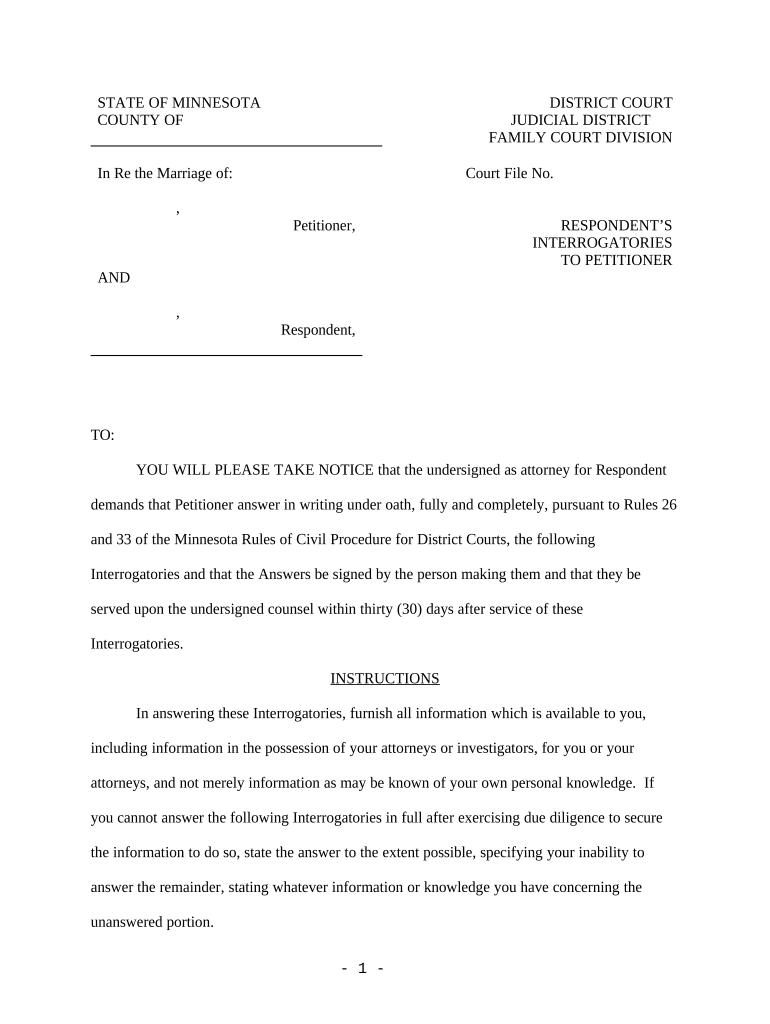
STATE OF MINNESOTA DISTRICT COURT COUNTY OF JUDICIAL DISTRICT FAMILY COURT DIVISION In Re the Marriage of: Court File No. , Petitioner, RESPONDENT’S INTERROGATORIES TO PETITIONER AND , Respondent, TO: YOU WILL PLEASE TAKE NOTICE that the undersigned as attorney for Respondent demands that Petitioner answer in writing under oath, fully and completely, pursuant to Rules 26 and 33 of the Minnesota Rules of Civil Procedure for District Courts, the following Interrogatories and that the Answers be signed by the person making them and that they be served upon the undersigned counsel within thirty (30) days after service of these Interrogatories. INSTRUCTIONS In answering these Interrogatories, furnish all information which is available to you, including information in the possession of your attorneys or investigators, for you or your attorneys, and not merely information as may be known of your own personal knowledge. If you cannot answer the following Interrogatories in full after exercising due diligence to secure the information to do so, state the answer to the extent possible, specifying your inability to answer the remainder, stating whatever information or knowledge you have concerning the unanswered portion. - 1 - These Interrogatories shall be deemed to be continuing until and during the course of trial. Information sought by these Interrogatories that you obtain after you serve your answers must be disclosed by supplementary answer. It is demanded that the Interrogatory precede its answer as required by Rule 33.01 (4) of the Minnesota Rules of Civil Procedure. Pursuant to Rule 34 of the Minnesota Rules of Civil Procedure, please attach as exhibits all documents which have been prepared in connection with this proceeding or upon which you may expect witnesses to rely or such other documents as may be requested in the accompanying Request for Production of Documents. Where a question can be answered by copying a document, then please do so and attach a copy of the document to your answers. INTERROGATORY NO. 1 Present Employment . For each current employer, state the name, address, and telephone number of that employer, and also state: A) The date you commenced your employment; B) Your job title or position; C) Your gross monthly salary if applicable or the average of total gross monthly wages paid to you this year; D) State the amount presently deducted from your present gross salary each pay period and describes the character of each deduction. You are specifically requested to attach to your answers to Interrogatories photocopies of the pay check stubs you have received from your employer(s) during the last twenty-four (24) months or such other evidence of income as verify your income for the last twenty-four (24) months; - 2 - INTERROGATORY 2 . Describe in detail your educational background and include the names and addresses of all institutions that you have attended, the dates of attendance, and a description of the degrees or certificates obtained. INTERROGATORY 3 . If you currently lack certification in any field in which you are degreed or have received training, describe in detail any and all requirements you must fulfill in order to obtain certification, how those requirements can be met, the time necessary to fulfill the requirements, and the costs of fulfilling the requirements. INTERROGATORY NO. 4 Other Income . State the amount, character, and source of any other income including but not limited to all payments of money or valuable property you have received from each source not set forth fully above in your answers to the foregoing interrogatories. Illustrative examples. The term other income as used in this interrogatory properly encompasses, merely by example , payments not set forth in answers to questions above received in compensation for other full-time, part-time, short-term, or irregular employment; all bonuses or commissions from any employers, clients, or principals; any payments you received in exchange for services performed by you for any businesses or clients; any form of dividend income, interest income, or gain on sale; trust or estate income; any regular periodic gifts from any source such as significant monthly or annual cash transfers from family or relatives; contributions by relatives to major purchases; and any grants or loans intended as student financial aid totaling more than your current tuition and fees at the time - 3 - payment was made, for past five (5) years. INTERROGATORY NO. 5 Business Expenses . For each business expense reimbursed to you by any employer, business, or other client in the last twelve (12) months, itemize the date of the expense, the name of the employer, business, or other client, the date of reimbursement, the name and address of the party to whom the expense was paid, and the purpose of the expense. Provide copies of all vouchers or other reimbursement requests submitted by you to any such employer for any such expense within said period. In the event there are no such vouchers, submit the itemized statements and/or charge slips for any such expense incurred on a personal or corporate credit card. INTERROGATORY NO. 6 Personal Financial Statements . If you have given a personal financial statement to any party within the last thirty-six (36) months, identify by name and address the person or corporation to whom each statement was given and the date of each statement and attach a copy of each such statement. INTERROGATORY NO. 7 Medical Treatment . Set forth with particularity any and all health care treatment you have sought or undergone for the last five (5) years to the date of the answers to these Interrogatories, whether sought of a medical doctor, nurse practitioner, clinical staff under a physician's direction, osteopath, chiropractor, herbalist, acupuncturist, hypnotist, physical therapist, weight-loss counselor, or any other practitioner of the healing or counseling arts, and with respect to each such incident set forth the names and addresses of the person to whom you went, the symptoms you described to each such person, the treatment you received and the result thereof. - 4 - INTERROGATORY NO. 8 Professional Evaluation. If you have been seen, tested, evaluated, or treated within the last five (5) years by any mental health care professional or any similar person such as a psychiatrist, psychologist, sociolog ist, social worker, family counselor, mental health consultant, marriage counselor, couples counselor, pastoral counselor (if paid specifically for consultations), chemical dependency counselor, or other practitioner of the healing or counseling arts, identify the professional by name, address and area of practice, state the date of each contact with the professional, explain the purpose of each contact, and indicate whether the contacts are continuing. INTERROGATORY NO. 9 Prescription Medication. Describe any prescription medication, which you presently take or have taken in the last twelve (12) months, the reason for the prescription, and the name and address of the physician ordering the prescription. INTERROGATORY NO. 10 Medications/Drugs . Set forth with detail the extent, purpose, and effect of your usage of any other various drugs, prescription medicines, psychoactive substances, or controlled substances you use or have used within the last five (5) years. INTERROGATORY NO. 11 Describe in detail any vacations, fishing trips, hunting trips, or similar journeys out of the Twin Cities metropolitan area you have taken in the last three years. INTERROGATORY NO. 12 Describe in detail any boats or vehicles including motorcycles, four-wheelers, and recreational watercraft owned or controlled by you or registered in your name. INTERROGATORY NO. 18 - 5 - Documents Requested. If any of the documents requested in the Request for Production of Documents previously served has been destroyed, please list the date of its destruction, the reason therefore, and the identity of the person who authorized such destruction. If you have been unable to locate any of the documents requested in the Request for Production of Documents served contemporaneously with these Interrogatories, please describe all attempts to locate such documents. INTERROGATORY NO. 19 State the nature and exact present location of any documents reflecting any of the information requested above. The effect of these interrogatories is continuing, and Respondent shall be required to produce promptly updated responses reflecting current information through judgment or trial. Dated: Name: Title: Address: Address: City, State, Zip: Phone: Fax: E-Mail: Attorney Reg. No.: CERTIFICATION The undersigned attorney has read the foregoing request, response, or objection, and to the best of the signor's knowledge, information and belief, formed after reasonable inquiry, the same complies with Minnesota Rules of Civil Procedure 26.07. - 6 - Dated: Name: Title: Address: Address: City, State, Zip: Phone: Fax: E-Mail: Attorney Reg. No.: - 7 - STATE OF MINNESOTA DISTRICT COURT COUNTY OF       JUDICIAL DISTRICT FAMILY COURT DIVISION In Re the Marriage of: Court File No. , Petitioner, REQUESTS FOR PRODUCTION AND OF DOCUMENTS , Respondent, TO: RESPONDENT and attorney , , , Minnesota , FAX . Pursuant to Rule 34 of the Rules of Civil Procedure of the District Court of Minnesota, Petitioner requests that Respondent produce and permit Petitioner, or someone acting on Petitioner’s behalf, to inspect and copy documents and data compilations designated as follows: PLEASE NOTE THAT OBJECTION WILL BE MADE AT OR BEFORE THE TIME OF TRIAL TO ANY ATTEMPT TO INTRODUCE EVIDENCE WHICH IS SOUGHT BY THESE REQUEST FOR PRODUCTION OF DOCUMENTS AND TO WHICH FULL DISCLOSURE HAS NOT BEEN MADE. 1 . DOCUMENTS UNDERLYING ANSWERS TO INTERROGATORIES. Any and all documents, correspondence, memoranda or other writings identified in your Answers to Interrogatories, which Interrogatories have been served contemporaneously herewith. 2 . FINANCIAL STATEMENTS. Any and all financial statements or copies of such statements, furnished by you to any bank or other lender, or otherwise prepared, in the last five - 8 - (5) years. 3 . TAX RETURNS AND INCOME FORMS. Copies of your individual state and federal income tax returns (including all W-2 wage statements, K-1s, federal forms 1099, and any other schedules and attachments thereto) filed by you individually or jointly with your spouse, for the past five (5) tax years for which you filed. For any income tax returns not yet filed, provide copies of all W-2 wage statements, K-1s, federal forms 1099, and any other documents upon which you will rely in the preparation of said returns. 4 . CURRENT PAYROLL RECORDS. Copies of any and all pay stubs or summary statements of payroll amounts and deductions you have received from any of your employers during the current year or a verified statement from your employer, showing gross earnings, all deductions, and net take home pay. 5 . EMPLOYMENT AGREEMENT. Unless provided elsewhere, any employment agreement, consulting agreement, or any and all documents relating to your remuneration and other benefits from employment. 6 . FRINGE BENEFITS. All records showing any fringe benefits paid to you from any business entity including, but not limited to, auto expense, travel expense, personal living and entertainment expenses, life insurance, bonuses, accident and health insurance during the last five (5) years. 7 . REAL ESTATE. Copies of any and all files and records regarding real estate in which you currently have or claim an interest, including, without limitation, earnest money agreements, closing statements, appraisal reports, deeds, mortgages, contracts for deed, insurance policies, receipts for improvements and repairs, amortization schedules and current real estate tax statements. 8 . BROKERAGE STATEMENTS. Copies of all brokerage account statements for - 9 - the last five (5) years which will show all securities owned by you, including, but not limited to, stocks, bonds, stock options, convertible debentures, warrants, mutual funds, treasury bills, tax exempt municipal or government bonds, other such securities or contingent securities or any other such accounts owned by you individually or jointly with another or owned by a business in which you have an interest, showing name of issuer, certificate number, number of shares, cost or other basis information, offering memoranda, subscription agreements, appraisal reports, offers to buy or sell such securities, and current values. 9 . CASH ACCOUNT RECORDS. Your check register(s), bank statements, canceled checks, and account records regarding deposits and withdrawals for the last five years for each depository at which you had any checking or savings accounts (including cash, money market, certificates of deposit, trust certificates, cash equiva lencies, or other cash accumulation accounts, etc.) in your own name and/or jointly with any other party, or held or maintained by others on your behalf as your agent, including any business trust accounts and business accounts. 10 . FINANCIAL POSITION. Any and all other documents in your possession, custody or under your control which evidence your current financial position, living expenses and liabilities. 11 . WILLS OR TRUSTS. If you have created any wills or trusts, either irrevocable or revocable, provide copies of each will and/or trust instrument establishing such trust and all accounting received or prepared in the last three (3) years to the date hereof. 12. VEHICLE REGISTRATION. Provide copies of any vehicle registration documents including titles, transfer documents, or Department of Motor Vehicle register receipts showing ownership of any boat, motor vehicle, recreational vehicle, or recreational water craft owned by you in the last five (5) years. It is requested that the above-designated documents and data compilations be made - 10 - available for visual inspection and selective copying at the offices of , Attorney at Law, , , , Minnesota , within thirty (30) days from the date of these Requests. This discovery is continuing until judgment or trial. If additional requested documen tation becomes available, you are under a duty pursuant to Rule 26.05 of the Minnesota Rules of Civil Procedure to inform Petitioner’s counsel and to permit inspection and copying of it. Dated: ________________ ______________________________ (Name of Attorney) Attorney for Petitioner (Address) (Address) (City, State, Zip) (Telephone Number) (Fax Number) Attorney Reg. No. - 11 - CERTIFICATION The undersigned attorney has read the foregoing request, response, or objection, and to the best of the signor's knowledge, information and belief, formed after reasonable inquiry, the same complies with Minnesota Rules of Civil Procedure 26.07. Dated: ____________ ______________________________ (Name of Attorney) Attorney for Petitioner (Address) (Address) (City, State, Zip) (Telephone Number) (Fax Number) Attorney Reg. No. - 12 -

Useful tips for completing your ‘Mn Documents’ online

Are you fed up with the inconvenience of handling paperwork? Look no further than airSlate SignNow, the premier eSignature tool for individuals and businesses. Bid farewell to the monotonous process of printing and scanning documents. With airSlate SignNow, you can effortlessly complete and sign documents online. Take advantage of the powerful features embedded in this intuitive and cost-effective platform and transform your document handling approach. Whether you need to sign forms or gather eSignatures, airSlate SignNow manages everything seamlessly, with only a few clicks.

Adhere to this step-by-step guide:

  1. Log into your account or sign up for a free trial with our service.
  2. Click +Create to upload a file from your device, cloud storage, or our template repository.
  3. Open your ‘Mn Documents’ in the editor.
  4. Click Me (Fill Out Now) to fill out the form on your end.
  5. Add and allocate fillable fields for other participants (if needed).
  6. Proceed with the Send Invite settings to request eSignatures from others.
  7. Download, print your version, or convert it into a reusable template.

Don’t fret if you need to collaborate with others on your Mn Documents or send it for notarization—our solution provides you with everything required to complete such tasks. Sign up with airSlate SignNow today and elevate your document management to new levels!

Here is a list of the most common customer questions. If you can’t find an answer to your question, please don’t hesitate to reach out to us.

Need help? Contact Support

The best way to complete and sign your mn documents form

Save time on document management with airSlate SignNow and get your mn documents form eSigned quickly from anywhere with our fully compliant eSignature tool.

How to Sign a PDF Online How to Sign a PDF Online

How to complete and sign documents online

Previously, dealing with paperwork required pretty much time and effort. But with airSlate SignNow, document management is quick and easy. Our powerful and user-friendly eSignature solution enables you to easily fill out and electronically sign your mn documents form online from any internet-connected device.

Follow the step-by-step guide to eSign your mn documents form template online:

  • 1.Register for a free trial with airSlate SignNow or log in to your account with password credentials or SSO authentication.
  • 2.Click Upload or Create and add a file for eSigning from your device, the cloud, or our form library.
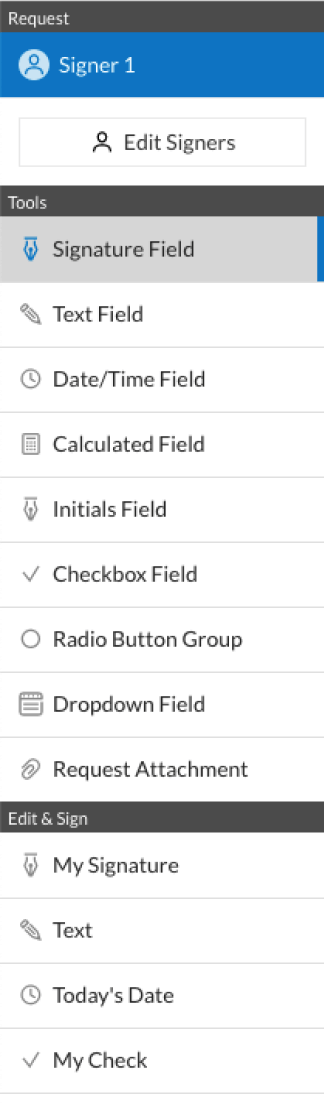
  • 3.Click on the document name to open it in the editor and utilize the left-side toolbar to complete all the blank areas accordingly.
  • 4.Drop the My Signature field where you need to eSign your form. Type your name, draw, or upload a photo of your handwritten signature.
  • 5.Click Save and Close to finish editing your completed document.

After your mn documents form template is ready, download it to your device, export it to the cloud, or invite other parties to eSign it. With airSlate SignNow, the eSigning process only requires a couple of clicks. Use our robust eSignature solution wherever you are to deal with your paperwork efficiently!

How to Sign a PDF Using Google Chrome How to Sign a PDF Using Google Chrome

How to fill out and sign forms in Google Chrome

Completing and signing paperwork is easy with the airSlate SignNow extension for Google Chrome. Adding it to your browser is a quick and beneficial way to manage your forms online. Sign your mn documents form sample with a legally-binding eSignature in a few clicks without switching between tools and tabs.

Follow the step-by-step guidelines to eSign your mn documents form template in Google Chrome:

  • 1.Go to the Chrome Web Store, search for the airSlate SignNow extension for Chrome, and add it to your browser.
  • 2.Right-click on the link to a document you need to approve and select Open in airSlate SignNow.
  • 3.Log in to your account with your credentials or Google/Facebook sign-in buttons. If you don’t have one, you can start a free trial.
  • 4.Use the Edit & Sign menu on the left to fill out your sample, then drag and drop the My Signature field.
  • 5.Add a photo of your handwritten signature, draw it, or simply type in your full name to eSign.
  • 6.Make sure all data is correct and click Save and Close to finish modifying your form.

Now, you can save your mn documents form sample to your device or cloud storage, send the copy to other people, or invite them to electronically sign your document with an email request or a secure Signing Link. The airSlate SignNow extension for Google Chrome improves your document workflows with minimum effort and time. Start using airSlate SignNow today!

How to Sign a PDF in Gmail How to Sign a PDF in Gmail How to Sign a PDF in Gmail

How to fill out and sign forms in Gmail

When you get an email containing the mn documents form for signing, there’s no need to print and scan a file or download and re-upload it to another program. There’s a better solution if you use Gmail. Try the airSlate SignNow add-on to rapidly eSign any documents right from your inbox.

Follow the step-by-step guidelines to eSign your mn documents form in Gmail:

  • 1.Navigate to the Google Workplace Marketplace and find a airSlate SignNow add-on for Gmail.
  • 2.Install the program with a corresponding button and grant the tool access to your Google account.
  • 3.Open an email with an attached file that needs signing and use the S symbol on the right sidebar to launch the add-on.
  • 4.Log in to your airSlate SignNow account. Select Send to Sign to forward the document to other parties for approval or click Upload to open it in the editor.
  • 5.Drop the My Signature option where you need to eSign: type, draw, or upload your signature.

This eSigning process saves efforts and only requires a couple of clicks. Use the airSlate SignNow add-on for Gmail to adjust your mn documents form with fillable fields, sign paperwork legally, and invite other parties to eSign them al without leaving your mailbox. Improve your signature workflows now!

How to Sign a PDF on a Mobile Device How to Sign a PDF on a Mobile Device How to Sign a PDF on a Mobile Device

How to complete and sign documents in a mobile browser

Need to quickly complete and sign your mn documents form on a mobile phone while doing your work on the go? airSlate SignNow can help without the need to set up additional software programs. Open our airSlate SignNow tool from any browser on your mobile device and create legally-binding eSignatures on the go, 24/7.

Follow the step-by-step guide to eSign your mn documents form in a browser:

  • 1.Open any browser on your device and go to the www.signnow.com
  • 2.Register for an account with a free trial or log in with your password credentials or SSO authentication.
  • 3.Click Upload or Create and pick a file that needs to be completed from a cloud, your device, or our form collection with ready-to go templates.
  • 4.Open the form and fill out the empty fields with tools from Edit & Sign menu on the left.
  • 5.Place the My Signature area to the form, then type in your name, draw, or add your signature.

In a few simple clicks, your mn documents form is completed from wherever you are. When you're done with editing, you can save the file on your device, build a reusable template for it, email it to other people, or ask them to eSign it. Make your paperwork on the go quick and efficient with airSlate SignNow!


How to Sign a PDF on iPhone How to Sign a PDF on iPhone

How to complete and sign paperwork on iOS

In today’s business community, tasks must be accomplished quickly even when you’re away from your computer. With the airSlate SignNow application, you can organize your paperwork and approve your mn documents form with a legally-binding eSignature right on your iPhone or iPad. Set it up on your device to conclude agreements and manage forms from anywhere 24/7.

Follow the step-by-step guidelines to eSign your mn documents form on iOS devices:

  • 1.Go to the App Store, find the airSlate SignNow app by airSlate, and set it up on your device.
  • 2.Open the application, tap Create to import a template, and select Myself.
  • 3.Opt for Signature at the bottom toolbar and simply draw your autograph with a finger or stylus to eSign the sample.
  • 4.Tap Done -> Save right after signing the sample.
  • 5.Tap Save or utilize the Make Template option to re-use this document later on.

This method is so easy your mn documents form is completed and signed within a couple of taps. The airSlate SignNow application works in the cloud so all the forms on your mobile device remain in your account and are available any time you need them. Use airSlate SignNow for iOS to enhance your document management and eSignature workflows!


How to Sign a PDF on Android How to Sign a PDF on Android

How to fill out and sign forms on Android

With airSlate SignNow, it’s easy to sign your mn documents form on the go. Install its mobile app for Android OS on your device and start enhancing eSignature workflows right on your smartphone or tablet.

Follow the step-by-step guide to eSign your mn documents form on Android:

  • 1.Open Google Play, search for the airSlate SignNow app from airSlate, and install it on your device.
  • 2.Log in to your account or create it with a free trial, then add a file with a ➕ key on the bottom of you screen.
  • 3.Tap on the uploaded file and choose Open in Editor from the dropdown menu.
  • 4.Tap on Tools tab -> Signature, then draw or type your name to eSign the sample. Complete empty fields with other tools on the bottom if needed.
  • 5.Utilize the ✔ key, then tap on the Save option to finish editing.

With an easy-to-use interface and full compliance with major eSignature standards, the airSlate SignNow app is the perfect tool for signing your mn documents form. It even operates without internet and updates all form modifications when your internet connection is restored and the tool is synced. Fill out and eSign forms, send them for approval, and make multi-usable templates whenever you need and from anyplace with airSlate SignNow.

Sign up and try Mn documents form
  • Close deals faster
  • Improve productivity
  • Delight customers
  • Increase revenue
  • Save time & money
  • Reduce payment cycles