Establishing secure connection…Loading editor…Preparing document…

Modification Agreement

This template is fully customizable. Edit the text, fill out the fields, and send it for signature. Give it a try!
Modification Agreement

What a Modification Agreement Is and When it Applies

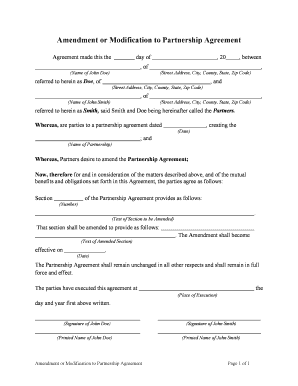
A Modification Agreement (also called an amendment) is a written document that changes one or more terms of an existing contract while leaving the remainder of the original agreement intact. It identifies the original agreement, describes the specific clauses being changed, states the effective date of the modification, and is executed by the parties with authority to bind the original contracting entities. Properly drafted amendments reduce ambiguity, preserve continuity between documents, and create an auditable record of the parties’ mutual intent to alter specific obligations or schedules under the original contract.

Why Use a Formal Modification Agreement

A formal Modification Agreement preserves clarity and enforceability by recording mutual consent to change contractual rights and duties. Under ESIGN (15 U.S.C. §7001) and UETA, electronic execution is valid where allowed by law, provided the parties demonstrate intent and can reproduce the record.

Why Use a Formal Modification Agreement

Who Typically Prepares and Signs Amendments

Parties should ensure the signatory has authority under the original agreement and that any required corporate approvals or board resolutions are documented before execution.

  • Landlords and tenants updating lease terms mid-term, such as rent or renewal dates.
  • Suppliers and customers adjusting delivery schedules, pricing, or scope of services.
  • Employers and employees altering compensation, duties, or contract durations.

Core Elements to Include in Every Amendment

A clear, well-structured Modification Agreement contains six core components that make the change enforceable and easy to reference alongside the original contract.

Parties

Full legal names and capacities of each party, matching the original agreement to avoid ambiguity or disputes about identity.
Reference

Identify the original contract by title, date, and section references so the amendment can be read in the correct context.

Amendments

Precise replacement language or strike-and-insert text that shows exactly what is deleted, replaced, or added, with cross-references to original sections.

Effective Date

The date when the amended terms take effect; this may differ from the execution date if the parties agree.

Consideration

If applicable, state any new consideration or mutual promises supporting the amendment to avoid enforceability challenges in some jurisdictions.

Execution

Signature blocks for authorized signers, with printed name, title, date, and any required witness or notary acknowledgements.

Required Information Checklist

Party Names: Exact legal entity names
Original Contract: Title and execution date
Modified Sections: Clause numbers or headings
Effective Date: MM/DD/YYYY format
Signatures: Authorized signer and date
Consideration: Amount or description

Step-by-Step: Completing a Modification Agreement

Follow these steps to prepare, execute, and distribute an enforceable amendment without reissuing the full contract.

  • 01
    Prepare Amendment: Draft precise replacement language and reference the original agreement.
  • 02
    Confirm Authority: Verify signers have corporate or delegated authority to amend.
  • 03
    Execute: Obtain signatures and required witnesses or notarization where applicable.
  • 04
    Distribute: Share executed copies and update contract registers or systems.

Configuring an Online Amendment Workflow

When automating amendments, use consistent fields and authentication to preserve auditability and legal validity.

Field Configuration
Template Name Create a unique amendment template per agreement type
Authentication Email link or SMS code; use stronger methods for high-risk changes
Reminders Set automatic reminders at 3 and 7 days for pending signers
Retention Store executed PDF and audit trail for compliance

Digital Signing and Submission Requirements

Ensure the platform you use complies with ESIGN (15 U.S.C. §7001) and UETA where applicable, and that you retain a reproducible record.

  • Authentication: Email verification or stronger multifactor
  • Audit Trail: IP, timestamp, and action log
  • Document Formats: PDF or DOCX with embedded audit record

Where to File and How to Distribute Executed Amendments

After execution, route the amendment to relevant recipients and update system records so obligations and rights are current.

  • Provide Copies: Send executed PDF to all parties and counsel as applicable
  • Update Register: Record amendment in contract management or ERP systems
  • Record If Needed: File at county recorder for real property changes
  • Archive: Retain original and audit trail per retention policy

Typical Deadlines and Processing Expectations

Timelines depend on the nature of the modification and any statutory filing requirements; plan accordingly to minimize operational disruption.

Execution Window:

Obtain signatures within agreed timeframe, commonly 5–14 business days

Return Copy:

Provide executed copy to counterparty within 5 business days

Recording for Real Estate:

Record deed-related amendments promptly; county timelines vary

Internal Update:

Update contract registers within 2 business days of execution

Dispute Response:

Address amendment disputes immediately; statutes of limitation may apply

Common Preparation Errors to Avoid

  • Failing to cite the original contract precisely, which creates ambiguity about which agreement is amended.
  • Using vague replacement language instead of exact clause text, leading to conflicting interpretations.
  • Allowing unauthorized signatories to execute the amendment without recorded corporate approvals or powers of attorney.
  • Neglecting to update internal systems and stakeholders, which causes inconsistent performance under amended terms.

Key Risks and Potential Consequences

Invalid Amendment: May be unenforceable
Conflicting Terms: Leads to litigation risk
Authority Defect: Third parties may challenge validity
Tax Exposure: Incorrect reporting or withholding
Regulatory Noncompliance: Industry fines or sanctions
Lost Evidence: Missing audit trail weakens enforcement

Real-World Examples of Modification Agreements in Use

Two brief examples show how organizations use amendments to adapt contracts without restarting negotiations.

Optica Ventures (Lease Amendment)

Optica needed to extend a commercial lease term by six months while changing rent

  • The amendment specified new term and rent amount
  • The executed amendment was attached to the original lease and recorded in the property file to preserve enforceability and billing continuity.

Martin Properties (Tenant Change)

A property manager altered permitted use provisions for a tenant to allow pop-up events

  • The amendment precisely replaced the use clause and added insurance requirements
  • The manager circulated the executed amendment to accounting, property management, and legal teams to update procedures.

eSignature Vendor Pricing Snapshot for Amendment Workflows

Compare common plan features and starting prices across vendors commonly used for executing Modification Agreements. Verify plan details with each vendor for your use case.

signNow DocuSign Adobe Sign PandaDoc HelloSign
Starting Price $8/user/mo $15/user/mo $14/user/mo $19/user/mo $15/user/mo
Free Trial 7-day free trial, no card required Varies by vendor Varies by vendor Varies by vendor Varies by vendor
Bulk Send Yes Yes Yes Yes Yes
Audit Trail Yes Yes Yes Yes Yes
Envelope Cap No cap Limits (100 envelopes/user/year) Varies by plan Varies by plan Varies by plan

Frequently Asked Questions About Modification Agreements

Answers to common questions about validity, electronic execution, signatures, and practical steps when amending an existing contract.


Need help? Contact support

be ready to get more
Join over 28 million airSlate SignNow users