Establishing secure connection…Loading editor…Preparing document…

Montana Adoption

This template is fully customizable. Edit the text, fill out the fields, and send it for signature. Give it a try!
Montana Adoption

What a Montana Adoption Filing Is and who it affects

A Montana adoption filing is a family‑court petition and supporting documentation used to legally transfer parental rights and establish a new parent‑child relationship under Montana law. The process begins with a petition to the District Court (or Youth Court when applicable) and typically includes consent or termination of parental rights, a home study or placement report when required, background checks for prospective parents, and a final decree entered by a judge. Adoption records often move from pre‑placement paperwork to a permanent court file; some records are sealed by statute or court order to protect the child’s privacy.

Why a carefully prepared Montana Adoption packet matters

Accurate, complete forms reduce delays, protect legal rights, and help courts finalize the transfer of parental rights. Using the correct supporting documents and following Montana court procedures reduces the risk of contested issues or remands for supplemental material.

Why a carefully prepared Montana Adoption packet matters

Who commonly prepares or signs Montana Adoption papers

Typical participants include prospective adoptive parents, birth parents providing consent, attorneys, social workers, and court personnel.

  • Prospective adoptive parents completing petitions, background disclosures, and affidavits of fitness to adopt.
  • Birth parents providing written consents or testimony when required by law.
  • Court-appointed social workers or agencies preparing home study and placement reports.

Each participant has specific signature, authentication, and timing responsibilities that affect whether the court will accept the filing.

Step-by-step sequence to prepare and file an adoption in Montana

Follow a consistent sequence: gather documents, complete forms, obtain required consents, collect supporting reports, and file with the correct court.

  • 01
    Gather Documents: Collect birth certificates, IDs, consent forms, and agency reports.
  • 02
    Complete Petition: Fill in petitioner, child, and respondent details with required dates.
  • 03
    Obtain Consents: Secure written consents or termination paperwork with notarization if required.
  • 04
    File with Court: Submit the packet to the district or youth court clerk for docketing.

Core components included in a professional Montana Adoption packet

A complete submission bundles statutory forms, evidentiary support, and court‑ready authorizations so judges can determine best interests and finalize adoption without supplemental orders.

Adoption Petition

The formal pleading that requests the court transfer parental rights and establish adoptive parentage; it frames jurisdictional facts and the relief sought.
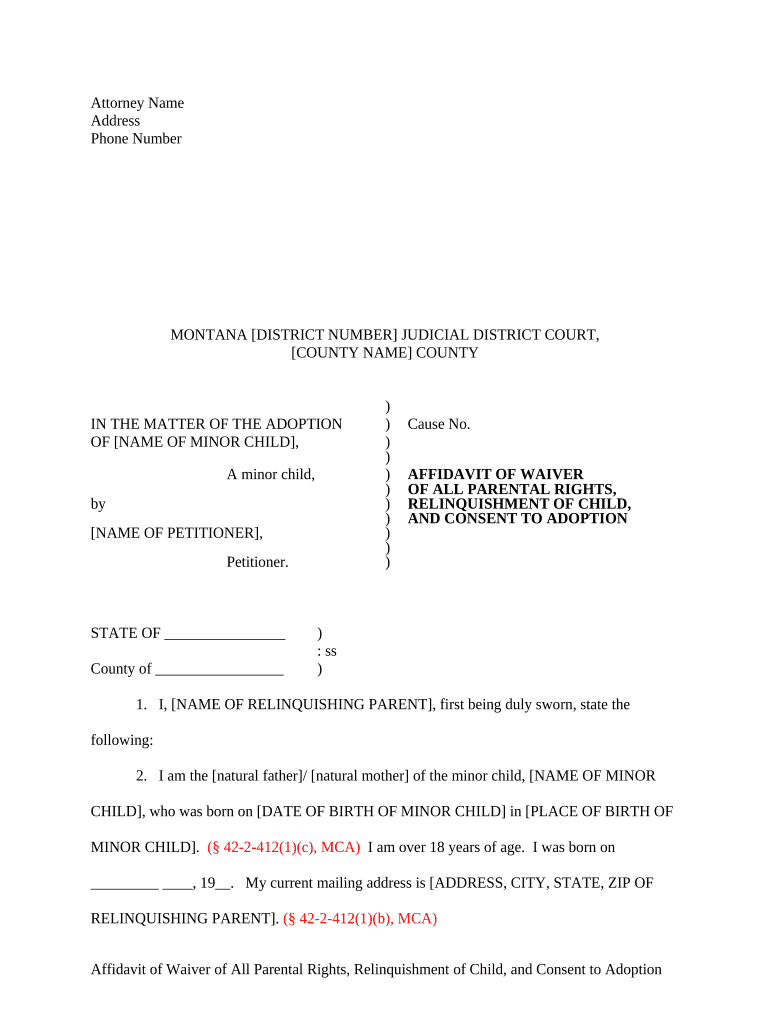
Parental Consent or Termination

Written consent documents or termination orders demonstrating legal release of rights by birth parents or termination by operation of law.

Home Study / Placement Report

Social worker evaluation of the home environment, referencing statutory suitability criteria and recommendations for placement.

Background Checks

Criminal history, child abuse registry checks, and fingerprint or FBI checks if required by statute or agency policy.

Supporting Affidavits

Signed statements from social workers, foster parents, or others verifying facts relevant to the child’s welfare and placement stability.

Final Decree

Judge’s signed order that completes the adoption, establishes parental rights, and instructs clerk on sealing or record retention where appropriate.

Essential data elements to include on every adoption form

Child Name: Full legal name
Child DOB: MM/DD/YYYY
Petitioner Info: Full name and contact
Birth Parent Info: Full name and consent status
Court Location: County and District Court
Signature Date: MM/DD/YYYY signature date

Where an adoption packet goes after you file

After filing the petition, the clerk assigns a case number, the court schedules hearings, and relevant agencies or social workers submit reports prior to final disposition.

  • Clerk Docketing: Clerk issues case number and assigns judge.
  • Service of Process: Respondents are served per Montana rules before hearings.
  • Agency Reports: Children’s services file placement and home study reports.
  • Court Hearing: Judge reviews evidence and may enter a final decree.

Digital signing and e‑filing considerations for adoption paperwork

Courts and agencies vary in acceptance of electronic signatures and e‑filing; verify county clerk and local rules before relying on e‑signatures for any document.

  • File Formats: PDF is widely required for e‑filing
  • Authentication: Clerk offices may require notarization or in‑person verification
  • Integrations: Common integrations include Microsoft 365 and Google Workspace

Use secure platforms that support tamper‑evident signatures, notarization workflows, and audit trails when the court or child welfare agency permits electronic submissions.

Typical timeframes and scheduling points in the adoption process

Processing time depends on case type, whether parental rights are contested, agency investigative timelines, and court schedules.

Initial Filing:

Clerk assigns case number, usually within days

Service and Response:

Respondents typically get 20–30 days to answer

Home Study:

Agency reports often take 30–90 days

Hearing Scheduling:

Court availability may add weeks to months

Final Decree:

Entry occurs after hearing and review of reports

Common mistakes that delay adoption processing

  • Submitting incomplete consent forms or missing notarizations that the court requires for a valid parental release.
  • Using inconsistent names or dates across documents, causing identity verification or record‑matching errors.
  • Failing to include mandated agency reports or background checks before the scheduled hearing.
  • Misunderstanding local e‑filing rules and submitting unsupported file types or unsecured documents.

Consequences of incorrect or deficient adoption paperwork

Case Dismissal: Filing defects can result in dismissal
Delayed Finalization: Incomplete evidence extends timelines
Revoked Consent: Improperly executed consent may be void
Perjury Exposure: False statements risk criminal penalties
Privacy Violations: Improper handling may breach confidentiality
Administrative Fines: Noncompliance with court rules can incur fees

eSignature vendor comparison for managing adoption forms (signNow first)

Vendor pricing and core capabilities vary; signNow is shown first per comparison rules. Confirm vendor compliance for court acceptance and HIPAA/BAA needs before use.

signNow DocuSign Adobe Sign PandaDoc HelloSign
Starting Price $8/user/mo $15/user/mo $14/user/mo $19/user/mo $15/user/mo
Free Trial 7-day trial Varies Varies Varies Varies
Bulk Send Yes Yes Yes Yes No
Audit Trail Yes Yes Yes Yes Yes
HIPAA Compliant Yes Yes Yes No No

Frequently asked questions about Montana Adoption forms and eSigning

Answers focus on common legal and procedural questions about acceptance, signatures, notarization, and correcting filings in Montana courts.


Need help? Contact support

be ready to get more
Join over 28 million airSlate SignNow users