Arizona Request to Leave the State
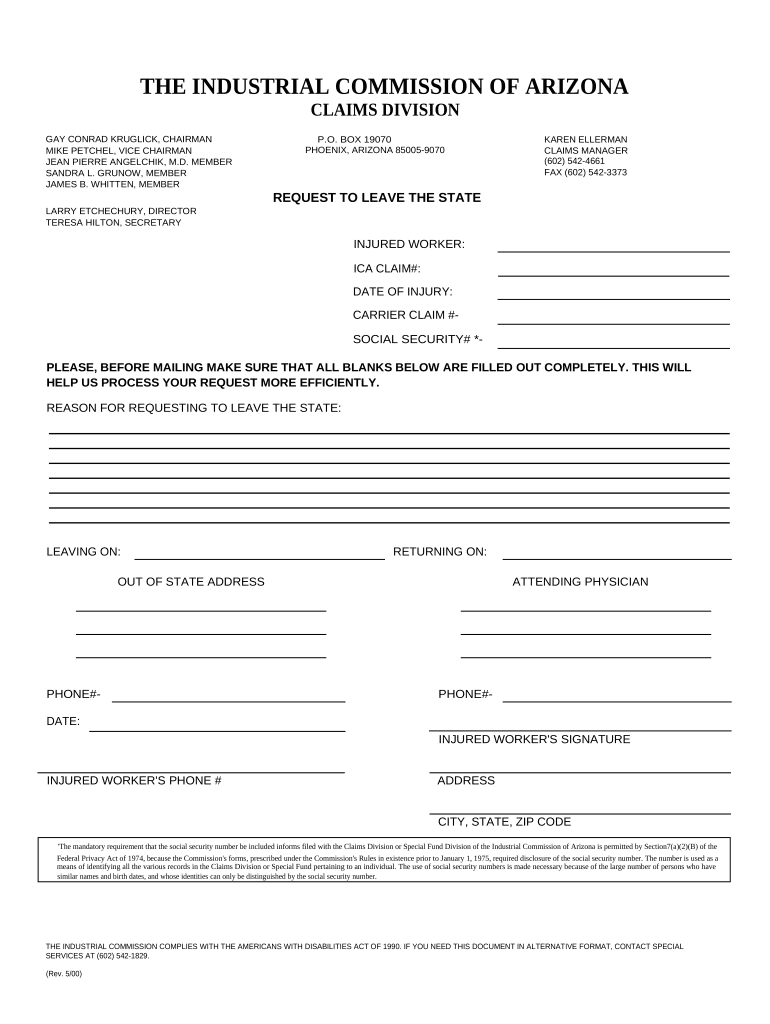
What the Arizona Request to Leave the State is and when it applies
Why a clear, complete Request matters
A properly completed Arizona Request to Leave the State clarifies legal authority, reduces disputes at checkpoints or borders, and preserves evidence of consent or court permission where required. Accurate details and required authentication help prevent inadvertent violations of custody or court orders.

Who typically prepares and signs this request
Several roles commonly prepare or sign an Arizona Request to Leave the State depending on circumstances and legal status.
- Parent or legal guardian asserting custodial consent for minor travel.
- Court-appointed guardian or conservator seeking authorization for a protected person.
- Attorney or party filing a motion seeking court approval to relocate a child.
Each signer’s authority should be documented; if a court order governs the matter, reference the order by case number and date to avoid ambiguity.
Step-by-step: completing the Request to Leave the State
-
01Gather documents: Collect IDs, custody orders, and travel itineraries.
-
02Complete form fields: Enter names, dates, destinations, and purpose accurately.
-
03Authenticate signature: Notarize or obtain witness signatures as required.
-
04Submit or retain: File with court or keep copies for travel and enforcement.
How filing, approval, and travel typically flow
-
Prepare Request: Draft with required facts and references.
-
Authenticate: Notarize or obtain witnesses if the form or court requires.
-
Deliver to Parties: Share copies with other parent, guardian, or attorney.
-
File or Carry: File with court if required; carry original when traveling.
Customizing and submitting the form online
| Field | Configuration |
|---|---|
| Signature field | Require signer signature and date field; enable signer authentication. |
| Attachment field | Allow upload of court orders, itineraries, and IDs in PDF or DOCX. |
| Routing order | Set signing sequence: preparer → co-parent/guardian → notarization step. |
| Retention setting | Enable secure storage and export to PDF/A for records. |
Digital signing and delivery considerations
Use digital tools that support required authentication, audit trails, and secure file formats when e-signing or sharing the request.
- Authentication: Email, SMS code, or stronger KBA options.
- Audit Trail: Capture IP, timestamp, and signer actions.
- File formats: Use PDF or PDF/A for reliable reproduction.
Ensure the platform you use complies with ESIGN and state rules and supports notarization workflows if a notary or RON session is required.
Timing and expected processing steps
Submission lead time:
Provide reasonable advance notice so other parties can respond; requirements differ by court and carrier.
Notary scheduling:
Allow time to schedule a notary or RON session before planned departure.
Court response:
If court approval is required, expect additional processing and possible hearing dates.
Carrier requirements:
Airlines and border officials may request originals or certified copies at time of travel.
Record retention:
Keep signed originals and supporting documents for disputes or enforcement.
Key milestones from preparation to travel
Document Assembly
Gather custody orders, IDs, and itinerary before drafting.
Form Completion
Fill in names, dates, destinations, and legal references.
Authentication Step
Notarize or obtain required witnesses and capture audit trail.
Distribution & Filing
Share with relevant parties and file with court if necessary.
Common mistakes to avoid when preparing the request
- Leaving dates or destinations vague, which creates enforcement gaps.
- Omitting court order references when custody is governed by a decree.
- Failing to authenticate signature when notarization is required.
- Not retaining a certified copy or secure digital archive for travel.
Potential consequences of an incomplete or incorrect request
Representative eSignature vendor comparison for completing and authenticating the request
| signNow | DocuSign | Adobe Sign | PandaDoc | HelloSign | |
|---|---|---|---|---|---|
| Starting Price | $8/user/mo | $15/user/mo | $14/user/mo | $19/user/mo | $15/user/mo |
| Free Trial | 7-day free trial, no credit card required | Varies by plan | Varies by plan | Varies by plan | Varies by plan |
| Bulk Send | Yes | Varies by plan | Varies by plan | Varies by plan | No |
| Audit Trail | Yes | Yes | Yes | Yes | Yes |
| HIPAA Compliant | Yes | Varies by plan | Varies by plan | No | No |
Real-world examples of how requests are used
Optica Ventures — COO
When a guardian needed to travel with a minor for medical treatment they prepared a detailed request with court order reference.
- The request included full itinerary and physician contact.
- Brian Fitzgibbons, COO of Optica Ventures LLC, noted that having clear documentation simplified coordination with medical providers and travel arrangements.
Martin Properties — Founder
A property manager sought permission to relocate a dependent between states for employment reasons.
- The request referenced the lease and custody context.
- Tim Martin explained that processing the request digitally and securing compliant signatures reduced the time needed to obtain written permissions that satisfied landlords and local officials.
FAQs and troubleshooting for the Arizona Request to Leave the State
-
Can the request be signed electronically?
Yes. Electronic signatures are generally enforceable under the federal ESIGN Act (15 U.S.C. ch. 96) and state UETA laws adopted by most states; ensure the method meets intent, consent, attribution, and retention requirements.
-
Is notarization always required in Arizona?
Not always. Whether notarization is required depends on the document’s purpose and the receiving authority. For travel consent involving minors or court filings, a notarized signature is commonly required; confirm requirements for your specific use.
-
Can a remote online notary (RON) be used?
Many states permit RON under defined standards; requirements include identity proofing and audio-video recording. Verify Arizona’s current RON rules and the receiving authority’s acceptance before scheduling a remote session.
-
What if the other parent objects?
If a co-parent or the court objects, the request may require a court hearing. Document attempts to communicate consent and retain copies of served notices and filings to support your position.
-
How should records be stored after travel?
Retain signed originals and electronic copies for at least three years; if records involve health information, follow HIPAA retention of six years (45 CFR §164.530(j)).
-
Who can verify authenticity at the border?
Border or law enforcement agents may request originals or certified copies and may consult court records. Carry notarized originals and contact information for custody case filings if travel risks scrutiny.