Establishing secure connection…Loading editor…Preparing document…

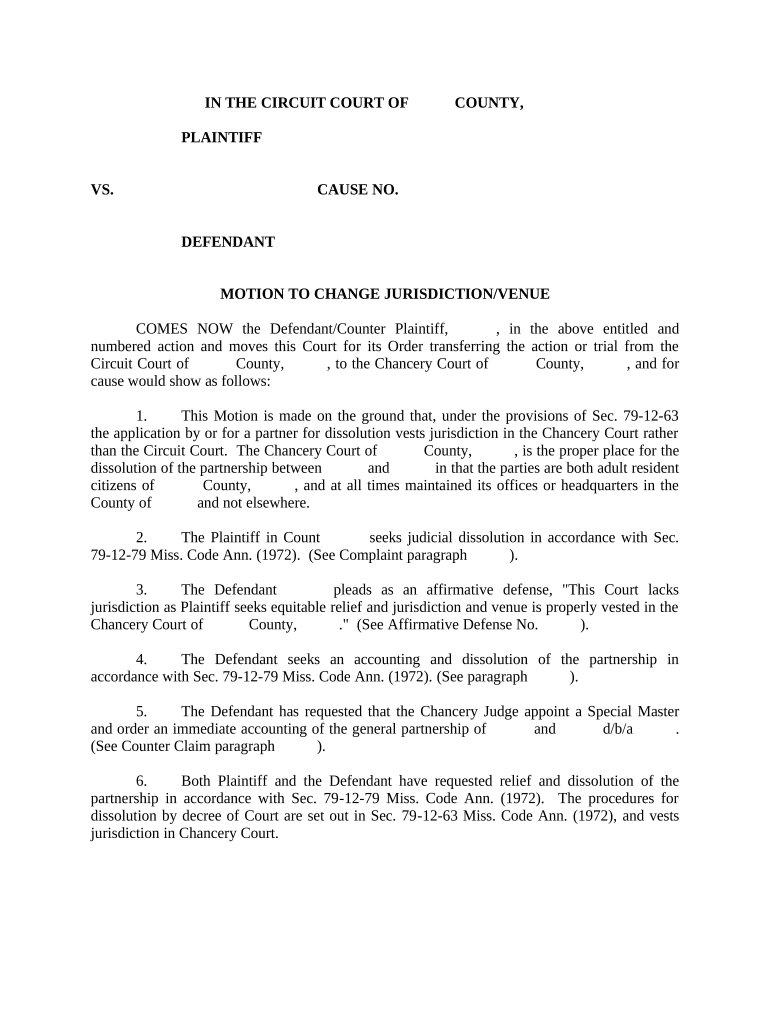
Motion to Change Venue

This template is fully customizable. Edit the text, fill out the fields, and send it for signature. Give it a try!
Motion to Change Venue

What a Motion to Change Venue Is and when it’s used

The Motion to Change Venue is a formal court filing requesting that a case be transferred from one courthouse or jurisdiction to another. Parties file the motion when venue is improper, inconvenient, or when an impartial trial cannot be held where the case was originally filed. The motion explains the legal grounds, cites controlling statutes or rules, and requests specific relief from the court. Procedures, timing, and proof requirements vary by jurisdiction; some courts accept electronic filing while others require in-person submission under local rules.

Why parties file a Motion to Change Venue

Filing a Motion to Change Venue helps ensure a case is heard in the correct or most convenient forum, protects parties’ rights to impartial adjudication, and can reduce travel and discovery costs. Properly supported motions increase the chance of successful transfer under procedural rules.

Why parties file a Motion to Change Venue

Who typically prepares or responds to this motion

Parties and counsel in civil litigation, including plaintiffs, defendants, and defense or plaintiff attorneys, commonly prepare this motion.

  • Plaintiff attorney: files when venue appears improper or forum selection favors a different jurisdiction.
  • Defense counsel: moves to transfer for convenience, to challenge forum, or to obtain a more favorable venue.
  • Pro se litigant: may file a motion but should follow local court rules and often seek legal advice.

Step-by-step: drafting, filing, and serving the motion

Follow these steps to prepare and file a Motion to Change Venue in compliance with typical court procedures.

  • 01
    Draft Motion: State grounds, facts, and legal authority concisely.
  • 02
    Attach Evidence: Include affidavits, exhibits, and supporting declarations.
  • 03
    File With Court: Submit via e-filing or clerk’s office per local rules.
  • 04
    Serve Parties: Provide required service copies and proof of service.

How to build an online workflow for the motion

Configure an online workflow for drafting, signing, and submitting the motion when courts accept electronic filings.

Workflow Field and Intended Configuration How to configure each workflow setting
Document Template (caption, margins, page numbers) Use court-approved caption and formatting templates
Signature Authentication (electronic or handwritten per rule) Select e-sign method permitted by local rules
E-filing Format (PDF/A, combined exhibits, bookmarks) Assemble PDF/A with bookmarked exhibits and attachments
Proof of Service Generation and Filing Enable automated proof of service with timestamps

Where to file and who receives the motion

This section outlines typical submission points and who must receive copies when filing a Motion to Change Venue.

  • Clerk's Office: File original motion and required copies with the court clerk.
  • E-Filing Portal: Submit via court-approved electronic filing system if the court permits.
  • Opposing Parties: Serve opposing counsel or pro se parties per service rules.
  • Judge's Chambers: Provide courtesy copies or proposed orders if local rules require.

Digital signing and e-submission considerations for court filings

Use of e-signatures and e-submission depends on court rules, authentication standards, and whether the motion is an official court filing.

  • Accepted Formats: PDF/A preferred; follow court specs.
  • Authentication Options: Email link, SMS code, or two-factor.
  • Audit Trail: Maintain timestamps, IP, and signature log.

Typical timing and response windows to track

Timing for filing a Motion to Change Venue varies by jurisdiction; deadlines may be fixed by statute, court rule, or local practice.

Typical Filing Deadline for Motion:

Often filed early in the litigation; many courts allow twenty to thirty days to move.

Response Deadline for Opposing Party:

Opposing parties commonly have fourteen or twenty-one days to file a written response.

Hearing Scheduling and Notice Period:

Courts issue hearing dates; notice periods can be two to four weeks.

Emergency or Expedited Motions:

Motions for expedited relief require showing of urgency and may have compressed timelines.

Effect on Deadlines and Discovery:

A granted transfer may alter deadlines; confirm new schedule with the receiving court.

Common mistakes to avoid when preparing the motion

  • Failing to check local rules: Courts have specific caption formats, filing fees, and service requirements that vary and can cause rejection.
  • Insufficient factual support: Unsupported assertions or conclusory statements without affidavits and evidence weaken the motion and the chance of transfer.
  • Wrong procedural timing: Missing filing deadlines or filing after responsive pleadings may forfeit the right to seek transfer.
  • Improper service: Failing to serve all necessary parties or to file proof of service can delay hearings or result in denial.

Consequences and procedural risks of errors

Denial of Motion: Court may deny transfer.
Sanctions Risk: Frivolous motions invite sanctions.
Procedural Waiver: Waives timeliness objections sometimes.
Increased Costs: Additional travel and discovery expenses.
Fee Shifting: Court may award costs to opposing party.
Scheduling Delay: Hearing rescheduling and trial delays.

Essential information and document elements to include

Case Caption: Exact court title and parties' names.
Docket Number: Full case number from court docket.
Party Names: Full legal names as on complaint.
Grounds Cited: Statutes, rules, and brief factual summary.
Supporting Affidavits: Signed declarations and exhibits attached.
Relief Sought: Specific transfer request and alternatives.

Real-world examples of venue transfer motions and outcomes

Examples below show common scenarios where courts consider venue transfer motions and how they were resolved.

Multistate Witness Burden

A defendant sought transfer after most witnesses and evidence resided in a different state, creating significant travel burden and increased litigation expense for all parties.

  • Court evaluated convenience factors and private interests.
  • The court granted transfer after weighing witness convenience, access to evidence, and the local interest in adjudication; transfer reduced travel costs and allowed trial to proceed where most events occurred under applicable venue statutes.

Alleged Local Prejudice

Plaintiff filed in the county of occurrence; defendant argued pretrial publicity created local prejudice preventing a fair trial and sought transfer to a distant forum.

  • Judge considered publicity and community bias evidence.
  • After evidentiary submissions, the court ordered a change of venue citing substantial likelihood of prejudice; the case was transferred to a district where impartial jury selection and trial logistics could be preserved.

eSignature vendor feature comparison relevant to Motion to Change Venue workflows

Comparison of common eSignature vendors and features relevant to preparing and executing a Motion to Change Venue.

signNow DocuSign Adobe Sign PandaDoc HelloSign
Starting Price $8/user/mo $15/user/mo $14/user/mo $19/user/mo $15/user/mo
Free Trial 7-day free trial Varies by plan Varies by plan Varies by plan Varies by plan
Bulk Send Yes Varies by plan Varies by plan Varies by plan Varies by plan
Audit Trail Yes Yes Yes Yes Yes
HIPAA Compliant Yes (BAA) Varies by plan Varies by plan Varies by plan Varies by plan

Frequently asked questions on signing, filing, and timing

Answers to common procedural and technical questions about preparing, signing, and filing a Motion to Change Venue.


Need help? Contact support

be ready to get more
Join over 28 million airSlate SignNow users