Establishing secure connection…Loading editor…Preparing document…

Mississippi Answer to Petition for Paternity and Establishment of Custody

This template is fully customizable. Edit the text, fill out the fields, and send it for signature. Give it a try!
Mississippi Answer to Petition for Paternity and Establishment of Custody

What the Mississippi Answer to Petition for Paternity and Establishment of Custody Is

The Mississippi Answer to Petition for Paternity and Establishment of Custody is a responsive court filing used by a respondent to admit, deny, or state defenses to allegations in a petition seeking paternity and custody orders. The Answer identifies the case caption, parties, and case number, sets out factual admissions or denials, asserts affirmative defenses or counterclaims where applicable, and requests specific relief such as custody, visitation, or genetic testing. Properly prepared Answers preserve the respondent’s right to contest paternity, seek temporary orders, and participate in hearings.

Why a Proper Answer Matters in Paternity and Custody Proceedings

Filing a timely, accurate Answer preserves your right to be heard, avoids default judgments, and frames the legal issues for discovery and hearings. It also enables requests for genetic testing, temporary custody, or parenting-time orders as part of initial case management.

Why a Proper Answer Matters in Paternity and Custody Proceedings

Who Typically Prepares and Files This Answer

The Answer is completed by the respondent named in the petition or by their attorney; it may also be prepared by a guardian ad litem or next friend for minors.

  • Respondent or parent: Completes admissions, denials, and factual statements; asserts defenses and custody preferences.
  • Attorneys: Draft precise legal language, file with the correct court clerk, and request temporary relief or testing.
  • Self-represented litigants: Must follow local rules for filing, service, and formatting to avoid procedural rejection.

Accurate completion and timely filing are essential to protect parental rights and to ensure the court schedules any necessary temporary orders or genetic testing.

Core Elements of a Professional Answer for Paternity and Custody

A complete Answer includes standardized case details, clear admissions or denials, affirmative defenses, counterclaims if any, proposed custody arrangements, and a signature block that complies with court formatting rules.

Caption and Case Data

Include the court name, county, case number, petitioner and respondent names, and any assigned judge so the clerk can file and route the document correctly without delay.
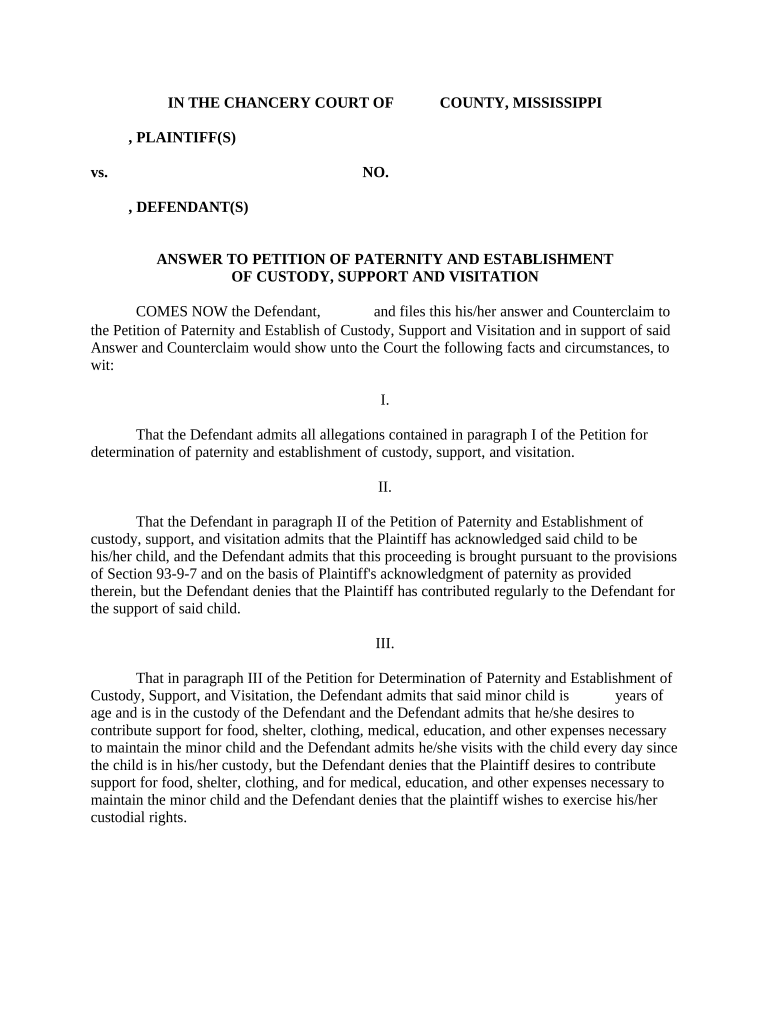
Admissions and Denials

Respond point-by-point to allegations in the petition using numbered paragraphs that track the petition; clear admissions or denials help narrow disputes and guide discovery and evidence requests.

Affirmative Defenses

Specify legal defenses you intend to assert (for example, statute of limitations or lack of jurisdiction) and provide concise factual bases to preserve those defenses for hearing or trial.

Counterclaims or Relief

If seeking counter-relief—such as custody, visitation, or child support adjustments—state those claims clearly and include the statutory or factual grounds that support such relief.

Requests for Genetic Testing

If paternity is contested, include a request for genetic testing or reference to pending tests; explain why testing is necessary and propose timing or conditions for sample collection.

Signature and Verification

Sign and date the Answer in the signature block; include the signer’s mailing address, telephone number, and attorney bar number if represented; notarization may be required by local rules.

Step-by-Step: Filing an Answer in Mississippi

Follow these core steps to respond to a petition for paternity and custody in Mississippi while preserving procedural rights and admissible defenses.

  • 01
    Review Petition: Read the petition carefully and note each allegation and requested relief.
  • 02
    Draft Answer: Prepare numbered responses mirroring petition paragraphs; include defenses and any counterclaims.
  • 03
    Sign and Notarize: Sign the Answer and notarize if local rules require or if requested by the court.
  • 04
    File and Serve: File with the clerk and serve all parties per Mississippi Rules of Civil Procedure and local rules.

How the Answer Moves Through Court Process

This sequence summarizes typical procedural flow after a respondent files an Answer in a Mississippi paternity and custody case.

  • Filing: Clerk assigns docket number and stamps the filed Answer.
  • Service: Proof of service must be filed showing all parties received the Answer.
  • Temporary Orders: Either party may request temporary custody or support hearings.
  • Scheduling: Court sets status conference, discovery deadlines, or trial dates.

Configuring an Electronic Workflow for the Answer

Set up a simple document workflow to prepare, sign, and file the Answer electronically while preserving audit records and copies for service.

Form Field Name and Configuration Purpose | Recommended setting
Case Caption Field Auto-fill from petition | Required, locked
Signature Field Signer must sign | Require typed or drawn signature
Date Field Use MM/DD/YYYY | Auto-populate on signature
Attachment Field Include exhibits | Allow PDF uploads for evidence

Digital Requirements and Delivery Options

Electronic completion and secure delivery reduce processing time but must meet court and privacy requirements.

  • File Formats: PDF and DOCX accepted
  • Authentication: Email or SMS code
  • Integrations: Court e-filing systems compatible

Confirm local court e-filing formats and retention policies before e-submitting to ensure acceptance and preservation of the record.

Common Deadlines and Timing Considerations

Court and local rules set deadlines; the following are common timing milestones respondents should track when answering a petition.

Response Deadline:

Generally 30 days from service; verify local rules

Temporary Relief Hearings:

Often scheduled within 14–30 days after filing

Discovery Deadlines:

Set by scheduling order; typically within weeks

Request for Genetic Testing:

File promptly to allow court-ordered testing

Motion Deadlines:

Follow local rules for motion filing and notice

Penalties and Legal Risks of an Incorrect or Late Answer

Default Judgment: Court may grant relief to petitioner
Loss of Defenses: Affirmative defenses may be waived
Contempt Sanctions: Fines or court-ordered compliance
Adverse Custody Orders: Temporary custody may be granted
Attorney Fees: Court may award fees to prevailing party
Evidence Limitations: Late issues may be excluded

Common Mistakes to Avoid When Preparing the Answer

  • Missing the response deadline leads to default and waives many defenses; always confirm the service date and local rule timing.
  • Failing to mirror petition paragraph numbers makes comparisons difficult and increases the chance of clerical rejection by the court.
  • Providing vague or contradictory statements instead of clear admissions or denials can undermine credibility and complicate hearings.
  • Neglecting to attach or reference required exhibits—such as custody agreements or testing results—may delay temporary relief or discovery.

Security and Compliance Considerations for Electronic Answers

Encryption: TLS 1.2/1.3 transit, AES-256 at rest
Audit Trail: IP, timestamp, action log retained
Auth Standards: Email, SMS, or stronger MFA options
HIPAA Support: BAA available where required
Regulatory Fit: Compliant with ESIGN and UETA
Certifications: SOC 2 Type II and ISO 27001

eSignature Vendor Pricing and Feature Snapshot

Comparison of common eSignature options for executing and managing court forms; signNow appears first as a platform option in this table.

signNow DocuSign Adobe Sign PandaDoc HelloSign
Starting Price $8/user/mo $15/user/mo $14/user/mo $19/user/mo $15/user/mo
Free Trial 7-day free trial No No Yes, limited Yes, limited
Bulk Send Yes Yes Yes Yes No
Audit Trail Yes Yes Yes Yes Yes
HIPAA Compliant Yes Yes Yes No No

Frequently Asked Questions About the Mississippi Answer

Answers to common procedural and practical questions about preparing, signing, and filing an Answer to a paternity and custody petition in Mississippi.


Need help? Contact support

be ready to get more
Join over 28 million airSlate SignNow users