Establishing secure connection…Loading editor…Preparing document…

New Jersey Substitution of Attorney

This template is fully customizable. Edit the text, fill out the fields, and send it for signature. Give it a try!
New Jersey Substitution of Attorney

What the New Jersey Substitution of Attorney Is and when it's used

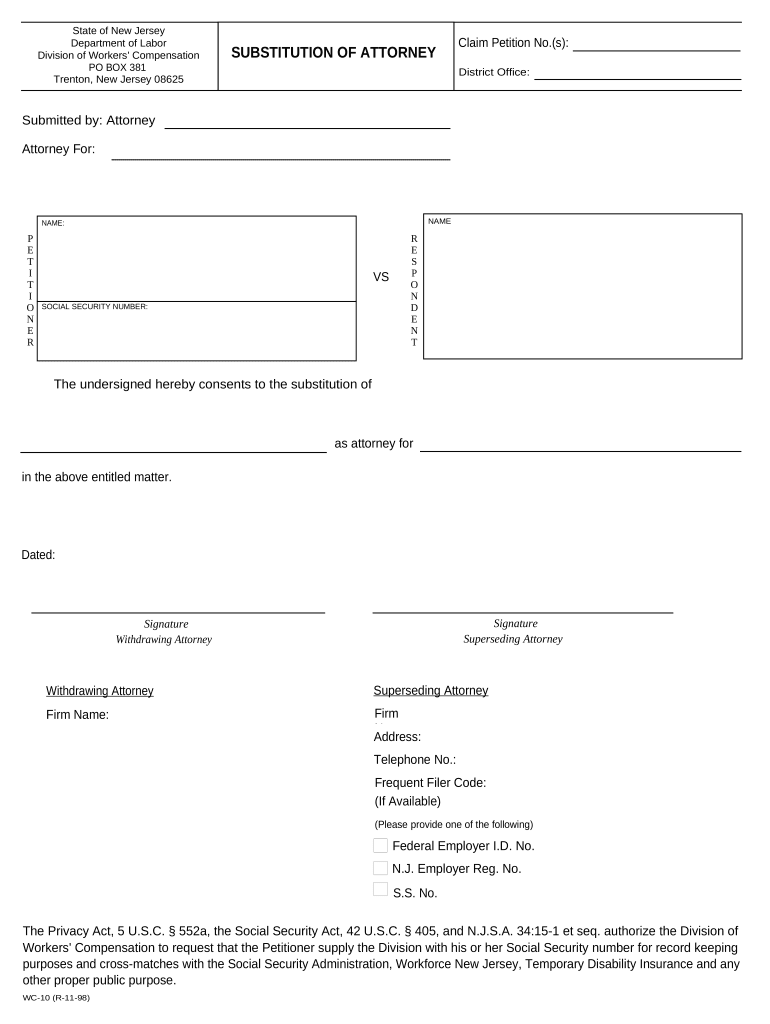
The New Jersey Substitution of Attorney is a formal filing used to record a change of counsel in an active case before a New Jersey court. The form identifies the case caption and docket number, the withdrawing attorney, the incoming attorney, client authorization or consent, and updated service addresses. It is filed with the court clerk and served on opposing parties so that notices, orders, and case communications are directed to the new attorney of record under local court procedures.

Why a clear substitution benefits the case and parties

Filing a substitution of attorney preserves client rights by ensuring proper service, prevents scheduling confusion, and clarifies which counsel carries responsibility for filings and appearances. A properly completed substitution avoids delays, reduces the risk of missed deadlines, and provides a clear administrative record for the court and opposing parties.

Why a clear substitution benefits the case and parties

Who commonly prepares or files this form

Attorneys, clients, and court staff use this document to record and communicate a change in representation.

  • Private practice attorneys updating counsel on civil or commercial matters
  • Public defenders or assigned counsel documenting representation changes in criminal cases
  • Clients or firms confirming authorized substitution and updated service information

Typical signatories and their roles

Withdrawing Counsel

The attorney leaving the case signs to record withdrawal and to confirm that the client has consented or that a substitution has been authorized; courts rely on this endorsement to update service lists and case management records.

Incoming Counsel

The new attorney of record signs to accept appearance and service; acceptance confirms responsibility for filings, client communication, and obligations under local court rules once the form is filed.

Essential data elements required on the form

Client Name: Full legal name
Case Caption: Plaintiff v. Defendant
Docket Number: Court-assigned number
Withdrawing Signature: Attorney signature
Incoming Signature: Attorney acceptance
Service Address: Mailing and email contact

Consequences of incorrect or incomplete substitution

Missed Service: Lost notices or orders
Court Rejection: Clerk may refuse filing
Ethical Risk: Potential client or bar complaints
Scheduling Delays: Hearing dates may be reset
Default Risk: Missed deadlines risk default
Administrative Fees: Additional filing costs

Common preparation errors to avoid

  • Failing to include the correct docket number or case caption, which causes the clerk to misfile or return the document to counsel.
  • Omitting the incoming attorney's written acceptance or the client's authorization, leaving the substitution incomplete under local rules.
  • Using an outdated service address or email for the new attorney, which leads to misdirected notices and missed deadlines.
  • Submitting a document without required signatures or with electronic signatures that do not meet the court’s e-filing authentication rules.

Step-by-step: complete and file the substitution

Follow these sequential steps to prepare, sign, file, and serve the substitution correctly.

  • 01
    Prepare Form: Enter caption, docket number, and party names.
  • 02
    Add Signatures: Obtain withdrawing and incoming attorney signatures.
  • 03
    File With Court: Submit to clerk by e-file or in person.
  • 04
    Serve Parties: Serve opposing counsel and retain proof.

Digital workflow overview for online completion and filing

A typical online workflow moves the form from preparation to signature, then to filing and service.

  • Upload Document: Start with a PDF or template.
  • Place Fields: Add signature, date, and contact fields.
  • Collect Signatures: Use accepted eSign or wet-sign methods.
  • File & Serve: E-file with clerk and serve counsel.

Recommended configuration for an e-file friendly substitution

Settings below reflect common requirements for online execution and later e-filing with the court.

Field Configuration
Signature Method Accept electronic signature with audit trail or wet signature
Authentication Use email verification or SMS code for signer identity
File Format PDF/A or flattened PDF for court compatibility
E-file Option Prepare for clerk portal upload or manual submission

Technical requirements for eSigning and secure sharing

Ensure the platform supports PDF, audit trails, secure transmission, and role-based signer flows before executing the form electronically.

  • File Types: PDF, DOCX supported
  • Authentication: Email or SMS codes
  • Integrations: Court portals and cloud storage

Realistic scenarios showing substitution use in practice

Two common scenarios illustrate how substitutions reduce risk and keep cases on schedule.

Civil Firm Transition

A mid-sized firm withdraws after settlement discussions begin

  • Incoming counsel formally accepts and updates service information
  • The substitution enables timely service of post-settlement filings and prevents misdirected notices, preserving client interests and court scheduling.

Public Defender Handoff

A public defender leaves a case and assigns new counsel

  • New counsel files the substitution of attorney quickly
  • Filing and serving the substitution ensures the defendant receives notices of hearings and that deadlines are calendared by the new attorney.

Practical tips for fast, accurate substitutions

Follow these quality-control practices to minimize rejection and administrative delay.

Verify Case Details
Confirm the exact case caption and docket number directly from the court record before preparing the substitution to avoid clerical misfiling and ensure the document links to the correct matter.
Obtain Written Consent
Secure explicit client authorization and written acceptance from incoming counsel before filing; keep signed copies in the client file to support ethical compliance and later verification.
Use a Reliable Audit Trail
If signing electronically, use a platform that preserves timestamps, signer authentication, IP addresses, and a completion certificate to demonstrate intent and attribution under ESIGN and UETA frameworks.
Serve and Record Proof
After filing, promptly serve opposing counsel and upload or retain proof of service so the record shows when parties were notified and to prevent disputes over notice timing.

Common eSignature vendor comparison for preparing and signing court filings

Below are typical plan and compliance distinctions; place your vendor choice in light of required authentication, audit trail, and HIPAA or court-specific needs.

signNow DocuSign Adobe Sign PandaDoc HelloSign
Starting Price $8/user/mo $15/user/mo $14/user/mo $19/user/mo $15/user/mo
Free Trial 7-day free trial Varies by vendor Varies by vendor Varies by vendor Varies by vendor
Bulk Send Yes Yes Yes Yes Yes
Audit Trail Yes Yes Yes Yes Yes
HIPAA Compliant Yes Yes Yes No No
Envelope Cap No cap 100 envelopes/user/year Varies by plan Varies by plan Varies by plan

Frequently asked questions about New Jersey Substitution of Attorney

Answers to common procedural and technical questions to help avoid filing problems and ensure the substitution is effective.


Need help? Contact support

be ready to get more
Join over 28 million airSlate SignNow users