Establishing secure connection… Loading editor… Preparing document…
Navigation

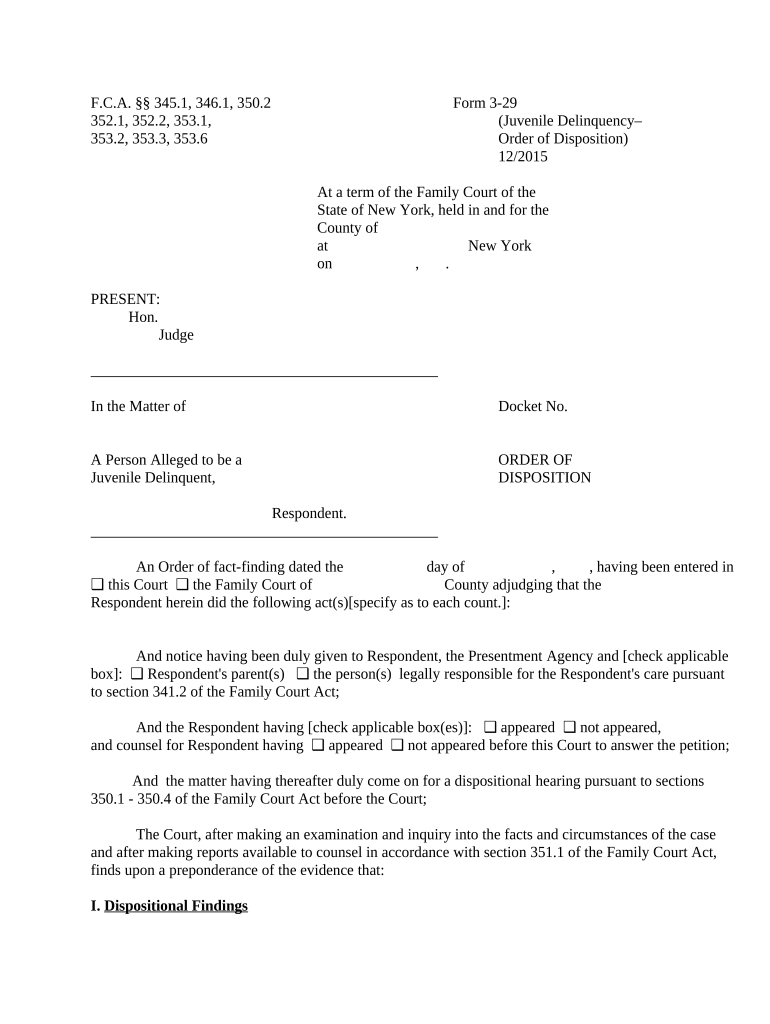
Fill and Sign the New York Disposition Form
Fill and Sign the New York Disposition Form

How it works

Open the document and fill out all its fields.
Apply your legally-binding eSignature.
Save and invite other recipients to sign it.

Rate template

4.5
52 votes
F.C.A. §§ 345.1, 346.1, 350.2 Form 3-29 352.1, 352.2, 353.1, (Juvenile Delinquency– 353.2, 353.3, 353.6 Order of Disposition) 12/2015 At a term of the Family Court of the State of New York, held in and for the County of at New York on , . PRESENT: Hon. Judge In the Matter of Docket No. A Person Alleged to be a ORDER OF Juvenile Delinquent, DISPOSITION Respondent. An Order of fact-finding dated the day of , , having been entered in this Court the Family Court of County adjudging that the❑ ❑ Respondent herein did the following act(s)[specify as to each count.]: And notice having been duly given to Respondent, the Presentment Agency and [check applicable box]: Respondent's parent(s) the person(s) legally responsible for the Respondent's care pursuant ❑ ❑ to section 341.2 of the Family Court Act; And the Respondent having [check applicable box(es)]: appeared not appeared, ❑ ❑ and counsel for Respondent having appeared not appeared before this Court to answer the petition; ❑ ❑ And the matter having thereafter duly come on for a dispositional hearing pursuant to sections 350.1 - 350.4 of the Family Court Act before the Court; The Court, after making an examination and inquiry into the facts and circumstances of the case and after making reports available to counsel in accordance with section 351.1 of the Family Court Act, finds upon a preponderance of the evidence that: I. Dispositional Findings A. Respondent requires supervision, treatment, or confinement; and B. The Court, having fully considered the matter of a particular disposition pursuant to section 352.2 of the Family Court Act, has determined that the Respondent requires the following disposition for the following Form 3-29 Page 3 reasons [specify; if the Respondent has been found to be sexually exploited, as defined in Social Services Law §447-a, so indicate]: II. Required Findings in Cases in Which the Respondent is Placed : 1 [The following determinations are required when order is placement; check applicable boxes and provide case-specific reasons ]: And the Court has determined that: A. Best Interests Finding : Continuation in, or return to, the Respondent’s home would would not be contrary to Respondent’s best interests based upon the following facts and for ❑ ❑ the following reasons [specify]: This determination was based upon the following information [check applicable box(es)]: Uniform Case Record, dated [specify]: ❑ Summary of the Uniform Case Record, dated [specify]: ❑ Service Plan, dated [specify]: ❑ Risk Assessment Instrument ❑ Probation Department report, dated [specify]: ❑ Mental health evaluation, dated [specify]: ❑ The report of [specify]: , dated [specify]: ❑ Testimony of [specify]: ❑ Other [specify]: ❑ B. Reasonable Efforts Findings : 1. Reasonable efforts, where appropriate, to prevent or eliminate the need for removal of the child from the home [check applicable box (es); state reasons as indicated. If prior finding was made, so indicate, including date]: were made as follows [specify]: ❑ 1 Note: These findings need not be made where the Respondent is placed restrictively pursuant to Family Court Act §353.5, in which case Form 3-33 or 3-34, as applicable, should be utilized. Form 3-29 Page 4 were not made❑ but the lack of efoott at appoopoiate [check all applicable boxet]: ❑ because of a prior judicial finding pursuant to F.C.A. §352.2(2)(c) that the authorized agency was not required to make reasonable efforts to reunify the Respondent with the parent(s) guardian(s) [specify date of finding]: ❑ ❑ because of other reasons [specify other reasons]: ❑ were not made. ❑ This determination was based upon the following information [check applicable box(es)]: Uniform Case Record, dated [specify]: ❑ Summary of the Uniform Case Record, dated [specify]: ❑ Service Plan, dated [specify]: ❑ Risk Assessment Instrument ❑ Probation Department report, dated [specify]: ❑ Mental health evaluation, dated [specify]: ❑ The report of [specify]: , dated [specify]: ❑ Testimony of [specify]: ❑ Other [specify]: ❑ 2. Reasonable efforts, where appropriate, to return the Respondent home safely [check applicable box and state reasons as indicated]: were made as follows [specify]: ❑ were not made ❑ but the lack of efoott at appoopoiate [check all applicable boxet]: ❑ because of a prior judicial finding pursuant to F.C.A. §352.2(2)(c) that the authorized agency was not required to make reasonable efforts to reunify the child with the parent(s) guardian(s) [specify date of finding]: ❑ ❑ because of other reasons [specify]: ❑ ☐ were not made. This determination was based upon the following information [check applicable box(es)]: Uniform Case Record, dated [specify]: ❑ Summary of the Uniform Case Record, dated [specify]: ❑ Service Plan, dated [specify]: ❑ Risk Assessment Instrument ❑ Probation Department report, dated [specify]: ❑ Mental health evaluation, dated [specify]: ❑ The report of [specify]: , dated [specify]: ❑ Testimony of [specify]: ❑ Other [specify]: ❑ Form 3-29 Page 5 3. Reasonable Efforts: Goal Other Than Return Home : [Applicable in cases in which the Respondent’s permanency plan is adoption, guardianship or permanent living arrangement other than reunification]: Reasonable efforts to make and finalize the Respondent’s permanency plan of [specify]: have been made as follows [specify]: ❑ were not made based upon the following facts and for the following reasons [specify]: ❑ This determination was based upon the following information [check applicable box(es)]: Uniform Case Record, dated [specify]: ❑ Summary of the Uniform Case Record, dated [specify]: ❑ Service Plan, dated [specify]: ❑ Risk Assessment Instrument ❑ Probation Department report, dated [specify]: ❑ Mental health evaluation, dated [specify]: ❑ The report of [specify]: , dated [specify]: ❑ Testimony of [specify]: ❑ Other [specify]: ❑ C. Findings Regarding Transitional Services and Out-of-State Placements : [Required where Respondent is 14 years of age or older]: The services, if any, needed to assist ❑ the Respondent to make the transition from foster care to independent living are [specify]: [Required where the Respondent is placed outside New York State]: Placement outside New ❑ York State ❑ is is not appropriate and in the Respondent’s best interests. ❑ D. Findings Regarding Pre-dispositional Risk Assessment Instrument : There ❑ is is not a validated pre-dispositional risk assessment instrument in use in this county ❑ that was developed by (or in New York City, approved by) the New York State Office of Children and Family Services. [REQUIRED where there is a validated pre-dispositional risk assessment instrument in use]: Respondent has been assessed on the risk assessment instrument as a [check box for level of risk]: [NYC cases only]: low medium high very high level of risk ❑ ❑ ❑ ❑ [NON-NYC cases only]: low medium high level of risk . ❑ ❑ ❑ [REQUIRED where validated pre-dispositional risk assessment instrument is in use and where placement is at a higher level of care than the assessed risk level; check box if applicable]: Placement, as directed below, is necessary and no less restrictive alternative is available, both for ❑ the protection of the community and to be consistent with the needs and best interests of the Respondent, Form 3-29 Page 6 notwithstanding the assessed risk level, for the following reasons {specify]: NOW, therefore, upon the findings made in the fact-finding and dispositional hearings and upon all proceedings had herein, it is hereby ORDERED and ADJUDGED that the above-named Respondent is a juvenile delinquent on the ground that the Respondent, while under 16 years of age, did an act which if done by an adult would constitute the crime(s) of [specify each count]: as defined by section(s) of the Penal Law Other [specify]:❑ ❑ ; and on the further ground that Respondent requires supervision, treatment, or confinement; and it is therefore ORDERED that [check applicable box(es)]: Respondent is conditionally discharged for a period of [specify]: months upon the ❑ following terms and conditions [Attach additional sheets, if necessary]: Respondent is placed on probation under the supervision of the Probation Department of the ❑ County of for a period of upon the following terms and conditions [Attach additional sheets, if necessary]: [Applicable where Respondent is directly placed with a suitable relative or other person]: ❑ This proceeding is continued and the Respondent is placed for a period of [specify]: less the period spent in detention pending disposition ❑ 2 in the custody of [specify suitable relative or other person]: , subject to the further orders of this Court. [REQUIRED where Respondent is placed in non-secure or limited-secure level of care]: ❑ This proceeding is continued and Respondent is placed in a non-secure level of care for a period of [specify period]: ❑ less the period spent in detention pending disposition, 3 in the custody of the Commissioner of the [check applicable box]: [Non-NYC cases only]: ❑ Department of Social Services of the County of [specify]: ❑ New York State Office of Children and Family Services [NYC cases only]: ❑ New York City Administration for Children’s Services. 2 Applicable unless all or part of such credit would not serve the needs and best interests of the Respondent or the need for protection of the community. See F.C.A §353.3(5). 3 Applicable unless all or part of such credit would not serve the best interests of the Respondent or the need for protection of the community. See F.C.A. §353.3(5). Note that in all placement cases, the placement period may be tolled by reason of the Respondent’s absence without leave. Form 3-29 Page 7 ❑ This proceeding is continued and Respondent is placed in a limited secure level of care for a period of [specify period]: ❑ less the period spent in detention pending disposition, 4 in the custody of the Commissioner of the [check applicable box]: [Non-NYC cases only]: ❑ New York State Office of Children and Family Services [NYC cases only]: ❑ New York City Administration for Children’s Services. ❑ [NYC cases only]: This proceeding is continued and Respondent is placed in the custody of the New York City Administration for Children’s Services in a non-secure OR limited secure level of care, the level to be determined by the Commissioner, for a period of [specify period up to 12 months]: less the period spent in detention pending disposition. ❑ 5 [NON-NYC cases only: REQUIRED where Respondent is placed with Department of Social Services for non-secure placement in a specific agency or class of agency]: ❑ The position of the Commissioner of Social Services of the County of [specify]: having been considered by the Court, this proceeding is continued and Respondent is placed for a period of [specify period]: ❑ less the period spent in detention pending disposition, 6 in the custody of the Commissioner of Social Services of the County of [specify]: , for non- secure placement with [specify agency or class of agency; note: if the Respondent has been found to be sexually exploited, as defined in Social Services Law §447-a, so indicate if Respondent should be placed in an available long-term safe house]: , subject to the further orders of this Court. In the event that the Commissioner of Social Services is unable to so place the child, the Commissioner [check applicable box]: ❑ shall ❑ need not apply to the Court for an order to stay, modify, set aside or vacate the order pursuant to Family Court Act §355.1. ❑ shall ❑ need not return Respondent to this Court for a new dispositional hearing. [NYC cases only; applicable where Respondent is placed with the NYC Administration for Children’s Services for non-secure or limited level of care where specific services are needed]: ❑ The Commissioner of the New York City Administration for Children’s Services is directed to provide the following services, authorized or required to be made available in the approved plan for the “Close to 4 Applicable unless all or part of such credit would not serve the best interests of the Respondent or the need for protection of the community. See F.C.A. §353.3(5). Note that in all placement cases, the placement period may be tolled by reason of the Respondent’s absence without leave. 5 Applicable unless all or part of such credit would not serve the best interests of the Respondent or the need for protection of the community. See F.C.A. §353.3(5). Note that in all placement cases, the placement period may be tolled by reason of the Respondent’s absence without leave. 6 Applicable unless all or part of such credit would not serve the best interests of the Respondent or the need for protection of the community. See F.C.A. §353.3(5). Form 3-29 Page 8 Home” program, to meet the needs of the Respondent [specify services; note: if the Respondent has been found to be sexually exploited, as defined in Social Services Law §447-a, so indicate if Respondent needs the services afforded by an available long-term safe house]: [Applicable where Respondent is placed with the New York State Office of Children and Family Services; note: in New York City cases, this paragraph is applicable only to [limited secure or] secure level of care]: This proceeding is continued and the Respondent is placed for a period of [specify]: ❑ ❑ less the period spent in detention pending disposition, 7 in the custody of the New York State Office of Children and Family Services, which is authorized to place the Respondent in a [specify]: secure ❑ facility at any time or from time to time during the first 60 days of residency; 8 limited secure facility [ ❑ non-NYC cases only ] non-secure facility [non-NYC cases only] ❑ subject to further orders of this Court. [ NON-NYC cases only ]: The position of the New York State Office of Children and Family Services ❑ having been considered by the Court, this proceeding is continued and the Respondent is placed for a period of [specify]: less the period spent in detention pending disposition, ❑ 9 in the custody of the New York State Office of Children and Family Services for placement with [specify agency or class of agency; note: if the Respondent has been found to be sexually exploited, as defined in Social Services Law §447-a, so indicate if Respondent should be placed in an available long-term safe house ]: , subject to further orders of this Court. In the event that the New York State Office of Children and Family Services is unable to place the Respondent in accordance with the direction hereof, or discontinues the placement with the authorized agency, the Respondent shall be deemed to have been placed with the New York State Office of Children and Family Services pursuant to paragraph (b) or (c) of subdivision three of section 353.3 of the Family Court Act. In such cases, the New York State Office of Children and Family Services shall notify the court, Presentment Agency, counsel for the Respondent and parent or other person responsible for the Respondent’s care, of the reason for discontinuing the placement with the authorized agency and the level and location of the youth’s placement. [ NON-NYC cases only: Optional where Respondent is placed with the New York State Office of Children and Family Services; check box if applicable]: The New York State Office of Children and Family Services shall photograph the Respondent ❑ pursuant to Executive Law § 507-a(3). [Optional where Respondent is 14 years of age or older and is placed with the New York State Office of Children and Family Services, the New York City Administration for Children’s Services or 7 Applicable unless all or part of such credit would not serve the needs and best interests of the Respondent or the need for protection of the community. See F.C.A. §353.3(5). 8 See F.C.A. §353.3(3)(a). 9 Applicable unless all or part of such credit would not serve the needs and best interests of the Respondent or the need for protection of the community. See F.C.A. §353.3(5). Form 3-29 Page 9 Commissioner of Social Services; check box if applicable ]: The placement agency is directed to provide the following services determined above to be ❑ needed to assist the child to make the transition from foster care to independent living [specify]: [Optional where Respondent is placed upon adjudication for a felony with the New York State Office of Children and Family Services or the New York City Administration for Children’s Services pursuant to F.C.A.§353.3(9); check box if applicable]: Respondent shall be confined in a residential facility for a minimum period of [specify minimum ❑ period not to exceed six months]: [REQUIRED where Respondent is placed with the New York City Administration for Children’s Services; optional for all other placement cases; check box if applicable]: The placement agency is directed to provide prior notice to the Respondent, attorney for the ❑ Respondent and Respondent’s parent or guardian in the event that Respondent is transferred from one facility to another, unless an immediate change of placement is necessary, in which case the notice shall be transmitted on the next business day. [REQUIRED where Respondent is placed with the New York State Office of Children and Family Services, the New York City Administration for Children’s Services or a local social services district ; check applicable boxes]: Respondent’s parent or legal guardian was present in Court and consented to the provision of ❑ routine medical, dental and mental health services and treatment to the Respondent by the: New York ❑ State Office of Children and Family Services New York City Administration for Children’s Services ❑ ❑ Department of Social Services, County of [specify]: ; OR Consent has not been obtained from Respondent’s parent or legal guardian, but this Order shall ❑ be deemed to grant consent for the : New York State Office of Children and Family Services New ❑ ❑ York City Administration for Children’s Services Department of Social Services, County of [specify]: ❑ to provide routine medical, dental and mental health services and treatment to the Respondent. [ REQUIRED where Respondent is placed non-securely with the Commissioner of a county Department of Social Services, the New York City Administration for Children’s Services or the New York State Office of Children and Family Services, pursuant to F.C.A.§353.3 or §353.4; check box if applicable]: ❑ ORDERED that if the Respondent remains in foster care, the [check box]: New York State Office of Children and Family Services; ❑ Commissioner of Social Services of [specify]: ❑ County; New York City Administration for Children’s Services ❑ shall file a petition for the next permanency hearing NO LATER THAN [specify date not less than 60 days before permanency hearing must be completed]: and the permanency hearing shall be completed by [specify date]: Form 3-29 Page 10 And it is further ORDERED that: Date: , . ENTER Judge of the Family Court PURSUANT TO SECTION 1113 OF THE FAMILY COURT ACT, AN APPEAL FROM THIS ORDER MUST BE TAKEN WITHIN 30 DAYS OF RECEIPT OF THE ORDER BY APPELLANT IN COURT, 35 DAYS FROM THE DATE OF MAILING OF THE ORDER TO APPELLANT BY THE CLERK OF COURT, OR 30 DAYS AFTER SERVICE BY A PARTY OR THE ATTORNEY FOR THE CHILD UPON THE APPELLANT, WHICHEVER IS EARLIEST. Check applicable box: Order mailed on [specify date(s) and to whom mailed]: ❑ Order received in court on [specify date(s) and to whom given]: ❑

Valuable tips on finalizing your ‘New York Disposition’ online

Are you fed up with the inconvenience of handling paperwork? Look no further than airSlate SignNow, the premier eSignature solution for individuals and businesses. Bid farewell to the tedious process of printing and scanning documents. With airSlate SignNow, you can effortlessly finalize and sign documents online. Utilize the powerful features packed into this intuitive and cost-effective platform and transform your method of paperwork management. Whether you need to authorize forms or gather eSignatures, airSlate SignNow manages everything seamlessly, with just a few clicks.

Follow this detailed guide:

  1. Sign in to your account or sign up for a free trial with our service.
  2. Click +Create to upload a file from your device, the cloud, or our template library.
  3. Access your ‘New York Disposition’ in the editor.
  4. Click Me (Fill Out Now) to complete the document from your end.
  5. Add and assign fillable fields for others (if needed).
  6. Proceed with the Send Invite settings to solicit eSignatures from others.
  7. Download, print your copy, or turn it into a reusable template.

No need to worry if you need to collaborate with others on your New York Disposition or send it for notarization—our solution provides you with everything required to achieve such tasks. Register with airSlate SignNow today and elevate your document management to new heights!

Here is a list of the most common customer questions. If you can’t find an answer to your question, please don’t hesitate to reach out to us.

Need help? Contact Support

The best way to complete and sign your new york disposition form

Save time on document management with airSlate SignNow and get your new york disposition form eSigned quickly from anywhere with our fully compliant eSignature tool.

How to Sign a PDF Online How to Sign a PDF Online

How to complete and sign documents online

Previously, working with paperwork required pretty much time and effort. But with airSlate SignNow, document management is easy and fast. Our powerful and user-friendly eSignature solution allows you to effortlessly fill out and electronically sign your new york disposition form online from any internet-connected device.

Follow the step-by-step guidelines to eSign your new york disposition form template online:

  • 1.Register for a free trial with airSlate SignNow or log in to your account with password credentials or SSO authentication.
  • 2.Click Upload or Create and import a form for eSigning from your device, the cloud, or our form collection.
  • 3.Click on the document name to open it in the editor and use the left-side menu to fill out all the empty areas accordingly.
  • 4.Drop the My Signature field where you need to approve your form. Provide your name, draw, or import an image of your handwritten signature.
  • 5.Click Save and Close to accomplish editing your completed form.

Once your new york disposition form template is ready, download it to your device, export it to the cloud, or invite other parties to eSign it. With airSlate SignNow, the eSigning process only takes a couple of clicks. Use our powerful eSignature tool wherever you are to manage your paperwork effectively!

How to Sign a PDF Using Google Chrome How to Sign a PDF Using Google Chrome

How to complete and sign documents in Google Chrome

Completing and signing documents is simple with the airSlate SignNow extension for Google Chrome. Adding it to your browser is a fast and productive way to deal with your paperwork online. Sign your new york disposition form sample with a legally-binding electronic signature in just a couple of clicks without switching between tools and tabs.

Follow the step-by-step guidelines to eSign your new york disposition form in Google Chrome:

  • 1.Go to the Chrome Web Store, locate the airSlate SignNow extension for Chrome, and install it to your browser.
  • 2.Right-click on the link to a document you need to sign and choose Open in airSlate SignNow.
  • 3.Log in to your account with your password or Google/Facebook sign-in option. If you don’t have one, sign up for a free trial.
  • 4.Use the Edit & Sign menu on the left to fill out your sample, then drag and drop the My Signature field.
  • 5.Add a picture of your handwritten signature, draw it, or simply type in your full name to eSign.
  • 6.Make sure all information is correct and click Save and Close to finish modifying your form.

Now, you can save your new york disposition form template to your device or cloud storage, send the copy to other individuals, or invite them to electronically sign your document with an email request or a secure Signing Link. The airSlate SignNow extension for Google Chrome enhances your document processes with minimum time and effort. Try airSlate SignNow today!

How to Sign a PDF in Gmail How to Sign a PDF in Gmail How to Sign a PDF in Gmail

How to fill out and sign documents in Gmail

When you get an email containing the new york disposition form for approval, there’s no need to print and scan a document or download and re-upload it to a different program. There’s a better solution if you use Gmail. Try the airSlate SignNow add-on to rapidly eSign any documents right from your inbox.

Follow the step-by-step guide to eSign your new york disposition form in Gmail:

  • 1.Navigate to the Google Workplace Marketplace and find a airSlate SignNow add-on for Gmail.
  • 2.Install the program with a related button and grant the tool access to your Google account.
  • 3.Open an email containing an attached file that needs approval and use the S symbol on the right sidebar to launch the add-on.
  • 4.Log in to your airSlate SignNow account. Choose Send to Sign to forward the document to other parties for approval or click Upload to open it in the editor.
  • 5.Put the My Signature option where you need to eSign: type, draw, or upload your signature.

This eSigning process saves time and only requires a few clicks. Use the airSlate SignNow add-on for Gmail to adjust your new york disposition form with fillable fields, sign forms legally, and invite other parties to eSign them al without leaving your mailbox. Improve your signature workflows now!

How to Sign a PDF on a Mobile Device How to Sign a PDF on a Mobile Device How to Sign a PDF on a Mobile Device

How to fill out and sign paperwork in a mobile browser

Need to quickly complete and sign your new york disposition form on a smartphone while doing your work on the go? airSlate SignNow can help without needing to install additional software applications. Open our airSlate SignNow solution from any browser on your mobile device and create legally-binding eSignatures on the go, 24/7.

Follow the step-by-step guide to eSign your new york disposition form in a browser:

  • 1.Open any browser on your device and go to the www.signnow.com
  • 2.Sign up for an account with a free trial or log in with your password credentials or SSO authentication.
  • 3.Click Upload or Create and pick a file that needs to be completed from a cloud, your device, or our form collection with ready-made templates.
  • 4.Open the form and fill out the blank fields with tools from Edit & Sign menu on the left.
  • 5.Add the My Signature area to the sample, then type in your name, draw, or upload your signature.

In a few simple clicks, your new york disposition form is completed from wherever you are. As soon as you're done with editing, you can save the document on your device, generate a reusable template for it, email it to other people, or ask them to eSign it. Make your paperwork on the go prompt and productive with airSlate SignNow!


How to Sign a PDF on iPhone How to Sign a PDF on iPhone

How to complete and sign forms on iOS

In today’s business world, tasks must be accomplished quickly even when you’re away from your computer. With the airSlate SignNow app, you can organize your paperwork and sign your new york disposition form with a legally-binding eSignature right on your iPhone or iPad. Set it up on your device to conclude contracts and manage forms from anywhere 24/7.

Follow the step-by-step guidelines to eSign your new york disposition form on iOS devices:

  • 1.Go to the App Store, find the airSlate SignNow app by airSlate, and install it on your device.
  • 2.Launch the application, tap Create to import a template, and choose Myself.
  • 3.Select Signature at the bottom toolbar and simply draw your autograph with a finger or stylus to eSign the form.
  • 4.Tap Done -> Save after signing the sample.
  • 5.Tap Save or utilize the Make Template option to re-use this paperwork later on.

This method is so easy your new york disposition form is completed and signed in just a few taps. The airSlate SignNow application works in the cloud so all the forms on your mobile device remain in your account and are available any time you need them. Use airSlate SignNow for iOS to enhance your document management and eSignature workflows!


How to Sign a PDF on Android How to Sign a PDF on Android

How to fill out and sign documents on Android

With airSlate SignNow, it’s simple to sign your new york disposition form on the go. Set up its mobile app for Android OS on your device and start improving eSignature workflows right on your smartphone or tablet.

Follow the step-by-step guide to eSign your new york disposition form on Android:

  • 1.Open Google Play, search for the airSlate SignNow application from airSlate, and install it on your device.
  • 2.Sign in to your account or create it with a free trial, then upload a file with a ➕ button on the bottom of you screen.
  • 3.Tap on the imported document and select Open in Editor from the dropdown menu.
  • 4.Tap on Tools tab -> Signature, then draw or type your name to eSign the form. Fill out empty fields with other tools on the bottom if required.
  • 5.Utilize the ✔ key, then tap on the Save option to end up with editing.

With a user-friendly interface and total compliance with primary eSignature standards, the airSlate SignNow application is the best tool for signing your new york disposition form. It even works without internet and updates all document modifications once your internet connection is restored and the tool is synced. Complete and eSign forms, send them for approval, and make re-usable templates anytime and from anyplace with airSlate SignNow.

Sign up and try New york disposition form
  • Close deals faster
  • Improve productivity
  • Delight customers
  • Increase revenue
  • Save time & money
  • Reduce payment cycles







