Establishing secure connection…Loading editor…Preparing document…

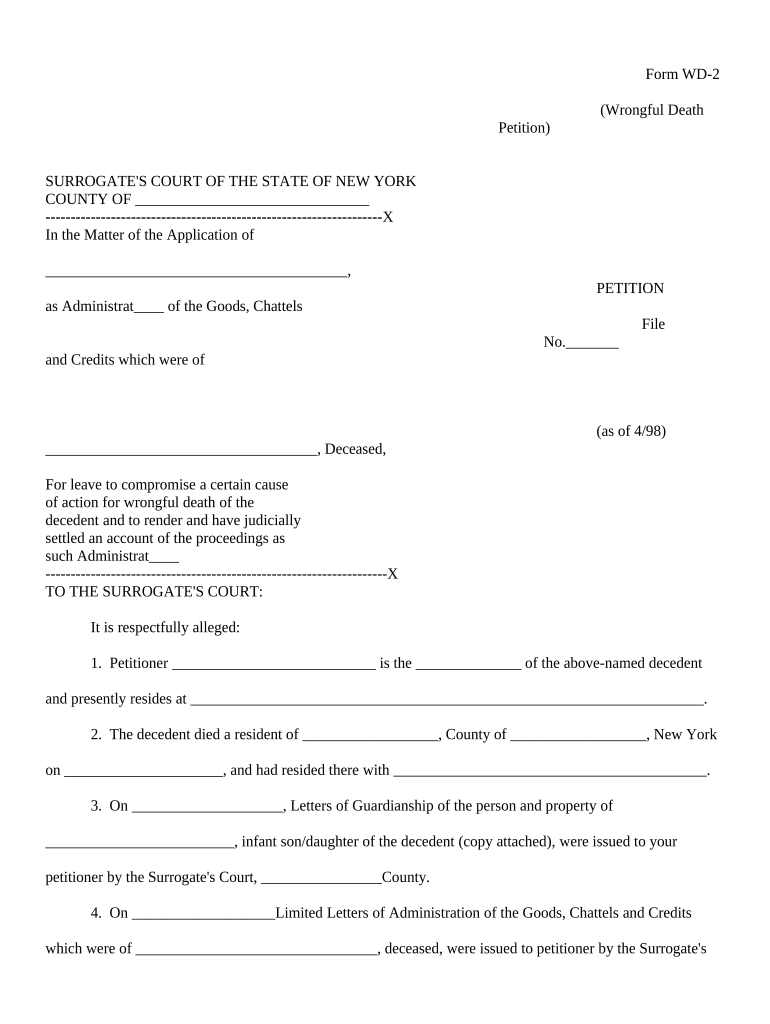
New York Wrongful Death Petition

This template is fully customizable. Edit the text, fill out the fields, and send it for signature. Give it a try!
New York Wrongful Death Petition

What the New York Wrongful Death Petition Is

A New York Wrongful Death Petition is the civil pleading filed to seek money damages for a death caused by another party’s wrongful act, omission, or negligence. In New York the claim is typically brought by the decedent’s personal representative on behalf of statutory distributees and beneficiaries and proceeds in the Supreme Court (county level) as a civil action. The petition sets out factual allegations, the legal theory of liability, the decedent’s relationship to claimants, and the damages sought, and it initiates service, discovery, and the court docketing process.

Why this Petition Matters for Survivors and Estates

Filing a wrongful death petition preserves legal remedies for survivors, secures compensation for pecuniary loss, and creates a formal record for insurance and estate administration. It also triggers procedural deadlines and discovery that cannot be recovered if omitted.

Why this Petition Matters for Survivors and Estates

Who Typically Prepares and Uses This Petition

The petition is most often prepared by attorneys representing the decedent’s estate or by a personal representative working with counsel.

  • Personal representatives or executors preparing a claim on behalf of beneficiaries and the estate.
  • Plaintiffs’ attorneys drafting the complaint, managing service, and coordinating medical and expert evidence.
  • Insurance adjusters and defense counsel reviewing allegations to evaluate coverage and liability exposure.

Who Signs and Files the Petition

Personal Representative

A personal representative or administrator of the decedent’s estate usually authorizes and files the petition; they may sign under penalty of perjury and must be able to show authority under estate appointment documents or county surrogate court records.

Plaintiff Attorney

An attorney representing the estate or beneficiaries typically signs and files the pleading, certifies service, and handles court filings, discovery, and settlement negotiations on the estate’s behalf.

Essential Data Elements to Include

Decedent Name: Full legal name
Date of Death: MM/DD/YYYY
Personal Representative: Name and appointment info
Beneficiaries: Names and relationships
Cause of Action: Negligence, wrongful act, or other basis
Damages Sought: Pecuniary and statutory claims

Step-by-Step: Completing the Petition

Follow a consistent sequence: prepare facts, attach supporting documents, obtain personal representative authority, and verify service details before filing.

  • 01
    Gather records: Collect medical records, death certificate, and incident reports.
  • 02
    Establish authority: Confirm personal representative appointment or obtain letters of administration.
  • 03
    Draft allegations: Describe facts, causation, and legal theories clearly and concisely.
  • 04
    Attach exhibits: Include summarized medical bills and proof of relationship.

Filing Flow: Where the Petition Goes Next

After drafting and signing, the petition moves through filing, service, defendant response, discovery, and pretrial phases.

  • Filing clerk: File the petition with the county Supreme Court clerk for docketing.
  • Service of process: Serve defendants per CPLR requirements and certify service.
  • Defendant response: Await answer, motion to dismiss, or other responsive pleading.
  • Discovery and motion practice: Proceed with document requests, depositions, and motions.

Consequences of Inaccurate or Late Petitions

Dismissal or delay: Missing jurisdictional facts can lead to motion practice or dismissal
Statute of limitations: Untimely filing may bar recovery
Costs exposure: Sanctions or attorneys’ fees may be awarded for bad-faith filings
Evidence loss: Delayed discovery can result in unavailable or degraded evidence
Insurance denials: Incomplete claims can hinder coverage or settlement offers
Probate conflicts: Inaccurate representative authority can stall estate administration

Common Preparation Mistakes to Avoid

  • Using inconsistent names or dates across the petition, death certificate, and proxy documents, which complicates proof of identity and service.
  • Failing to attach or reference the personal representative’s letters of administration, causing jurisdictional or standing objections from defendants.
  • Overlooking medical records or expert reports at filing that later become critical to proving causation and damages.
  • Neglecting to follow CPLR service rules or to include complete service addresses, resulting in invalid service and delayed proceedings.

How a Petition Differs from Related Pleadings

Compare common documents to understand the petition’s purpose versus other filings in New York civil practice.

Document Type Purpose Typical Use
Wrongful Death Petition seek survivor damages estate-led civil claim
Survival Action compensate estate for decedent losses estate assets recovery
Estate Probate Petition appoint representative probate administration
Criminal Complaint seek criminal penalties prosecutor-led

Practical Examples of How the Petition Is Used

Representative scenarios illustrate common fact patterns and procedural choices in New York wrongful death matters.

Auto Collision Case

A personal representative files a petition after a fatal highway crash with attached medical bills and police report

  • The petition alleges negligence by the other driver
  • The estate pursues pecuniary loss, funeral expenses, and loss of support while the insurer evaluates liability and defense counsel prepares an answer.

Medical Malpractice Case

A decedent’s family files a petition claiming negligent care following a hospital procedure

  • Expert reports are attached during initial disclosures
  • Counsel seeks economic damages and prepares for depositions while coordinating with the surrogate court for estate-related documents.

Digital Signing and eFiling Considerations

Electronic signatures and e-filing can streamline execution and service but must meet legal and court-specific rules.

  • eSignature Legality: ESIGN Act (15 U.S.C. ch. 96) and New York ESRA (NY Tech Law §301-309) generally permit e-signatures, but courts may have local rules.
  • Authentication: Use adequate signer authentication (email code, SMS, or stronger) to establish intent and attribution.
  • Court Rules: Verify county Supreme Court local rules for e-filing and accepted signature formats.

Electronic vs Digital Signatures — Practical Differences

Understand the technical and legal distinctions so you can choose the appropriate signature method for court filings and evidentiary needs.

Criteria Electronic Signature Digital Signature
Definition any electronic sound or symbol cryptographic pki-based signature
Typical Use court filings, forms high-assurance compliance (e.g., 21 cfr part 11)
Non-repudiation audit trail supports attribution certificate-based non-repudiation
Admissibility admissible if meets esign/u.s. rules stronger technical proof in disputes

Representative eSignature Vendor Comparison for Petition Workflows

Basic vendor characteristics relevant to executing and managing petitions; signNow placed first per platform data and feature considerations.

signNow DocuSign Adobe Sign PandaDoc HelloSign
Starting Price $8/user/mo $15/user/mo $14/user/mo $19/user/mo $15/user/mo
Free Trial 7-day free trial Varies by plan Varies by plan Varies by plan Varies by plan
Bulk Send Yes Varies by plan Varies by plan Varies by plan Varies by plan
Audit Trail Yes Yes Yes Yes Yes
HIPAA Compliant Yes Varies by plan Varies by plan Varies by plan Varies by plan
Envelope Cap No envelope cap 100 envelopes/user/year Varies by plan Varies by plan Varies by plan

Practical Tips to Reduce Risk and Speed Processing

Apply consistent administrative and drafting habits to reduce objections and preserve claims.

Confirm authority early
Obtain and attach letters of administration or court appointment before filing to avoid standing challenges.
Standardize names and dates
Use the decedent’s legal name uniformly across documents and exhibits to prevent identity disputes.
Document chain of custody
Record how records were obtained and maintained to preserve evidence admissibility.
Check local rules
Review county Supreme Court e-filing and signature rules before submitting electronically.

Frequently Asked Questions and Practical Answers

Answers to common procedural and technical questions about preparing and submitting a New York wrongful death petition.


Need help? Contact support

be ready to get more
Join over 28 million airSlate SignNow users