Establishing secure connection… Loading editor… Preparing document…
Navigation

Fill and Sign the New York Support Form
Fill and Sign the New York Support Form

How it works

Open the document and fill out all its fields.
Apply your legally-binding eSignature.
Save and invite other recipients to sign it.

Rate template

4.7
52 votes
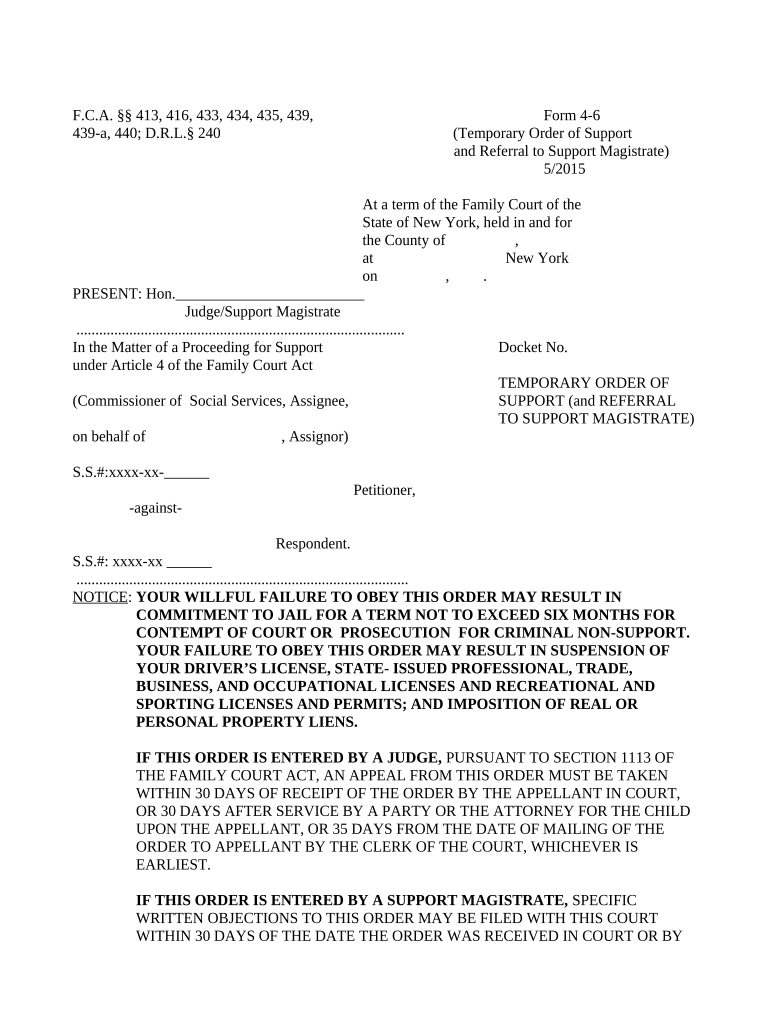
F.C.A. §§ 413, 416, 433, 434, 435, 439, Form 4-6 439-a, 440; D.R.L.§ 240 (Temporary Order of Support and Referral to Support Magistrate) 5/2015 At a term of the Family Court of the State of New York, held in and for the County of , at New York on , . PRESENT: Hon._________________________ Judge/Support Magistrate ....................................................................................... In the Matter of a Proceeding for Support Docket No. under Article 4 of the Family Court Act TEMPORARY ORDER OF (Commissioner of Social Services, Assignee, SUPPORT (and REFERRAL TO SUPPORT MAGISTRATE) on behalf of , Assignor) S.S.#:xxxx-xx- Petitioner, -against- Respondent. S.S.#: xxxx-xx ........................................................................................ NOTICE : YOUR WILLFUL FAILURE TO OBEY THIS ORDER MAY RESULT IN COMMITMENT TO JAIL FOR A TERM NOT TO EXCEED SIX MONTHS FOR CONTEMPT OF COURT OR PROSECUTION FOR CRIMINAL NON-SUPPORT. YOUR FAILURE TO OBEY THIS ORDER MAY RESULT IN SUSPENSION OF YOUR DRIVER’S LICENSE, STATE- ISSUED PROFESSIONAL, TRADE, BUSINESS, AND OCCUPATIONAL LICENSES AND RECREATIONAL AND SPORTING LICENSES AND PERMITS; AND IMPOSITION OF REAL OR PERSONAL PROPERTY LIENS. IF THIS ORDER IS ENTERED BY A JUDGE, PURSUANT TO SECTION 1113 OF THE FAMILY COURT ACT, AN APPEAL FROM THIS ORDER MUST BE TAKEN WITHIN 30 DAYS OF RECEIPT OF THE ORDER BY THE APPELLANT IN COURT, OR 30 DAYS AFTER SERVICE BY A PARTY OR THE ATTORNEY FOR THE CHILD UPON THE APPELLANT, OR 35 DAYS FROM THE DATE OF MAILING OF THE ORDER TO APPELLANT BY THE CLERK OF THE COURT, WHICHEVER IS EARLIEST. IF THIS ORDER IS ENTERED BY A SUPPORT MAGISTRATE, SPECIFIC WRITTEN OBJECTIONS TO THIS ORDER MAY BE FILED WITH THIS COURT WITHIN 30 DAYS OF THE DATE THE ORDER WAS RECEIVED IN COURT OR BY PERSONAL SERVICE, OR IF THE ORDER WAS RECEIVED BY MAIL, WITHIN 35 DAYS OF THE MAILING OF THE ORDER. The above-named Petitioner having filed a petition in this Court, dated , alleging that the above-named Respondent is chargeable with the support of , (and) ; and Respondent having appeared before this Court to answer the petition and to show why an order of support and other relief requested in the petition should not be granted, and having been advised by the Court of the right to counsel, and Respondent having denied admitted the ☐ ☐ allegations of the petition; and The name, address and telephone number of Respondent’s current employer(s) are: NAME ADDRESS TELEPHONE NOW, after examination and inquiry into the facts and circumstances of the case and □ upon application of the Petitioner □ upon the Court's own motion, it is ORDERED that the above-named Respondent, upon notice of this order, pay or cause to be paid to [check applicable box]: □ Petitioner □ Support Collection Unit at , the sum of $ □ weekly □ every two weeks □ monthly □twice per month □ quarterly, such payments to commence on , allocated as follows: for and toward the support of , spouse, the sum of $ □ weekly □ every two weeks □ monthly □twice per month □ quarterly and for and toward the support of the child(ren), the sum of $ □ weekly □ every two weeks □ monthly □twice per month □ quarterly: Name Las 4 Digists of Soc. Sec. # Date of Birth Amount Spouse: Child(ren): Total and it is further ORDERED that, pursuant to Domestic Relations Law §236B(1)(a), payments for the support of the spouse shall terminate upon death of the spouse, upon the spouse’s valid or invalid marriage or upon modification in accordance with Domestic Relations Law §236B(9) or 248; and it is further □ ORDERED that commencing on _________________the above-named Respondent, upon notice of this Order, pay or cause the above amount(s) to be paid to [check applicable box]: □ Petitioner by cash , check or money order. □ Non-IV-D cases: Payable to the Petitioner by check or money order and mailed to the NYS Child Support Processing Center, P. O. Box 15365, Albany, NY 12212-5365. The county name for the matter must be included with the payment for identification purposes. □ IV-D cases: Payable by check or money order made payable to and mailed to the NYS Child Support Processing Center, PO Box 15363, Albany, NY 12212-5363. The county name and New York Case Identifier number for the matter must be included with the payment for identification purposes; and it is further ORDERED that for the following reason(s)☐ constituting good cause pursuant to Section 440(1) of the Family Court Act, the IV-D cases: Support ☐ Collection Unit Non-IV-D cases: Court shall NOT issue an immediate income execution; however ☐ in the event of default, 1 this order shall be enforceable pursuant to Section 5241 of the Court Practice law and Rules, or any other manner provided by law; and it is further [IV- D cases only]: □ ORDERED that the Respondent, custodial parent and any other individual parties immediately notify the Support Collection Unit of any changes in the following information: residential and mailing addresses, social security number, telephone number, driver’s license number; and name, address and telephone numbers of the parties’ employers and any change in health insurance benefits, including any termination of benefits, change in the health insurance benefit carrier or premium, or extent and availability of existing or new benefits; and it is further ORDERED that this order shall be enforceable pursuant to Section 5241 or 5242 of the Civil Practice Law and Rules, or in any other manner provided by law; And the Court having determined that [check applicable box]: □ The child(ren) are currently covered by the following health insurance plan [specify]: which is maintained by [specify party]: □ Health insurance coverage is available to one of the parents or a legally-responsible relative [specify name]: under the following health insurance plan [specify, if known]: , which provides the following health insurance benefits [specify extent and type of benefits, if known, including dental, optical, prescription drug and other health-related benefits]: □ Health insurance coverage is available to both of the parents as follows: Name Health Insurance Plan Premium or Contribution Benefits □ No legally-responsible relative has health insurance coverage available for the child(ren), but the child(ren) may be eligible for health insurance benefits under the New York “Child Health Plus” program or New York State Medical Assistance Program, or the publicly funded health insurance program in the State where the custodial parent resides, □ No legally-responsible relative has health insurance coverage available for the child(ren), but the child(ren) are currently enrolled in the New York State Medical Assistance Program, 1 " Default", as defined in CPLR 5241, means the failure to make three payments on the date due in the full amount directed in this order, or the accumulation of arrears, including amounts arising from retroactive support, that are equal to or greater than the amount directed to be paid for one month, whichever occurs first. IT IS THEREFORE ORDERED that [specify name(s) of legally-responsible relative(s)]: □ continue to maintain health insurance coverage for the following eligible dependent(s) [specify]: under the above-named existing plan for as long as it remains available; □ enroll the following eligible dependent(s) [specify]: under the following health insurance plan [specify]: immediately and without regard to seasonal enrollment restrictions and maintain such coverage as long as it remains available in accordance with [IV-D cases]: □ the Medical Execution, which shall be issued immediately by the Support Collection Unit, pursuant to CPLR 5241 □ the Medical Execution issued by this Court [Non-IV-D cases]: □ the Qualified Medical Child Support Order. The cost or premiums, if any, to be paid by the legally-responsible relative(s) to obtain or maintain such benefits be allocated as follows between the parties [specify]: Such coverage shall include all plans covering the health, medical, dental, optical and prescription drug needs of the dependents named above and any other health care services or benefits for which the legally-responsible relative is eligible for the benefit of such dependents; provided, however, that the group health plan is not required to provide any type or form of benefit or option not otherwise provided under the group health plan except to the extent necessary to meet the requirements of Section 1396(g-1) of Title 42 of the United States Code. The legally-responsible relative(s) shall assign all insurance reimbursement payments for health care expenses incurred for (his)(her) eligible dependent(s) to the provider of such services or the party having actually incurred and satisfied such expenses, as appropriate; OR □ IT IS THEREFORE ORDERED that the custodial parent [specify name]: shall immediately apply to enroll the eligible child(ren) in the “Child Health Plus” program (the NYS health insurance program for children) and the New York State Medical Assistance Program or the publicly funded health insurance program in the State where the custodial parent resides. And the Court further finds that: The mother is the custodial non-custodial parent, whose pro rata share of the cost or premiums ☐ ☐ to obtain or maintain such health insurance coverage is , The father is the custodial non-custodial parent, whose pro rata share of the cost or premiums ☐ ☐ to obtain or maintain such health insurance coverage is ; And the Court further finds that [check applicable box]: □ Each parent shall pay the cost or premiums in the same proportion as each of their incomes are to the combined parental income as cited above; OR □ Upon consideration of the following factors [specify]: pro-rating the payment would be unjust or inappropriate for the following reasons [specify]: and, therefore, the payments shall be allocated as follows [specify]: ; and it is further OR □ [Where the child(ren) are recipients of managed care coverage under the New York State Medical Assistance Program] ORDERED that , the non-custodial parent herein, shall pay the amount of $ per toward to the managed care premium under the New York State Medical Assistance Program; □Where the child(ren) are recipients of fee-for-service coverage under the New York State Medical Assistance Program] ORDERED that , the non-custodial parent herein, shall pay up to an annual maximum of $ for the current calendar year to the New York State Medical Assistance Program upon written notice that the program has paid health care expenses on behalf of the child(ren) for costs incurred during the current calendar year. □ [Where the child(ren) are recipients of fee-for-service coverage under the New York State Medical Assistance Program] ORDERED that , the non-custodial parent herein, pay as part of the cash medical support obligation up to an annual maximum of $ for the calendar year commencing January 1, and for every year thereafter to the New York State Medical Assistance Program upon written notice that the Medicaid program has paid health care expenses on behalf of the child(ren). □ ORDERED that , the non-custodial parent herein, shall pay the amount of $ , representing his/her share of premiums and/or costs incurred by the New York State Medical Assistance Program for the period of time from to the date of this order, which amount shall be support arrears/past due support; □ ORDERED that in the event that the child(ren) cease(s) to be enrolled in the New York State Medical Assistance Program, the non-custodial parent’s obligation to pay his/her share of managed care coverage premiums and/or fee-for-service reimbursement shall terminate as of the date the child(ren) is/are no longer enrolled in Medicaid; ORDERED that the legally responsible relative immediately notify the [check applicable box]: □ other party (non-IV-D cases) □ Support Collection Unit (IV-D cases) of any change in health insurance benefits, including any termination of benefits, change in the health insurance benefit carrier or premium, or extent and availability of existing or new benefits; and it is further ORDERED, that [specify name]: shall execute and deliver to [specify name]: any forms, documents, or instruments to assure timely payment of any health insurance claim for the child(ren); and it is further ORDERED that upon a finding that the above-named legally-responsible relative(s) willfully failed to obtain health insurance benefits in violation of [check applicable box(es)]: □ this order □ the medical execution □ the qualified medical child support order, such relative(s) will be presumptively liable for all health care expenses incurred on behalf of the above-named defendant(s) from the first date such dependent(s)(was)(were) eligible to be enrolled to receive health insurance benefits after the issuance of such order or execution directing the acquisition of such coverage; and it is further ORDERED that [specify]: the legally-responsible relative(s) herein, shall pay (his)(her) pro rata share of future reasonable health expenses of the child(ren) not covered by insurance by [check applicable box]: □ direct payments to the health care provider □ other [specify]: ; and it is further ORDERED that, if health insurance benefits for the above-named child(ren) not available at the present time become available in the future to the legally-responsible relative(s), such relative(s) shall enroll the dependent(s) who are eligible for such benefits immediately and without regard to seasonal enrollment restrictions and shall maintain such benefits so long as they remain available; and it is further [Check applicable box(es): □ [Where the Court has made a finding that health insurance is not available] ORDERED that an execution for medical support enforcement shall not be issued by the support collection unit unless a subsequent determination is made by the Court that such health insurance benefits are available; and it is further □ ORDERED that , the non-custodial parent herein, pay the sum of $ as (his)(her) proportionate share of reasonable child care expenses, to be paid as follows: ; and it is further □ ORDERED that , the non-custodial parent herein, pay the sum of $ as educational expenses by □ direct payment to the educational provider □ other [specify]: ; and it is further □ ORDERED that [specify party or parties; check applicable box(es)]: □ purchase and maintain life and/or accident insurance policy in the☐ ☐ amount of [specify]: (and/or) □ maintain the following existing life and/or accident insurance policy in the ☐ ☐ amount of [specify]: (and/or) □ assign the following as beneficiary beneficiaries [specify]: ☐ ☐ to the following existing life and/or accident insurance policy or policies ☐ ☐ [specify policy or policies and amount(s)]: . In the case of life insurance, the following shall be designated as irrevocable beneficiaries [specify]: during the following time period [specify]: . In the case of accident insurance, the insured party shall be designated as irrevocable beneficiary during the following time period [specify]: . The obligation to provide such insurance shall cease upon the termination of the duty of [specify party]: to provide support for each child;. and it is further [IV-D Cases]: □ ORDERED that when the person or family to whom family assistance is being paid no longer receives family assistance, support payments shall continue to be made to the Support Collection Unit, unless such person or family requests otherwise; and it is further □ ORDERED that the support obligor, the non-custodial parent, is directed to: 2 □ seek employment □ participate in job training, employment counseling, or other programs designed to lead to employment [specify program]: ; and it is further [Judicial Orders Only] : □ ORDERED that Respondent shall have the following rights of visitation with respect to the child(ren)[specify]: ; and it is further ORDERED, that the issue of support is hereby referred to a support magistrate for final determination pursuant to Sections 439 and 439-a of the Family Court Act; and it is further [REQUIRED] IT IS FURTHER ORDERED that a copy of this order be provided promptly by [check applicable box]:□ Support Collection Unit ((IV-D cases: ) □ Clerk of Court (non- IV-D cases) to the New York State Case Registry of Child Support Orders established pursuant to Section 111-b(4-a) of the Social Services Law; and it is further and it is further 2 Inapplicable where support obligor is receiving SSI or social security disability benefits. See FCA §437-a. ORDERED that [specify]: ENTER ________________________________ (Judge of the Family Court)(Support Magistrate) Dated: , . Check applicable box: Order mailed on [specify date(s) and to whom mailed ]:___________________________☐ Order received in court on [specify date(s) and to whom given]:_____________________ ☐ INFORMATION CONCERNING COST OF LIVING ADJUSTMENTS AND MODIFICATIONS . (1) THIS ORDER OF CHILD SUPPORT SHALL BE ADJUSTED BY THE APPLICATION OF A COST OF LIVING ADJUSTMENT AT THE DIRECTION OF THE SUPPORT COLLECTION UNIT NO EARLIER THAN TWENTY-FOUR MONTHS AFTER THIS ORDER IS ISSUED, LAST MODIFIED OR LAST ADJUSTED, UPON THE REQUEST OF ANY PARTY TO THE ORDER OR PURSUANT TO PARAGRAPH (2) BELOW. UPON APPLICATION OF A COST OF LIVING ADJUSTMENT AT THE DIRECTION OF THE SUPPORT COLLECTION UNIT, AN ADJUSTED ORDER SHALL BE SENT TO THE PARTIES WHO, IF THEY OBJECT TO THE COST OF LIVING ADJUSTMENT, SHALL HAVE THIRTY-FIVE (35) DAYS FROM THE DATE OF MAILING TO SUBMIT A WRITTEN OBJECTION TO THE COURT INDICATED ON SUCH ADJUSTED ORDER. UPON RECEIPT OF SUCH WRITTEN OBJECTION, THE COURT SHALL SCHEDULE A HEARING AT WHICH THE PARTIES MAY BE PRESENT TO OFFER EVIDENCE WHICH THE COURT WILL CONSIDER IN ADJUSTING THE CHILD SUPPORT ORDER IN ACCORDANCE WITH THE CHILD SUPPORT STANDARDS ACT. (2) A RECIPIENT OF FAMILY ASSISTANCE SHALL HAVE THE CHILD SUPPORTORDER REVIEWED AND ADJUSTED AT THE DIRECTION OF THE SUPPORT COLLECTION UNIT NO EARLIER THAN TWENTY-FOUR MONTHS AFTER SUCH ORDER IS ISSUED, LAST MODIFIED OR LAST ADJUSTED WITHOUT FURTHER APPLICATION OF ANY PARTY. ALL PARTIES WILL RECEIVE NOTICE OF ADJUSTMENT FINDINGS. (3) WHERE ANY PARTY FAILS TO PROVIDE, AND UPDATE UPON ANY CHANGE, THE SUPPORT COLLECTION UNIT WITH A CURRENT ADDRESS TO WHICH AN ADJUSTED ORDER CAN BE SENT AS REQUIRED BY SECTION 443 OF THE FAMILY COURT ACT, THE SUPPORT OBLIGATION AMOUNT CONTAINED THEREIN SHALL BECOME DUE AND OWING ON THE DATE THE FIRST PAYMENT IS DUE UNDER THE TERMS OF THE ORDER OF SUPPORT WHICH WAS REVIEWED AND ADJUSTED OCCURRING ON OR AFTER THE EFFECTIVE DATE OF THE ORDER, REGARDLESS OF WHETHER OR NOT THE PARTY HAS RECEIVED A COPY OF THE ADJUSTED ORDER. (4) IN ADDITION TO A COST OF LIVING ADJUSTMENT, EACH PARTY HAS A RIGHT TO SEEK A MODIFICATION OF THE CHILD SUPPORT ORDER UPON A SHOWING OF: (I) A SUBSTANTIAL CHANGE IN CIRCUMSTANCES; OR (II) THAT THREE YEARS HAVE PASSED SINCE THE ORDER WAS ENTERED, LAST MODIFIED OR ADJUSTED; OR (III) THERE HAS BEEN A CHANGE IN EITHER PARTY'S GROSS INCOME BY FIFTEEN PERCENT OR MORE SINCE THE ORDER WAS ENTERED, LAST MODIFIED, OR ADJUSTED; HOWEVER, IF THE PARTIES HAVE SPECIFICALLY OPTED OUT OF SUBPARAGRAPH (II) OR (III) OF THIS PARAGRAPH IN A VALIDLY EXECUTED AGREEMENT OR STIPULATION, THEN THAT BASIS TO SEEK MODIFICATION DOES NOT APPLY.

Practical advice on preparing your ‘New York Support’ online

Are you fed up with the burden of dealing with paperwork? Look no further than airSlate SignNow, the premier electronic signature platform for individuals and businesses. Bid farewell to the lengthy process of printing and scanning documents. With airSlate SignNow, you can seamlessly fill out and sign documents online. Take advantage of the extensive features bundled in this user-friendly and cost-effective platform and transform your method of document management. Whether you need to authorize forms or collect electronic signatures, airSlate SignNow takes care of it all effortlessly, with just a few clicks.

Follow this comprehensive guide:

  1. Sign in to your account or sign up for a free trial with our service.
  2. Click +Create to upload a file from your device, cloud, or our form library.
  3. Edit your ‘New York Support’ in the editor.
  4. Click Me (Fill Out Now) to complete the document on your behalf.
  5. Add and designate fillable fields for others (if needed).
  6. Proceed with the Send Invite settings to solicit eSignatures from others.
  7. Download, print your copy, or convert it into a reusable template.

No need to worry if you need to collaborate with your teammates on your New York Support or send it for notarization—our platform provides you with everything necessary to accomplish such tasks. Create an account with airSlate SignNow today and upgrade your document management to a higher standard!

Here is a list of the most common customer questions. If you can’t find an answer to your question, please don’t hesitate to reach out to us.

Need help? Contact Support

The best way to complete and sign your new york support form

Save time on document management with airSlate SignNow and get your new york support form eSigned quickly from anywhere with our fully compliant eSignature tool.

How to Sign a PDF Online How to Sign a PDF Online

How to complete and sign forms online

Previously, working with paperwork required lots of time and effort. But with airSlate SignNow, document management is quick and easy. Our powerful and user-friendly eSignature solution lets you effortlessly fill out and eSign your new york support form online from any internet-connected device.

Follow the step-by-step guide to eSign your new york support form template online:

  • 1.Register for a free trial with airSlate SignNow or log in to your account with password credentials or SSO authentication.
  • 2.Click Upload or Create and import a form for eSigning from your device, the cloud, or our form library.
  • 3.Click on the document name to open it in the editor and use the left-side menu to fill out all the blank areas appropriately.
  • 4.Drop the My Signature field where you need to eSign your sample. Type your name, draw, or upload an image of your regular signature.
  • 5.Click Save and Close to accomplish modifying your completed document.

As soon as your new york support form template is ready, download it to your device, export it to the cloud, or invite other individuals to eSign it. With airSlate SignNow, the eSigning process only requires a few clicks. Use our powerful eSignature tool wherever you are to handle your paperwork successfully!

How to Sign a PDF Using Google Chrome How to Sign a PDF Using Google Chrome

How to complete and sign forms in Google Chrome

Completing and signing documents is simple with the airSlate SignNow extension for Google Chrome. Installing it to your browser is a quick and beneficial way to manage your forms online. Sign your new york support form sample with a legally-binding eSignature in a couple of clicks without switching between programs and tabs.

Follow the step-by-step guide to eSign your new york support form template in Google Chrome:

  • 1.Go to the Chrome Web Store, search for the airSlate SignNow extension for Chrome, and add it to your browser.
  • 2.Right-click on the link to a form you need to eSign and select Open in airSlate SignNow.
  • 3.Log in to your account with your password or Google/Facebook sign-in option. If you don’t have one, you can start a free trial.
  • 4.Use the Edit & Sign toolbar on the left to fill out your sample, then drag and drop the My Signature option.
  • 5.Insert a photo of your handwritten signature, draw it, or simply type in your full name to eSign.
  • 6.Verify all the details are correct and click Save and Close to finish modifying your paperwork.

Now, you can save your new york support form sample to your device or cloud storage, email the copy to other individuals, or invite them to eSign your form with an email request or a protected Signing Link. The airSlate SignNow extension for Google Chrome improves your document workflows with minimum time and effort. Try airSlate SignNow today!

How to Sign a PDF in Gmail How to Sign a PDF in Gmail How to Sign a PDF in Gmail

How to complete and sign documents in Gmail

When you get an email with the new york support form for approval, there’s no need to print and scan a file or save and re-upload it to another program. There’s a much better solution if you use Gmail. Try the airSlate SignNow add-on to promptly eSign any documents right from your inbox.

Follow the step-by-step guide to eSign your new york support form in Gmail:

  • 1.Visit the Google Workplace Marketplace and look for a airSlate SignNow add-on for Gmail.
  • 2.Install the program with a related button and grant the tool access to your Google account.
  • 3.Open an email with an attached file that needs signing and use the S sign on the right panel to launch the add-on.
  • 4.Log in to your airSlate SignNow account. Select Send to Sign to forward the file to other parties for approval or click Upload to open it in the editor.
  • 5.Place the My Signature option where you need to eSign: type, draw, or upload your signature.

This eSigning process saves time and only takes a couple of clicks. Utilize the airSlate SignNow add-on for Gmail to adjust your new york support form with fillable fields, sign forms legally, and invite other parties to eSign them al without leaving your mailbox. Improve your signature workflows now!

How to Sign a PDF on a Mobile Device How to Sign a PDF on a Mobile Device How to Sign a PDF on a Mobile Device

How to fill out and sign forms in a mobile browser

Need to rapidly complete and sign your new york support form on a mobile phone while working on the go? airSlate SignNow can help without the need to install additional software apps. Open our airSlate SignNow solution from any browser on your mobile device and create legally-binding eSignatures on the go, 24/7.

Follow the step-by-step guidelines to eSign your new york support form in a browser:

  • 1.Open any browser on your device and follow the link www.signnow.com
  • 2.Create an account with a free trial or log in with your password credentials or SSO option.
  • 3.Click Upload or Create and add a file that needs to be completed from a cloud, your device, or our form collection with ready-to go templates.
  • 4.Open the form and fill out the empty fields with tools from Edit & Sign menu on the left.
  • 5.Add the My Signature area to the sample, then enter your name, draw, or upload your signature.

In a few simple clicks, your new york support form is completed from wherever you are. As soon as you're done with editing, you can save the file on your device, build a reusable template for it, email it to other people, or invite them eSign it. Make your paperwork on the go fast and productive with airSlate SignNow!


How to Sign a PDF on iPhone How to Sign a PDF on iPhone

How to complete and sign paperwork on iOS

In today’s corporate environment, tasks must be completed quickly even when you’re away from your computer. Using the airSlate SignNow app, you can organize your paperwork and sign your new york support form with a legally-binding eSignature right on your iPhone or iPad. Set it up on your device to close deals and manage documents from just about anywhere 24/7.

Follow the step-by-step guidelines to eSign your new york support form on iOS devices:

  • 1.Go to the App Store, search for the airSlate SignNow app by airSlate, and set it up on your device.
  • 2.Open the application, tap Create to upload a form, and select Myself.
  • 3.Select Signature at the bottom toolbar and simply draw your autograph with a finger or stylus to eSign the sample.
  • 4.Tap Done -> Save right after signing the sample.
  • 5.Tap Save or utilize the Make Template option to re-use this document later on.

This process is so straightforward your new york support form is completed and signed within a few taps. The airSlate SignNow application works in the cloud so all the forms on your mobile device are kept in your account and are available any time you need them. Use airSlate SignNow for iOS to enhance your document management and eSignature workflows!


How to Sign a PDF on Android How to Sign a PDF on Android

How to fill out and sign paperwork on Android

With airSlate SignNow, it’s simple to sign your new york support form on the go. Set up its mobile app for Android OS on your device and start boosting eSignature workflows right on your smartphone or tablet.

Follow the step-by-step guidelines to eSign your new york support form on Android:

  • 1.Navigate to Google Play, find the airSlate SignNow app from airSlate, and install it on your device.
  • 2.Log in to your account or register it with a free trial, then upload a file with a ➕ button on the bottom of you screen.
  • 3.Tap on the imported document and select Open in Editor from the dropdown menu.
  • 4.Tap on Tools tab -> Signature, then draw or type your name to electronically sign the sample. Complete blank fields with other tools on the bottom if required.
  • 5.Use the ✔ button, then tap on the Save option to finish editing.

With a user-friendly interface and full compliance with main eSignature standards, the airSlate SignNow app is the perfect tool for signing your new york support form. It even operates without internet and updates all record changes when your internet connection is restored and the tool is synced. Fill out and eSign forms, send them for approval, and generate re-usable templates anytime and from anywhere with airSlate SignNow.

Sign up and try New york support form
  • Close deals faster
  • Improve productivity
  • Delight customers
  • Increase revenue
  • Save time & money
  • Reduce payment cycles







