Establishing secure connection…Loading editor…Preparing document…

Petition to Perpetuate Testimony

This template is fully customizable. Edit the text, fill out the fields, and send it for signature. Give it a try!
Petition to Perpetuate Testimony

What a Petition to Perpetuate Testimony Is

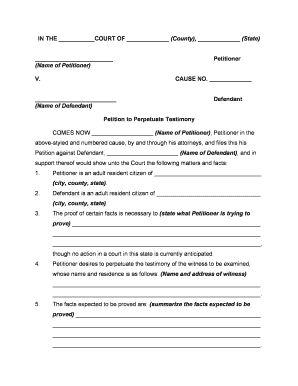
A Petition to Perpetuate Testimony is a pretrial court filing used to preserve a witness’s sworn testimony when that witness is likely to be unavailable for trial. Courts permit taking advance testimony by deposition, affidavit, or recorded statement under federal Rule 27 or comparable state procedure. The petition identifies the witness, explains why preservation is necessary, specifies the topics or questions to be covered, and requests a court order authorizing the deposition method and any protections for confidentiality or exhibit handling.

Why Preserving Testimony Matters

A Petition to Perpetuate Testimony secures evidence that might otherwise be lost, reduces the risk that crucial statements will be excluded as hearsay, and creates an authenticated record for later use at trial or in settlement negotiations.

Why Preserving Testimony Matters

Who Typically Files This Petition

Common filers include attorneys and parties who need to lock in testimony before a witness becomes unreachable, incapacitated, or otherwise unavailable.

  • Civil litigators preparing for trial when witnesses may relocate, become incapacitated, or die.
  • Estate representatives preserving testimony about wills, capacity, or disputed asset transfers.
  • Corporate counsel and investigators documenting witness statements for regulatory or internal matters.

Step-by-Step: Completing and Filing the Petition

Follow these core stages to prepare, file, and execute a Petition to Perpetuate Testimony in compliance with court rules.

  • 01
    Gather facts: Collect witness identity, contact, health status, and reasons for potential unavailability.
  • 02
    Draft petition: State case caption, specific testimony sought, and factual basis for preservation.
  • 03
    File and serve: File with appropriate court and serve all parties per local rules.
  • 04
    Schedule deposition: Arrange date, location, recording, and any requested authentication or travel accommodations.

Frequently Asked Questions and Practical Answers

Quick answers to common procedural, evidentiary, and technical questions about petitions, admissibility, timing, and objections.


Need help? Contact support

Essential Petition Details to Include

Case Caption: Court, county, case number.
Petitioner Name: Full legal name of petitioner.
Witness Name: Full legal name and aliases.
Contact Details: Mailing address, phone, email.
Statement Summary: Topics and proposed questions.
Relief Requested: Type of preservation and limits.

Key Risks and Possible Consequences

Motion Denial: Court may deny petition.
Hearsay Exclusion: Testimony may be excluded.
Service Defect: Improper service voids filing.
Sanctions Risk: Court may impose sanctions.
Perjury Exposure: Witness may face perjury charges.
Cost Exposure: Unexpected deposition costs.

Common Mistakes to Avoid

  • Failing to provide detailed factual support for anticipated witness unavailability commonly causes petitions to be denied or narrowly limited by the court.
  • Overbroad topic descriptions that are poorly tied to disputed issues invite objections and are likely to be curtailed during hearing.
  • Failure to properly serve notice on all parties or to follow local filing rules can result in procedural dismissal or re‑service requirements.
  • Neglecting to document authentication, chain of custody, and preservation steps for electronic recordings weakens admissibility at trial.

Configuring an Online Workflow for This Petition

Set up templates and secure routing to standardize petitions, supporting exhibits, and deposition scheduling while preserving audit trails.

Field Configuration
Case Caption Auto-populate case caption from template fields.
Signer Authentication Email link, SMS OTP, or KBA where required.
Document Template Use fillable PDF with conditional topic fields.
Retention Policy Apply retention rules and secure storage.

Technical and Security Considerations for eSubmission

Ensure the e‑submission platform supports accepted file formats, secure transmission, auditable trails, and any notarization method required by the court.

  • File Formats: PDF, DOCX, or native formats accepted.
  • Encryption: TLS 1.2/1.3 in transit, AES-256 at rest.
  • Integrations: Integrates with Google Workspace, NetSuite, Box.

eSignature Pricing and Feature Overview for Petition Workflows

High-level comparison of starting prices and select capabilities to consider when exchanging petitions, exhibits, or preserved testimony electronically.

signNow DocuSign Adobe Sign PandaDoc HelloSign
Starting Price $8/user/mo $15/user/mo $14/user/mo $19/user/mo $15/user/mo
Free Trial Yes, 7-day free trial Varies by vendor Varies by vendor Varies by vendor Varies by vendor
Bulk Send Yes Yes Yes Yes No
Audit Trail Yes Yes Yes Yes Yes
HIPAA Compliant Yes Yes Yes No No
Envelope Cap No cap 100 envelopes/user/year Varies Varies Varies

Representative Users and Their Needs

Litigation Attorney

A civil litigation attorney uses the petition to secure testimony from witnesses likely to become unavailable, ensuring admissible deposition transcripts and reducing surprise at trial. They coordinate filing, service, and logistics to meet procedural standards.

Estate Executor

An estate executor files to preserve testimony about will terms or the decedent’s capacity when witnesses are elderly or ill, ensuring evidence remains available for probate and reducing contested proceedings.

Illustrative Use Cases

Realistic examples demonstrate different ways courts authorize preservation of testimony to avoid loss of critical evidence.

Corporate Investigation

A mid-size company faced an overseas witness who was relocating and at risk of losing access for internal and regulatory investigations.

  • Court permitted a sworn deposition in advance.
  • The court authorized a recorded remote deposition; the preserved testimony supported internal compliance findings and reduced the need for repeat witness travel, saving significant time and expense while maintaining evidentiary integrity.

Probate Dispute

An executor sought to preserve testimony from an elderly witness with declining health regarding decedent intent and informal promises.

  • A video deposition was requested.
  • The petition was granted with a limited scope; recorded testimony was admitted at probate, clarifying disputed bequests and reducing litigation time and costs while protecting witness dignity.

Process Flow: From Petition to Preserved Record

Overview of the typical sequence to obtain court authorization and capture admissible testimony through deposition or recorded statements.

  • Prepare Petition: Draft factual basis and list testimony topics.
  • File & Serve: Submit petition per court rules and serve parties.
  • Hearing/Order: Attend hearing; secure court order defining scope.
  • Take Testimony: Record deposition with reporter and custody logs.

Practical Tips to Improve Acceptance and Admissibility

Adopt these practices to make petitions more persuasive and to protect the evidentiary value of preserved testimony.

Be specific
Draft narrowly tailored topics tied to disputed facts. Courts favor precision; broad, exploratory requests invite objection and likely limitation. Explain how each topic relates to the case to establish necessity and proportionality.
Document urgency
Attach affidavits, medical records, travel itineraries, or other documentary proof showing imminent unavailability. Concrete evidence at filing helps overcome objections based on speculation.
Preserve originals
Use certified court reporters and tamper-evident storage for recordings; retain original files and metadata so later authentication and admissibility are straightforward.
Coordinate authentication
Propose authentication steps in the petition such as reporter certificates, exhibit logs, witness affidavits, or forensic hashing to reduce later chain-of-custody disputes.
be ready to get more
Join over 28 million airSlate SignNow users