Establishing secure connection…Loading editor…Preparing document…

Notice of Appeal Form

This template is fully customizable. Edit the text, fill out the fields, and send it for signature. Give it a try!
Notice of Appeal Form

What the Notice of Appeal Form Is and when it matters

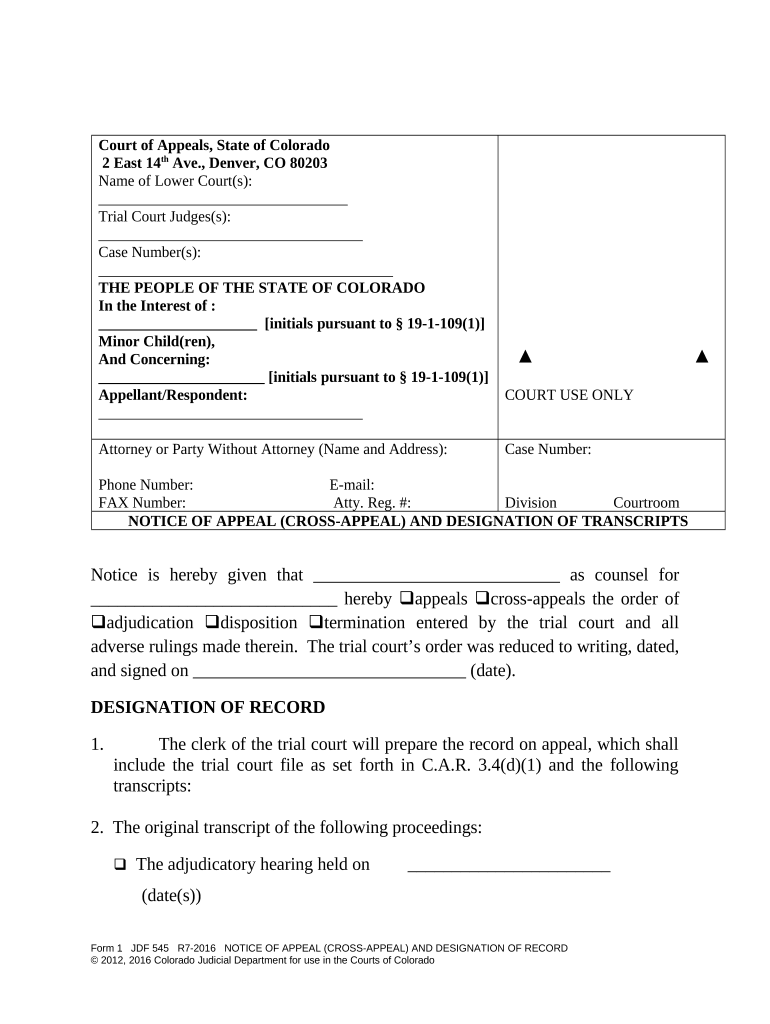
A Notice of Appeal Form is the formal filing a party submits to begin appellate review of a lower-court decision. It identifies the appealing party (appellant), the judgment or order being appealed, the court that issued the decision, and the appellate court to which the appeal is directed. The notice preserves the appellant’s right to challenge the decision and triggers the appellate docketing and briefing schedule. Filing procedures, deadlines, and required attachments vary by jurisdiction and court level.

Why a correctly prepared Notice of Appeal matters

A timely and complete Notice of Appeal preserves appellate rights, starts mandatory timelines, and prevents dismissal for procedural defects. Clear identification of the judgment and parties avoids jurisdictional disputes and limits later challenges to appealability.

Why a correctly prepared Notice of Appeal matters

Who files and who relies on the Notice of Appeal

Parties should confirm who must sign, serve, and file the notice under the applicable rules before submitting it to the court.

  • Appellants and their lawyers who seek review of a judgment or final order.
  • Respondents and opposing counsel who track deadlines and prepare opposing briefs.
  • Clerks and court staff who docket appeals and manage service and records.

Essential parts to include in a professional Notice of Appeal

A complete Notice of Appeal lists the judgment appealed, the case and court identifiers, parties, relief sought, and the requested appellate court. Accuracy and conformity with local rules reduce the risk of rejection.

Caption

Court name, case number, and caption exactly as on the underlying judgment or order being appealed.
Appellant

Full legal name and contact information for the party initiating the appeal; include counsel name and bar number if represented.

Judgment/Order

Clear identification of the exact judgment or order being appealed, including date of entry or signing.

Appellate Court

Name of the court to which the appeal is being taken (e.g., state intermediate appellate court, state supreme court, U.S. Court of Appeals).

Relief Sought

Brief statement of the nature of the appeal (e.g., reversal, new trial, remand) without extensive argument.

Signature Block

Signature of appellant or counsel, typed name, address, telephone, email, and date of filing under the local signing rules.

Step-by-step: filling and filing a Notice of Appeal

Follow this sequence to prepare and submit a Notice of Appeal while meeting common procedural requirements.

  • 01
    Confirm finality: Ensure the order or judgment is final or appealable before filing.
  • 02
    Check deadlines: Calculate the appeal period from date of entry to determine the last filing day.
  • 03
    Complete form: Populate all required fields, attach a copy of the judgment, and sign where required.
  • 04
    File and serve: File with the clerk and serve all parties using approved methods under local rules.

Where to file and how the Notice of Appeal proceeds

The filing destination and routing depend on whether the appeal is to a state or federal appellate court; follow the clerk’s e-filing requirements closely.

  • Trial Court Clerk: Submit the notice to the clerk who entered the judgment to initiate the appeal process.
  • Appellate Docketing: Clerk of the appellate court assigns a docket number once the record is transmitted or docketing fee paid.
  • Service on Parties: Serve opposing parties per local rule—often via electronic service or certified mail.
  • Record Preparation: Court reporter and clerk prepare the trial record and transcripts for the appellate court.

Configuring an online workflow for Notices of Appeal

Use an eFiling-ready workflow to collect signatures, attach the judgment, and produce service proofs compatible with court portals.

Field Configuration
Required Attachments Auto-attach certified judgment PDF and supporting order
Signature Type Allow typed, drawn, or PKI signatures as permitted by court rule
Service Proof Generate certificate of service showing recipients and timestamps
E-file Output Produce court-acceptable PDF/A file with metadata

Delivering the Notice: distribution options and eSubmission needs

Keep records of filing receipts, eFiling confirmation numbers, service certificates, and delivery timestamps for the appellate record.

  • Court eFiling Portals: Use the court’s certified eFiling system when available.
  • Email / Electronic Service: Allowed when local rules permit; include timestamped proof of delivery.
  • Certified Mail / Process Server: Use where electronic service is not authorized or to meet physical-service requirements.

Required information and fields to include on the form

Case Number: Exact case identifier
Court of Record: Trial court name
Appellant: Full legal name
Respondent: Opposing party name
Date of Judgment: MM/DD/YYYY
Signature: Appellant or counsel

Common filing deadlines and timing expectations

Deadlines for filing a Notice of Appeal differ by court and case type; calculate days from the entry date of the judgment or order and confirm with local rules.

Federal civil appeals:

Typically 30 days from entry; 60 days if the United States is a party

Criminal cases (federal):

Generally 14 days from entry of judgment in criminal appeals

State court appeals:

Varies by state—commonly 20–60 days from final judgment

Post-judgment motions:

Tolling motions may extend the appeal period; check the rule on time tolling

Late filing consequences:

Untimely notices risk dismissal for lack of jurisdiction

Key milestones after filing the Notice of Appeal

Filing the notice begins a sequence of administrative and briefing milestones that proceed on set schedules.

01

Notice Filed

Clerk accepts and records the notice, starting the appeal timeline.

02

Record Assembly

Trial court compiles the record and transcripts for the appellate court.

03

Docketing Fee

Appellant pays appellate filing or docketing fees as required.

04

Briefing Schedule

Appellant and respondent receive deadlines for briefs and appendices.

Common mistakes to avoid when preparing a Notice of Appeal

  • Missing or incorrect case number that prevents proper docketing and linkage to the trial record.
  • Filing after the appeal period has expired without relying on an express tolling rule or court authorization.
  • Failing to attach or identify the exact judgment or order being appealed, creating ambiguity about the scope of the appeal.
  • Not serving all required parties or failing to file proof of service with the clerk as required by local rules.

Consequences and procedural risks of an incorrect Notice of Appeal

Dismissal Risk: Late or defective notice can lead to dismissal
Jurisdictional Bar: Untimely filing may deprive appellate jurisdiction
Fee Forfeiture: Failure to pay docketing fees may delay appeal
Waiver: Improper scope can forfeit issues on appeal
Sanctions: Bad-faith filings risk attorney sanctions
Record Inadequacy: Missing transcripts can limit appellate review

Sample eSignature vendor comparison for filing and serving Notice of Appeal documents

Selected vendor features and starting prices for electronic signature platforms. Confirm features and plan limits with each vendor before choosing a solution for court filings.

signNow DocuSign Adobe Sign PandaDoc HelloSign
Starting Price $8/user/mo $15/user/mo $14/user/mo $19/user/mo $15/user/mo
Free Trial 7-day free trial Varies Varies Varies Varies
Bulk Send Yes Yes Yes Yes Varies
Audit Trail Yes Yes Yes Yes Yes
Envelope Cap No cap 100 envelopes/user/year Varies Varies Varies

Frequently asked questions about Notices of Appeal

Answers to common procedural and filing questions about Notices of Appeal, eService, and signature options.


Need help? Contact support

be ready to get more
Join over 28 million airSlate SignNow users