Establishing secure connection…Loading editor…Preparing document…

Notice of Appeal

This template is fully customizable. Edit the text, fill out the fields, and send it for signature. Give it a try!
Notice of Appeal

What a Notice of Appeal Is and where it fits

A Notice of Appeal is a formal document filed by a party who seeks review of a lower court's decision by a higher tribunal. It identifies the judgment, the parties, the judgment date, and the specific court to which the appeal is taken. The Notice preserves appellate rights by triggering the appellate court's jurisdictional and timing rules and starts the appeal process; it does not substitute for appellate briefs, which present legal arguments and supporting authorities later in the docketing sequence.

Why filing a correct Notice of Appeal matters

A correctly prepared Notice of Appeal preserves the right to appellate review, complies with strict filing deadlines, and prevents waiver of issues. It creates an official record that starts appellate jurisdiction and service obligations so the case can be calendared and briefs scheduled.

Why filing a correct Notice of Appeal matters

Who typically prepares and files a Notice of Appeal

Different roles share responsibility: the appellant ensures accuracy and deadlines, the clerk enforces filing rules, and opposing parties receive service and respond as required.

  • Appellate attorneys preparing formal filings for a client and coordinating service.
  • Pro se litigants filing their own appeals without outside counsel, often with guidance.
  • Courthouse clerks who accept, stamp, and docket Notices for appellate intake.

Core elements to include in a professional Notice of Appeal

A complete Notice of Appeal follows court-specific formatting and includes identification, judgment details, parties, relief sought, and the appellant's certification of service. Courts may require additional attachments or fee payment.

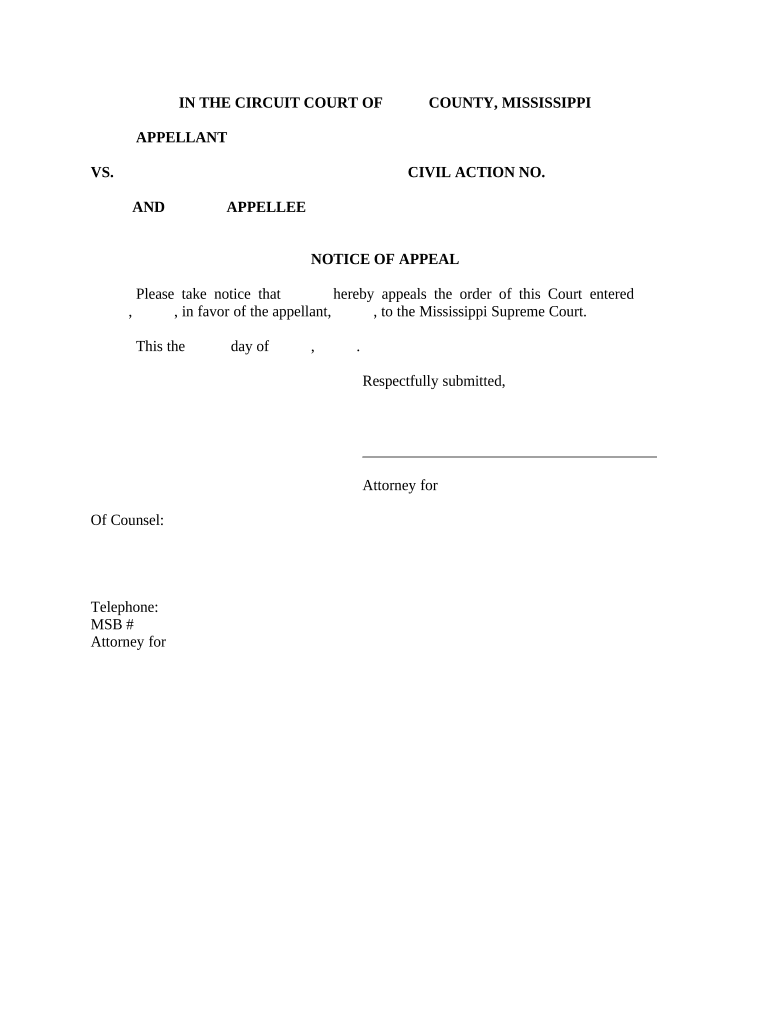
Caption and Court

Include the full case caption, case number, and the name of the lower court exactly as shown on the judgment; mismatches can lead to rejection or clerk requests.
Appellant Identification

State the appellant's full legal name, address, and contact information; indicate whether multiple appellants exist and list them precisely to avoid service errors.

Judgment or Order

Identify the specific judgment or order being appealed, including the date entered on the docket and a concise description of the ruling under review.

Relief Sought

Describe the relief you are requesting on appeal (for example, reversal, new trial, or remand) in clear, neutral terms to frame the appellate issues.

Notice Statement

Use explicit language that the party 'gives notice of appeal' from the specified judgment to the named appellate court and reference the applicable rule or statute when required.

Signature and Service

Include dated signature block for counsel or pro se appellant and a certificate of service showing how and when opposing parties and the clerk were served.

Step-by-step: completing and filing your Notice of Appeal

Follow these steps in order to prepare and file a Notice of Appeal that meets common court requirements and preserves appellate rights.

  • 01
    Confirm finality: Verify the order is final for appeal before proceeding.
  • 02
    Check deadline: Calculate the last filing date using the judgment date and applicable rules.
  • 03
    Prepare Notice: Complete caption, case number, judgment date, relief sought, and service certificate.
  • 04
    File and serve: File with the clerk and serve opposing parties per court rules.

Typical filing and service workflow for appellate intake

A standardized workflow reduces errors: prepare, file with the trial court clerk, serve parties, and confirm docketing with the appellate court.

  • Prepare documents: Assemble Notice, filing fee, and service certificates.
  • File with clerk: Submit original and required copies per local rules.
  • Serve opposing parties: Use accepted methods: personal, mail, email if allowed.
  • Confirm docketing: Obtain appellate docket number and calendar information.

Configuring an online Notice of Appeal workflow

Set up an online workflow to collect signatures, attachments, and service information while ensuring evidence of authentication and retention.

Field Configuration
Case Caption Field Required, text field with character limit and auto-fill from template
Judgment Date Field Date field with MM/DD/YYYY validation and calendar picker
Signature Block Signer role assigned; eSign with audit trail and timestamp
Certificate of Service Checkboxes and date field to log service method and date

Technical considerations for eFiling and eService

Ensure compatibility with court eFiling portals and retain a signed, timestamped copy with an audit trail for reproducibility and service verification.

  • Accepted File Types: PDF/A preferred; courts may accept PDF or DOCX per local rules
  • Signer Authentication: Use email+access code or stronger multi-factor where required
  • Integrations: Connect with court eFiling portals, document stores, and case management systems

Common appeal deadlines to watch

Appeal deadlines vary by jurisdiction and case type. Use these common deadline benchmarks and verify with the local rules or clerk.

Federal civil appeals:

Notice generally due within 30 days of entry (FRAP 4(a))

Federal criminal appeals:

Shorter window: usually 14 days from judgment

State court appeals:

Varies—often 20–30 days; check state rules and statutes

Statutory extensions:

Government parties may have longer windows (e.g., 60 days)

Post-judgment motions:

Timelines may pause pending timely motions for reconsideration

Key milestones after filing the Notice of Appeal

After filing, the case proceeds through docketing, briefing, and scheduling; track each milestone to meet subsequent deadlines.

01

File Notice

Trial court clerk receives and stamps the Notice; triggers appellate jurisdiction.

02

Service and Proof

Serve opposing parties and file certificate of service with the clerk.

03

Docketing and Record

Appellate court dockets case and orders record transmission from trial court.

04

Briefing Schedule

Court issues deadlines for appellant and appellee briefs and possible oral argument.

Frequent procedural pitfalls to avoid

  • Missing or misstating the judgment date can render the Notice untimely and result in dismissal.
  • Failing to serve all parties according to rule requirements may lead to sanctions or ineffective service.
  • Using incorrect caption or case number can delay docketing and require clerk corrections.
  • Omitting a certificate of service or signature block often causes clerks to reject the filing.

Consequences of an incorrect or late Notice of Appeal

Waived Issues: Untimely filing can waive appellate rights and foreclose review.
Dismissal Risk: Clerical defects or failure to serve can result in dismissal.
Sanctions Exposure: Improper service or filings may invite costs or sanctions.
Lost Time: Correcting rejected Notices delays briefing and resolution.
Additional Fees: Clerks may require re-filing fees or fee deficiency cures.
Record Gaps: Failure to transmit the record can limit appellate review scope.

Security and compliance considerations when eFiling appellate documents

Encryption: TLS 1.2/1.3 in transit; AES-256 at rest
HIPAA: BAA required when PHI is involved
ESIGN / UETA: Electronic signatures legally enforceable
SOC 2: SOC 2 Type II available on request
21 CFR Part 11: Compliant options for FDA-regulated records
ISO 27001: Certified information security management

eSignature vendor comparison for filing notices and court documents

Compare basic pricing and key capabilities relevant to legal document signing; signNow appears first per vendor listing rules.

signNow DocuSign Adobe Sign PandaDoc HelloSign
Starting Price $8/user/mo $15/user/mo $14/user/mo $19/user/mo $15/user/mo
Free Trial Yes, 7-day trial No No No No
Bulk Send Yes Yes Yes Yes No
Audit Trail Yes Yes Yes Yes Yes
HIPAA Compliant Yes Yes Yes No No

Real-world examples of digital workflows in legal practices

Organizations use eSignature and document workflows to streamline filings, preserve records, and coordinate multi-party service in appeals and related court processes.

Optica Ventures LLC — COO

A small legal operations team centralized document collection to avoid in-person signatures.

  • Reduced turnaround for client approvals and court filings.
  • "The interface is simple and easy-to-use for our team; more importantly, it is just as easy for our customers."

Martin Properties — Founder

A property management firm filed documents remotely and tracked service confirmations.

  • Staff processed filings while away from the office.
  • "I can process and execute all of these documents online with 100% compliance and built-in security. Whether on mobile or working offline, I can get forms back to their necessary parties efficiently."

Practical tips to reduce errors and speed processing

Adopting consistent formatting and verification steps prevents clerical rejections and preserves appeal rights.

Verify Dates and Numbers
Double-check judgment dates, docket numbers, and case captions against the lower-court record before filing to avoid untimely or misdirected Notices.
Use Standard Language
Follow the court's preferred Notice language or local rule template to reduce clerk rejections and ensure the appeal is properly framed.
Retain Audit Trails
Keep signed copies, service certificates, and audit logs with timestamps and IP metadata to evidence service and authenticity if challenged.
Confirm Clerk Requirements
Check the trial court clerk and appellate court for required copies, electronic submission formats, and fee procedures before filing.

Frequently asked questions about Notices of Appeal

Answers to common procedural and practical questions about preparing, filing, and serving a Notice of Appeal.


Need help? Contact support

be ready to get more
Join over 28 million airSlate SignNow users