Establishing secure connection…Loading editor…Preparing document…

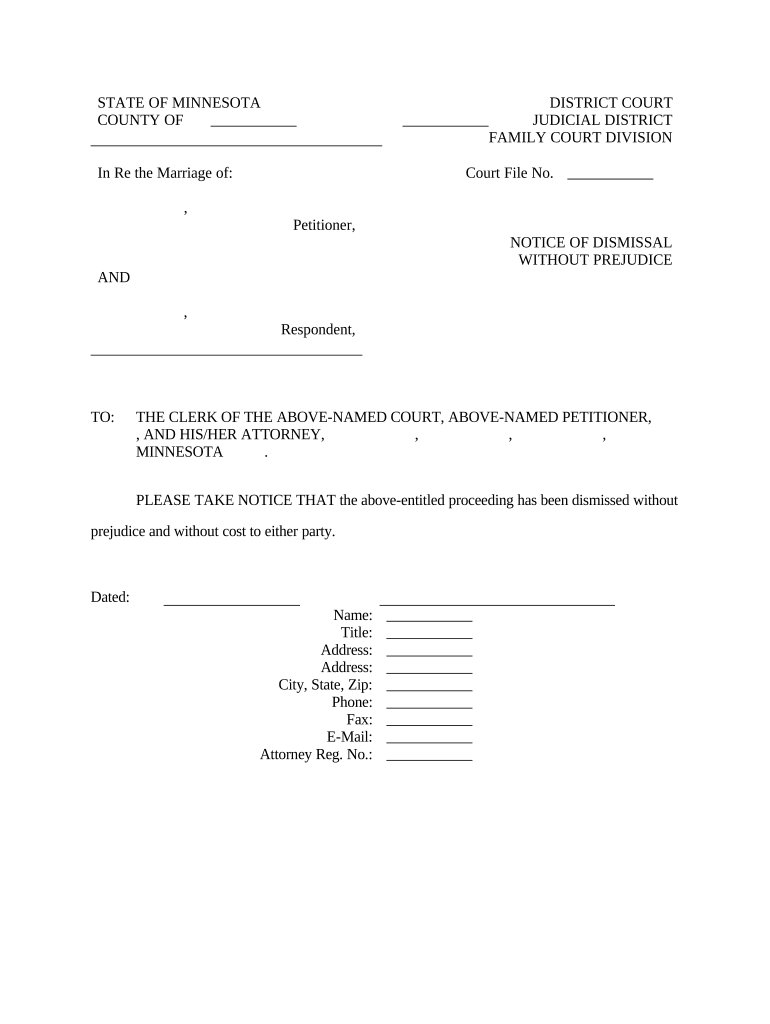
Minnesota Notice of Dismissal Without Prejudice

This template is fully customizable. Edit the text, fill out the fields, and send it for signature. Give it a try!
Minnesota Notice of Dismissal Without Prejudice

What the Minnesota Notice of Dismissal Without Prejudice Is

A Minnesota Notice of Dismissal Without Prejudice is a court filing used to dismiss a civil case while preserving the plaintiff's ability to refile the claim later. It notates that the dismissal does not adjudicate the merits and therefore does not bar the claim, subject to statute of limitations and any court orders. The notice must identify the case, the parties, and the dismissal terms; it is processed according to local court filing and service rules and may be subject to electronic filing requirements.

Why a Dismissal Without Prejudice Might Matter in Your Case

A dismissal without prejudice lets a plaintiff stop current proceedings while preserving the right to refile, often used to correct defects, pursue settlement, or reframe claims. It can limit immediate litigation costs and preserve claims if refiling is timely under the applicable statute of limitations.

Why a Dismissal Without Prejudice Might Matter in Your Case

Who Typically Prepares and Uses This Notice

The notice is commonly prepared by plaintiffs or plaintiff counsel to voluntarily end a pending action without losing the right to bring the matter again.

  • Plaintiffs and counsel who need to pause litigation while preserving refiling rights
  • Defense counsel who review and accept the procedural dismissal terms
  • Courts and clerks who docket the notice and enforce local filing rules

Users should confirm local court rules and applicable statutes of limitations before filing to avoid unintended waiver of claims or procedural issues.

Step-by-Step: Preparing and Filing the Notice

Follow these essential steps to prepare, sign, and submit a Minnesota Notice of Dismissal Without Prejudice.

  • 01
    Draft the Notice: Create a clear caption and dismissal clause.
  • 02
    Confirm Case Details: Verify case number and party names.
  • 03
    Sign and Date: Have the authorized party sign and date.
  • 04
    File and Serve: File with the clerk and serve opposing counsel.

How the Dismissal Process Typically Flows

This is a common routing sequence from preparation through clerk processing and service on other parties.

  • Prepare Document: Draft and proofread the notice.
  • Obtain Signatures: Signer executes the notice.
  • File with Court: Submit via e-file or clerk's office.
  • Serve Opposing Parties: Provide proof of service per local rules.

Digital Workflow Settings to Consider

Configure filing and signature settings to align with court rules and service requirements before submitting documents.

Field Configuration
Authentication Email link or SMS code
Signature Type Typed or drawn signature accepted
Attachment Include proof of service or exhibits
Filing Method E-file or clerk paper filing

Key Timing Considerations and Deadlines

Timing affects whether refiling is permitted and how the court treats venue and service; check statutory limits carefully.

Service Deadline:

Serve opposing parties as required by local rules.

Court Filing Time:

File with clerk per e-filing windows and business days.

Statute of Limitations:

Refiling is subject to applicable limitations statutes.

Processing Time:

Clerk processing varies by county and caseload.

Certificate of Service:

Include and file proof of service with the notice.

Security and Compliance Considerations

Encryption: TLS 1.2/1.3 in transit; AES-256 at rest
Audit Trail: Detailed timestamps, IPs, and actions recorded
Regulatory: ESIGN and UETA legal frameworks supported
HIPAA: BAA required for protected health information
21 CFR Part 11: Supported for FDA-regulated records
Certifications: SOC 2 Type II and ISO 27001 available

Risks of an Incorrect or Incomplete Notice

Refiling Risk: Statute of limitations may bar refiling
Service Failure: Improper service can invalidate dismissal
Clerk Rejection: Incorrect caption or case number delays docketing
Sanctions: Frivolous or bad-faith filings can trigger sanctions
Waiver: Unintended waiver of claims if conditions unmet
Evidence Risk: Lack of proof of service complicates enforcement

Common Preparation Mistakes to Avoid

  • Using an incorrect or outdated case caption that does not match the complaint or docket entry can cause the clerk to misfile the notice.
  • Failing to include a certificate of service or improperly completing it leaves no record that opposing counsel received the dismissal.
  • Entering the wrong case number or court name delays processing and may require corrective filings and additional fees.
  • Assuming dismissal without prejudice automatically tolls the statute of limitations can create exposure to refiling bars.

Practical Tips for Accurate and Efficient Filing

Adopt these practices to reduce rejection risk, preserve rights, and streamline court clerk processing.

Verify Docket Information
Before filing, compare the notice to the court docket and original complaint to confirm party names, case number, and jurisdiction match exactly; small discrepancies can cause misfiling or clerical rejection, delaying case administration.
Include Proof of Service
Attach a completed certificate of service showing method, date, and recipient; if serving electronically, follow local rules for consent and provide transmission details to avoid disputes about whether opposing counsel received the notice.
Record Retention
Retain signed copies, filing receipts, and service proof for the full period relevant to potential refiling or audit; electronic copies with immutable audit trails help demonstrate timing and attribution if needed.
Consult Counsel About Tolling
If refiling might be affected by a statute of limitations, obtain legal advice about tolling agreements or stipulations and include any agreed language in the dismissal to preserve refiling rights where appropriate.

How Organizations Use Electronic Notices in Practice

Real organizations use electronic workflows to produce and file procedural court notices while preserving legal formality and traceability.

Martin Properties

A regional real estate firm digitized dismissal notices to avoid in-person signings and clerical delays.

  • Implemented mobile signing for agents.
  • "I can process and execute all of these documents online with 100% compliance and built-in security," helping them reduce turnaround time and maintain consistent records across transactions.

Optica Ventures LLC

A small business legal team standardized procedural filings including dismissals.

  • Centralized templates and signature workflows.
  • The interface is simple and easy-to-use for internal teams and customers, enabling consistent filing format and reliable proof of execution when coordinating with outside counsel.

Comparing eSignature Vendors for Procedural Notices

Basic pricing and feature availability for common eSignature vendors. signNow appears first per vendor ordering rules.

signNow DocuSign Adobe Sign PandaDoc HelloSign
Starting Price $8/user/mo $15/user/mo $14/user/mo $19/user/mo $15/user/mo
Free Trial 7-day free trial Varies Varies Varies Varies
Bulk Send Yes Yes Yes Yes No
Audit Trail Yes Yes Yes Yes Yes
HIPAA Compliant Yes Yes Yes No No

Frequently Asked Questions About Dismissal Without Prejudice

Answers to common procedural and eSignature questions about filing a Minnesota Notice of Dismissal Without Prejudice.


Need help? Contact support

be ready to get more
Join over 28 million airSlate SignNow users