Establishing secure connection…Loading editor…Preparing document…

Notice Subpoena Form

This template is fully customizable. Edit the text, fill out the fields, and send it for signature. Give it a try!
Notice Subpoena Form

What a Notice Subpoena Form Is and when it’s used

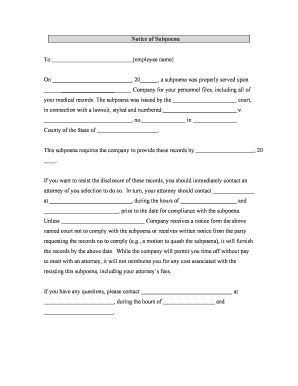
A Notice Subpoena Form is a formal written request used to compel witness attendance, the production of documents, or both, under applicable court or administrative rules. It notifies a person or organization that their testimony or records are sought and explains the required actions, deadlines, and any appearance location or method. The form is commonly issued by parties in litigation, by government agencies, or by counsel who obtain a court order; procedural requirements and acceptable service methods depend on court rules and the issuing jurisdiction.

Why the Notice Subpoena Form matters for evidence and compliance

A properly completed Notice Subpoena ensures legally recognized notice, minimizes objections, and preserves admissible evidence. It creates a record of what was requested and when, supporting motions to compel or sanctions if ignored.

Why the Notice Subpoena Form matters for evidence and compliance

Who prepares and responds to a Notice Subpoena

Parties, attorneys, compliance officers, and administrative agencies commonly prepare or serve notice subpoenas as part of discovery or regulatory investigations.

  • Plaintiffs and defense counsel serving subpoenas in civil litigation, ensuring requests align with local rules and protective orders.
  • Compliance or records officers at businesses who receive subpoenas and coordinate document collection and legal review before production.
  • Third parties such as banks or custodians who receive duces tecum subpoenas and must validate records, privacy obligations, and service method.

Recipients should consult counsel immediately to confirm authority, timing, and any privilege or confidentiality issues before producing materials.

Step-by-step: completing and serving a Notice Subpoena

Follow a consistent sequence: prepare, review, serve, track responses, and preserve a record of service and production.

  • 01
    Draft: Populate case caption, addressee, and specific document requests.
  • 02
    Review: Confirm scope, privilege checks, and any protective-order provisions.
  • 03
    Serve: Use the court-allowed method and obtain proof of service.
  • 04
    Track: Log responses, objections, and produced items for chain-of-custody.

Typical workflow from issuance to production

A clear workflow reduces disputes: create the notice, authenticate identity, serve, receive objections, then produce or move to quash as appropriate.

  • Create: Generate subpoena with precise text and exhibit list.
  • Authenticate: Confirm the correct recipient and authority to serve.
  • Serve: Deliver via permitted method, record proof of service.
  • Respond: Collect documents, log, and deliver according to instructions.

Typical digital workflow settings for e-submission

Configure the digital process to match court and privacy requirements, including authentication level and audit trail settings.

Field Configuration
Authentication Email link with optional SMS code
Audit Trail Enable IP, timestamp, and event log
Document Format PDF/A or native with metadata preserved
Retention Enable 7+ year secure storage

Digital delivery and eSubmission requirements

Choose a platform that supports secure file formats, signer authentication, and a detailed audit trail before transmitting subpoena materials.

  • File Types: PDF, DOCX, native files
  • Authentication: Email, SMS, or KBA
  • Integrations: CRM and cloud storage

Key timing considerations for issuing and responding

Deadlines vary by court and type of subpoena; confirm local rules, federal rules, or agency regulations before setting response expectations.

Issuance Timing:

Issue sufficiently in advance to allow service and production; courts expect reasonable notice.

Response Window:

Response deadlines depend on the court; local rules or scheduling orders often specify timing.

Objection Period:

Many jurisdictions allow prompt written objections; follow the objection procedure in the subpoena.

Production Date:

Specify an explicit production date or method for rolling productions.

Preservation Duty:

Preserve relevant documents immediately upon notice to avoid spoliation claims.

Milestones from draft to production

Track discrete milestones so each action is documented and defensible in court.

01

Draft Completed

Subpoena text finalized and exhibits attached.

02

Legal Review

Privilege and scope checked by counsel.

03

Service Executed

Proof of service obtained and logged.

04

Production Logged

Delivered items tracked with a production index.

Consequences of errors or noncompliance

Sanctions: Court may impose monetary sanctions.
Contempt: Persistent noncompliance can lead to contempt.
Evidence Exclusion: Improperly obtained or produced material may be excluded.
Cost Shifting: Court may order the requester to pay costs.
Privacy Breach: Producing protected records risks HIPAA or FERPA violations.
Service Defect: Incorrect service can render subpoena ineffective.

Common preparation pitfalls to avoid

  • Requesting overly broad categories of records without date ranges, which invites objections and motion practice.
  • Serving the wrong legal entity or individual name, causing delays for corrected service and potential dismissal of the request.
  • Failing to check for existing protective orders or confidentiality designations before requesting sensitive documents.
  • Neglecting to specify format or delivery method, leading to disputes over native files versus PDFs and metadata loss.

Security and compliance considerations for electronic subpoenas

In-transit Encryption: TLS 1.2/1.3
At-rest Encryption: AES-256
Audit Trail: IP, timestamp, event log
Regulatory Certifications: SOC 2 Type II, ISO 27001
Privacy Compliance: HIPAA (BAA required)
eSign Laws: ESIGN and UETA compliance

Essential parts of a professional Notice Subpoena Form

A complete form balances precision, legal sufficiency, and procedural clarity to reduce friction in service and production.

Caption and Case Info

Complete court caption, case number, and party names are essential to link the subpoena to the underlying matter and to avoid clerical rejection at filing or service.
Target Identification

Clear identification of the individual or entity to be served, including business registration data where applicable, reduces the risk of defective service and delay.

Specific Requests

Detailed descriptions of the documents or categories requested, with date ranges and account identifiers, prevent overbreadth objections and streamline review.

Production Terms

Explicit delivery instructions, format requirements, and who will bear costs help avoid disputes and ensure usable productions for review and admission.

Objection and Motion Process

Include instructions for filing objections, the deadline to object, and whether a meet-and-confer is required to reduce unnecessary motion practice.

Service and Proof

Specify acceptable service methods and require a signed proof of service or affidavit to establish the chain of custody and compliance with court rules.

Practical examples of Notice Subpoena use

Two concise scenarios show typical use cases and the practical considerations for each party involved.

Corporate Records Request

A litigation counsel requests bank statements and email records from a corporate custodian for a rolling production

  • Request limited to three years and specific accounts
  • The custodian coordinated a privilege review and produced redacted documents with a detailed index and date stamps for admissibility.

Third-Party Custodian

A plaintiff serves a subpoena on an online service provider for user content and logs

  • Provider requires a valid court order and compliance with privacy laws
  • Counsel obtained a narrowly tailored order, used secure transfer, and preserved the required A/V and metadata for evidentiary use.

Vendor pricing and feature snapshot for e-signature support

Comparison of starting prices and core capabilities relevant to preparing and delivering Notice Subpoena Forms; signNow is listed first in accordance with vendor ordering rules.

signNow DocuSign Adobe Sign PandaDoc HelloSign
Starting Price $8/user/mo $15/user/mo $14/user/mo $19/user/mo $15/user/mo
Free Trial 7-day free trial No free trial No free trial Free tier limited Free tier limited
Bulk Send Yes Yes Yes Yes No
Audit Trail Yes Yes Yes Yes Yes
HIPAA Compliant Yes Yes Yes No No

Frequently asked questions about the Notice Subpoena Form

Answers to common procedural, service, and eSignature questions to help avoid delays and objections during issuance and response.


Need help? Contact support

be ready to get more
Join over 28 million airSlate SignNow users