Establishing secure connection…Loading editor…Preparing document…

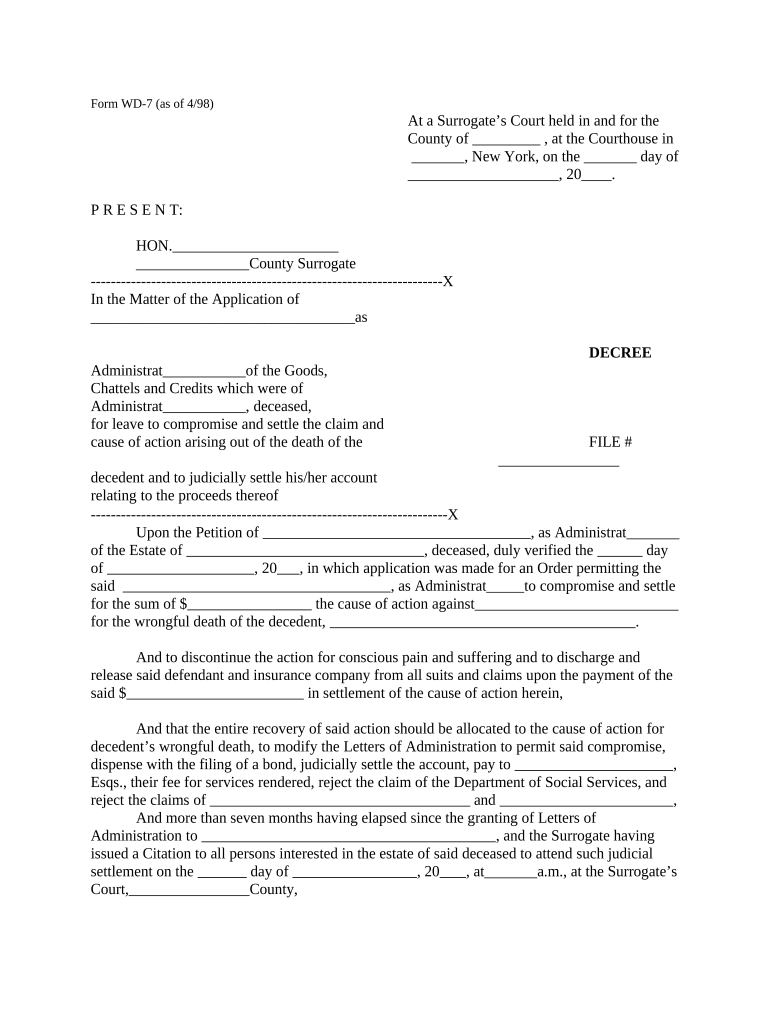
New York Decree for Compromise and Settlement of Wrongful Death Claim

This template is fully customizable. Edit the text, fill out the fields, and send it for signature. Give it a try!
New York Decree for Compromise and Settlement of Wrongful Death Claim

What the New York Decree for Compromise and Settlement of Wrongful Death Claim is

A New York Decree for Compromise and Settlement of Wrongful Death Claim is a court-approved order that finalizes a negotiated settlement resolving a wrongful death action and directs distribution of proceeds to eligible claimants. The decree records the parties, settlement terms, and any releases; it often accompanies stipulations, releases, and accounting used to obtain judicial approval. Electronic execution is generally permitted under the federal ESIGN Act (15 U.S.C. ch. 96) and New York’s Electronic Signatures and Records Act (NY Tech Law §301–309), subject to statutory exceptions and court rules.

Why a formal decree matters in wrongful death settlements

A decree transforms a settlement agreement into an enforceable court order, clarifies distribution, closes claims against defendants, and protects fiduciaries and insurers from later disputes.

Why a formal decree matters in wrongful death settlements

Who commonly prepares or reviews this decree

Typical users include plaintiff attorneys, personal representatives, insurance counsel, and probate or estate counsel working to finalize distribution.

  • Plaintiff attorney representing beneficiaries and negotiating release terms.
  • Personal representative or executor handling estate distribution and accountings.
  • Insurance counsel coordinating insurer approvals and claim discharge language.

Principal signers and their roles

Personal Representative

The court-appointed fiduciary or executor who signs to accept and carry out distribution instructions; responsible for filing the decree and accounting with the court and for ensuring proceeds are distributed per the decree.

Plaintiff Attorney

Attorney for the beneficiaries who signs attestations, settlements, and releases; certifies consent by claimants and often files the decree as part of the court submission package.

Stepwise process to prepare and file the decree

Use this sequence to prepare a complete decree that the court can accept without delay.

  • 01
    Assemble documents: Collect settlement agreement, releases, proofs of authority, and beneficiary affidavits.
  • 02
    Draft decree: Draft language reflecting agreement terms, distributions, and court directives.
  • 03
    Obtain signatures: Secure signatures from personal representative, attorney, and any required witnesses or notary.
  • 04
    File with court: Submit decree with required exhibits and pay filing fees to the appropriate docket.

Essential components included in a professional decree

A clear, structured decree reduces post-settlement disputes and simplifies court approval and distribution.

Introductory Recitals

Background facts and procedural posture describing the underlying wrongful death action and settlement negotiations leading to the decree.
Findings of Fact

Court-adopted statements confirming the settlement is fair and that claimants have authority to settle, when required by court rules.

Settlement Terms

Precise dollar amounts, payment timing, escrow arrangements, and conditions precedent to distribution.

Release Language

Defined release that identifies released parties, scope, exceptions, and effective date to prevent future claims.

Distribution Directions

Detailed allocation to beneficiaries, payment method, handling of liens, and trustee or fiduciary instructions.

Certification and Entry

Signature blocks, notary or witness lines if required, and directive for the clerk to enter the decree on the court docket.

Required record and security elements

Audit Trail: Preserve timestamped signing history.
Encryption: Protect documents in transit and at rest.
Access Control: Restrict edit and view permissions by role.
BAA Availability: Execute BAA if protected health information is included.
Retention Policy: Store original signed decree per retention rules.
Authentication: Use signer verification measures when required.

Configuring an online workflow for the decree

Set up a reproducible e-filing workflow to reduce manual errors and speed execution.

Field Configuration
Upload and template Upload the signed PDF and save a fillable template
Field placement Place signature, date, and initials fields where required
Signer order Define signing sequence for fiduciary and counsel
Authentication method Select email, SMS code, or stronger ID verification

Technical requirements for eSigning and submission

Choose a platform that supports PDF, DOCX upload, audit trails, and required signer authentication.

  • File formats: PDF, DOCX supported
  • Integrations: Cloud storage and case management
  • Authentication: Email, SMS, or KBA

Where to send and how to submit the decree

Follow a clear routing path from signature to court filing and beneficiary distribution.

  • Execute: All required parties sign and date the decree.
  • Notarize if needed: Obtain notarization or witness acknowledgements per state rules.
  • File with court: Deliver the decree and exhibits to the clerk for entry.
  • Distribute proceeds: Issue payments per distribution schedule after entry.

Practical risks and legal consequences of errors

Invalid Entry: Clerk rejection or case misfiling
Distribution Disputes: Beneficiaries may contest allocations
Tax Exposure: Incorrect allocations trigger IRS inquiries
Lien Claims: Unresolved liens can delay disbursement
Sanctions: Court sanctions for misleading submissions
Revocation Risk: Ambiguous releases may permit later suits

Common preparation mistakes to avoid

  • Using inconsistent party names across pleadings, settlements, and the decree, which can create enforceability disputes and clerk confusion.
  • Failing to include clear release and exception language, leaving open residual claims that prolong litigation and delay distribution of funds.
  • Omitting proof of authority for signers, such as letters testamentary or letters of administration, which courts frequently require for entry.
  • Neglecting to coordinate tax reporting allocations and any lien or claim notices that must be resolved before funds are disbursed.

Time-sensitive items and typical deadlines

Watch deadlines for filing, court entry, and tax reporting that may affect when funds can be disbursed.

Statute of Limitations:

File the wrongful death action within the applicable state limitations period; consult counsel.

Court Calendaring:

Observe court scheduling rules for submission and hearing dates on decree entry.

Tax Reporting:

Report settlement allocations and issue tax forms in accordance with IRS deadlines.

Notary/Authentication:

Complete any required notarization or witness steps before filing with the clerk.

Appeal Window:

Post-entry challenges may be limited by short appellate timeframes; act promptly.

Practical tips to ensure an accurate and court-acceptable decree

Apply these practices to reduce revisions, speed entry, and protect beneficiaries and fiduciaries.

Consistent Names and References
Verify that all names, addresses, and caption data exactly match prior filings, settlement documents, and official records to prevent clerk rejection and to ensure enforceability; correct discrepancies before submission.
Clear Release and Allocation
Draft release language that specifically identifies released parties and any survivals or carve-outs, and include an explicit allocation of gross settlement between damages categories to clarify tax treatment and lien responsibility.
Document Authority
Attach or reference letters testamentary, letters of administration, or beneficiary consents as proof of authority to settle and distribute funds so the court can approve without additional evidentiary hearings.
Preserve Complete Records
Maintain signed originals, notarizations, audit trails, and supporting correspondence for the full retention period required by IRS, HIPAA, and applicable state rules to defend against later audits or challenges.

Comparing eSignature vendor pricing and basic capabilities

Basic pricing and capability differences for common eSignature vendors; signNow appears first per vendor comparison conventions.

signNow DocuSign Adobe Sign PandaDoc HelloSign
Starting Price $8/user/mo $15/user/mo $14/user/mo $19/user/mo $15/user/mo
Free Trial Yes, 7-day trial No No No No
Bulk Send Yes Yes Yes Yes No
Audit Trail Yes Yes Yes Yes Yes
HIPAA Compliant Yes Yes Yes No No

Frequently asked questions about the New York Decree for Compromise and Settlement of Wrongful Death Claim

Answers to common procedural and technical questions encountered when preparing, signing, and filing these decrees.


Need help? Contact support

be ready to get more
Join over 28 million airSlate SignNow users