Establishing secure connection…Loading editor…Preparing document…

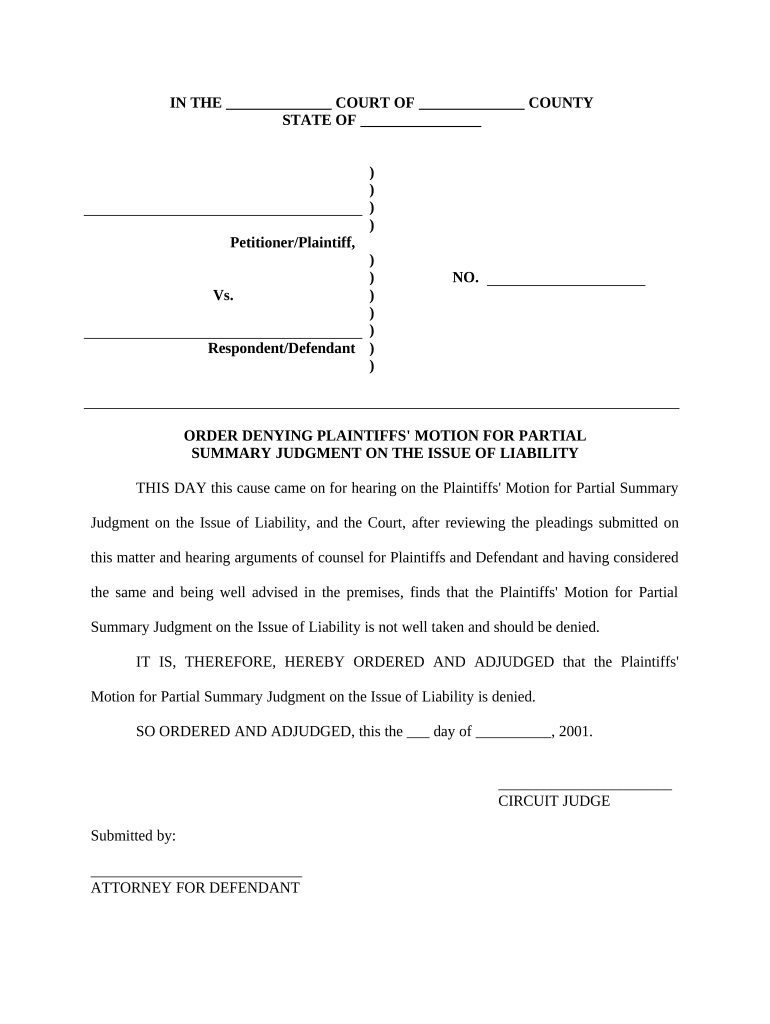
Order Denying Motion for Partial Summary Judgment

This template is fully customizable. Edit the text, fill out the fields, and send it for signature. Give it a try!
Order Denying Motion for Partial Summary Judgment

What an Order Denying Motion for Partial Summary Judgment Is

An Order Denying Motion for Partial Summary Judgment is a formal court document in which a judge declines to grant summary judgment on some or all issues presented in a motion. It resolves legal questions when the judge finds factual disputes or determines that the moving party has not met the legal standard showing there is no genuine issue for trial. The order may address specific claims, defenses, or legal theories and often explains the court’s reasoning, citing governing law and record evidence before leaving remaining issues for trial or further proceedings.

Why this Court Order Matters to Your Case

An order denying partial summary judgment preserves disputed factual issues for trial, shapes litigation strategy, and clarifies the court’s view of evidentiary gaps or legal deficiencies. It can affect case timing, settlement leverage, and what evidence parties need to prepare for trial.

Why this Court Order Matters to Your Case

Who Prepares and Relies on This Order

This order is typically drafted or reviewed by judges, law clerks, litigating attorneys, and court clerks; clients and opposing parties review it to understand the court’s disposition.

  • Civil litigators and their support staff who track dispositive motions and trial preparation responsibilities.
  • Court personnel who docket, enter the order, and notify parties of appeal windows or further deadlines.
  • In-house counsel or compliance officers who assess business exposure and settlement posture following the ruling.

Accurate drafting and prompt entry into the record ensure parties are notified correctly and preserve appellate and post-judgment rights.

Core Components of a Professional Denial Order

A well-structured order is concise, cites relevant law, summarizes material facts, explains reasoning, and directs further proceedings or deadlines.

Caption

Case caption and docket number at the top, matching the underlying case file and motion document to avoid clerical misrouting.
Disposition

Clear statement denying the motion or denying specific counts so there is no ambiguity about what the court decided.

Findings

Concise recitation of undisputed facts and identification of genuine disputes of material fact that preclude summary judgment.

Legal Basis

Citation to controlling statutes and case law that justify denial, showing application of the summary judgment standard.

Conclusion

Explicit directive on next steps, such as proceeding to trial, scheduling status conferences, or allowing limited discovery.

Signature Block

Judge’s signature, typed name, title, and entry date; clerk’s docket stamp or notation verifying date of entry.

Required Information to Include on the Order

Case Caption: Names of parties and court designation
Docket Number: Unique case identifier
Motion Identified: Title and filing date of the motion
Ruling Language: Exact denial wording
Judge Identity: Judge name and chamber
Entry Date: Date order was entered on docket

Step-by-Step: Creating and Entering the Denial Order

Follow these steps to ensure the order is complete, properly entered, and distributed to parties and the court record.

  • 01
    Assemble Record: Gather motion, responses, exhibits, and relevant transcripts.
  • 02
    Draft Order: Use clear denial language and cite legal authority.
  • 03
    Review & Sign: Judge or authorized signatory signs and dates the order.
  • 04
    Docket & Serve: Clerk enters order and serves all parties per local rules.

How to Customize and Complete the Order Online

Configure an e-document workflow so drafts, approvals, and final entry are auditable and traceable across stakeholders.

Field Configuration
Caption Field Auto-populate from case management system
Docket Number Field Use validated format to prevent typos
Judge Signature Field Require secure signer authentication
Entry Date Field Auto-fill on clerk docket entry

Where to File and How the Order Reaches the Record

The order must be entered on the court docket and formally served according to local electronic filing and service rules.

  • Court Docket: Clerk uploads and stamps the order into the official case file.
  • E-Filing System: Use local e-filing portal for submission and entry where required.
  • Electronic Service: Serve parties via the court’s e-service function or authorized e-mail addresses.
  • Manual Service: When required, deliver paper copies per local rules.

Distribution Options and Technical Considerations

Choose platforms that preserve an auditable trail and comply with court and privacy rules when sharing or signing orders.

  • E-Filing Integration: Connect to court e-filing portals when available.
  • Audit Trail: Record timestamps, IPs, and signer identity.
  • Authentication: Use multi-factor or identity proofing if required.

Verify the chosen method satisfies local court rules and any confidentiality obligations before distributing the final order.

Common Deadlines Affecting a Denial Order

After entry of an order denying partial summary judgment, specific deadlines may follow for post-judgment motions, appeals, or additional discovery depending on rules and local practice.

Motion for Reconsideration:

Often 14 days from entry, but check local rules.

Notice of Appeal:

Typically 30 days from entry under FRAP 4(a), verify for your court.

Post-Entry Discovery:

Court may set a schedule for remaining discovery within weeks.

Trial Readiness:

Status conferences typically scheduled to set trial dates.

Service Deadline:

Serve the order immediately per local e-service rules.

Common Pitfalls to Avoid When Preparing the Order

  • Using imprecise denial language that creates ambiguity about which claims were denied or preserved.
  • Failing to reference the specific motion docket entry, causing confusion about which pleading is being decided.
  • Entering a different date on the signature block than the clerk’s docket entry, which can affect appeal windows.
  • Neglecting to serve the order through the court’s required e-service mechanism or to all counsel of record.

Consequences of an Incorrect or Defective Order

Waived Issues: Ambiguity can lead to waiver of appellate arguments
Appeal Delay: Incorrect entry dates can affect appeal timeliness
Sanctions Risk: Misleading statements may trigger sanctions
Service Problems: Improper service can void notice requirements
Increased Costs: Re-drafting or clarification motions add expense
Trial Disruption: Unclear holdings complicate trial preparation

Practical Examples of How Orders Are Used

These scenarios show common downstream actions after an order denies partial summary judgment.

Civil Litigation Example

A judge denies summary judgment on liability

  • Parties must prepare evidentiary submissions for trial
  • The denial preserves factual disputes, prompts targeted discovery, and often leads to settlement discussions or a narrowed trial scope.

Regulatory Dispute Example

A court denies partial summary judgment on statutory interpretation

  • Agency retains burden to prove regulatory compliance
  • The order requires additional factual records, may extend pretrial timelines, and affects agency enforcement posture.

Frequently Asked Questions about Orders Denying Partial Summary Judgment

Answers to common procedural and practical questions about drafting, entry, service, e-signing, and post-entry actions for denial orders.


Need help? Contact support

eSignature Vendor Pricing Snapshot for Court Documents

Typical vendor pricing and capabilities for electronically signing and distributing legal orders; signNow is listed first for comparison purposes.

signNow DocuSign Adobe Sign PandaDoc HelloSign
Starting Price $8/user/mo $15/user/mo $14/user/mo $19/user/mo $15/user/mo
Free Trial 7-day free trial Yes Yes Yes Yes
Bulk Send Yes Yes Yes Yes No
Audit Trail Yes Yes Yes Yes Yes
HIPAA Compliant Yes Yes Yes No No
be ready to get more
Join over 28 million airSlate SignNow users