Establishing secure connection…Loading editor…Preparing document…

Option Agreement for Purchase of Patent Rights

This template is fully customizable. Edit the text, fill out the fields, and send it for signature. Give it a try!
Option Agreement for Purchase of Patent Rights

What this Option Agreement for Purchase of Patent Rights is and when it applies

An Option Agreement for Purchase of Patent Rights is a written contract giving one party the temporary right to acquire specified patent rights from the owner under pre-agreed terms. It sets the patent identification, option period, exercise mechanics, purchase price or pricing formula, required notices, and closing conditions. Parties often use it to reserve an exclusive window to evaluate technology, perform diligence, secure financing, or align licensing before committing to a full assignment. Carefully drafted terms protect entitlement, define payment timing, and specify post-closing assignment and recordation obligations.

Why this agreement matters and its legal enforceability

A clear option agreement preserves bargaining position, prevents third‑party transfers, and documents commercial terms in advance while leaving time for diligence and financing. Under the ESIGN Act and state UETA provisions, electronically signed option agreements are generally enforceable if they meet intent, consent, attribution, and retention requirements (see ESIGN and UETA guidance).

Why this agreement matters and its legal enforceability

Who typically prepares, signs, and benefits from this option agreement

The agreement aligns expectations across technical, commercial, and legal teams and reduces the risk of contested ownership during the option period.

  • Patent owners or assignees looking to monetize or test commercial potential without immediate assignment.
  • Acquirers, licensees, or venture investors seeking a fixed period to complete due diligence and structure financing.
  • In-house and outside counsel managing IP clearance, assignment mechanics, and recordation with the USPTO.

Typical signatories and their roles

Patent Owner — CEO

The patent owner or authorized representative executes the agreement to grant the option; they must have authority to assign or to deliver assignment at closing and should disclose encumbrances and chain of title issues for diligence.

Acquirer — VP Business Development

The acquiring party signs to secure the exclusive purchase window, commits consideration or payment schedule on exercise, and typically assumes responsibility for recording the assignment and fulfilling closing conditions.

Core clauses to include in a professional option agreement

A robust agreement covers commercial terms, transaction mechanics, and risk allocation. Each clause should be clear on timing, deliverables, and remedies to reduce post-exercise disputes.

Option Term

Specify the start and end dates or triggering events for the option, including any extension rights, renewal mechanics, and whether exclusivity applies during the option period.
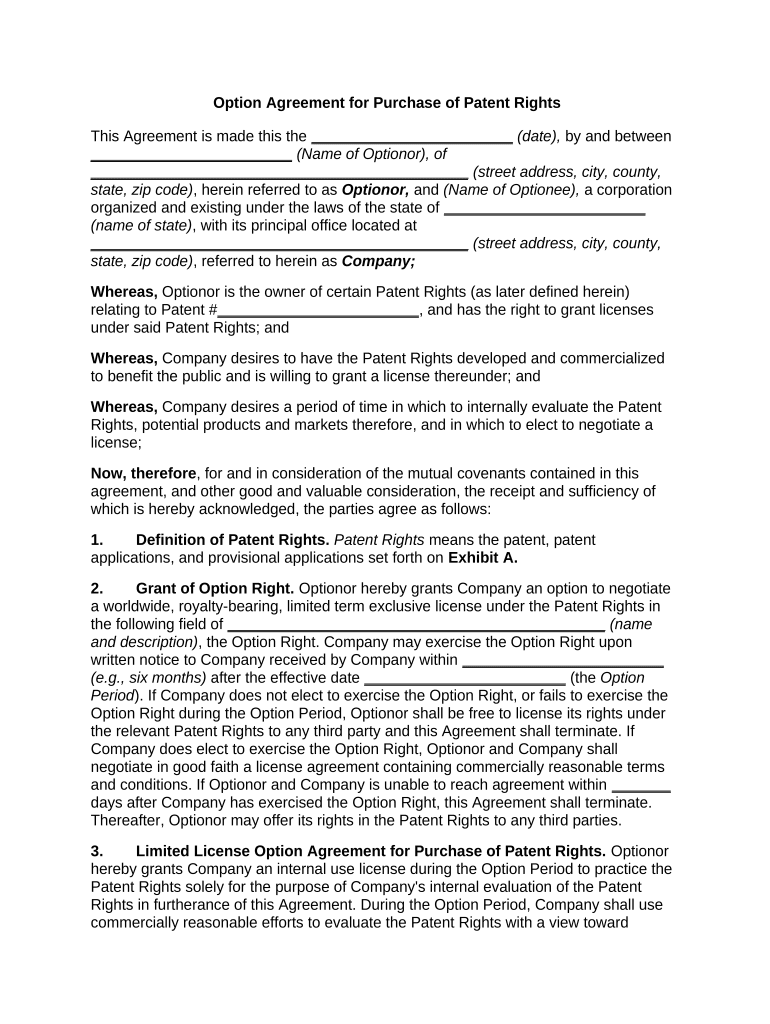
Patent Identification

List patent numbers, application serial numbers, jurisdictions, and related continuations or divisional applications so the subject rights are unambiguous and reproducible for recording and due diligence.

Purchase Price

State the fixed price, milestone payments, royalty formula, or valuation mechanism, including currency, taxes, and any escrow or deposit required on exercise.

Exercise Mechanics

Define how the option is exercised (written notice, electronic notice), required delivery method, timing for payment, and any required closing deliverables from each party.

Representations

Include owner representations about title, inventorship, absence of encumbrances, and pending litigation; include buyer representations as needed for reliance and indemnity triggers.

Assignment & Recordation

Describe required assignment instruments, obligations to record the assignment with the USPTO or equivalent office, and responsibility for recordation fees and timing.

Step-by-step: complete and execute an option agreement

Follow a clear sequence to prepare, review, sign, and record the option agreement to preserve rights and avoid gaps in title.

  • 01
    Draft Terms: Negotiate patent scope, price, term, and exercise conditions with counsel.
  • 02
    Identify Patents: Confirm patent numbers, applications, and chain of title before finalizing the agreement.
  • 03
    Execute Agreement: Collect signatures from authorized signatories using an audit trail and agreed authentication level.
  • 04
    Record Assignment: On exercise, deliver assignment instruments and record with the USPTO or applicable registry promptly.

Digital workflow recommended settings for online completion

Configure the online signing workflow to capture identity, preserve records, and support later recordation and audit needs.

Field Configuration
Authentication Email plus optional SMS code for added signer verification
Field Types Include signature, printed name, title, initials, date, and optional attachment fields
Bulk Send Enable for mass investor or portfolio assignments (available on higher tiers)
Audit Trail Capture IP, timestamp, and action log for each signer

Technical considerations for electronic signing and submission

Choose an eSignature provider that preserves an audit trail and stores signed copies in a tamper-evident format for recordation and future reference.

  • Integrations: Salesforce, NetSuite, Google Workspace
  • File Types: PDF, DOCX, PDF/A supported
  • Security: TLS and AES-256 encryption

Typical electronic execution process for an option agreement

A standard online signing flow reduces friction and creates a reliable record of consent, attribution, and timestamps for enforceability.

  • Upload Document: Sender uploads final agreement to the signing platform
  • Place Fields: Sender adds signature, date, and attachment fields
  • Invite Signers: Platform sends email or link to each signer
  • Complete Signing: Signers authenticate, review, and sign; audit trail recorded

Typical timelines, deadlines, and processing expectations

Key dates in the option lifecycle are negotiable but should be explicit to avoid disputes about timeliness or missed rights.

Option Period:

Commonly 6–24 months, negotiated; specify start and end dates

Exercise Notice Deadline:

State how to deliver notice and the exact cut-off time and date

Payment Timing:

Specify payment due on exercise or within a fixed number of days, e.g., 30 days

Closing Window:

Allow defined period to deliver assignment instruments after exercise

Recordation Timing:

Record assignment with USPTO or registry promptly to protect rights

Key milestones from grant to recordation

Track these numbered milestones to ensure the option progresses smoothly to exercise and formal assignment.

01

Negotiation Complete

Parties finalize commercial terms and patent list before executing the option

02

Option Grant

Option becomes effective on the stated date when signed by authorized parties

03

Exercise Event

Buyer sends formal exercise notice within the option term following contract terms

04

Closing & Recordation

Parties exchange instruments, transfer payment, and record assignment with the USPTO

Common drafting and execution pitfalls to avoid

  • Vague patent descriptions that omit application or continuation details causing recordation disputes.
  • Unclear exercise mechanics or delivery methods producing arguments over whether notice was timely given.
  • Failure to secure authorized signatory signatures or corporate approvals leading to unenforceability.
  • Omitting assignment formalities or recordation responsibilities, delaying protection of acquired rights.

Possible legal and commercial consequences of mistakes

Loss of Rights: Patent rights may remain with the owner
Invalid Assignment: Recordation failure can impair chain of title
Breach Damages: Monetary liability for contract breaches
Tax Consequences: Mischaracterized payments may trigger withholding
Enforceability Risk: Improper signatures may invalidate agreement
Delayed Recordation: Creates vulnerability to intervening transfers

How an option agreement differs from related IP documents

Compare the option agreement with assignment, license, and exclusive negotiation agreements to choose the right instrument for your transaction.

Criteria Option Agreement Assignment License
Primary Purpose reserve purchase right transfer title permit use
Timing future exercise immediate ongoing
Consideration deposit or fee possible full payment royalties or fees
Recordation record on exercise record immediately sometimes recordable

eSignature provider comparison for executing option agreements

Pricing and feature availability vary by vendor and plan. This table highlights starting price and key features relevant to executing and recordkeeping for option agreements.

signNow DocuSign Adobe Sign PandaDoc HelloSign
Starting Price $8/user/mo $15/user/mo $14/user/mo $19/user/mo $15/user/mo
Free Trial 7-day free trial Varies Varies Varies Varies
Bulk Send Yes (Premium) Yes Yes Yes No
Audit Trail Yes Yes Yes Yes Yes
HIPAA Compliant Yes Yes Yes No No
Envelope Cap No cap 100 envelopes/user/year Varies Varies Varies

FAQs: common questions about using and enforcing an option agreement

Answers to frequently asked questions address enforceability, signatures, notarization, recording, and what happens if facts change after signing.


Need help? Contact support

be ready to get more
Join over 28 million airSlate SignNow users