Establishing secure connection…Loading editor…Preparing document…

Consent of Incorporator and Unanimous Consent of Directors in Lieu of Organizational Meeting

This template is fully customizable. Edit the text, fill out the fields, and send it for signature. Give it a try!
Consent of Incorporator and Unanimous Consent of Directors in Lieu of Organizational Meeting

What this Consent document is and when it replaces an organizational meeting

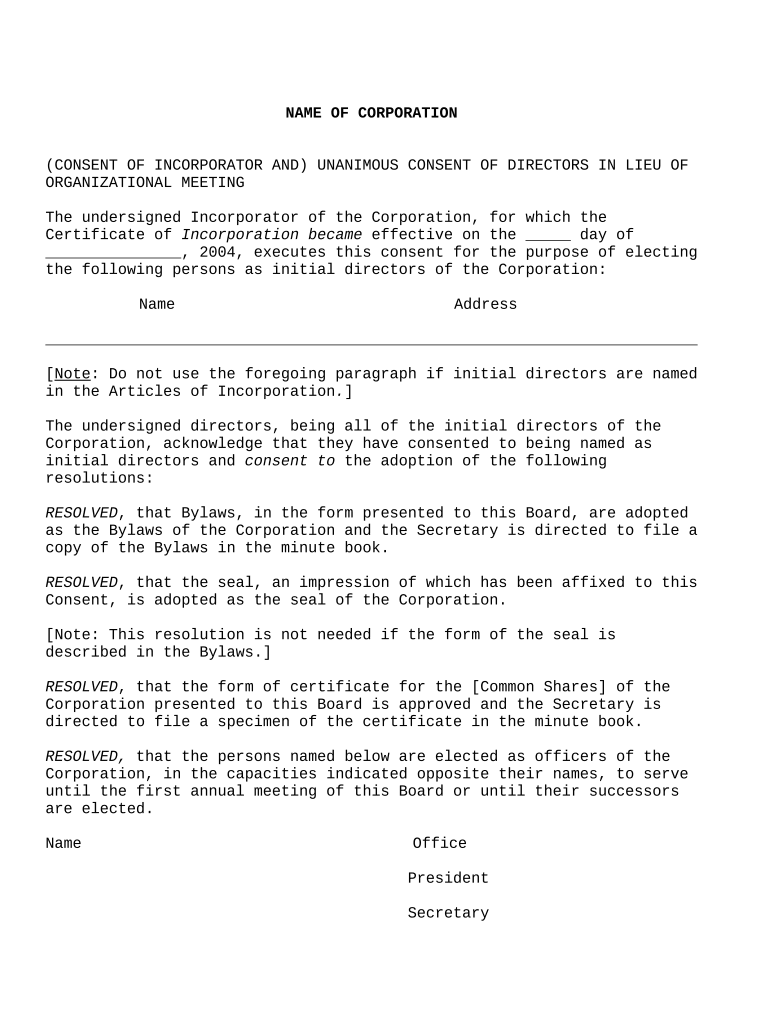
The Consent of Incorporator and Unanimous Consent of Directors in Lieu of Organizational Meeting is a corporate record that documents the incorporator's initial actions and the board's unanimous written approval of organizational matters without holding a physical meeting. It typically adopts the initial bylaws, appoints officers, approves issuance of shares, authorizes bank accounts and accepts the articles of incorporation. Using a written unanimous consent creates an official, signed substitute for minutes of an organizational meeting and becomes part of the corporation’s permanent records.

Why use a written unanimous consent instead of convening a meeting

A unanimous written consent streamlines formation tasks, documents unanimous approval, reduces scheduling friction and creates a clear audit trail. It provides the same corporate effect as minutes of an organizational meeting when signed properly and retained with corporate records.

Why use a written unanimous consent instead of convening a meeting

Who typically prepares and signs this unanimous consent

This form is prepared during formation and signed by the incorporator and all initial directors; attorneys or corporate paralegals often draft or review it.

  • Incorporator or formation agent prepares the initial document and certifies that articles were filed.
  • All initial directors sign to record unanimous approval and adopt bylaws and officers.
  • Corporate secretary or counsel files the signed consent in the corporate minute book for recordkeeping.

Keep the signed consent with the corporate minute book and provide copies to officers and legal counsel for compliance and bank onboarding purposes.

Typical signatories and their roles

Incorporator

The incorporator is the person who filed the articles of incorporation and usually signs to document initial corporate acts. The incorporator’s consent confirms filing details and may authorize initial organizational steps before directors act.

Directors

All initial directors must sign the unanimous consent to adopt bylaws, appoint officers, authorize bank accounts, and take other organizational actions. Directors’ signatures evidence board approval and meet corporate formalities.

Step-by-step: completing and executing the unanimous consent

Follow these steps to prepare, execute, and retain the consent so it functions as the organizational minutes.

  • 01
    Draft consent: List incorporator details, directors, and specific organizational actions.
  • 02
    Review legal items: Confirm bylaws, share authorization, and officer appointments match filed articles.
  • 03
    Collect signatures: Obtain signatures from incorporator and all directors, printed name and date included.
  • 04
    File in minute book: Store the executed consent with corporate records and distribute certified copies as needed.

How the consent substitutes for an organizational meeting

This sequence shows how written unanimous consent creates corporate authority and supporting records without an in-person meeting.

  • Initiation: Incorporator drafts the consent and proposes board actions in writing.
  • Unanimous approval: Every director signs, evidencing unanimous assent to the listed actions.
  • Effectiveness: Signed consent has the same effect as minutes when preserved in corporate records.
  • Record retention: Place the original in the minute book and provide copies to officers and counsel.

Key elements to include in a professional unanimous consent

A complete consent is specific, states effective dates, lists adopted documents and actions, identifies signers, and creates a clear record for banks, counsel, and compliance.

Adoption of Bylaws

Include the exact bylaws adopted or a statement adopting attached bylaws; specify any effective provisions such as director terms and meeting rules.
Officer Appointments

Identify each officer by full name and title, state the scope of authority, and specify start dates for corporate and banking authorizations.

Share Issuance

Document number and class of authorized shares, issuance to initial shareholders, and any stock restriction language required by agreement.

Bank Account Authorization

Authorize officers to open accounts, specify bank signers, and require identification documentation matching corporate records.

Registered Agent Confirmation

Confirm registered agent name and acceptance, matching the filing with the Secretary of State for service of process.

Recordkeeping Statement

A certification that the consent is signed by all directors and that the document will be kept in the corporate minute book as organizational minutes.

Digital workflow settings for online completion and signing

Configure these common settings when preparing the consent for electronic execution to ensure legal compliance and an audit trail.

Field Configuration
Signature Type Electronic signature with audit trail
Authentication Email link plus optional SMS code
Timestamping Enable system timestamps and IP capture
Document Retention Store signed PDF with certificate of completion

Technical considerations for eSigning the consent

Choose a platform that supports audit trails, signer authentication, PDF export, and appropriate compliance certifications for your industry.

  • File formats: Use PDF or DOCX for stable rendering.
  • Authentication: Email, SMS, or KBA as needed.
  • Audit Trail: Capture timestamps, IPs, and signer actions.

Ensure the chosen eSignature provider meets ESIGN and UETA requirements and can produce a certificate of completion that accompanies the signed PDF for recordkeeping.

Practical tips for accurate and defensible consent drafting

Use clear, specific language and verify names, dates, and reference documents to reduce downstream friction with banks, officers, and regulators.

Match corporate filings exactly
Verify the corporate name and state of formation match the filed articles to prevent banking or contract delays and to preserve internal consistency.
Be explicit about authority
State precisely which powers are granted to officers and include limitations; avoid vague delegations that can generate disputes or rejection by third parties.
Keep bylaws attached
Attach or reference the adopted bylaws verbatim so reviewers can confirm governance rules without needing separate retrieval requests.
Preserve the original
Retain the executed original or certified electronic record in the corporate minute book with a certificate of completion and copies to counsel.

Typical timing and administrative steps after signing the consent

After execution, specific follow-up actions and typical timing help complete formation and enable operations such as banking and tax registration.

Organizational Actions Effective:

Consent is effective on the date listed in the document or upon last signature.

Obtain EIN:

Apply to IRS for EIN immediately to enable bank accounts and tax registrations.

Open Bank Accounts:

Banks typically require certified minutes and identification; allow several business days for account approval.

State Filings:

No state filing for the consent itself; file any required franchise or initial reports per state timeline.

Record retention:

Place signed consent in the minute book immediately and retain per retention schedule.

Key milestones from incorporation to operational readiness

A short milestone timeline shows the sequence from articles filing to operational setup after the unanimous consent.

01

File Articles

Secretary of State accepts and issues filing evidence.

02

Execute Consent

Incorporator and directors sign the unanimous consent document.

03

EIN and Banking

Obtain EIN and open bank accounts with certified records.

04

Start Operations

Begin business operations once authorizations and accounts are in place.

Common pitfalls when preparing unanimous consents

  • Using informal or vague language that fails to specify adopted bylaws, officer powers, or share issuances, creating ambiguity later in corporate governance.
  • Mismatched names or incorrect state of incorporation that cause banks or registrars to reject documents and delay account setup or contractual authority.
  • Failing to have every required director sign, which voids the ‘unanimous’ nature and may require a meeting or corrected paperwork to cure.
  • Neglecting to retain the executed consent in the corporate minute book, which weakens evidence of compliance during audits or bank onboarding.

Required information and typical fields in the consent

Corporate Name: Exact legal name
State Filed: Incorporation state
Filing Date: MM/DD/YYYY
Director Names: Full legal names
Actions Approved: Specific organizational acts
Signatures: Signed by incorporator and all directors

Consequences of errors or missing approvals

Invalid Authority: Third parties may refuse action
Bank Delays: Account openings delayed or denied
Tax Impact: EIN or reporting issues
Share Disputes: Share issuance could be challenged
Regulatory Risk: State compliance questions
Remedial Costs: Legal fees to correct records

Sample scenarios: how consents are used in practice

Two concise examples show typical uses for incorporator and director consents in early-stage and institutional settings.

Small Startup Formation

A founder files articles and prepares a consent to adopt bylaws and appoint officers for an initial team.

  • All three initial directors sign on the same day to approve officer roles.
  • The executed consent is used to open bank accounts and is retained in the minute book, preventing scheduling delays and providing immediate operational authority.

Investor-Backed Close

In an institutional formation, counsel drafts a detailed unanimous consent documenting share classes and investor rights.

  • Directors unanimously approve issuance and restrictive legends.
  • The consent, with attached subscription schedules and bylaws, is provided to escrow and banking partners to finalize funding and account access without convening a physical meeting.

eSignature platform pricing and capability snapshot for executing consents

Platform pricing and features vary; the table below lists starting price and core capabilities to consider when choosing an eSignature provider for organizational consents.

signNow DocuSign Adobe Sign PandaDoc HelloSign
Starting Price $8/user/mo $15/user/mo $14/user/mo $19/user/mo $15/user/mo
Free Trial 7-day trial Varies by plan Varies by plan Varies by plan Varies by plan
Bulk Send Yes Yes Yes Yes No
Audit Trail Yes Yes Yes Yes Yes
HIPAA Compliant Yes Yes Yes No No

Frequently asked questions about using and signing the consent

Answers to common legal and practical questions about electronic execution, notarization, and recordkeeping for unanimous consents.


Need help? Contact support

be ready to get more
Join over 28 million airSlate SignNow users