Establishing secure connection…Loading editor…Preparing document…

Waste Management Services Agreement

This template is fully customizable. Edit the text, fill out the fields, and send it for signature. Give it a try!
Waste Management Services Agreement

What the Waste Management Services Agreement Is

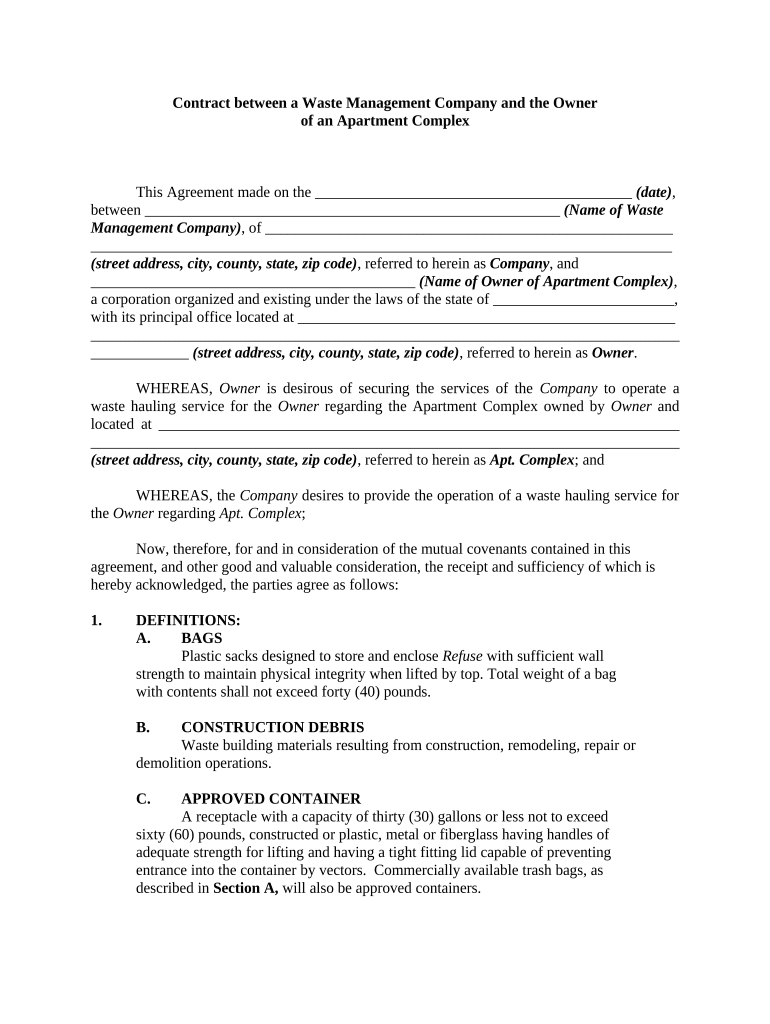
The Waste Management Services Agreement is a written contract that governs the relationship between a generator or client and a waste services provider for collection, transport, treatment, recycling, or disposal of solid, hazardous, or regulated medical waste. It defines scope of services, service levels, schedules, fees, insurance and indemnity, regulatory obligations, recordkeeping and manifests, and termination rights. A clear agreement allocates risk, assigns responsibility for permits and manifests, and documents access for audits and inspections to help both parties demonstrate compliance with applicable federal and state environmental and health rules.

Why a Formal Agreement Matters

A Waste Management Services Agreement documents obligations, reduces disputes, and helps demonstrate compliance with environmental and public health laws. It clarifies payment, liability, insurance, recordkeeping, and reporting responsibilities so both parties can manage operational and enforcement risk effectively.

Why a Formal Agreement Matters

Who Typically Uses This Agreement

Typical users include municipal agencies, waste haulers, commercial property managers, and regulated generators of hazardous or medical waste.

  • Municipalities and public works departments managing collection contracts and landfill operations.
  • Private haulers and transfer stations contracted for pickup, transport, and disposal services.
  • Hospitals and laboratories arranging regulated medical waste pickup with documented chain-of-custody.

Key Parties and Their Roles

Municipal Manager

As the contracting authority, the municipal manager negotiates scope, approves contractor insurance and bonding, authorizes payments, enforces service levels, and ensures procurement and public‑records obligations are satisfied while retaining signed agreements per state retention rules.

Service Provider

The service provider operates collection and transport services, maintains required permits and insurance, completes manifests and chain-of-custody records, documents staff training, and indemnifies the client as specified; providers must cooperate with audits and regulatory inspections.

Core Elements to Include in the Agreement

A robust Waste Management Services Agreement balances operational specificity with legal protections; include clauses that define services, performance standards, compliance obligations, payment mechanics, insurance, and liability allocation.

Scope

Define waste types covered, excluded materials, collection frequency, pickup locations, handling protocols, and acceptance criteria to avoid operational ambiguity and ensure regulatory consistency.
Service Levels

Specify pickup windows, response times for missed pickups or spills, KPIs, remedies for breaches, and measurable methods for verifying performance and invoicing accuracy.

Compliance

Require the contractor to maintain permits, comply with manifesting and transport rules, follow hazardous waste and medical waste regulations, and promptly report inspections or violations.

Fees

State base rates, billing cycles, pass-through disposal fees, surcharge mechanisms, escalation formulas, and processes for resolving disputed invoices in writing.

Insurance

Detail required insurance types and minimum limits, certificate and endorsement requirements, additional insured status where needed, and notice obligations for changes or claims.

Indemnity

Allocate responsibility for third-party claims, cleanup costs, fines, and defense expenses; specify limits, exclusions, and procedures for tendering defense and control of litigation.

Step-by-Step: Completing and Executing the Agreement

Follow this sequence to prepare, review, sign, and store the Waste Management Services Agreement accurately and consistently.

  • 01
    Prepare Draft: Gather scope, permits, manifest templates, and insurance certificates before drafting.
  • 02
    Review Terms: Have legal counsel and operations review regulatory, liability, and payment provisions.
  • 03
    Execute: All authorized signatories sign and date the final agreement.
  • 04
    Distribute Copies: Provide signed copies to contractor operations, compliance, and retained records.

Setting Up an Online Signing Workflow

Configure an online workflow to route, authenticate, and securely store the Waste Management Services Agreement using conditional fields and role-based signing.

Field Configuration
Signer Order Sequential or parallel routing by role
Authentication Email OTP, SMS code, or KBA for high-risk signers
Conditional Fields Show fees, insurance, or manifests when specific options are selected
Storage Encrypted records retained with audit trail and access controls

Typical Routing and Execution Flow

A common flow starts with drafting, internal approvals, signatures (electronic or wet), notarization when required, and distribution to operations and records.

  • Drafting: Author uploads template and customizes clauses for the project.
  • Approval: Legal and procurement verify regulatory and budget compliance.
  • Signing: Signers authenticate and apply electronic or wet signatures as required.
  • Filing: Store executed copy in records system and share with stakeholders.

Platform and Technical Requirements for eSigning

Select an eSignature platform that supports TLS/AES encryption, detailed audit trails, role-based access, and integrations with cloud storage and ERP systems.

  • Encryption: TLS 1.2/1.3 in transit; AES-256 at rest
  • Integrations: Connect to Salesforce, NetSuite, Procore, or cloud storage
  • Authentication: Email, SMS OTP, or advanced signer identity options

Essential Data Points the Agreement Must Record

Parties: Full legal names and addresses
Scope of Services: Detailed tasks, frequencies, and locations
Term: Start and end dates
Fees: Rates, billing schedule, and invoices
Insurance: Coverage limits and certificate requirements
Regulatory Compliance: Permits, manifests, reporting obligations

Common Drafting Mistakes to Avoid

  • Vague scope descriptions that omit collection frequency, waste types, or handling methods, which often lead to disputes over missed pickups or unauthorized disposal.
  • Failing to require proof of permits, manifests, and insurance from subcontractors, exposing the client to enforcement actions and financial liability.
  • Ambiguous indemnity or limitation of liability clauses that leave parties uncertain about responsibility for cleanup costs and regulatory fines.
  • Not specifying manifesting, chain-of-custody, and record retention periods for hazardous or medical waste, complicating audits and regulatory responses.

Practical Tips for Strong Contracts

Adopt clear, enforceable language and operational metrics to minimize disputes and support compliance oversight.

Draft a granular scope and procedures
Define accepted waste, exclusions, pickup frequency, and handling steps in operational detail so field crews and compliance teams have explicit instructions.
Require verified permits and insurance
Obtain current certificates and additional insured endorsements from contractors and subcontractors to reduce client exposure in enforcement or third-party claims.
Specify manifests and retention
Mandate signed manifests, chain-of-custody records, and retention periods aligning with applicable EPA or state rules to facilitate audits and incident response.
Include clear remedies and notice rules
Lay out cure periods, liquidated damages if appropriate, and formal notice addresses and methods to accelerate dispute resolution.

Key Dates and Deadlines to Track

Monitor effective dates, service start, billing cycles, insurance expirations, and termination notice windows to avoid coverage gaps and unintended renewals.

Effective Date:

Contract start date; obligations commence on this date.

Service Commencement:

Date services must begin per the agreed schedule.

Billing Cycle:

Invoice issuance and payment due dates to track cash flow.

Insurance Renewal:

Certificates and endorsements due before policy expirations.

Termination Notice:

Advance notice required to avoid automatic renewal.

Milestones from Negotiation to Service

Sequence the agreement lifecycle into clear milestones so stakeholders know their responsibilities and when approvals or actions are due.

01

Negotiation and Drafting

Agree scope, fees, and regulatory responsibilities with stakeholders before signature.

02

Internal Approvals

Obtain procurement, legal, and budget approvals per organizational rules.

03

Execution and Authentication

Signatures, and notarization if required, finalize contractual obligations.

04

Operational Handover

Deliver manifests, schedules, contacts, and start services on the agreed date.

Primary Penalties and Business Risks

Late Payment Penalties: Interest, suspension of service
Regulatory Fines: EPA or state enforcement actions
Contractual Liability: Indemnity and damage claims
Termination Exposure: Early termination fees
Worker Safety Violations: OSHA penalties possible
Invalid Agreement Risk: Missing signatures or wrong parties

eSignature Pricing and Compliance Comparison

Compare common plan features and compliance capabilities relevant to executing Waste Management Services Agreements for regulated service providers and clients.

signNow DocuSign Adobe Sign PandaDoc HelloSign
Starting Price $8/user/mo $15/user/mo $14/user/mo $19/user/mo $15/user/mo
Free Trial 7-day free trial Varies Varies Varies Varies
Bulk Send Yes Yes Yes Yes No
Audit Trail Yes Yes Yes Yes Yes
HIPAA Compliant Yes Yes Yes No No
Envelope Cap No cap 100 envelopes/user/year Varies Varies Varies

Illustrative Use Cases

Two practical examples show how typical organizations structure agreements and the outcomes they achieve when operational and legal elements are aligned.

Municipal Contracting

A mid-sized city revised its contract to require manifests, spill response procedures, and measurable KPIs for routes.

  • The city tracked performance monthly using standardized reports.
  • As a result, missed pickups and citizen complaints dropped, the contractor improved route adherence, and audit readiness for state environmental reviews became demonstrably stronger.

Healthcare Generator

A regional hospital standardized its waste agreement to require licensed medical waste haulers and chain-of-custody documentation.

  • The contract required HIPAA-aware handling where PHI might be present.
  • The hospital reduced regulatory risk, streamlined pickup scheduling, and improved documentation for accreditation and inspection responses.

Frequently Asked Questions and Troubleshooting

Answers to common questions about completing, signing, notarizing, and retaining Waste Management Services Agreements, with practical steps to resolve frequent issues.


Need help? Contact support

be ready to get more
Join over 28 million airSlate SignNow users