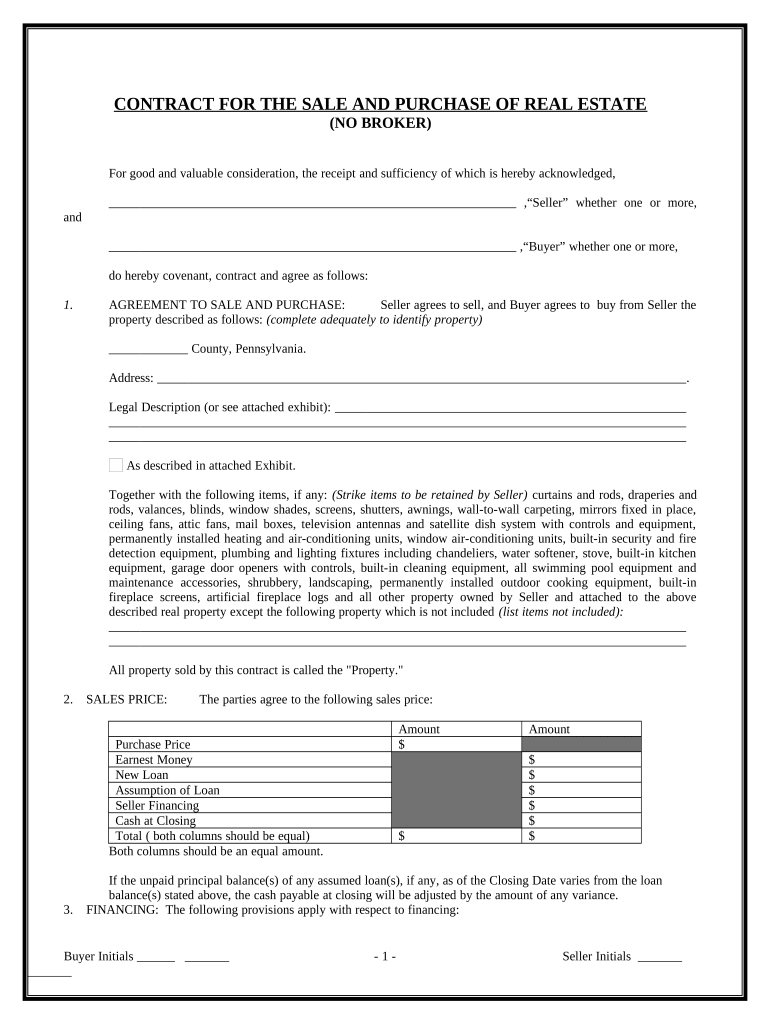
CONTRACT FOR THE SALE AND PURCHASE OF REAL ESTATE
(NO BROKER)
For good and valuable consideration, the receipt and sufficiency of which is hereby acknowledged,
,“Seller” whether one or more,
and
,“Buyer” whether one or more,
do hereby covenant, contract and agree as follows:
1. AGREEMENT TO SALE AND PURCHASE: Seller agrees to sell, and Buyer agrees to buy from Seller the
property described as follows: (complete adequately to identify property)
County, Pennsylvania.
Address: .
Legal Description (or see attached exhibit):
As described in attached Exhibit.
Together with the following items, if any: (Strike items to be retained by Seller) curtains and rods, draperies and
rods, valances, blinds, window shades, screens, shutters, awnings, wall-to-wall carpeting, mirrors fixed in place,
ceiling fans, attic fans, mail boxes, television antennas and satellite dish system with controls and equipment,
permanently installed heating and air-conditioning units, window air-conditioning units, built-in security and fire
detection equipment, plumbing and lighting fixtures including chandeliers, water softener, stove, built-in kitchen
equipment, garage door openers with controls, built-in cleaning equipment, all swimming pool equipment and
maintenance accessories, shrubbery, landscaping, permanently installed outdoor cooking equipment, built-in
fireplace screens, artificial fireplace logs and all other property owned by Seller and attached to the above
described real property except the following property which is not included (list items not included):
All property sold by this contract is called the "Property."
2. SALES PRICE: The parties agree to the following sales price:
Amount Amount
Purchase Price $
Earnest Money $
New Loan $
Assumption of Loan $
Seller Financing $
Cash at Closing $
Total ( both columns should be equal) $ $
Both columns should be an equal amount.
If the unpaid principal balance(s) of any assumed loan(s), if any, as of the Closing Date varies from the loan
balance(s) stated above, the cash payable at closing will be adjusted by the amount of any variance.
3. FINANCING: The following provisions apply with respect to financing:
Buyer Initials ______ _______ - 1 - Seller Initials _______
_______
CASH SALE: This contract is not contingent on financing.
OWNER FINANCING: Seller agrees to finance
dollars of the purchase price pursuant
to a promissory note from Buyer to Seller of $ , bearing % interest per annum, payable
over a term of years with even monthly payments, secured by a deed of trust or mortgage
lien with the first payment to begin on the day of , 20 .
NEW LOAN OR ASSUMPTION: This contract is contingent on Buyer obtaining financing.
Within days after the effective date of this contract Buyer shall apply for all financing or
noteholder's approval of any assumption and make every reasonable effort to obtain financing or
assumption approval. Financing or assumption approval will be deemed to have been obtained when the
lender determines that Buyer has satisfied all of lender's financial requirements (those items relating to
Buyer's net worth, income and creditworthiness). If financing or assumption approval is not obtained
within days after the effective date hereof, this contract will terminate and the earnest money
will be refunded to Buyer. If Buyer intends to obtain a new loan, the loan will be of the following type:
Conventional VA FHA Other:
The following provisions apply if a new loan is to be obtained:
FHA. It is expressly agreed that notwithstanding any other provisions of this contract, the Purchaser
(Buyer) shall not be obligated to complete the purchase of the Property described herein or to incur any
penalty by forfeiture of earnest money deposits or otherwise unless the Purchaser (Buyer) has been given
in accordance with HUD/FHA or VA requirements a written statement by the Federal Housing
Commissioner, Veterans Administration, or a Direct Endorsement lender setting forth the appraised value
of the Property of not less than $ . The Purchaser (Buyer) shall have the privilege and
option of proceeding with consummation of the contract without regard to the amount of the appraised
valuation. The appraised valuation is arrived at to determine the maximum mortgage the Department of
Housing and Urban Development will insure. HUD does not warrant the value nor the condition of the
Property. The Purchaser (Buyer) should satisfy himself/herself that the price and condition of the
Property are acceptable.
VA. If Buyer is to pay the purchase price by obtaining a new VA-guaranteed loan: It is agreed that,
notwithstanding any other provisions of this contract, Buyer shall not incur any penalty by forfeiture of
earnest money or otherwise be obligated to complete the purchase of the Property described herein, if the
contract purchase price or cost exceeds the reasonable value of the Property established by the Veterans
Administration. Buyer shall, however, have the privilege and option of proceeding with the
consummation of this contract without regard to the amount of the reasonable value established by the
Veterans Administration.
Existing Loan Review. If an existing loan is not to be released at closing, Seller shall provide copies of
the loan documents (including note, deed of trust or mortgage, modifications) to Buyer within
calendar days from acceptance of this contract. This contract is conditional upon Buyer's review and
approval of the provisions of such loan documents. Buyer consents to the provisions of such loan
documents if no written objection is received by Seller from Buyer within calendar days
from Buyer's receipt of such documents. If the lender's approval of a transfer of the Property is required,
this contract is conditional upon Buyer's obtaining such approval without change in the terms of such
loan, e x c e p t a s m a y b e a g r e e d b y B u y e r . I f l e n d e r ' s a p p r o v a l i s n o t o b t a i n e d o n o r
b e f o r e , this contract
shall be terminated on such date. The Seller shall shall not, be released from liability under such
existing loan. If Seller is to be released and release approval is not obtained, Seller may nevertheless elect
to proceed to closing, or terminate this agreement in the sole discretion of Seller.
Credit Information. If Buyer is to pay all or part of the purchase price by executing a promissory note in
Buyer Initials ______ _______ - 2 - Seller Initials _______
_______
favor of Seller or if an existing loan is not to be released at closing, this contract is conditional upon
Seller's approval of Buyer's financial ability and creditworthiness, which approval shall be at Seller's sole
and absolute discretion. In such case: (l) Buyer shall supply to Seller on or before ,
, at, Buyer's expense, information and documents concerning Buyer's financial, employment
and credit condition; (2) Buyer consents that Seller may verify Buyer's financial ability and
creditworthiness; (3) any such information and documents received by Seller shall be held by Seller in
confidence, and not released to others except to protect Seller's interest in this transaction; (4) if Seller
does
not provide written notice of Seller's disapproval to Buyer on or before ,
, then Seller waives this condition.
4. EARNEST MONEY: Buyer shall deposit $
as earnest money with upon execution of this contract by both parties.
5. PROPERTY CONDITION:
RADON GAS:
(A) Seller represents that Seller has no knowledge concerning the presence or absence of radon unless checked
below.
(1) Seller has knowledge that the Property was tested on the dates, by the methods (e.g., charcoal
canister, alpha track, etc.) and with the results of all tests indicated below:
DATE TEST TYPE RESULTS (picocuries/liter or working levels)
COPIES OF ALL AVAILABLE TEST REPORTS will be delivered to Buyer with this Agreement.
SELLER DOES NOT WARRANT THE METHODS OR RESULTS OF THE TESTS.
(2) Seller has knowledge that the Property underwent radon reduction measures on the date(s) and by
the method(s) indicated below:
DATE RADON REDUCTION METHOD
(B) RADON INSPECTION CONTINGENCY:
WAIVED: Buyer understands that the option to request the Property be inspected for radon by a
certified inspector is available. BUYER WAIVES THIS OPTION and hereby releases Seller from any and
all claims, losses or demands including but not limited to personal injuries and all the consequences thereof,
whether known or unknown, which may arise from the presence of radon gas at the Property. This release
will survive settlement/closing.
ELECTED: Buyer, at Buyer’s expense, has the option to obtain, from a certified inspector, a radon test
of the Property, and will deliver a copy of the test report to the Seller within days (15 days if not
specified) of the execution of this Contract. If the test report reveals the presence of radon below 0.02
working levels (4 picocuries/liter), Buyer accepts the Property and agrees to the above language of release.
If, however, the test report reveals the presence of radon at or above 0.02 working levels (4
picocuries/liter), Buyer will, within 7 days of the receipt of the results, notify Seller, and either:
(1) Terminate the contract in writing, and receive back all earnest money, or
(2) Request that Seller mitigate the radon problem to a working level of below 0.02, at
Seller’s expense, by use of a certified radon mitigation firm, including re-testing by a
second firm unrelated to the mitigation firm, within ___ days of Buyer’s notification of
Seller. If Seller fails to agree to, or succeed at, this mitigation as evidenced by re-testing
by a second firm, this contract shall be void and earnest money shall be returned to Buyer.
Buyer Initials ______ _______ - 3 - Seller Initials _______
_______
SELLER’S PROPERTY DISCLOSURE STATEMENT: In compliance with Pennsylvania law, 68 Pa.C.S.A. §
7301 through § 7315:
Seller has furnished, and Buyer has received and reviewed, a Seller’s Property Disclosure Statement; or
Seller is not required to furnish a Property Disclosure Statement, because:
SELLER’S DISCLOSURE OF LEAD-BASED PAINT AND LEAD-BASED PAINT HAZARDS is required by
Federal law for a residential dwelling constructed prior to 1978. An addendum providing such disclosure is
attached is not applicable.
Buyer hereby represents that he has personally inspected and examined the above-mentioned premises and all
improvements thereon. Buyer hereby acknowledges that unless otherwise set forth in writing elsewhere in this
contract neither Seller nor Seller's representatives, if any, have made any representations concerning the present or
past structural condition of the improvements. Buyer and Seller agree to the following concerning the condition
of the property:
Buyer accepts the property in its "as-is" and present condition.
Buyer may have the property inspected by persons of Buyer's choosing and at Buyer's expense. If
the inspection report reveals defects in the property, Buyer shall notify Seller within 5 days of
receipt of the report and may cancel this contract and receive a refund of earnest money, or close
this agreement notwithstanding the defects, or Buyer and Seller may renegotiate this contract, in
the discretion of Seller. All inspections and notices to Seller shall be complete within days
after execution of this agreement.
Buyer accepts the Property in its present condition; provided Seller, at Seller’s expense, shall
complete the following repairs and treatment:
Buyer agrees that he will not hold Seller or its representatives responsible or liable for any present or future
structural problems or damage to the foundation or slab of said property. If the subject residential dwelling was
constructed prior to 1978, Buyer may conduct a risk assessment or inspection for the presence of lead-based
paint and/or lead-based paint hazards, to be completed within days after execution of this agreement.
In the alternative, Buyer may waive the opportunity to conduct an assessment/inspection by indicating said
waiver on the attached Lead-Based Paint Disclosure form.
MECHANICAL EQUIPMENT AND BUILT IN APPLIANCES: All such equipment is sold "as-is" without
warranty, or shall be in good working order on the date of closing. Any repairs needed to mechanical
equipment or appliances, if any, shall be the responsibility of Seller Buyer.
UTILITIES: Water is provided to the property by , Sewer is provided
by . Gas is provided by .
Electricity is provided by .
Other:
The present condition of all utilities is accepted by Buyer.
6. CLOSING: The closing of the sale will be on or before , 20 , unless extended pursuant
to the terms hereof.
Closing may be extended to within 7 days after objections to matters disclosed in the title abstract, certificate or
Buyer Initials ______ _______ - 4 - Seller Initials _______
_______
Commitment or by the survey have been cured.
If financing or assumption approval has been obtained, the Closing Date will be extended up to 15 days if
necessary to comply with lender's closing requirements (for example, appraisal, survey, insurance policies, lender-
required repairs, closing documents). If either party fails to close this sale by the Closing Date, the non-defaulting
party will be entitled to exercise the remedies contained herein. The closing date may also be extended by written
agreement of the parties.
7. TITLE AND CONVEYANCE: Seller is to convey title to Buyer by Warranty Deed or (as
appropriate) and provide Buyer with a Certificate of Title prepared by an attorney, title or abstract company upon
whose Certificate or report title insurance may be obtained from a title insurance company qualified to do and
doing business in the state of Pennsylvania. Seller will also execute a Bill of Sale, if necessary, for the transfer of
any personal property. Seller shall, prior to or at closing, satisfy all outstanding mortgages, deeds of trust and
special liens affecting the subject property which are not specifically assumed by Buyer herein. Title shall be
good and marketable, subject only to (a) covenants, conditions and restrictions of record, (b) public, private utility
easements and roads and rights-of-way, (c) applicable zoning ordinances, protective covenants and prior mineral
reservations,
(d) special and other assessments on the property, if any, (e) general taxes for the year and subsequent
years and (e) other: . A
title report shall be provided to Buyer at least 5 days prior to closing. If there are title defects, Seller shall notify
Buyer within 5 days of closing and Buyer, at Buyer's option, may either (a) if defects cannot be cured by
designated closing date, cancel this contract, in which case all earnest money deposited shall be returned, (b)
accept title as is, or (c) if the defects are of such character that they can be remedied by legal action within a
reasonable time, permit Seller such reasonable time to perform curative work at Seller's expense. In the event that
the curative work is performed by Seller, the time specified herein for closing of this sale shall be extended for a
reasonable period necessary for such action. Seller represents that the property may be legally used as zoned and
that no government agency has served any notice to Seller requiring repairs, alterations or corrections of any
existing condition except as stated herein.
COAL NOTICE: Applicable; Not Applicable.
Applicability : This NOTICE is applicable i f the mineral/sub-surface rights to coal under the land (or any part
thereof) – and/or the right of physical support of the surface (or any part thereof) by or derived from underground
coal – has been previously separated/severed from the ownership right to the land’s surface and buildings thereon
as properly recorded in the property records – or if not recorded, th is N OTICE is applicable provided that the
person, firm or entity who, or which, sells, conveys, transfers, insures title or agrees to do any of those things has
notice of, or reason to know of, such unrecorded severance/separation. Furthermore, if there is a contemporaneous
separation/severance of any above-noted right, whether or not recorded, th is N OTICE is applicable. (per 52 P.S. §
1551(b))
This document may not sell, convey, transfer, include or insure the title to the coal and right of
support underneath the surface land described or referred to herein, and the owner or owners of
such coal may have the complete legal right to remove all of such coal and, in that connection,
damage may result to the surface of the land and any house, building or other structure on or in
such land. The inclusion of this notice does not enlarge, restrict or modify any legal rights or
estates otherwise created, transferred, excepted or reserved by this instrument.
(This notice is set forth in the manner provided in 52 P. S. § 1551(a)(1) )
FUTHER NOTICE REGARDING SUB-SURFACE SUPPORT:
If the property to be conveyed is situated in a county in which bituminous coal has been found and is separately
assessed for taxation, Buyer acknowledges that, if no right of support is certified by Seller in the deed of
conveyance, Buyer may not be obtaining the right of physical support of surface land by the underlying coal.
Buyer understands that the purchased property can be protected from damage from mining-related subsidence by a
private contract with the owners of the economic interests in the coal. If no right of support is certified by Seller in
the deed of conveyance, Buyer agrees to sign the deed from Seller, which deed will contain NOTICE language
similar to the foregoing in compliance with 52 P.S. § 1406.14.
8. APPRAISAL, SURVEY AND TERMITE INSPECTION: Any appraisal of the property shall be the responsibility of
Buyer Initials ______ _______ - 5 - Seller Initials _______
_______
Buyer Seller. A survey is: not required required, the cost of which shall be paid by Seller
Buyer. A termite inspection is not required required, the cost of which shall be paid by Seller Buyer. If
a survey is required it shall be obtained within 5 days of closing.
9. POSSESSION AND TITLE: Seller shall deliver possession of the Property to Buyer at closing. Title shall
be conveyed to Buyer, if more than one as Joint tenants with rights of survivorship, tenants in common,
Other: Prior to closing the property shall remain
in the possession of Seller and Seller shall deliver the property to Buyer in substantially the same condition at
closing, as on the date of this contract, reasonable wear and tear excepted.
10. CLOSING COSTS AND EXPENSES: The following closing costs shall be paid as provided. (Leave
blank if the closing cost does not apply.)
Closing Costs Buyer Seller Both*
Attorney Fees
Title Insurance
Title Abstract or Certificate
Property Insurance
Recording Fees
Appraisal
Survey
Termite Inspection
Origination fees
Discount Points
If contingent on rezoning, cost and expenses of rezoning
Other:
All other closing costs
* 50/50 between buyer and seller.
11. PRORATIONS: Taxes for the current year, interest, maintenance fees, assessments, dues and rents, if any, will be
prorated through the Closing Date. If taxes for the current year vary from the amount prorated at closing, the
parties shall adjust the prorations when tax statements for the current year are available. If a loan is assumed and
the lender maintains an escrow account, the escrow account must be transferred to Buyer without any deficiency.
Buyer shall reimburse Seller for the amount in the transferred account. Buyer shall pay the premium for a new
insurance policy. If taxes are not paid at or prior to closing, Buyer will be obligated to pay taxes for the current
year.
12. CASUALTY LOSS: If any part of the Property is damaged or destroyed by fire or other casualty loss after the
effective date of the contract, Seller shall restore the Property to its previous condition as soon as reasonably
possible. If Seller fails to do so due to factors beyond Seller’s control, Buyer may either (a) terminate this contract
and the earnest money will be refunded to Buyer, (b) extend the time for performance and the Closing Date will
be extended as necessary, or (c) accept the Property in its damaged condition and accept an assignment of
insurance proceeds.
13. DEFAULT: If Buyer fails to comply with this contract, Buyer will be in default, and Seller may either (a) enforce
specific performance, seek such other relief as may be provided by law, or both, or (b) terminate this contract and
receive the earnest money as liquidated damages, thereby releasing both parties from this contract. If, due to
factors beyond Seller’s control, Seller fails within the time allowed to make any non-casualty repairs or deliver
evidence of clean title, Buyer may either (a) extend the time for performance up to 15 days and the Closing Date
will be extended as necessary or (b) terminate this contract as the sole remedy and receive a refund of the earnest
money. If Seller fails to comply with this contract for any other reason, Seller will be in default and Buyer may
Buyer Initials ______ _______ - 6 - Seller Initials _______
_______
either (a) enforce specific performance, seek such other relief as may be provided by law, or both, or (b) terminate
this contract and receive the earnest money, thereby releasing both parties from this contract.
14. ATTORNEY'S FEES: The prevailing party in any legal proceeding brought under or with respect to the transaction
described in this contract is entitled to recover from the non-prevailing party all costs of such proceeding and
reasonable attorney’s fees.
15. REPRESENTATIONS: Seller represents that as of the Closing Date (a) there will be no liens, assessments, or security
interests against the Property which will not be satisfied out of the sales proceeds unless securing payment of any
loans assumed by Buyer and (b) assumed loans will not be in default. If any representation in this contract is
untrue on the Closing Date, this contract may be terminated by Buyer and the earnest money will be refunded to
Buyer. All representations contained in this contract will survive closing.
16. FEDERAL TAX REQUIREMENT: If Seller is a "foreign person", as defined by applicable law, or if Seller fails to
deliver an affidavit that Seller is not a "foreign person", then Buyer shall withhold from the sales proceeds an
amount sufficient to comply with applicable tax law and deliver the same to the Internal Revenue Service together
with appropriate tax forms. IRS regulations require filing written reports if cash in excess of specified amounts is
received in the transaction.
17. AGREEMENT OF PARTIES: This contract contains the entire agreement of the parties and cannot be changed
except by their written agreement.
18. NOTICES: All notices from one party to the other must be in writing and are effective when mailed to, hand-
delivered at, or transmitted by facsimile machine as follows:
To Buyer at: To Seller at:
Telephone ( ) Telephone ( )
Facsimile ( ) Facsimile ( )
19. ASSIGNMENT: This agreement may not be assigned by Buyer without the consent of Seller. This agreement may be
assigned by Seller and shall be binding on the heirs and assigns of the parties hereto.
20. PRIOR AGREEMENTS: This contract incorporates all prior agreements between the parties, contains the entire and
final agreement of the parties, and cannot be changed except by their written consent. Neither party has relied
upon any statement or representation made by the other party or any sales representative bringing the parties
together. Neither party shall be bound by any terms, conditions, oral statements, warranties, or representations not
herein contained. Each party acknowledges that he has read and understands this contract. The provisions of this
contract shall apply to and bind the heirs, executors, administrators, successors and assigns of the respective
parties hereto. When herein used, the singular includes the plural and the masculine includes the feminine as the
context requires.
21. NO BROKER OR AGENTS: The parties represent that neither party has employed the services of a real estate broker
or agent in connection with the property, or that if such agents have been employed, that the party employing said
agent shall pay any and all expenses outside the closing of this agreement.
22. EMINENT DOMAIN: If the property is condemned by eminent domain after the effective date hereof, the Seller and
Buyer shall agree to continue the closing, or a portion thereof, or cancel this Contract. If the parties cannot agree,
this contract shall remain valid with Buyer being entitled to any condemnation proceeds at or after closing, or
be cancelled and the earnest money returned to Buyer.
Buyer Initials ______ _______ - 7 - Seller Initials _______
_______
23. OTHER PROVISIONS
24. TIME IS OF THE ESSENCE IN THE PERFORMANCE OF THIS AGREEMENT.
25. GOVERNING LAW: This contract shall be governed by the laws of the State of Pennsylvania.
26. DEADLINE LIST ( Optional) (complete all that apply ). Based on other provisions of Contract.
Deadline Date
Loan Application Deadline, if contingent on loan
Loan Commitment Deadline
Buyer(s) Credit Information to Seller
Disapproval of Buyers Credit Deadline
Survey Deadline
Title Objection Deadline
Appraisal Deadline
Property Inspection Deadline
Whether or not listed above, deadlines contained in this Contract may be extended informally by a writing signed
by the person granting the extension except for the closing date which must be extended by a writing signed by
both Seller and Buyer.
EXECUTED the day of , 20 (THE EFFECTIVE DATE).
Buyer Seller
Buyer Seller
Buyer Initials ______ _______ - 8 - Seller Initials _______
_______
EXHIBIT FOR DESCRIPTION OR ATTACH SEPARATE DESCRIPTION
RECEIPT
Receipt of Earnest Money is acknowledged.
Signature: Date: , 20
By:
Telephone ( )
Address
Facsimile ( )
City State Zip Code
Buyer Initials ______ _______ - 9 - Seller Initials _______
_______
THIS IS A SEPARATE INSTRUCTION PAGE REGARDING LEAD-BASED PAINT DISCLOSURE
THIS PAGE IS NOT PART OF THE CONTRACT . IT IS PROVIDED BY USLF
TO AID THE SELLER IN COMPLYING WITH FEDERAL LEAD-BASED
PAINT DISCLOSURE LAW, FOR HOUSES BUILT PRIOR TO 1978.
* * *
IMPORTANT!!!
NOTES CONCERNING LEAD-PAINT DISCLOSURE REQUIREMENTS
Introduction: If the dwelling was constructed PRIOR TO 1978, federal law REQUIRES a Lead-Based Paint
Disclosure Form to be attached to the sale contract, completed and signed by the seller and purchaser. If the
dwelling was constructed in 1978 or later, this form is not required. If in doubt about the timing of
construction, use the disclosure form. Whenever the form is used, the seller must also give the purchaser the
EPA lead-based paint pamphlet discussed below. Sellers must retain a copy of the signed disclosure form for no
less than three years from the date the sale closes.
Background: To protect families from exposure to lead from paint, dust, and soil, Congress passed the
Residential Lead-Based Paint Hazard Reduction Act of 1992. HUD and EPA require the disclosure of known
information on lead-based paint and related hazards before the sale of most housing built before 1978.
Requirements: Before the sale contract becomes enforceable, sellers must fully comply with lead-paint
disclosure law. Compliance is accomplished by:
(1) Fully completing and delivering to the buyers, as an attachment to the contract, the LEAD-
BASED PAINT DISCLOSURE form (the buyers also initial and sign this form), and
(2) Giving the buyers the EPA pamphlet entitled "Protect Your Family From Lead In Your
Home." (See the download link for the pamphlet, below.)
Purchase the Disclosure Form: If you need to purchase a Lead-Based Paint Disclosure Form, you can easily
do so using USLF. http://www.uslegalforms.com/lead-paint-disclosure-forms.htm Click this link (or copy it
into the address window of you internet browser) and select your state. Two forms will be accessed. You want
the “LEAD1” form, for sales transactions ( not the “LEAD2” form for rentals). Click the “Information and
Preview” link for more info on the form, and then order the form.
The Free EPA Pamphlet: The seller must give the buyer the EPA-approved information pamphlet on
identifying and controlling lead-based paint hazards entitled "Protect Your Family From Lead In Your Home."
You may obtain and print this pamphlet free by clicking the following download link (or copying the link into
the address window of your internet browser):
http://www.epa.gov/lead/pubs/leadpdfe.pdf
The form is in .pdf format and you will need the free Adobe Acrobat Reader to view the form. In the
unlikely circumstance that the Adobe Acrobat Reader is not installed on your computer, you can download
it free from http://www.adobe.com/products/acrobat/readstep2.html . The download is quick and easy.
* * *
~ Thank you for using USLF ~