Establishing secure connection…Loading editor…Preparing document…

Pennsylvania Agreed Revocation of Postnuptial Agreement

This template is fully customizable. Edit the text, fill out the fields, and send it for signature. Give it a try!
Pennsylvania Agreed Revocation of Postnuptial Agreement

What the Pennsylvania Agreed Revocation of Postnuptial Agreement Is

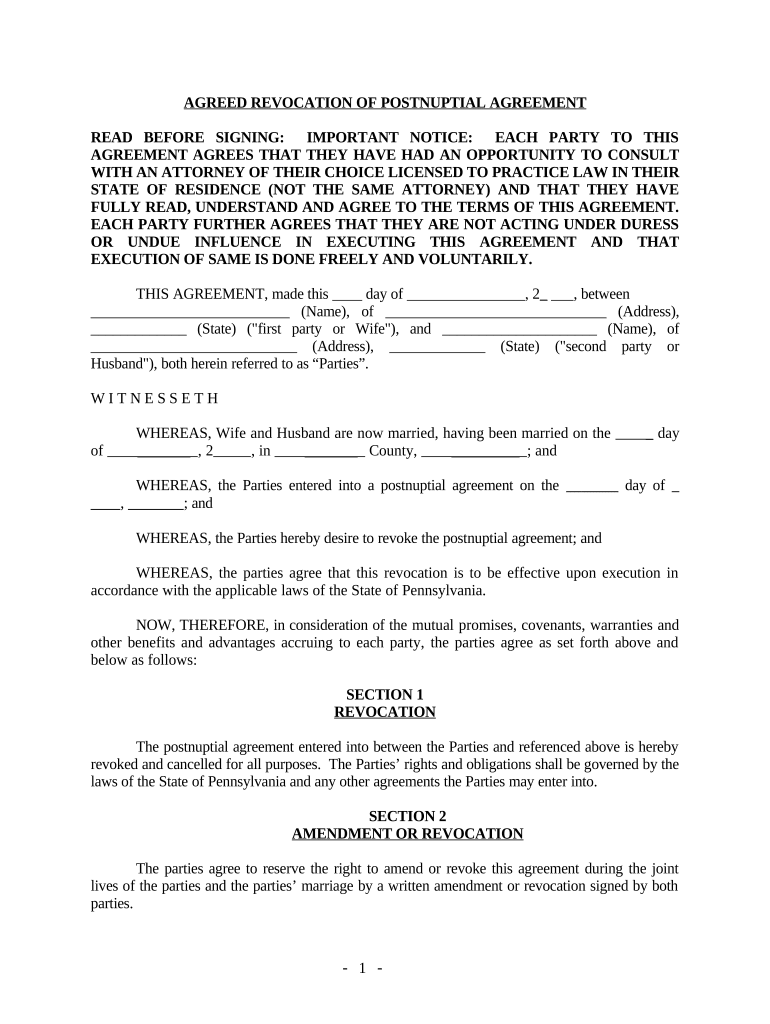
A Pennsylvania Agreed Revocation of Postnuptial Agreement is a written instrument in which both spouses jointly agree to rescind, terminate, or modify an existing postnuptial agreement. The revocation should identify the original agreement by date, describe which provisions are revoked or superseded, state the effective date of the revocation, and record mutual consent. Proper execution typically includes signature blocks for both parties and may include notarization or witnesses depending on evidence needs. When properly executed, the revocation clarifies property rights and reduces the risk of future disputes over the prior agreement.

Why an Agreed Revocation Matters in Pennsylvania

An agreed revocation provides clear, mutual documentation that a prior postnuptial agreement no longer governs spouses’ rights. It prevents ambiguity, aids court review, and preserves enforceability of current arrangements by showing contemporaneous consent.

Why an Agreed Revocation Matters in Pennsylvania

Who Typically Prepares and Signs This Revocation

Professionals and individuals approach this document for certainty when married parties want to undo or replace a prior postnuptial agreement.

  • Married parties who mutually agree to change financial arrangements, property division, or support terms.
  • Family law attorneys preparing a legally clear revocation or advising on enforceability.
  • Mediators and divorce planners documenting negotiated settlements to avoid later disputes.

Execution practices vary by situation; parties often work with counsel to ensure the revocation is precise and enforceable.

Representative Signer Profiles

Spouses (Parties)

Two spouses jointly execute the revocation to demonstrate mutual consent. Both parties should review terms, confirm asset allocations, and sign in the presence of any required witnesses or a notary to maximize evidentiary weight in future disputes.

Family Attorney

A family law attorney drafts or reviews the revocation to ensure that language clearly identifies the original agreement, describes the scope of the revocation, and minimizes unintended legal consequences such as gaps in property division or conflicts with other agreements.

Essential Legal and Security Considerations

ESIGN / UETA: Electronic signatures are generally valid under ESIGN and UETA
Encryption Transit: TLS 1.2/1.3 protects data in transit
Encryption At Rest: AES-256 encryption for stored records
Audit Trail: Timestamp, IP, and action log available
HIPAA BAA: Business associate agreement available where needed
21 CFR Readiness: Supports compliance for regulated workflows

Primary Risks and Consequences of Errors

Unenforceability: Revocation may be invalid
Invalid Signatures: Signatures not attributable
Tax Consequences: Possible reporting issues
Court Challenge: Revocation subject to attack
Loss of Rights: Unintended waivers may occur
Recordation Issues: Failure to notarize can complicate proof

Common Preparation Mistakes to Avoid

  • Failing to cite the original postnuptial agreement date and parties, which makes it unclear what is being revoked and invites litigation.
  • Using vague language such as 'all prior agreements' without identifying specific provisions, risking unintended consequences or incomplete revocation.
  • Not confirming that both spouses have capacity and voluntary consent, which can lead to later claims of duress or incapacity.
  • Neglecting to keep signed originals or certified copies, increasing difficulty proving the revocation in court or during settlement.

Step-by-Step: Completing an Agreed Revocation

Follow these sequential steps to prepare, execute, and preserve a clear mutual revocation of a postnuptial agreement.

  • 01
    Gather the originals: Locate the original postnuptial agreement and any amendments.
  • 02
    Draft the revocation: Specify the original date, identify revoked provisions, and state the effective date.
  • 03
    Execute formally: Both spouses sign; consider notarization or witnesses for evidence.
  • 04
    Distribute and store: Provide signed copies to parties and counsel; store originals securely.

How Execution and Recordkeeping Typically Flow

A predictable workflow helps ensure the revocation is effective and readily provable if later questioned.

  • Prepare Document: Draft precise language and identify the original agreement.
  • Sign and Authenticate: Parties sign with chosen authentication method.
  • Optional Notarization: Notarize to strengthen evidentiary value.
  • Preserve Copies: Provide copies to counsel and store originals securely.

Key Components of a Professional Agreed Revocation

A well-drafted revocation clearly identifies the preexisting agreement, states mutual consent, and addresses transitional issues so the parties’ intentions are unambiguous.

Identification

Reference the original postnuptial agreement by full title and date so the document being revoked is unmistakable and provable.
Recitals

Briefly state the parties’ identities and the mutual decision to revoke, including any relevant background or reason for clarity.

Revocation Clause

Explicitly state which provisions are revoked or whether the entire agreement is rescinded, using precise phrasing to limit ambiguity.

Allocations

If needed, specify interim asset and liability allocations or confirm that prior terms cease to apply as of the effective date.

Representations

Include statements that parties have capacity, are signing voluntarily, and have had opportunity for counsel, to reduce later challenges.

Execution Block

Provide dated signature lines for both parties and space for notarization or witness attestation where advisable.

How to Configure an Online Revocation Workflow

Set up an eSignature workflow that collects identity evidence, timestamps, and a retained audit trail for legal certainty.

Field Configuration
Signer Authentication Email plus SMS code or ID verification
Required Fields Make name, date, and signature mandatory
Notary Integration Enable RON session or local notary step
Audit Trail Options Capture IP, timestamps, and download logs

Technical Requirements for eSigning and Storage

Choose a platform that supports secure eSignature, audit trails, and required output formats for recordkeeping.

  • File Formats: PDF and DOCX supported
  • Integrations: Work with CRM and storage systems
  • Authentication: SMS, email, or ID proofing

Ensure chosen tools meet legal and organizational security needs, and retain exportable copies for evidence and counsel review.

Comparing eSignature Pricing and Key Capabilities

Select a provider based on required features, compliance needs, and budget. The table shows starting prices and common capability differences.

signNow DocuSign Adobe Sign PandaDoc HelloSign
Starting Price $8/user/mo $15/user/mo $14/user/mo $19/user/mo $15/user/mo
Free Trial 7-day free trial Varies by plan Varies by plan Varies by plan Varies by plan
Bulk Send Yes Yes Yes Yes No
Audit Trail Yes Yes Yes Yes Yes
HIPAA Compliant Yes Yes Yes No No
Envelope Cap No cap 100 envelopes/user/year Varies Varies Varies

Real-World Examples of Agreement Workflows

Examples illustrate how organizations use electronic workflows and clear revocation language to reduce friction and improve proof of consent.

Optica Ventures

The interface is simple and easy-to-use for the team

  • Faster execution improves customer turnaround
  • By using a secure signing flow, the company reduced paper handling and maintained clear audit trails for counsel and recordkeeping.

Xerox NetSuite

airSlate SignNow provided integration flexibility with NetSuite

  • Reduced manual uploads and errors
  • The team automated routing and captured required evidence for each signer, simplifying post-execution tracking and internal compliance.

Frequently Asked Questions and Common Issues

Answers address common legal, procedural, and technical questions about executing a Pennsylvania agreed revocation of a postnuptial agreement.


Need help? Contact support

be ready to get more
Join over 28 million airSlate SignNow users